
Highlight
Apple launched the new CLMonitor API at WWDC23, a Swift Actor-based location monitoring framework. Developers only need to create Monitors, add conditions, and await events to monitor the entry/exit of geographical areas and Beacon state changes. They no longer need to manually handle thread synchronization and delegate callbacks.
Core Content
Three steps to get started with CLMonitor
(00:31) The core usage of CLMonitor is extremely simple:
- Create a Monitor: pass in an alphanumeric string as the name
- Add conditions: use
addMethod to add the area or Beacon to be monitored - await event: receive status change events through asynchronous sequence
(01:33) CLMonitor is a top-level Swift Actor. This means that all access is thread-safe and no manual handling of locks or queues is required. Create, add, remove, query records, all operations only requireawait。
Two condition types
(03:07)
CircularGeographicCondition: Circular geographical area, defined by center coordinates and radius. Similar to iOS 16 and earlierCLCircularRegion。
BeaconIdentityCondition: Beacon identity condition, defined by UUID, Major and Minor. Similar toCLBeaconIdentityConstraint。
(04:56) Beacon conditions support three-level matching strategies:
- UUID only: matches all Beacons under this UUID
- UUID + Major: Match all Beacons under a specific group
- UUID + Major + Minor: Match a single specific Beacon
This design allows you to deploy flexibly: the same UUID covers all sites, different Majors distinguish sites, and different Minors distinguish specific locations within the site.
Events and Records
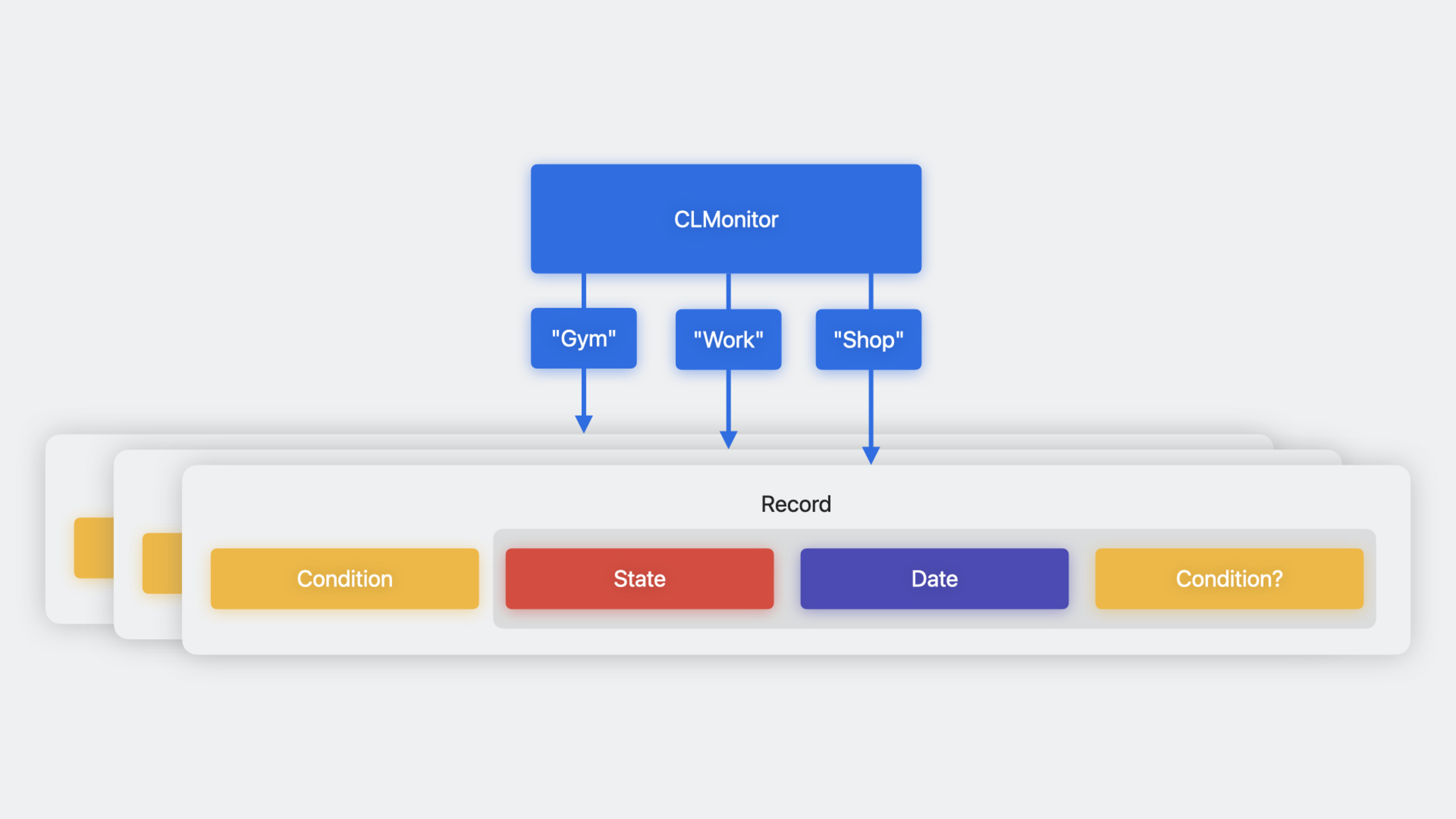
(09:14) Each monitored condition has a corresponding record (record), including:
- condition: the original condition to be monitored
- lastEvent: the latest event, including status (satisfied/unsatisfied/unknown), time and refinement
(10:03) refinement is a clever design of CLMonitor. When you listen to a Beacon with a wildcard (specify only the UUID), the event when the condition is met will contain refinement, telling you the actual detected Major and Minor values. This makes it easy to “listen to all sites but know exactly which site”.
Detailed Content
Create Monitor and add conditions
(01:53)
import CoreLocation

// Create the monitor
let monitor = await CLMonitor("MyLocationMonitor")

// Add a circular geographic region condition
let workCoordinate = CLLocationCoordinate2D(latitude: 37.3349, longitude: -122.0090)
let workCondition = CLMonitor.CircularGeographicCondition(
    center: workCoordinate,
    radius: 100.0  // meters
)
await monitor.add(workCondition, identifier: "Work")

// Add a beacon condition (UUID only, matching all sites)
let cafeteriaUUID = UUID(uuidString: "E2C56DB5-DFFB-48D2-B060-D0F5A71096E0")!
let beaconCondition = CLMonitor.BeaconIdentityCondition(uuid: cafeteriaUUID)
await monitor.add(beaconCondition, identifier: "AnyCafeteria")
Key points:
- Monitor name is an alphanumeric string used for persistent logging
- If a monitor with the same name already exists, it will be opened instead of creating a new one
- There can only be one open instance of the same name at the same time
Listen for events
(12:12)
// Listen for events in a Task
Task {
    for await event in monitor.events {
        switch event.state {
        case .satisfied:
            print("\(event.identifier) - condition satisfied")

            // If a refinement is available, get detailed information
            if let refinement = event.refinement {
                print("Detected beacon: \(refinement)")
            }

        case .unsatisfied:
            print("\(event.identifier) - condition not satisfied")

        case .unknown:
            print("\(event.identifier) - state unknown")
        }

        // Get the complete record
        if let record = await monitor.record(for: event.identifier) {
            print("Last event time: \(record.lastEvent.date)")
        }
    }
}
Key points:
monitor.eventsIt is an asynchronous sequence and automatically recovers when the status changes.- Events contain identifier, state, date and refinement
- New events will only be received when the status changes
Query records
(11:09)
// Get a single record
if let record = await monitor.record(for: "Work") {
    let condition = record.condition
    let lastEvent = record.lastEvent
    print("State: \(lastEvent.state), time: \(lastEvent.date)")
}

// Iterate through all records
for identifier in await monitor.identifiers {
    if let record = await monitor.record(for: identifier) {
        print("\(identifier): \(record.lastEvent.state)")
    }
}
Key points:
monitor.identifiersReturns a list of identifiers for all added conditions- Records and states are persistent and persist after the application is restarted
- No need to maintain identifier list yourself
Set initial state
(08:33) You can specify the initial state when adding conditions:
// Assume the app has already determined that the user is outside the work area
await monitor.add(
    workCondition,
    identifier: "Work",
    assuming: .unsatisfied
)
If the assumption is wrong, Core Location will give the correct value after determining the true state. This parameter is mainly used to reduce the delay before the initial state is determined.
Remove condition
await monitor.remove("Work")Removing a condition will also delete the corresponding record.
Core Takeaways
-
Replace the old area monitoring code
- What to do: Use existing
CLCircularRegionandCLBeaconRegionMigrate the code to CLMonitor - Why it’s worth doing: CLMonitor is based on Swift Actor and asynchronous sequence. The code is simpler and thread-safe. It no longer needs to deal with delegate callbacks and thread synchronization.
- How to get started: Create a CLMonitor instance and convert the existing
startMonitoring(for:)The call is replaced withmonitor.add(),WilllocationManager(_:didEnterRegion:)The delegate method is replaced withfor await event in monitor.events
- What to do: Use existing
-
Build smart location-triggered workflows
- What to do: Use CLMonitor’s Beacon three-level matching capabilities to build location-based automated workflows
- Why it’s worth doing: Flexible matching of UUID/Major/Minor allows the same Beacon deployment to support three granularities of “enter any office”, “enter a specific office” and “enter a specific area of the office”
- How to get started: Deploy a Beacon with a unified UUID. Different offices use different Majors, and different areas in the office use different Minors. Create CLMonitor conditions with corresponding granularity in the application.
-
Realize persistent location status management
- What to do: Use the persistent recording feature of CLMonitor to restore the location status after the application restarts
- Why it’s worth doing: Records and status are automatically persisted, and the application can continue from the last state when it is restarted after being terminated by the system.
- How to get started: in
didFinishLaunchingWithOptionsRe-initialize the Monitor with the same name, immediately await events to resume monitoring, and query the records to obtain the last known status
-
Combined with SwiftUI to build real-time location UI
- What to do: Combine CLMonitor with SwiftUI to build an interface that reflects location status in real time
- Why it’s worth doing: Asynchronous sequences are naturally suitable for SwiftUI
.taskModifier to concisely implement location state driven UI - How to get started:Create CLMonitor in ViewModel, in the view
.taskTo start event listening, use@PublishedProperty-driven UI updates
Related Sessions
- Meet Core Location for spatial computing — Core Location’s permission model and positioning behavior on visionOS
- Discover streamlined location updates — CLLocationUpdate’s real-time location update API
- What’s new in Swift — New features of the Swift language, including Actors and concurrency
- Meet SwiftUI for spatial computing — SwiftUI adaptation on spatial computing platform
Comments
GitHub Issues · utterances