
Highlight
Metal expanded the ray tracing API at WWDC2023, adding Curve Primitives for hair rendering, Multi-level Instancing for complex scenes, and GPU-driven indirect instance accelerated structure construction, allowing both game and production-level renderers to handle larger-scale scenes.
Core Content
From triangles to curves: pain points in hair rendering
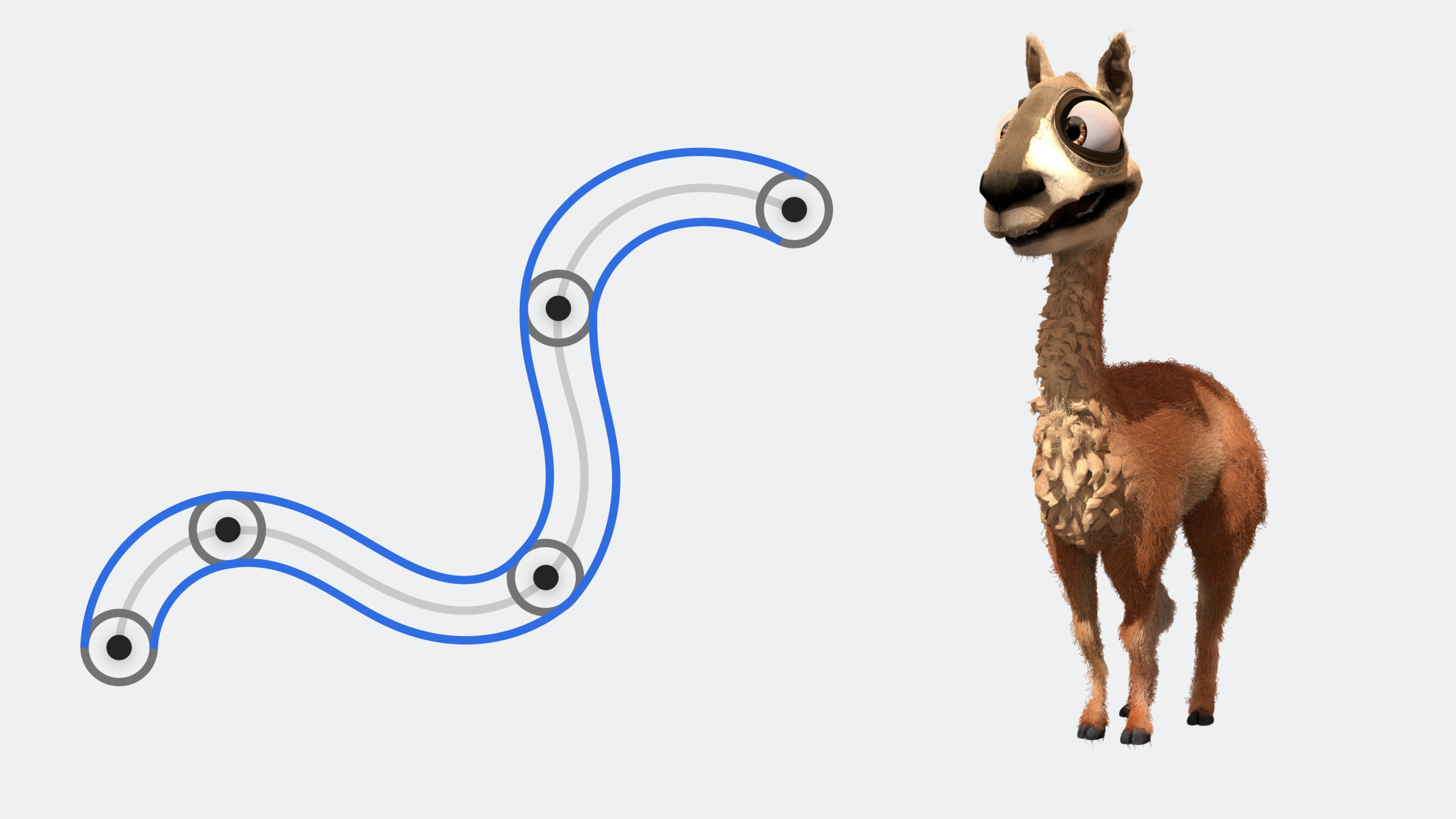
Modeling hair and fur with triangles is a graphics developer’s nightmare. A single hair requires dozens of triangles to look fake, and a character may have millions of hairs. The memory usage explodes, the construction of the acceleration structure takes a long time, and you can still see jaggies when you zoom in closer.
Metal 2023 introduces curve geometry (Curve Primitives), directly supporting four curve basis functions: Bezier, Catmull-Rom, B-Spline and linear. Curves remain smooth as the camera zooms in, take up less memory than triangles, and accelerate structure construction faster.
Scene scale bottleneck: the evolution of instantiation
When rendering a complex scene like the Moana island, simply cramming all the geometry into one acceleration structure would eat up memory. Instancing allows the same object to appear repeatedly in different locations, and only one copy of the geometry data is stored.
Multi-level instantiation in 2023 goes one step further: instance acceleration structures can contain other instance acceleration structures. A palm tree can be composed of instances of the trunk and leaves, with an entire forest instantiating the tree. Moana scenes thus save millions of instances.
GPU driver optimization for dynamic scenes
The game rebuilds the instance acceleration structure every frame, and filling in the instance descriptor on the CPU side becomes a bottleneck. The Indirect Instance Acceleration Structure Descriptor allows instance culling, descriptor filling, and final instance counting to be completed on the GPU, completely bypassing the CPU.
Detailed Content
Curve geometry descriptor
(06:42)
Metal 2023 adds MTLAccelerationStructureCurveGeometryDescriptor, which is specially used for curved geometry such as hair and vegetation:
let geometryDescriptor = MTLAccelerationStructureCurveGeometryDescriptor()

geometryDescriptor.controlPointBuffer = controlPointBuffer
geometryDescriptor.radiusBuffer = radiusBuffer
geometryDescriptor.indexBuffer = indexBuffer

geometryDescriptor.controlPointCount = controlPointCount
geometryDescriptor.segmentCount = segmentCount
geometryDescriptor.curveType = .round
geometryDescriptor.curveBasis = .bezier
geometryDescriptor.segmentControlPointCount = 4
Key points:
controlPointBuffer: stores control point locationsradiusBuffer: radius of each control point, interpolated along the curveindexBuffer: The starting control point index of each curve segmentcurveType:.roundfor cylindrical cross-section,.flatfor long-range optimization performancecurveBasis: optional.bezier,.catmullRom,.bspline,.linearsegmentControlPointCount: Number of control points for each curve segment (2, 3 or 4)
Build acceleration structure
(07:29)
Three-step process for creating a Primitive Acceleration Structure:
// 1. Create the descriptor
let accelerationStructureDescriptor = MTLPrimitiveAccelerationStructureDescriptor()
accelerationStructureDescriptor.geometryDescriptors = [geometryDescriptor]

// 2. Query memory requirements
let sizes = device.accelerationStructureSizes(descriptor: accelerationStructureDescriptor)
let heapSize = device.heapAccelerationStructureSizeAndAlign(size: sizes.accelerationStructureSize)

// 3. Allocate and build
var accelerationStructure = heap.makeAccelerationStructure(size: heapSize.size)
let scratchBuffer = device.makeBuffer(length: sizes.buildScratchBufferSize,
                                      options: .storageModePrivate)!

let commandEncoder = commandBuffer.makeAccelerationStructureCommandEncoder()!
commandEncoder.build(accelerationStructure: accelerationStructure,
                     descriptor: accelerationStructureDescriptor,
                     scratchBuffer: scratchBuffer,
                     scratchBufferOffset: 0)
commandEncoder.endEncoding()
Key points:
- Allocating acceleration structures from the heap can reduce subsequent resource management overhead
scratchBufferis only used during the build process and can be reused after the build is completed.- Multiple build operations can be encoded into the same command encoder and executed in parallel
Instance acceleration structure and multi-level instantiation
(11:30)
The instance acceleration structure references multiple original acceleration structures and is placed into the scene through the transformation matrix:
var instanceASDesc = MTLInstanceAccelerationStructureDescriptor()
instanceASDesc.instanceCount = instanceCount
instanceASDesc.instancedAccelerationStructures = [mountainAS, treeAS, leafAS]
instanceASDesc.instanceDescriptorType = .userID

// Allocate the instance descriptor buffer
let size = MemoryLayout<MTLAccelerationStructureUserIDInstanceDescriptor>.stride
let instanceDescriptorBuffer = device.makeBuffer(length: size * instanceCount,
                                                 options: .storageModeShared)!
instanceASDesc.instanceDescriptorBuffer = instanceDescriptorBuffer

// Populate the instance descriptors
var instanceDesc = MTLAccelerationStructureUserIDInstanceDescriptor()
instanceDesc.accelerationStructureIndex = 0
instanceDesc.transformationMatrix = transformMatrix
instanceDesc.mask = 0xFFFFFFFF
Key points:
instancedAccelerationStructuresThe index in the array is referenced throughaccelerationStructureIndexmaskis used for light mask filtering to achieve selective intersection- During multi-level instantiation, the instance acceleration structure can contain other instance acceleration structures, and the maximum level is specified through the
max_levelstag
GPU driver indirect instance build
(14:06)
The indirect instance acceleration structure allows the GPU to fully control instance generation:
var instanceASDesc = MTLIndirectInstanceAccelerationStructureDescriptor()
instanceASDesc.instanceDescriptorType = .indirect
instanceASDesc.maxInstanceCount = maxInstances
instanceASDesc.instanceCountBuffer = instanceCountBuffer
instanceASDesc.instanceDescriptorBuffer = instanceDescriptorBuffer
Key points:
maxInstanceCountis the default upper limit, the actual amount is written by the GPUinstanceCountBuffer- Suitable for scenarios where the number of instances is dynamically determined after GPU culling
- Indirect instance descriptors refer directly to acceleration structures via
accelerationStructureIDrather than array indexes
Accelerate structural optimization: Refit and Compaction
(19:22)
When the geometry moves slightly, there is no need to rebuild the entire acceleration structure. Use refit to update the bounding box:
let scratchBuffer = device.makeBuffer(length: sizes.refitScratchBufferSize,
                                      options: .storageModePrivate)!

commandEncoder.refit(sourceAccelerationStructure: accelerationStructure,
                     descriptor: asDescriptor,
                     destinationAccelerationStructure: accelerationStructure,
                     scratchBuffer: scratchBuffer,
                     scratchBufferOffset: 0)
After the build is complete, use compaction to reclaim excess memory:
// Query the compressed size
sizeCommandEncoder.writeCompactedSize(accelerationStructure: accelerationStructure,
                                      buffer: sizeBuffer,
                                      offset: 0,
                                      sizeDataType: .ulong)

// Allocate a new acceleration structure, then compact it
compactCommandEncoder.copyAndCompact(sourceAccelerationStructure: accelerationStructure,
                                     destinationAccelerationStructure: compactedAccelerationStructure)
Key points:
- Refit is much faster than reconstruction and is suitable for dynamic geometry that is updated every frame
- Compaction can recycle the memory allocated conservatively during the build, and has the most obvious effect on the original acceleration structure.
- The original acceleration structure can be released after compression is completed
Ray intersection in Shader
(21:48)
Perform ray intersection in Metal Shading Language:
[[kernel]]
void trace_rays(acceleration_structure<instancing> as, /* ... */) {
  intersector<instancing, max_levels<3>, triangle_data, curve_data> i;

  i.assume_geometry_type(geometry_type::curve | geometry_type::triangle);
  i.assume_curve_type(curve_type::round);
  i.assume_curve_basis(curve_basis::bezier);
  i.assume_curve_control_point_count(3);

  ray r(origin, direction);

  intersection_result<instancing, max_levels<3>, triangle_data, curve_data> result = i.intersect(r, as);

  if (result.type == intersection_type::triangle) {
    float distance = result.distance;
    float2 coords = result.triangle_barycentric_coord;
    // shade triangle...
  } else if (result.type == intersection_type::curve) {
    float distance = result.distance;
    float param = result.curve_parameter;
    // shade curve...
  }

  // Get instance-level information
  for (uint i = 0; i < result.instance_count; ++i) {
    uint id = result.instance_id[i];
  }
}
Key points:
instancingtag enables instance accelerated structural intersectionmax_levels<3>specifies the maximum number of instantiation levelstriangle_dataprovides the center of gravity coordinates,curve_dataprovides the curve parameters- Assumption statements such as
assume_geometry_typeimprove intersection performance result.instance_idarray contains all instance IDs that the ray passed through
Core Takeaways
-
Hair/Vegetation Renderer
- What to build: Replace triangular models of hair and grass with curved geometry
- Why it’s worth doing: Memory reduction by more than 50%, no aliasing in close-up, accelerated structure construction faster
- How to start: Define the curve with
MTLAccelerationStructureCurveGeometryDescriptorand choose the.catmullRombasis function for the most natural look
-
Large-scale open world game
- What to build: Use multi-level instancing to build repetitive scenes such as forests and cities
- Why it’s worth doing: Moana scenes save millions of instances, 3-level instancing reduces build times with minimal impact on trace times
- How to start: Put static content into a multi-level instance acceleration structure, dynamic content is managed separately, and only the dynamic part is reconstructed in each frame
-
GPU driven culling system
- What to build: Complete frustum culling and LOD selection on the GPU, directly generating instance acceleration structures
- Why it’s worth doing:
MTLIndirectInstanceAccelerationStructureDescriptorEliminates CPU-GPU round trip, suitable for thousands of instance scenarios - How to start: Write compute shader to output indirect instance descriptor and instance count to buffer, which is directly used to accelerate structure construction
-
Production-Grade Path Tracer
- What to build: Combine refit and compaction to optimize dynamic scene rendering
- Why it’s worth doing: refit processes deformed meshes, and compaction recycles static geometry memory. The combination of the two greatly reduces the cost of each frame.
- How to start: After the static geometry is constructed, compaction is performed, the dynamic geometry is refit every frame, and full reconstruction is performed regularly.
Related Sessions
- Discover ray tracing with Metal — A 2020 Introduction to Metal Ray Tracing Basics
- Maximize your Metal ray tracing performance — In-depth explanation of ray tracing performance optimization
- Render Metal with ray tracing — Ray tracing rendering practical code
- Metal for accelerating ray tracing — Official sample code and documentation
Comments
GitHub Issues · utterances