
Highlight
Background Assets in iOS 17 adds Essential Downloads, letting apps download required resources during App Store installation so users don’t wait on first launch. A new
xcrun backgroundassets-debugtool simulates each extension entry point.
Core Content
The last thing users want is a long download progress bar right after opening your app. Game levels, video courses, magazine content—large assets downloaded only after launch make for a poor experience.
(01:05)The Background Assets framework (introduced in iOS 16.1) downloads resources via an App Extension while your app isn’t running. This year adds Essential Downloads, so critical resources can finish downloading during App Store installation.
Architecture
(01:20)Background Assets has two parts:
- Background Assets framework: Schedules downloads from within your app
- App Extension: Runs download logic while the app isn’t running
The Extension is woken at three times: app install, app update, and periodic background checks.
Essential Downloads
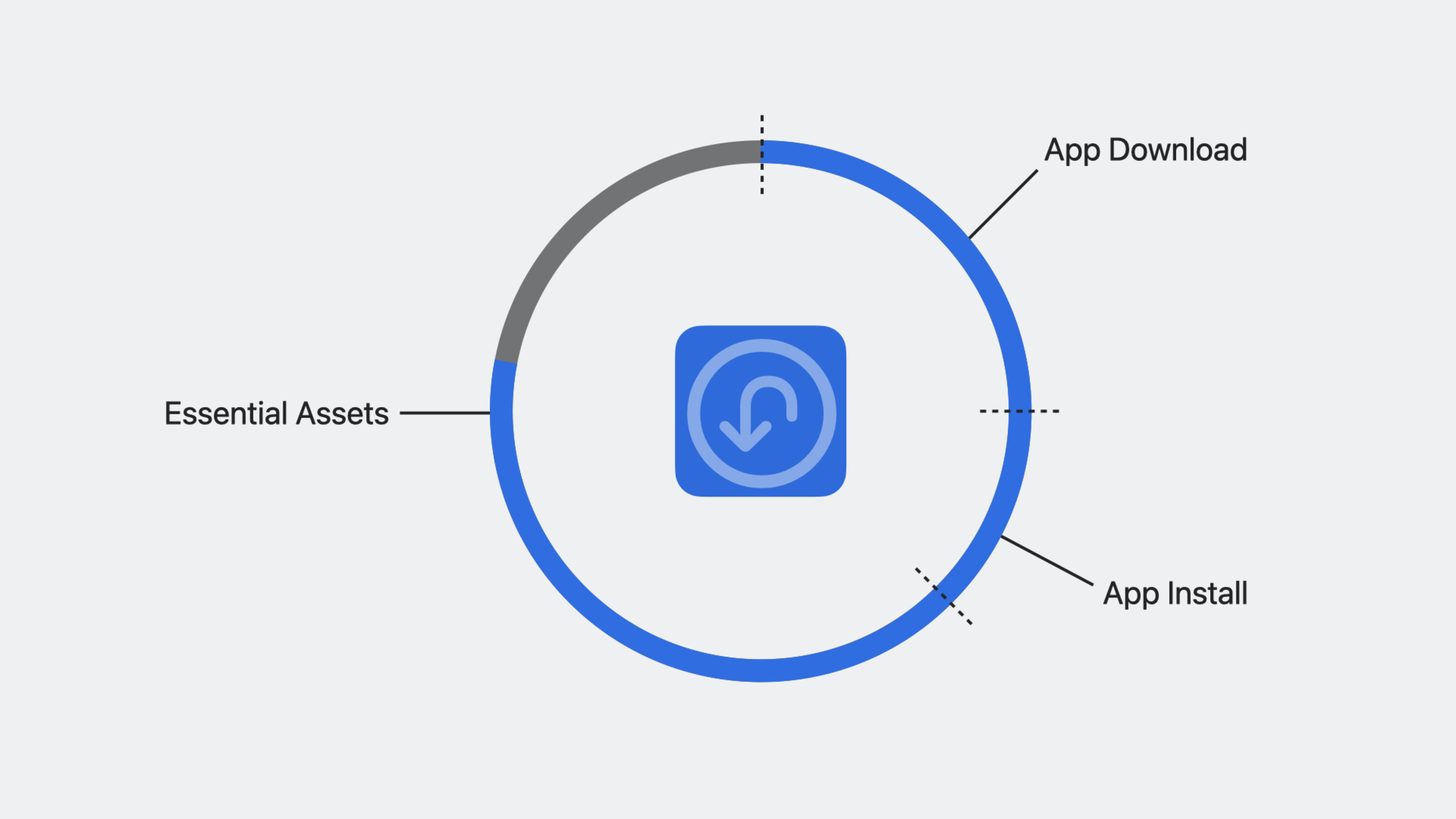
(10:35)Essential Downloads is this year’s headline feature. Resources marked essential download during app installation, merged into the App Store download progress. Users can’t launch the app until essential downloads complete.
This suits a game’s first level, core app content, or anything that must be available on first launch.
Runtime Limits
(04:42)The Extension has strict resource limits:
- Memory: a few MB; exceeding it terminates the Extension
- Runtime: a few minutes per day by default, adjusted dynamically based on app usage
- Extension doesn’t run in Low Power Mode or when Background App Refresh is off
Debugging Tools
(29:38)The xcrun backgroundassets-debug tool simulates each Extension entry point without waiting for real install or background events.
Detailed Content
Info.plist Configuration
(16:00)Add required keys to your app’s Info.plist:
<key>BAManifestURL</key>
<string>https://your-cdn.com/manifest.json</string>

<key>BAInitialDownloadRestrictions</key>
<dict>
    <key>BADownloadAllowance</key>
    <integer>104857600</integer>
    <key>BAEssentialDownloadAllowance</key>
    <integer>52428800</integer>
    <key>BADownloadDomainAllowList</key>
    <array>
        <string>your-cdn.com</string>
    </array>
</dict>

<key>BAMaxInstallSize</key>
<integer>209715200</integer>

<key>BAEssentialMaxInstallSize</key>
<integer>104857600</integer>
Key points:
BAManifestURL: URL of the manifest fileBADownloadAllowance: Total download size cap for non-essential resources (bytes)BAEssentialDownloadAllowance: Total download size cap for essential resources (bytes)BAEssentialMaxInstallSize: Disk usage cap after essential resources are installedBAMaxInstallSize: Disk usage cap after non-essential resources are installedBADownloadDomainAllowList: Domain allowlist for downloads before first launch
Extension Implementation
(24:46)Create a Background Assets Extension:
import BackgroundAssets

class DownloadExtension: NSObject, BADownloaderExtension {

    func downloads(for request: BAContentRequest,
                   manifestURL: URL,
                   extensionInfo: BAAppExtensionInfo) -> Set<BADownload> {

        // Parse the manifest file
        guard let manifestData = try? Data(contentsOf: manifestURL),
              let manifest = try? JSONDecoder().decode(Manifest.self, from: manifestData) else {
            return []
        }

        // Save the manifest to the App Group
        saveManifestToAppGroup(manifest)

        var downloads: Set<BADownload> = []

        for session in manifest.sessions where !session.isDownloaded {
            let download = BAURLDownload(
                identifier: session.id,
                request: URLRequest(url: session.videoURL),
                essential: session.isEssential,
                fileSize: session.fileSize,
                applicationGroupIdentifier: "group.com.yourapp",
                priority: .default
            )
            downloads.insert(download)
        }

        return downloads
    }

    func backgroundDownload(_ download: BADownload,
                           didFinishDownloadingTo fileURL: URL) {
        // Use withExclusiveControl to ensure exclusive access
        BADownloadManager.shared.withExclusiveControl { control in
            guard let control = control else { return }

            // Move the file from the temporary location to the final location
            do {
                let finalURL = self.finalURL(for: download)
                try FileManager.default.moveItem(at: fileURL, to: finalURL)

                // Update local state
                self.markSessionAsDownloaded(download.identifier)
            } catch {
                print("Failed to move file: \(error)")
            }
        }
    }

    func backgroundDownload(_ download: BADownload, failedWithError error: Error) {
        // If a required download fails, requeue it as optional
        if let urlDownload = download as? BAURLDownload, urlDownload.isEssential {
            let nonEssentialDownload = urlDownload.removingEssential()
            try? BADownloadManager.shared.scheduleDownload(nonEssentialDownload)
        }
    }
}
Key points:
downloads(for:manifestURL:extensionInfo:)returns the set of resources to download- Essential downloads can only be scheduled during install/update events
- Use
withExclusiveControlto prevent the app and Extension from operating on files simultaneously - Move files to their final location immediately after download completes
- When essential downloads fail, use
removingEssential()to re-queue as non-essential
App Integration
(19:31)Manage downloads from your app:
import BackgroundAssets

class SessionManager: NSObject, BADownloadManagerDelegate {
    let downloadManager = BADownloadManager.shared

    override init() {
        super.init()
        downloadManager.delegate = self
    }

    func startDownload(for session: Session) {
        downloadManager.withExclusiveControl { control in
            guard let control = control else { return }

            // Check whether it is already in the download queue
            if let existingDownload = self.downloadManager.currentDownloads
                .first(where: { $0.identifier == session.id }) {
                // Already exists; promote to foreground to speed up the download
                self.downloadManager.startForegroundDownload(existingDownload)
            } else {
                // Create a new download
                let download = BAURLDownload(
                    identifier: session.id,
                    request: URLRequest(url: session.videoURL),
                    essential: false,
                    fileSize: session.fileSize,
                    applicationGroupIdentifier: "group.com.yourapp",
                    priority: .default
                )

                try? self.downloadManager.scheduleDownload(download)
                self.downloadManager.startForegroundDownload(download)
            }
        }
    }

    // MARK: - BADownloadManagerDelegate

    func downloadManager(_ manager: BADownloadManager,
                        downloadDidProgress download: BADownload) {
        updateProgress(for: download.identifier, progress: download.progress)
    }

    func downloadManager(_ manager: BADownloadManager,
                        downloadDidFinish download: BADownload) {
        // The file has already been moved to the final location in the extension
        markSessionAsDownloaded(download.identifier)
    }

    func downloadManager(_ manager: BADownloadManager,
                        downloadDidFail download: BADownload,
                        withError error: Error) {
        print("Download failed: \(error)")
    }
}
Key points:
BADownloadManageris a singleton that connects directly to the system schedulerwithExclusiveControlensures mutual exclusion with the ExtensionstartForegroundDownloadpromotes a background download to the foreground for faster completion- Foreground promotion doesn’t restart the download—it resumes from where it left off
- Foreground downloads fail immediately on network issues (unlike background retries)
Debugging the Extension
(29:38)Use backgroundassets-debug to simulate entry points:
# List connected devices
xcrun backgroundassets-debug list-devices

# Simulate an app install event
xcrun backgroundassets-debug simulate app-install \
    --device <DEVICE_UUID> \
    --bundle-id com.yourapp

# Simulate an app update event
xcrun backgroundassets-debug simulate app-update \
    --device <DEVICE_UUID> \
    --bundle-id com.yourapp

# Simulate a periodic background check
xcrun backgroundassets-debug simulate periodic \
    --device <DEVICE_UUID> \
    --bundle-id com.yourapp
Key points:
- Device must have Developer Mode enabled
- Commands can be sent over Bluetooth or Wi-Fi—no USB required
- Simulated events reset the Extension’s runtime limit
- Use
man backgroundassets-debugfor full documentation
File Management Best Practices
(09:44)Downloaded files are marked purgeable by default:
// Put downloaded files in the Caches directory
let cachesURL = FileManager.default.urls(for: .cachesDirectory,
                                          in: .userDomainMask).first!
let finalURL = cachesURL.appendingPathComponent("downloads/\(identifier)")

// Use a move operation, not copy
try FileManager.default.moveItem(at: tempURL, to: finalURL)
Key points:
- Place downloaded files in the Caches directory; the system can purge them when space is low
- Use
moveIteminstead ofcopyItemto preserve purgeable status - Modified or extracted files are no longer tracked by the system and count toward backup storage
- Check file existence on app launch and re-download if missing
Essential Download Lifecycle
(11:21)Essential download lifecycle:
- User requests app install from the App Store
- System reads essential configuration from Info.plist
- After app install completes, system wakes the Extension
- Extension returns a mix of essential and non-essential downloads
- Essential downloads start immediately, merged into App Store install progress
- After essential downloads complete, the app becomes launchable
- Non-essential downloads continue in the background
Key points:
- Essential download file sizes must be accurate or downloads will fail
- Users can disable in-app content downloads in App Store settings
- Your app must handle the case where essential resources aren’t fully downloaded
- Server must support HTTP Range requests for resumable downloads
Core Takeaways
1. Deliver an “open and go” experience for content apps
What to build: Mark core content (homepage data for news apps, first lesson for education apps, first few game levels) as Essential Downloads so users can use the app on first open.
Why it’s worth doing: Users who download from the App Store and then wait for content have high churn. Essential Downloads deliver content alongside the app.
How to start: Configure BAEssentialDownloadAllowance and BAEssentialMaxInstallSize in Info.plist, and set essential: true for core resources in the Extension’s downloads(for:).
2. Build a smart resource preloading system
What to build: Use periodic background checks to preload new content while users aren’t using the app—e.g., a podcast app auto-downloading new episodes on Wi-Fi.
Why it’s worth doing: Background Assets intelligently schedules Extension runs based on usage. Frequently used apps get more runtime; infrequent ones are throttled.
How to start: Parse the manifest in the Extension, compare server content with locally downloaded content, and return BADownload sets for updates. Use BADownloadManager.currentDownloads to avoid duplicate scheduling.
3. Implement level streaming for games
What to build: Split game levels into essential (first 3 levels) and optional (later levels)—essential levels download with install, later levels preload in the background.
Why it’s worth doing: Game assets are often huge; bundling everything in the IPA exceeds App Store limits. Background Assets enables on-demand level downloads.
How to start: Design a resource manifest where each level records file size and download URL. Mark early levels essential, rest non-essential. In the Extension, prioritize levels the user is about to play.
4. Build an offline-first video learning app
What to build: Let users mark videos for offline viewing; Background Assets downloads them in the background and notifies when complete.
Why it’s worth doing: Users mark videos on Wi-Fi, downloads happen in the background, and content is ready when they’re on the subway or a plane.
How to start: Maintain a “pending download” list in the app, share it with the Extension via App Group. The Extension reads the list during background runs and schedules downloads. On launch, use withExclusiveControl to check status and update UI.
Related Sessions
- Create a more responsive camera experience — iOS 17 camera responsiveness APIs: deferred processing, zero shutter lag, responsive capture
- Support external cameras in your iPadOS app — Use external cameras like Apple Studio Display in iPadOS apps
- What’s new in the Photos picker — New Photos picker improvements with embedding and continuous selection
- Meet SwiftUI for spatial computing — SwiftUI’s new capabilities on spatial computing platforms
Comments
GitHub Issues · utterances