
Highlight
In iOS 17, App Shortcuts make app features available immediately after installation with no manual setup. Users can trigger them via Siri voice commands, Spotlight search, and Shortcuts app automations—and the same code extends to Apple Watch and HomePod.
Core Content
Why App Shortcuts Matter
Before iOS 15, users had to open the Shortcuts app or use the “Add to Siri” button to set up shortcuts. That friction kept many people from trying them.
App Shortcuts solve this: they’re available automatically after install, with zero configuration. Users can trigger them three ways:
- Speak a trigger phrase to Siri
- See and tap them in Spotlight search
- Combine them into more complex automations in the Shortcuts app
(00:48)
Basic Implementation: Creating a Todo List
Implementing an App Shortcut takes just two steps: define an App Intent and define an App Shortcut.
import AppIntents

// Step one: define an App Intent
struct CreateListIntent: AppIntent {
    static var title: LocalizedStringResource = "Create List"

    @Parameter(title: "List Name")
    var listName: String

    func perform() async throws -> some IntentResult & ReturnsValue {
        // Logic that actually creates the list
        let newList = TodoList(name: listName)
        try await TodoStore.shared.createList(newList)

        return .result(
            value: newList,
            dialog: "Created list \(listName)"
        )
    }
}

// Step two: define an App Shortcut
struct DemoAppShortcuts: AppShortcutsProvider {
    static var appShortcuts: [AppShortcut] {
        AppShortcut(
            intent: CreateListIntent(),
            phrases: [
                "Create a list in \(.applicationName)",
                "Make a new list with \(.applicationName)"
            ],
            shortTitle: "Create List",
            systemImageName: "plus.square"
        )
    }
}
Key points:
- Each app can have at most one
AppShortcutsProvider AppShortcutincludes the intent, Siri trigger phrases, short title, and system icon- You can define multiple trigger phrases for a single shortcut
- Use
\(.applicationName)instead of hardcoding the app name to support synonym recognition
(03:29)
Advanced: Entity and Query
When a shortcut needs to reference specific objects inside your app, define an Entity and Query.
import AppIntents

// Entity: a conceptual object in the app
struct TodoList: AppEntity {
    let id: UUID
    let name: String

    static var typeDisplayRepresentation: TypeDisplayRepresentation {
        "Todo List"
    }

    var displayRepresentation: DisplayRepresentation {
        DisplayRepresentation(
            title: "\(name)",
            image: .init(systemName: "list.bullet")
        )
    }

    static var defaultQuery = TodoListQuery()
}

// Query: helps the system find entities
struct TodoListQuery: EntityQuery {
    func entities(for identifiers: [TodoList.ID]) async throws -> [TodoList] {
        identifiers.compactMap { TodoStore.shared.list(withID: $0) }
    }

    func suggestedEntities() async throws -> [TodoList] {
        TodoStore.shared.recentLists()
    }
}

// Intent that uses Entity as a parameter
struct SummarizeListIntent: AppIntent {
    static var title: LocalizedStringResource = "Summarize List"

    @Parameter(title: "List")
    var list: TodoList

    func perform() async throws -> some IntentResult & ReturnsValue {
        let summary = await TodoStore.shared.summarize(list: list)
        return .result(
            value: summary,
            dialog: "\(list.name) has \(summary.pendingCount) pending items"
        )
    }
}
Key points:
AppEntityrequiresid,typeDisplayRepresentation, anddisplayRepresentation- Entities shown in Spotlight need an image or symbol
EntityQuery’ssuggestedEntitiescontrols recommended contententities(for:)retrieves specific instances by identifier
(04:42)
App Shortcuts with Parameters
struct DemoAppShortcuts: AppShortcutsProvider {
    static var appShortcuts: [AppShortcut] {
        AppShortcut(
            intent: SummarizeListIntent(),
            phrases: [
                "Summarize my \(list) with \(.applicationName)",
                "What's in my \(list) in \(.applicationName)",
                "Summarize a list with \(.applicationName)"  // Version without parameters
            ],
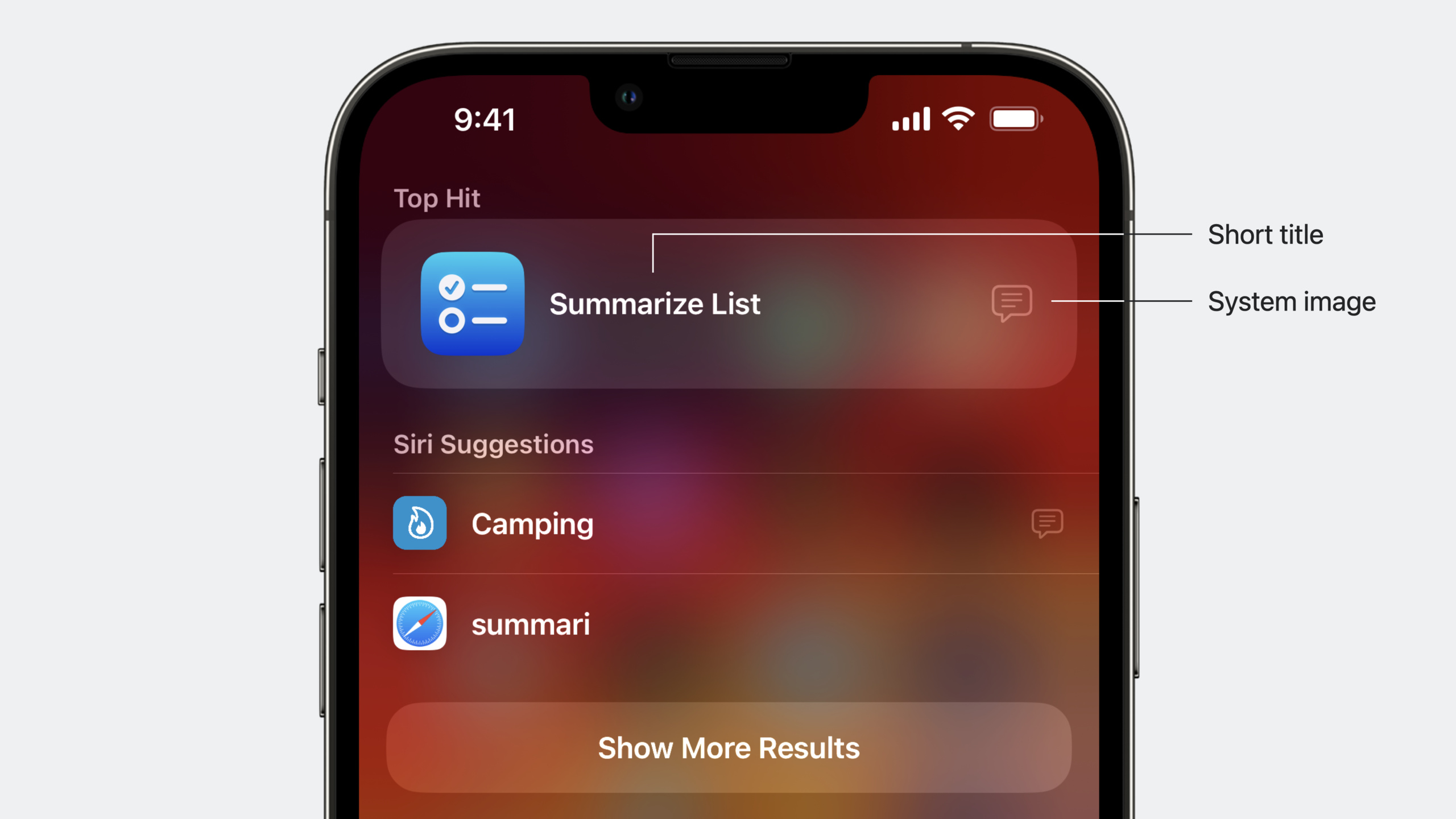
            shortTitle: "Summarize List",
            systemImageName: "text.magnifyingglass"
        )
    }
}
Key points:
- Phrases can reference parameters with
\(parameterName) - Provide a version without parameters so Siri can prompt for selection when the user doesn’t specify one
- Call
updateAppShortcutParameters()after entity data changes - Also call on first launch—otherwise parameterized phrases won’t work
(07:40)
Detailed Content
iOS 17 Feature: Flexible Matching
In iOS 16, Siri only recognized exact trigger phrase matches. iOS 17 introduces the Semantic Similarity Index, which automatically matches semantically similar phrases.
// This phrase is defined
"Summarize my groceries list with Demo"

// In iOS 17, these can also match automatically without extra code
"Tell me the summary of my groceries list with Demo"
"Give me a summary of my shopping list with Demo"
Key points:
- Rebuild with Xcode 15 to enable—no code changes needed
- You can disable “Enable App Shortcuts Flexible Matching” in Build Settings
- New
synonymsAPI lets you define aliases for Entity instances
(14:24)
Synonyms and Negative Phrases
extension TodoList {
    var displayRepresentation: DisplayRepresentation {
        DisplayRepresentation(
            title: "\(name)",
            synonyms: ["shopping", "grocery list"]
        )
    }
}

struct DemoAppShortcuts: AppShortcutsProvider {
    static var appShortcuts: [AppShortcut] {
        AppShortcut(
            intent: SummarizeListIntent(),
            phrases: ["Summarize my \(list) with \(.applicationName)"],
            shortTitle: "Summarize List",
            systemImageName: "text.magnifyingglass",
            negativePhrase: "Send a Demo summary to my grocery store"
        )
    }
}
Key points:
synonymslet users refer to the same entity by different namesnegativePhraseprevents unrelated sentences from accidentally triggering the shortcut- Call
updateAppShortcutParameters()after synonym changes
(15:17)
App Shortcuts Preview Tool
Xcode 15 introduces App Shortcuts Preview, letting you test Siri phrases without running the app.
How to use it:
- Product > App Shortcuts Preview
- Build the app first to generate the Semantic Similarity Index
- Select your app on the left and enter test phrases
- Switch locales to test multiple languages
This tool dramatically shortens the debug cycle, especially for multilingual testing without changing device language.
(16:25)
String Catalog Localization
iOS 17 removes the per-locale limit on trigger phrase count. Manage localization with String Catalog:
// Create AppShortcuts.xcstrings
// After compilation, phrases are automatically extracted from AppShortcutsProvider
// Add any number of extra phrases for each locale
Key points:
- New apps: create a String Catalog named “AppShortcuts”
- Existing apps: migrate AppShortcuts.strings to String Catalog
- Only apps targeting iOS 17+ can use this feature
(18:41)
Cross-Device Support
Apple Watch:
- App Shortcuts must come from a watchOS app installed on the watch
- iOS app shortcuts cannot run on Watch
- Flexible Matching is not supported—phrases must match exactly
HomePod:
- Requires a companion iOS/iPadOS device with an App Shortcuts-enabled app installed
- The app may not launch at all on HomePod
- Returned dialogs should be clear and concise—HomePod is voice-only
// Provide full spoken descriptions for HomePod and concise versions for visual devices
IntentDialog(
    full: "Your groceries list has 5 pending items: milk, eggs, bread, apples, and coffee",
    supporting: "5 items pending"
)(22:05)
Core Takeaways
-
What to build: Zero-configuration voice entry points for core features
- Why it’s worth doing: App Shortcuts are available automatically after install with no manual setup, dramatically lowering the barrier to use
- How to start: Create an
AppIntentfor each core feature, define trigger phrases inAppShortcutsProvider, use\(.applicationName)for synonym support
-
What to build: Surface app entities in Spotlight
- Why it’s worth doing: Spotlight Top Hits shows your app’s App Shortcuts—users see available actions when searching for your app name
- How to start: Define
AppEntityfor in-app objects, include image or symbol indisplayRepresentation, implementsuggestedEntitiesto control recommendations
-
What to build: Context-aware Siri tips
- Why it’s worth doing: When users see a Siri Tip in your app, they’re more likely to remember and use voice control
- How to start: Add
SiriTipViewon relevant screens—supported in both SwiftUI and UIKit, placed near related content
-
What to build: Extend voice experiences to Apple Watch and HomePod
- Why it’s worth doing: The same App Intents code serves multiple devices, expanding user reach
- How to start: Define App Shortcuts separately for your watchOS app; return the
fullversion ofIntentDialogfor HomePod scenarios
-
What to build: A phrase testing workflow with App Shortcuts Preview
- Why it’s worth doing: Manual Siri phrase testing is slow and hard to cover across languages
- How to start: Use App Shortcuts Preview in Xcode 15, test standard phrases, variants, and edge cases for each intent, export test cases for your team
Related Sessions
- Explore enhancements to App Intents — Comprehensive App Intents framework enhancements in iOS 17
- Integrate your media app with HomePod — Integrate your media app with HomePod
- Design App Shortcuts — Design guidelines for App Shortcuts
- Migrate custom Intents to App Intents — Migrate SiriKit Intents to App Intents
Comments
GitHub Issues · utterances