
Highlight
iOS 17’s Speech framework lets developers customize the on-device speech recognition language model with custom vocabulary and templates, improving recognition accuracy for technical terms, names, and domain phrases — all processing happens locally.
Core Content
Limitations of General Language Models
Since iOS 10, the Speech framework has wrapped the full acoustic and language model pipeline in a simple API. But this API treats all apps the same, forcing every app to use the same language model.
The problem: different domains need different language model behavior. A chess app wants users to dictate moves like “Play the Albin counter gambit.” The general language model saw many music requests during training (“Play the album…”), so it misrecognizes this as a music playback request. Chess terminology never appeared in training data.
(00:29)
Building Training Data
iOS 17 introduces the SFLanguageModel class with a result builder DSL to build training data containers.
import Speech

// Define exact phrases and their weights
let trainingData = SFLanguageModel.CustomData {
    PhraseCount(phrase: "Albin counter gambit", count: 50)
    PhraseCount(phrase: "Queen's Gambit", count: 100)
    PhraseCount(phrase: "Winawer variation", count: 30)
}
Key points:
PhraseCountdescribes how often a phrase appears in the final dataset, weighting specific phrases higher- The system accepts limited data — balance boosting phrases against overall budget
(02:57)
Batch-Generating Samples with Templates
import Speech

// Define word classes
let pieces = ["pawn", "knight", "bishop", "rook", "queen", "king"]
let files = ["a", "b", "c", "d", "e", "f", "g", "h"]
let ranks = ["1", "2", "3", "4", "5", "6", "7", "8"]

// Use templates to generate all possible move combinations
let chessMoves = SFLanguageModel.CustomData {
    TemplateCount(
        pattern: "\(pieces) to \(files)\(ranks)",
        count: 10000
    )
}
Key points:
TemplateCountcombines word classes into patterns to batch-generate samples- Count applies to the entire template — 10,000 samples distribute evenly across all generated data
- Templates suit large combination spaces like chess moves or medical term combinations
(03:47)
Custom Pronunciations
import Speech

// Define spelling and pronunciation for technical terms
let medicalTerms = SFLanguageModel.CustomData {
    PhraseCount(
        phrase: "amoxicillin",
        pronunciation: "@.mO.k.sI."lI.nIn",
        count: 20
    )
}
Key points:
- Pronunciations use X-SAMPA string format
- Each locale supports a different subset of pronunciation symbols
- Suited for loanwords or special pronunciations in medical, legal, and other professional domains
(04:28)
Runtime Training Data
import Speech

// Dynamically generate training data based on user data
func generateUserSpecificTrainingData(contacts: [Contact]) -> SFLanguageModel.CustomData {
    SFLanguageModel.CustomData {
        for contact in contacts.prefix(50) {
            PhraseCount(phrase: "call \(contact.name)", count: 10)
        }
    }
}

// Write data to a file
try trainingData.export(to: fileURL)
Key points:
- Runtime-generated data can be based on user-specific info like contact names and call frequency
- Privacy-sensitive data always stays on device — never sent over the network
- Training data is bound to a single locale; use
NSLocalizedStringfor multilingual scenarios
(05:09)
Deploying Custom Models
import Speech

// Prepare the custom language model (a time-consuming operation that should run in the background)
let customModelURL = try await SFLanguageModel.prepareCustomLanguageModel(
    for: fileURL,
    clientIdentifier: "com.example.chessapp",
    locale: Locale(identifier: "en_US")
)

// Configure the recognition request
let request = SFSpeechAudioBufferRecognitionRequest()
request.requiresOnDeviceRecognition = true
request.customizedLanguageModel = customModelURL

// Start recognition
let recognizer = SFSpeechRecognizer(locale: Locale(identifier: "en_US"))!
let task = recognizer.recognitionTask(with: request) { result, error in
    if let result = result {
        print(result.bestTranscription.formattedString)
    }
}
Key points:
prepareCustomLanguageModelhas significant latency — must run on a background thread- Recognition requests must set
requiresOnDeviceRecognition = trueor customization won’t take effect - All customized requests are strictly processed on device; data never leaves the device
(06:08)
Detailed Content
How Speech Recognition Works
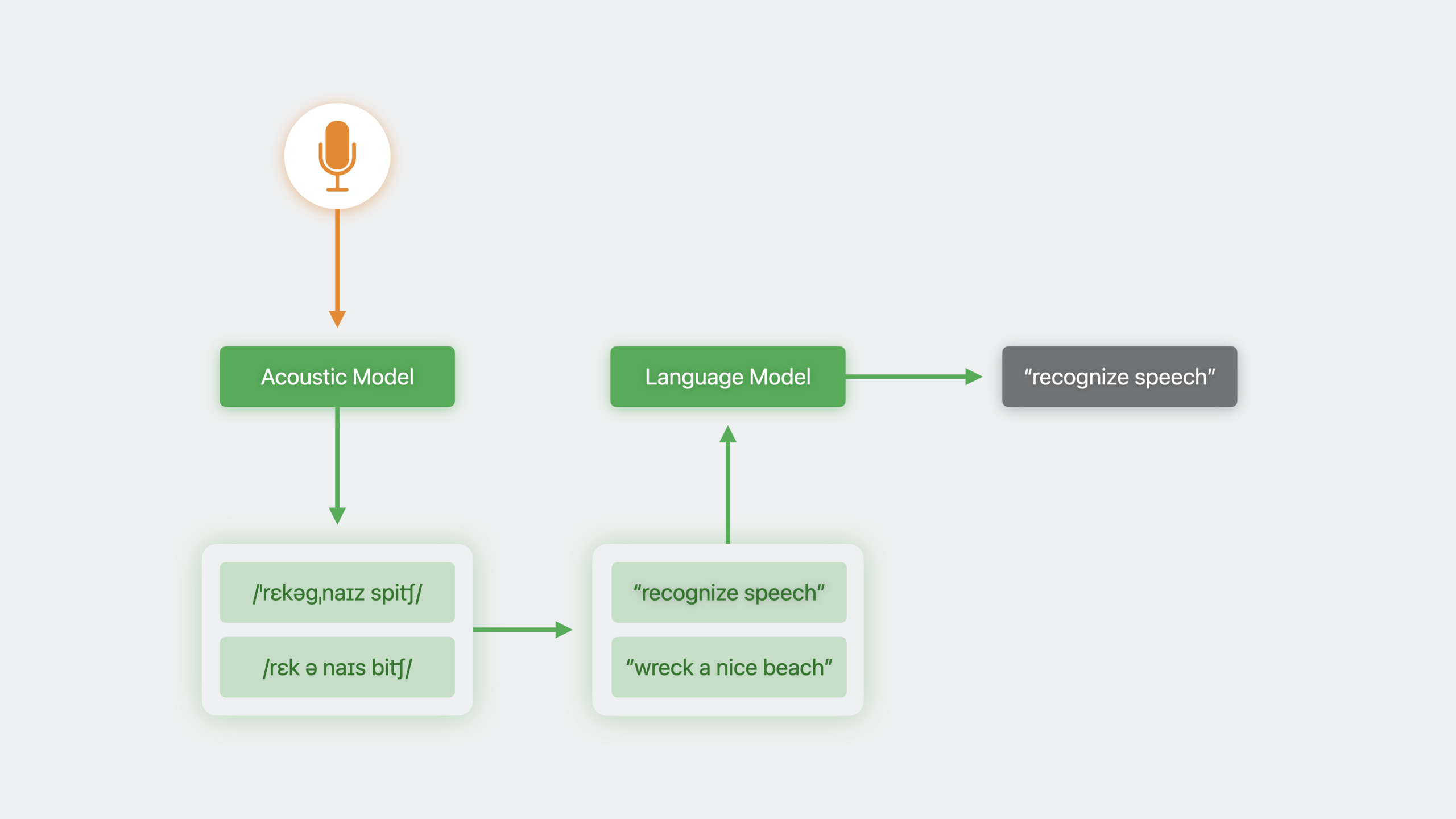
Speech recognition has two steps:
- Acoustic model: Converts audio data to phoneme representations
- Language model: Selects the most likely sentence from multiple candidate transcriptions
When multiple phoneme representations match audio, or a single phoneme maps to multiple transcriptions, the language model disambiguates. It predicts the probability of a given word appearing in a sequence based on usage patterns seen during training.
(00:37)
Data Budget and Balance
The system limits total training data. The count parameter in PhraseCount determines phrase weight in the final dataset. Give higher counts to frequent phrases, lower counts to rare ones. But watch the overall budget — avoid over-emphasizing certain phrases at the expense of other important vocabulary.
(03:30)
Privacy Protection Mechanisms
Language model customization is designed so data never leaves the device:
- Training data files are generated and stored locally
prepareCustomLanguageModelruns entirely on device- Recognition requests are processed on device, not sent to the cloud
This suits privacy-sensitive data like contact names, call history, and personal playlists.
(05:33)
Core Takeaways
-
What to do: Add voice input support for professional domain apps
- Why it’s worth it: General speech recognition has low accuracy on technical terms; custom language models can raise medical, legal, and engineering vocabulary recognition to usable levels
- How to start: Collect domain high-frequency phrases with
SFLanguageModel.CustomData, set weights withPhraseCount, export and deploy viaprepareCustomLanguageModel
-
What to do: Implement personalized speech recognition based on user data
- Why it’s worth it: Contact names, personal playlists, and frequent contacts can’t be covered by general models
- How to start: Read contacts or user history at app launch, generate
PhraseCountlists, periodically update training data files
-
What to do: Use templates to generate training data for complex combination scenarios
- Why it’s worth it: Manually listing all phrase combinations is impractical; templates batch-cover entire combination spaces
- How to start: Define word class arrays, combine into patterns with
TemplateCount, set appropriate total sample count for even distribution
-
What to do: Design dedicated recognition models for voice-controlled games
- Why it’s worth it: Game commands usually have fixed grammar structures; templates can perfectly cover all possible command combinations
- How to start: Analyze all voice-controllable game operations, define action/target/direction word classes, generate complete command sets with templates
-
What to do: Build an offline voice notes app
- Why it’s worth it: On-device recognition + language model customization means fully offline use, suited for privacy-sensitive scenarios
- How to start: Set
requiresOnDeviceRecognition = true, generate training data from user’s historical note content so common vocabulary gets higher recognition weight
Related Sessions
- Spotlight your app with App Shortcuts — Let users trigger app features with voice via App Shortcuts
- Explore enhancements to App Intents — Latest enhancements to the App Intents framework
- Integrate your media app with HomePod — Integrate media apps with HomePod for voice-controlled playback
Comments
GitHub Issues · utterances