
Highlight
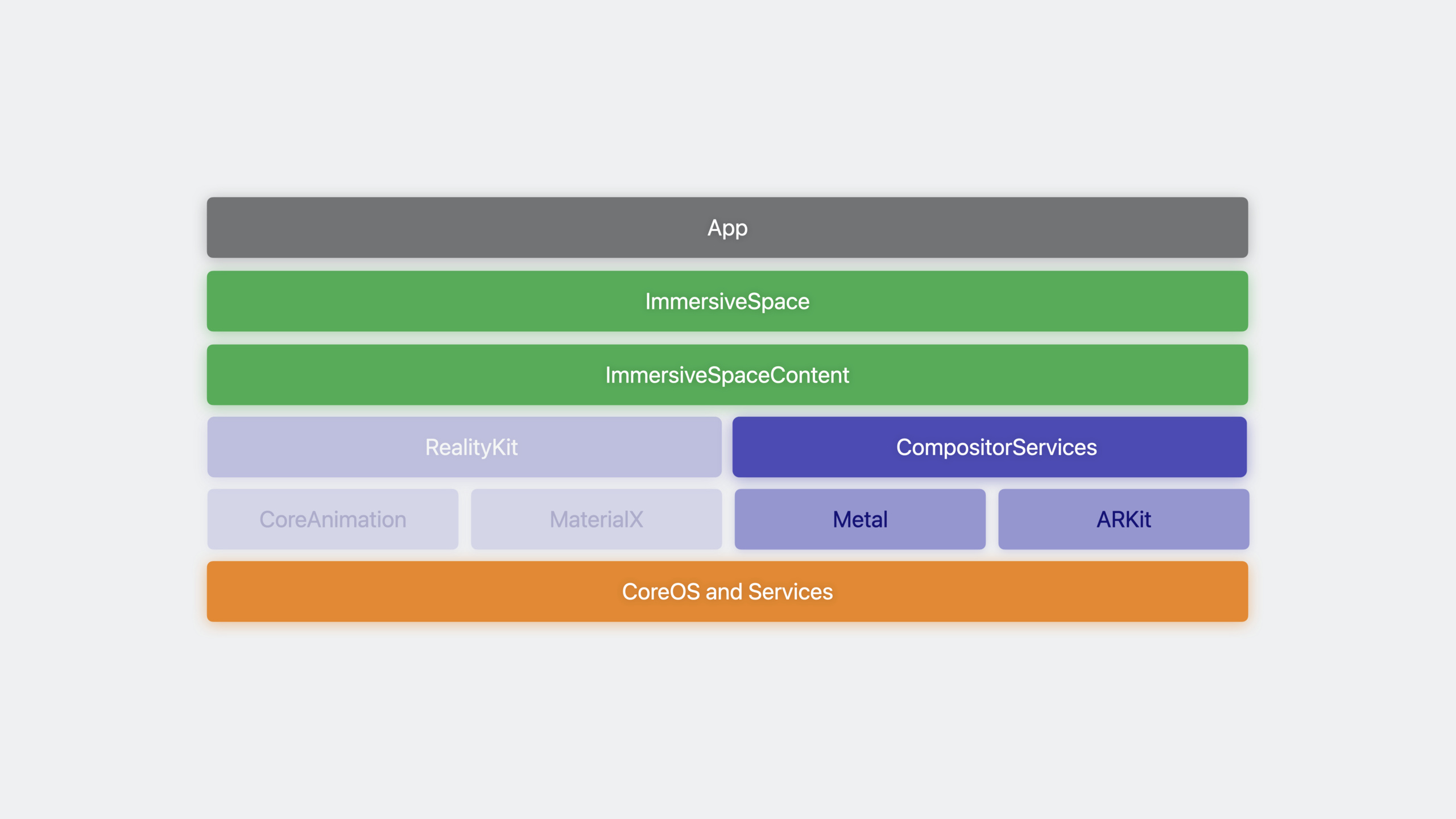
Apple enables developers to render directly to the visionOS compositor using the CompositorServices API with Metal, combined with ARKit for fully immersive experiences. The core architecture is SwiftUI creating ImmersiveSpace + CompositorLayer configuring the rendering session, with the engine body writable in C/C++.
Core Content
Rendering Choices for Fully Immersive Experiences
(00:10)Two rendering paths exist for fully immersive experiences on visionOS. RealityKit suits most scenarios, using CoreAnimation and MaterialX under the hood. For direct rendering pipeline control, Metal + ARKit is the alternative. RecRoom is an example using CompositorServices + Metal + ARKit.
SwiftUI Scene Architecture
(01:47)visionOS has three main scene types:
- Window: 2D experience similar to macOS
- Volume: Coexists with other apps in Shared Space; content renders within boundaries
- ImmersiveSpace: Renders content at any location for fully immersive experiences
Metal rendering chooses the ImmersiveSpace type. It serves as a container; content is provided through the ImmersiveSpaceContent protocol. When using Metal, this content type is called CompositorLayer.
CompositorServices API
(03:42)CompositorServices is a new API on visionOS providing Metal rendering interfaces for apps to render directly to the compositor server. Features low IPC overhead, low latency, and supports both C and Swift APIs.
Creating a CompositorLayer requires two parameters:
CompositorLayerConfigurationprotocol: Defines rendering session behavior and capabilitiesLayerRenderer: Rendering session interface for scheduling and rendering frames
Application Entry Code
(04:45)
@main
struct MyApp: App {
    var body: some Scene {
        ImmersiveSpace {
            CompositorLayer { layerRenderer in
                let engine = my_engine_create(layerRenderer)
                let renderThread = Thread {
                    my_engine_render_loop(engine)
                }
                renderThread.name = "Render Thread"
                renderThread.start()
            }
        }
    }
}
Key points:
@mainmarks the application entry pointImmersiveSpaceserves as the scene containerCompositorLayerreceives thelayerRendererinstance- Create engine instance and render thread in the closure
- Render loop runs on a separate thread to avoid blocking the main thread
Default Scene Configuration
(05:20)SwiftUI creates a Window scene by default even when the first scene is ImmersiveSpace. To change this, add the UIApplicationPreferredDefaultSceneSessionRole key to Info.plist with value CPSceneSessionRoleImmersiveSpaceApplication.
CompositorLayer Configuration
(10:32)
struct MyConfiguration: CompositorLayerConfiguration {
    func makeConfiguration(capabilities: LayerRenderer.Capabilities,
                           configuration: inout LayerRenderer.Configuration) {

        let supportsFoveation = capabilities.supportsFoveation
        let supportedLayouts = capabilities.supportedLayouts(options: supportsFoveation ?
                                                             [.foveationEnabled] : [])

        configuration.layout = supportedLayouts.contains(.layered) ? .layered : .dedicated

        configuration.isFoveationEnabled = supportsFoveation

        // HDR support
        configuration.colorFormat = .rgba16Float
   }
}
Key points:
supportsFoveationchecks if the device supports foveated rendering (simulator does not)supportedLayoutsqueries available layout optionslayoutselects texture mapping: layered (single texture, dual slices), dedicated (dual textures, single slice each), shared (single texture, single slice, dual viewports)isFoveationEnabledenables foveated renderingcolorFormatset to.rgba16Floatsupports HDR rendering
Foveated Rendering
(06:51)Foveated rendering’s core goal: increase pixels-per-degree density without increasing texture size. visionOS achieves this through a sampling rate map—higher sampling in the gaze region, reduced in peripheral areas. This reduces rendering power while maintaining visual fidelity.
The Compositor provides MTLRasterizationRateMap per frame. In Xcode Metal Debugger, inspect target textures and rasterization rate maps to observe compression across regions.
LayerRenderer Layout Details
(08:28)Layout defines how each eye’s content maps to Metal textures:
| Layout | Textures | Slices | Viewports | Characteristics |
|---|---|---|---|---|
| layered | 1 | 2 | 2 | Single-pass stereo rendering, supports foveation |
| dedicated | 2 | 1 | 1 | Independent texture per eye, easy to port |
| shared | 1 | 1 | 2 | Single texture dual viewport, suitable without foveation |
Layered is the best choice, supporting single-pass rendering while retaining foveation capability.
Color Management
(09:57)The Compositor expects content rendered in extended linear Display P3 color space. visionOS supports 2.0 EDR dynamic range (twice SDR). Default pixel formats do not support HDR; explicitly set to rgba16Float.
Detailed Content
Render Loop
(12:20)
void my_engine_render_loop(my_engine *engine) {
    my_engine_setup_render_pipeline(engine);

    bool is_rendering = true;
    while (is_rendering) @autoreleasepool {
        switch (cp_layer_renderer_get_state(engine->layer_renderer)) {
            case cp_layer_renderer_state_paused:
                cp_layer_renderer_wait_until_running(engine->layer_renderer);
                break;
            case cp_layer_renderer_state_running:
                my_engine_render_new_frame(engine);
                break;
            case cp_layer_renderer_state_invalidated:
                is_rendering = false;
                break;
        }
    }

    my_engine_invalidate(engine);
}
Key points:
my_engine_setup_render_pipelineinitializes resources needed for the rendering pipeline@autoreleasepoolmanages autoreleased objectscp_layer_renderer_get_statequeries layer renderer state- In
pausedstate, thread sleeps waiting to resume - In
runningstate, renders one frame - In
invalidatedstate, ends loop and cleans up resources
Single-Frame Rendering Flow
(15:56)
void my_engine_render_new_frame(my_engine *engine) {

    cp_frame_t frame = cp_layer_renderer_query_next_frame(engine->layer_renderer);
    if (frame == nullptr) { return; }

    cp_frame_timing_t timing = cp_frame_predict_timing(frame);
    if (timing == nullptr) { return; }

    cp_frame_start_update(frame);

    my_input_state input_state = my_engine_gather_inputs(engine, timing);
    my_engine_update_frame(engine, timing, input_state);

    cp_frame_end_update(frame);

    // Wait until the optimal time for querying the input
    cp_time_wait_until(cp_frame_timing_get_optimal_input_time(timing));

    cp_frame_start_submission(frame);

    cp_drawable_t drawable = cp_frame_query_drawable(frame);
    if (drawable == nullptr) { return; }

    cp_frame_timing_t final_timing = cp_drawable_get_frame_timing(drawable);
    ar_pose_t pose = my_engine_get_ar_pose(engine, final_timing);
    cp_drawable_set_ar_pose(drawable, pose);

    my_engine_draw_and_submit_frame(engine, frame, drawable);

    cp_frame_end_submission(frame);
}
Key points:
cp_layer_renderer_query_next_framegets the next frame objectcp_frame_predict_timingpredicts frame timing informationcp_frame_start_update/cp_frame_end_updatewrap the update phase (non-latency-sensitive work: animation, character updates, input gathering)cp_time_wait_untilwaits until optimal input query timecp_frame_start_submission/cp_frame_end_submissionwrap the submission phase (latency-sensitive work: head-pose-dependent rendering)cp_frame_query_drawablegets the drawable (contains target texture)cp_drawable_set_ar_posesets AR pose; Compositor uses it for reprojectionmy_engine_draw_and_submit_frameencodes GPU work and submits
Frame Timing Diagram
The Compositor’s timing object defines three key time points:
- optimal input time: Best time to query latency-sensitive input; also the best time to start rendering a frame
- rendering deadline: Time by which CPU and GPU rendering work must complete
- presentation time: Time the frame appears on screen
The update phase should complete before optimal input time. After waiting for optimal input time, begin the submission phase. CPU and GPU work must complete before rendering deadline, or the Compositor uses the previous frame.
Adding Input Support
(18:57)
@main
struct MyApp: App {
    var body: some Scene {
        ImmersiveSpace {
            CompositorLayer(configuration: MyConfiguration()) { layerRenderer in
                let engine = my_engine_create(layerRenderer)
                let renderThread = Thread {
                    my_engine_render_loop(engine)
                }
                renderThread.name = "Render Thread"
                renderThread.start()
                layerRenderer.onSpatialEvent = { eventCollection in
                    var events = eventCollection.map { my_spatial_event($0) }
                    my_engine_push_spatial_events(engine, &events, events.count)
                }
            }
        }
        .upperLimbVisibility(.hidden)
    }
}
Key points:
configurationparameter passes custom configurationonSpatialEventregisters spatial event callback- Map Swift spatial events to C-type events
.upperLimbVisibility(.hidden)hides real hands, shows virtual hands
Event Push and Input Gathering
void my_engine_push_spatial_events(my_engine *engine,
                                   my_spatial_event *spatial_event_collection,
                                   size_t event_count) {
    os_unfair_lock_lock(&engine->input_event_lock);
    // Copy events into an internal queue
    os_unfair_lock_unlock(&engine->input_event_lock);
}

my_input_state my_engine_gather_inputs(my_engine *engine,
                                       cp_frame_timing_t timing) {
    my_input_state input_state = my_input_state_create();

    os_unfair_lock_lock(&engine->input_event_lock);
    input_state.current_pinch_collection = my_engine_pop_spatial_events(engine);
    os_unfair_lock_unlock(&engine->input_event_lock);

    ar_hand_tracking_provider_get_latest_anchors(engine->hand_tracking_provider,
                                                 input_state.left_hand,
                                                 input_state.right_hand);

    return input_state;
}
Key points:
- Spatial events are delivered on the main thread; lock mechanism needed for synchronization
os_unfair_lockused for thread-safe read/writear_hand_tracking_provider_get_latest_anchorsgets left and right hand skeleton data- Input gathering happens in the update phase, before optimal input time
Core Takeaways
1. Build a Custom VR Rendering Engine with Metal
- What to do: Write a lightweight VR rendering engine from scratch for visionOS
- Why it’s worth it: CompositorServices provides low-level access; C/C++ engine code is cross-platform reusable. Foveated rendering and single-pass instanced rendering offer significant performance optimization headroom
- How to start: Create ImmersiveSpace and CompositorLayer with SwiftUI, write render loop in C, configure layered layout + foveation, integrate ARKit for head pose
2. Develop Gesture-Interactive Immersive Art Tools
- What to do: Let users create 3D sculptures or paintings in virtual space with gestures
- Why it’s worth it: ARKit hand tracking + Metal direct rendering enables extremely low-latency interactive feedback. Spatial events provide full 3D position for pinch
- How to start: Read hand skeleton data in
gather_inputs, use pinch events as “brush” triggers, update virtual brush position in update phase, render strokes in submission phase
3. Port Existing OpenGL/Metal Games to visionOS
- What to do: Bring 3D games built with custom engines to visionOS
- Why it’s worth it: Engine body can be C/C++; only a thin SwiftUI wrapper is needed. Single-Pass Instanced Rendering reduces CPU overhead; Foveated Rendering improves visual quality
- How to start: Create CompositorLayer with SwiftUI, change the final step of the existing rendering pipeline to write to Compositor-provided drawables, add depth buffer writes, replace existing camera control with ARKit
4. Build Immersive Data Visualization Apps
- What to do: Render complex datasets (molecular structures, weather models) as interactive 3D visualizations
- Why it’s worth it: HDR support (rgba16Float) enables more precise high dynamic range data display; users can rotate and scale data models with natural gestures
- How to start: Configure HDR color format, handle gesture input in update phase to control camera/model transforms, use Metal compute shaders for data preprocessing
Related Sessions
- Bring your Unity VR app to a fully immersive space — Migrate existing Unity VR apps to visionOS fully immersive space
- Build great games for spatial computing — Overview of spatial computing game development techniques
- Meet ARKit for spatial computing — New ARKit APIs for spatial computing in depth
Comments
GitHub Issues · utterances