
Highlight
Apple completely rewrote ARKit for visionOS, providing brand-new C and Swift APIs supporting world tracking, scene reconstruction, plane detection, image tracking, and hand tracking—letting developers build immersive spatial apps while preserving privacy.
Core Content
From iOS to visionOS: ARKit’s transformation
When iOS 11 launched in 2017, ARKit let developers build augmented reality experiences on phones for the first time. Six years later, ARKit has grown from a phone framework into a system-level service on visionOS.
On visionOS, ARKit is deeply integrated into the operating system. From window interactions to immersive games, the foundation is driven by ARKit. The API was completely redesigned, offering both modern Swift interfaces and classic C interfaces.
Privacy-first architecture
ARKit needs camera and sensor data to understand the world, but that raw data never leaves the system daemon. Sensor data goes directly into ARKit’s daemon, where Apple’s algorithms process it securely before curated results are forwarded to apps.
To access ARKit data, apps must meet two conditions: enter Full Space (ARKit data is unavailable in Shared Space), and request user authorization.
Three core concepts
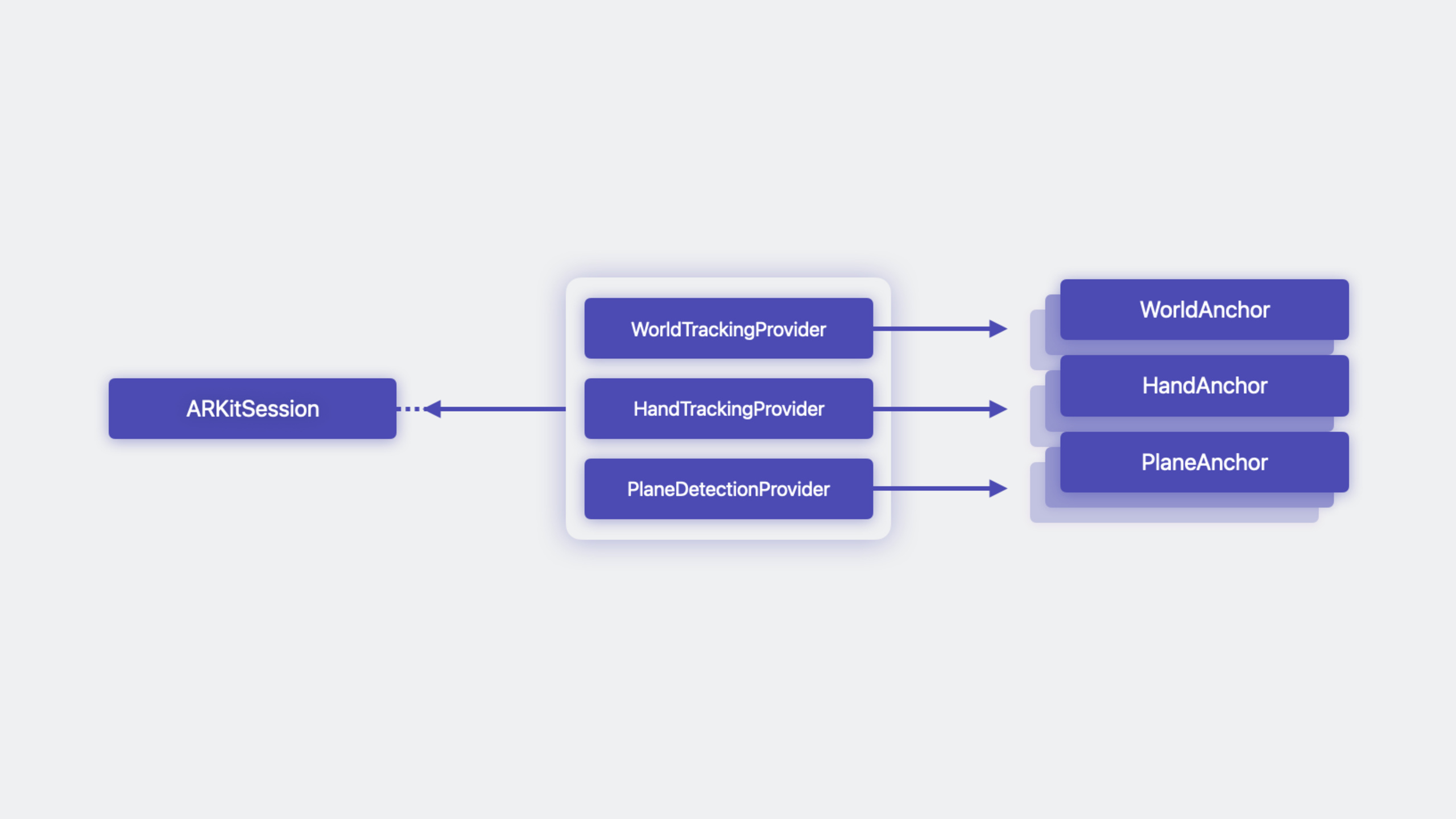
The ARKit API consists of three building blocks:
- Anchor: Represents position and orientation in the real world, with a unique identifier and transform matrix. Some Anchors are trackable (TrackableAnchor); hide associated virtual content when tracking is lost.
- Data Provider: Represents a single ARKit capability, allowing polling or observing data updates. Different Data Provider types supply different data.
- Session: Combines a set of Data Providers to run together. After a Session starts, each Data Provider asynchronously receives data at varying update frequencies depending on data type.
World tracking: anchoring virtual content to reality
WorldTrackingProvider is the foundation for placing virtual content. It provides two core capabilities:
WorldAnchor: WorldAnchors added by developers are automatically persisted, remaining valid across app launches and device restarts. Only the Anchor’s identifier and transform matrix are persisted; developers maintain the mapping to virtual content.
WorldAnchor persistence is location-based. Moving from home to the office unloads the home map and loads the office map. When you return, ARKit automatically relocalizes and restores previous Anchors.
Device pose: Query the device’s position and orientation relative to the app origin. Required when doing custom rendering with Metal and CompositorServices.
Scene understanding: perceiving surroundings
- Plane detection: PlaneDetectionProvider supplies horizontal and vertical PlaneAnchors with alignment, geometry, and semantic classification (e.g., floor, table).
- Scene geometry: SceneReconstructionProvider reconstructs the environment as a subdivided mesh (MeshAnchor) with vertices, normals, faces, and per-face semantic classification. Usable for high-fidelity physics simulation.
- Image tracking: ImageTrackingProvider detects 2D images in the real world, providing ImageAnchor and estimated scale factor.
Hand tracking: a new dimension of interaction
HandTrackingProvider is a brand-new ARKit feature on visionOS. It provides HandAnchor containing:
- Chirality: Left or right hand
- Skeleton: Hand skeleton with all joints
- Transform: Wrist transform matrix relative to the app origin
Each joint includes parent joint, name, localTransform (relative to parent), rootTransform (relative to root), and isTracked flag.
Developers can use hand tracking for two interactions: placing virtual content relative to the hand, or detecting custom gestures.
TimeForCube example: putting it all together
The demo app TimeForCube shows how to combine ARKit features:
- Scene reconstruction generates collision bodies for physics simulation and gesture targets
- Hand tracking creates invisible collision bodies at fingertips
- SpatialTapGesture detects taps and spawns cubes above the tap location
- Physics system lets cubes fall onto scene collision bodies
- Hand collision bodies let users “push” cubes with their hands
Detailed Content
Authorization API
(05:20)
Before accessing ARKit data, request user authorization. You can batch-request multiple authorization types:
session = ARKitSession()

Task {
    let authorizationResult = await session.requestAuthorization(for: [.handTracking])

    for (authorizationType, authorizationStatus) in authorizationResult {
        print("Authorization status for \(authorizationType): \(authorizationStatus)")

        switch authorizationStatus {
        case .allowed:
            // All good!
            break
        case .denied:
            // Need to handle this.
            break
        // ...
        }
    }
}
Key points:
ARKitSession()creates a session instancerequestAuthorization(for:)asynchronously requests authorization; pass an array to batch-request multiple types- Results are enumerated by authorization type; handle
.deniedwith app-specific fallback logic - If you don’t request proactively, ARKit prompts automatically when running a session
World tracking and device pose (C API)
(10:20)
For immersive apps using Metal custom rendering, use the C API to query device pose:
#include <ARKit/ARKit.h>
#include <CompositorServices/CompositorServices.h>

struct Renderer {
    ar_session_t                 session;
    ar_world_tracking_provider_t world_tracking;
    ar_pose_t                    pose;
    // ...
};

void renderer_init(struct Renderer *renderer) {
    renderer->session = ar_session_create();

    ar_world_tracking_configuration_t config = ar_world_tracking_configuration_create();
    renderer->world_tracking = ar_world_tracking_provider_create(config);

    ar_data_providers_t providers = ar_data_providers_create();
    ar_data_providers_add_data_provider(providers, renderer->world_tracking);
    ar_session_run(renderer->session, providers);

    renderer->pose = ar_pose_create();
    // ...
}
Key points:
ar_session_create()creates an ARKit sessionar_world_tracking_provider_create()creates a world tracking data providerar_data_providers_create()andar_data_providers_add_data_provider()add providers to a collectionar_session_run()starts the sessionar_pose_create()pre-allocates a pose object to avoid allocation in the render loop
Query pose in the render function:
(10:21)
void render(struct Renderer *renderer,
            cp_layer_t       layer,
            cp_frame_t       frame_encoder,
            cp_drawable_t    drawable) {
    const cp_frame_timing_t timing_info = cp_drawable_get_frame_timing(drawable);
    const cp_time_t presentation_time = cp_frame_timing_get_presentation_time(timing_info);
    const CFTimeInterval target_render_time = cp_time_to_cf_time_interval(presentation_time);

    simd_float4x4 pose = matrix_identity_float4x4;

    const ar_pose_status_t status =
        ar_world_tracking_provider_query_pose_at_timestamp(renderer->world_tracking,
                                                           target_render_time,
                                                           renderer->pose);

    if (status == ar_pose_status_success) {
        pose = ar_pose_get_origin_from_device_transform(renderer->pose);
    }

    // ...

    cp_drawable_set_ar_pose(drawable, renderer->pose);
    // ...
}
Key points:
cp_drawable_get_frame_timing()gets frame timing from CompositorServicescp_frame_timing_get_presentation_time()gets target presentation timear_world_tracking_provider_query_pose_at_timestamp()queries device pose at a specific timear_pose_get_origin_from_device_transform()extracts device transform relative to app origincp_drawable_set_ar_pose()sets pose on the drawable, informing the compositor of rendering pose- Pose queries are relatively expensive; not recommended for content placement or other non-rendering logic
Hand tracking skeleton structure
(16:00)
Skeleton structure in the Swift API:
@available(xrOS 1.0, *)
public struct Skeleton : @unchecked Sendable, CustomStringConvertible {

    public func joint(named: SkeletonDefinition.JointName) -> Skeleton.Joint

    public struct Joint : CustomStringConvertible, @unchecked Sendable {
        public var parentJoint: Skeleton.Joint? { get }
        public var name: String { get }
        public var localTransform: simd_float4x4 { get }
        public var rootTransform: simd_float4x4 { get }
        public var isTracked: Bool { get }
    }
}
Key points:
joint(named:)queries a joint by name, e.g..handIndexFingerTipparentJointgets parent joint reference, forming a hierarchylocalTransformis transform relative to parent jointrootTransformis transform relative to wrist (root joint)isTrackedindicates whether the joint is currently tracked
Hand tracking C API initialization:
(17:00)
struct Renderer {
    ar_hand_tracking_provider_t  hand_tracking;
    struct {
        ar_hand_anchor_t left;
        ar_hand_anchor_t right;
    } hands;
    // ...
};

void renderer_init(struct Renderer *renderer) {
    // ...
    ar_hand_tracking_configuration_t hand_config = ar_hand_tracking_configuration_create();
    renderer->hand_tracking = ar_hand_tracking_provider_create(hand_config);

    ar_data_providers_t providers = ar_data_providers_create();
    ar_data_providers_add_data_provider(providers, renderer->world_tracking);
    ar_data_providers_add_data_provider(providers, renderer->hand_tracking);
    ar_session_run(renderer->session, providers);

    renderer->hands.left = ar_hand_anchor_create();
    renderer->hands.right = ar_hand_anchor_create();
    // ...
}
Poll hand data in the render loop:
(17:25)
void render(struct Renderer *renderer, ... ) {
    // ...
    ar_hand_tracking_provider_get_latest_anchors(renderer->hand_tracking,
                                                 renderer->hands.left,
                                                 renderer->hands.right);

    if (ar_trackable_anchor_is_tracked(renderer->hands.left)) {
        const simd_float4x4 origin_from_wrist
            = ar_anchor_get_origin_from_anchor_transform(renderer->hands.left);
        // ...
    }
    // ...
}
Key points:
ar_hand_tracking_provider_create()creates a hand tracking providerar_hand_anchor_create()pre-allocates hand anchor objectsar_hand_tracking_provider_get_latest_anchors()polls latest hand dataar_trackable_anchor_is_tracked()checks if anchor is trackedar_anchor_get_origin_from_anchor_transform()gets anchor transform relative to app origin
TimeForCube app structure
(18:00)
@main
struct TimeForCube: App {
   @StateObject var model = TimeForCubeViewModel()

    var body: some SwiftUI.Scene {
        ImmersiveSpace {
            RealityView { content in
                content.add(model.setupContentEntity())
            }
            .task {
                await model.runSession()
            }
            .task {
                await model.processHandUpdates()
            }
            .task {
                await model.processReconstructionUpdates()
            }
            .gesture(SpatialTapGesture().targetedToAnyEntity().onEnded({ value in
                let location3D = value.convert(value.location3D, from: .global, to: .scene)
                model.addCube(tapLocation: location3D)
            }))
        }
    }
}
Key points:
ImmersiveSpaceis required; ARKit data is only available in Full SpaceRealityViewpresents 3D content- Three
.taskblocks run session, hand updates, and scene reconstruction updates respectively SpatialTapGesturedetects spatial tap gestures
ViewModel structure:
(18:50)
@MainActor class TimeForCubeViewModel: ObservableObject {
    private let session = ARKitSession()
    private let handTracking = HandTrackingProvider()
    private let sceneReconstruction = SceneReconstructionProvider()

    private var contentEntity = Entity()
    private var meshEntities = [UUID: ModelEntity]()
    private let fingerEntities: [HandAnchor.Chirality: ModelEntity] = [
        .left: .createFingertip(),
        .right: .createFingertip()
    ]
    // ...
}
Key points:
ARKitSessionmanages all ARKit data providersHandTrackingProviderandSceneReconstructionProviderare concrete data providersmeshEntitiesmaps MeshAnchor IDs to ModelEntity via dictionaryfingerEntitiescreates a fingertip entity for each hand
Processing hand updates
(20:00)
func processHandUpdates() async {
    for await update in handTracking.anchorUpdates {
        let handAnchor = update.anchor

        guard handAnchor.isTracked else { continue }

        let fingertip = handAnchor.skeleton.joint(named: .handIndexFingerTip)
        guard fingertip.isTracked else { continue }

        let originFromWrist = handAnchor.transform
        let wristFromIndex = fingertip.rootTransform
        let originFromIndex = originFromWrist * wristFromIndex

        fingerEntities[handAnchor.chirality]?.setTransformMatrix(originFromIndex, relativeTo: nil)
    }
}
Key points:
handTracking.anchorUpdatesis an async sequence continuously producing hand anchor updates- Check
handAnchor.isTrackedfirst; skip when tracking is lost - Get index fingertip joint
.handIndexFingerTip handAnchor.transformis wrist transform relative to app originfingertip.rootTransformis fingertip transform relative to wrist- Multiply to get full fingertip transform relative to app origin
- Update corresponding fingertip entity based on
handAnchor.chirality(.left or .right)
Processing scene reconstruction updates
(21:20)
func processReconstructionUpdates() async {
    for await update in sceneReconstruction.anchorUpdates {
        let meshAnchor = update.anchor

        guard let shape = try? await ShapeResource.generateStaticMesh(from: meshAnchor) else { continue }

        switch update.event {
        case .added:
            let entity = ModelEntity()
            entity.transform = Transform(matrix: meshAnchor.transform)
            entity.collision = CollisionComponent(shapes: [shape], isStatic: true)
            entity.physicsBody = PhysicsBodyComponent()
            entity.components.set(InputTargetComponent())

            meshEntities[meshAnchor.id] = entity
            contentEntity.addChild(entity)
        case .updated:
            guard let entity = meshEntities[meshAnchor.id] else { fatalError("...") }
            entity.transform = Transform(matrix: meshAnchor.transform)
            entity.collision?.shapes = [shape]
        case .removed:
            meshEntities[meshAnchor.id]?.removeFromParent()
            meshEntities.removeValue(forKey: meshAnchor.id)
        @unknown default:
            fatalError("Unsupported anchor event")
        }
    }
}
Key points:
sceneReconstruction.anchorUpdatesasync sequence produces mesh anchor updatesShapeResource.generateStaticMesh(from:)generates collision shape from MeshAnchor.addedevent: create new entity, set transform, collision, physics body, and input target componentisStatic: truemeans scene geometry is a static collision bodyInputTargetComponent()lets entity receive gestures.updatedevent: update existing entity transform and collision shape.removedevent: remove from parent and clean up dictionary
Adding cubes
(22:20)
func addCube(tapLocation: SIMD3<Float>) {
    let placementLocation = tapLocation + SIMD3<Float>(0, 0.2, 0)

    let entity = ModelEntity(
        mesh: .generateBox(size: 0.1, cornerRadius: 0.0),
        materials: [SimpleMaterial(color: .systemPink, isMetallic: false)],
        collisionShape: .generateBox(size: SIMD3<Float>(repeating: 0.1)),
        mass: 1.0)

    entity.setPosition(placementLocation, relativeTo: nil)
    entity.components.set(InputTargetComponent(allowedInputTypes: .indirect))

    let material = PhysicsMaterialResource.generate(friction: 0.8, restitution: 0.0)
    entity.components.set(PhysicsBodyComponent(shapes: entity.collision!.shapes,
                                               mass: 1.0,
                                               material: material,
                                               mode: .dynamic))

    contentEntity.addChild(entity)
}
Key points:
- Placement is 20 cm above the tap point
ModelEntitycreates mesh, material, collision shape, and mass togetherInputTargetComponent(allowedInputTypes: .indirect)allows only indirect input (e.g., eye gaze + pinch)PhysicsMaterialResource.generate(friction:restitution:)customizes physics materialPhysicsBodyComponent(mode: .dynamic)creates a dynamic physics body affected by gravity- After falling onto scene collision bodies, cubes can be pushed with hand collision bodies
Core Takeaways
-
What to do: Develop a virtual furniture placement app that lets users preview furniture in a real room.
-
Why it matters: ARKit’s WorldAnchor auto-persists; virtual furniture placed by users stays in the same position across multiple device wearings. PlaneDetectionProvider identifies tables and floors for precise placement.
-
How to start: Use
PlaneDetectionProviderto detect planes, addWorldAnchorwithWorldTrackingProviderto anchor furniture, and load USDZ models with RealityKit. -
What to do: Create a gesture-controlled music player that switches songs and adjusts volume with hand gestures.
-
Why it matters: HandTrackingProvider provides precise tracking of 26 joints, recognizing custom gestures like pinch, open, and wave—no extra hardware controllers needed.
-
How to start: Listen to
HandTrackingProvider.anchorUpdates, analyzeSkeleton.JointrootTransformchange patterns, and define a gesture state machine for playback control. -
What to do: Build an education app that overlays 3D models and animations on real book pages.
-
Why it matters: ImageTrackingProvider detects specific reference images and provides ImageAnchor when detected. ReferenceImage can be created from asset catalogs or code.
-
How to start: Create
ImageTrackingProviderwithReferenceImageconfiguration; load RealityKit entities at ImageAnchor position when detected; useImageAnchor.estimatedScaleFactorto correct content size. -
What to do: Develop an immersive fitness app that tracks user movements and provides feedback.
-
Why it matters: Hand tracking combined with scene geometry can determine if the user’s hand touches virtual targets or if the body is in the correct spatial position.
-
How to start: Use both
HandTrackingProviderandSceneReconstructionProvider; place virtual targets on scene mesh; detect collisions between hand joints and targets.
Related Sessions
- Build spatial experiences with RealityKit — RealityKit fundamentals on visionOS; build immersive scenes with ARKit data
- Bring your ARKit app to spatial computing — Guide to migrating existing iOS ARKit apps to visionOS
- Create immersive Unity apps — Create immersive visionOS apps with Unity; involves ARKit data integration
- Optimize your 3D assets for spatial computing — Optimize 3D assets for better performance on visionOS
Comments
GitHub Issues · utterances