
Highlight
3D video content delivery for visionOS builds on existing HLS workflows, using MV-HEVC to encode stereoscopic video. New parallax contour metadata ensures subtitles don’t conflict in depth with 3D imagery, and 2D and 3D can share the same audio and subtitle assets.
Core Content
Your existing 2D workflow is fully compatible
Already delivering 2D content via HLS? Most of the work is done.
(00:51) visionOS 2D video playback capabilities are identical to iPhone, iPad, and Apple TV. Existing HLS streams need no modification to play on spatial computing platforms. Apple’s goal: delivering 2D content to visionOS should be the same as delivering to any other platform.
Playback capabilities on spatial computing platforms
(02:15) visionOS supports the following playback specs:
- Up to 4K resolution
- 90Hz refresh rate; 24fps content automatically uses 96Hz mode
- SDR and HDR support
These specs match high-end TVs, ensuring your highest-quality content is experienced in full.
3D stereoscopic video: MV-HEVC
(05:37) The core of 3D video is stereoscopic vision—slightly different images for the left and right eyes, with the brain perceiving depth through parallax. Apple uses MV-HEVC (Multiview HEVC) encoding:
- A single video track contains both left and right eye views
- “2D Plus Delta” strategy: the base 2D view is encoded with standard HEVC; the right eye only encodes the difference from the left
- 2D players see only the base view and play normally
- 3D players decode both views for stereoscopic display
- Apple Silicon natively supports MV-HEVC decoding
A new Video Extended Usage (VEXU) box serves as a lightweight signal indicating whether video is in stereoscopic format.
Subtitles and depth conflict
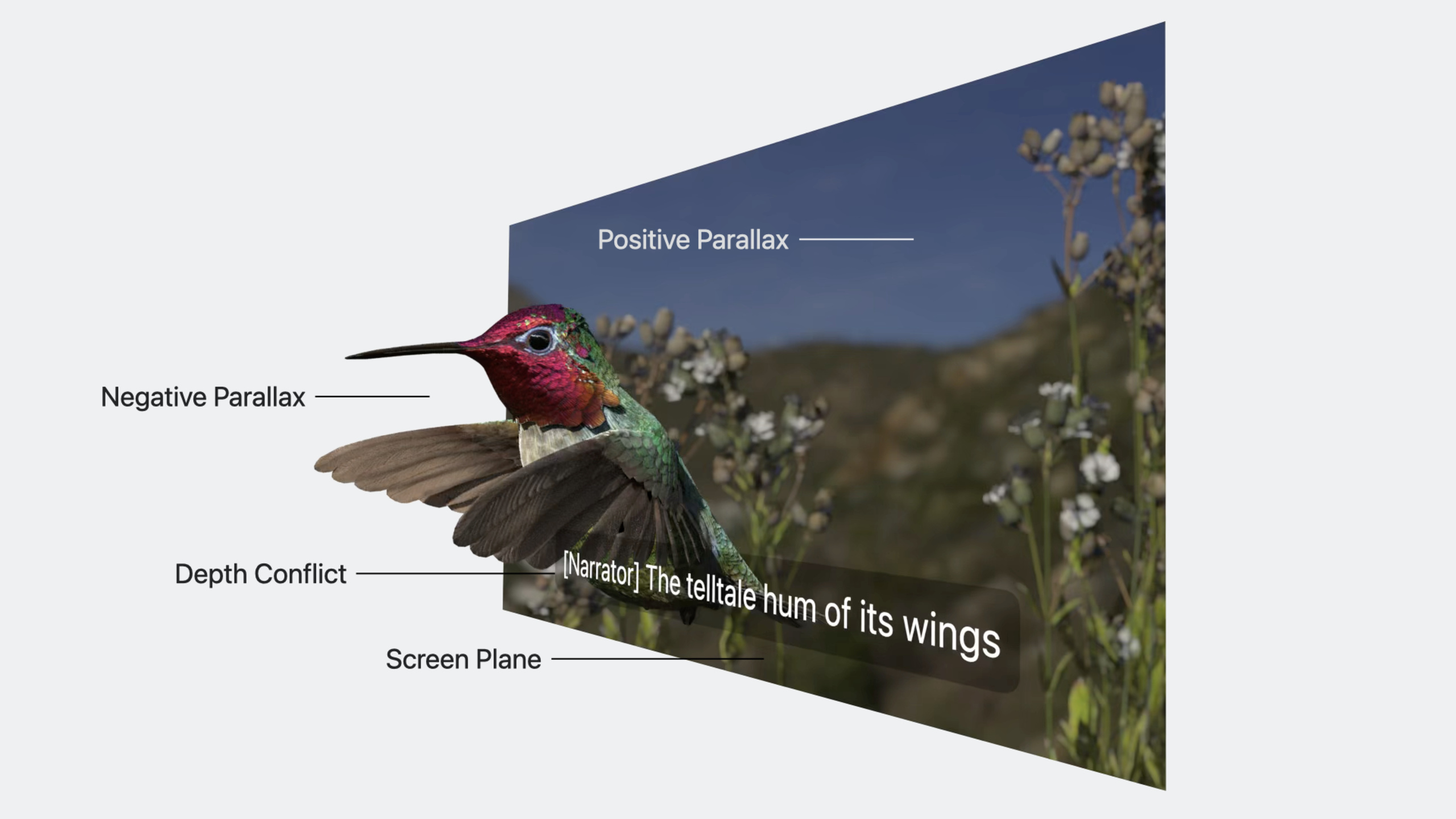
(09:17) A key issue in 3D video: subtitles can conflict in depth with foreground objects in the frame, causing viewing discomfort.
Apple’s solution is parallax contour metadata:
- Each video frame is divided into a 10×10 grid
- The minimum parallax value for each grid region is recorded
- During playback, the system automatically adjusts subtitle depth to avoid overlapping foreground objects
- The same 2D subtitle assets work for both 2D and 3D experiences
HLS adaptation
(13:03) HLS delivery for 3D content requires these updates:
- HLS spec version updated to 12
- New
REQ-VIDEO-LAYOUTtag identifies stereoscopic video - Support for fragmented MP4 timed metadata carrying parallax information
- 2D and 3D video can be mixed in the same playlist
Detailed Content
2D content production workflow recap
(00:41) The existing HLS delivery workflow has three steps:
- Encoding: Video encoded with HEVC; audio encoded by language and role (dialogue, audio description); subtitles in WebVTT
- Packaging: Use Apple HLS tools to convert encoded media into fMP4 segments and playlists
- Delivery: Distribute to clients via CDN
Audio preparation
(02:33) Audio production is the same as 2D. It’s recommended to provide both:
- Spatial Audio format (with head tracking support)
- Stereo fallback track (ensures reliable playback on all devices)
If 2D and 3D video use the same edit, they can share the same audio assets.
MV-HEVC encoding in detail
(06:48) MV-HEVC technical details:
Single-frame structure:
+------------------+
|  Base HEVC view   |  <- visible to a 2D player (such as the left eye)
|  (left/right eye base image) |
+------------------+
|  Delta encoding       |  <- difference between the right eye and the base
|  (parallax difference data)    |
+------------------+
Key points:
- The base view uses standard HEVC encoding; 2D decoders can play it directly
- Delta data describes left-right eye differences; 3D decoders compute the full stereoscopic pair
- More encoding-efficient than independently encoding two views
- VEXU box identifies stereoscopic format and included eye views
Parallax contour metadata production
(11:20) Steps to produce parallax contour metadata:
- Prepare synchronized left and right eye video tracks
- Perform parallax/difference analysis to generate depth information for each region
- Package parallax information as a metadata payload
- Write to a timed metadata track associated with the video track
- Multiplex into the same file; HLS packaging automatically generates segments containing metadata
A 10×10 grid is recommended as a balance between storage and resolution.
HLS playlist example
(13:57) Multivariant playlist supporting 3D video:
#EXTM3U
#EXT-X-VERSION:12

# 3D video stream
#EXT-X-STREAM-INF:BANDWIDTH=8000000,REQ-VIDEO-LAYOUT="CH-STEREO"
3d_video_1080p.m3u8

# 2D video stream (fallback)
#EXT-X-STREAM-INF:BANDWIDTH=4000000
2d_video_1080p.m3u8

# 2D iFrame stream (thumbnail scrubbing)
#EXT-X-I-FRAME-STREAM-INF:BANDWIDTH=2000000
2d_iframe_1080p.m3u8

# Audio stream (shared by 2D/3D)
#EXT-X-MEDIA:TYPE=AUDIO,GROUP-ID="audio",NAME="English",LANGUAGE="en",URI="audio_en.m3u8"
#EXT-X-MEDIA:TYPE=AUDIO,GROUP-ID="audio",NAME="Chinese",LANGUAGE="zh",URI="audio_zh.m3u8"

# Subtitle stream (shared by 2D/3D)
#EXT-X-MEDIA:TYPE=SUBTITLES,GROUP-ID="subs",NAME="English",LANGUAGE="en",URI="subtitles_en.m3u8"
Key points:
#EXT-X-VERSION:12: HLS spec version 12 supportsREQ-VIDEO-LAYOUTREQ-VIDEO-LAYOUT="CH-STEREO": identifies stereoscopic video streams- 3D and 2D video can coexist in the same playlist, but won’t auto-switch after loading
- Include a 2D iFrame stream to support thumbnail scrubbing
3D content comfort guidelines
(14:46) 3D content design must consider viewing comfort:
- Avoid extreme parallax (neither positive nor negative direction should be too large)
- Avoid high-frequency motion that makes focusing difficult
- Avoid depth conflicts caused by window violations
- Screen size affects comfort; users can change screen size by adjusting distance
Core Takeaways
-
Add 3D content support to your video platform
- What to do: Add MV-HEVC encoding to your existing HLS workflow to deliver 3D video to visionOS users
- Why it’s worth it: visionOS users expect immersive viewing; 3D content is a competitive differentiator
- How to start: Use encoding tools that support MV-HEVC, adding stereoscopic view encoding on top of your existing HEVC workflow
-
Reuse existing subtitle assets for 3D content
- What to do: Add parallax contour metadata to 3D video so existing WebVTT subtitles automatically adapt to 3D playback
- Why it’s worth it: No need to remake subtitles; the same assets serve both 2D and 3D users
- How to start: Perform parallax analysis in post-production, generating 10×10 grid parallax contour data
-
Add Spatial Audio to HLS streams
- What to do: Add Spatial Audio format to your existing audio workflow while keeping a stereo fallback
- Why it’s worth it: Head-tracked spatial audio on visionOS is a core experience; fallback ensures compatibility
- How to start: Use encoding tools supporting Dolby Atmos or Apple Spatial Audio, declaring both audio variants in the HLS playlist
-
Optimize CDN caching strategy
- What to do: 3D video (MV-HEVC) typically has higher bitrates than 2D; adjust CDN caching and distribution strategy
- Why it’s worth it: visionOS users expect 4K 3D; ensure sufficient bandwidth and cache capacity
- How to start: Analyze MV-HEVC bitrate increase relative to 2D HEVC, and adjust CDN edge cache configuration
-
Build 2D/3D mixed playlists
- What to do: Provide both 2D and 3D video variants in the same HLS playlist, letting the player choose based on device capability
- Why it’s worth it: One playlist covers all Apple devices, simplifying content management
- How to start: Use
#EXT-X-VERSION:12andREQ-VIDEO-LAYOUTtags to organize variants
Related Sessions
- Create a great spatial playback experience — Frameworks and APIs for video playback on visionOS
- Support HDR video in your app — Support HDR video in your app
- Explore immersive sound design — Spatial audio and immersive sound design
Comments
GitHub Issues · utterances