
Highlight
iOS 17’s UIKit Trait System adds custom trait definitions, trait override APIs, closure-based trait change observation, and two-way bridging with SwiftUI environment keys—letting data flow seamlessly between UIKit and SwiftUI components.
Core Content
Trait basics recap
Traits are independent pieces of data the system propagates to every view controller and view in your app. UIKit includes many system traits: user interface style, horizontal size class, preferred content size category, and more.
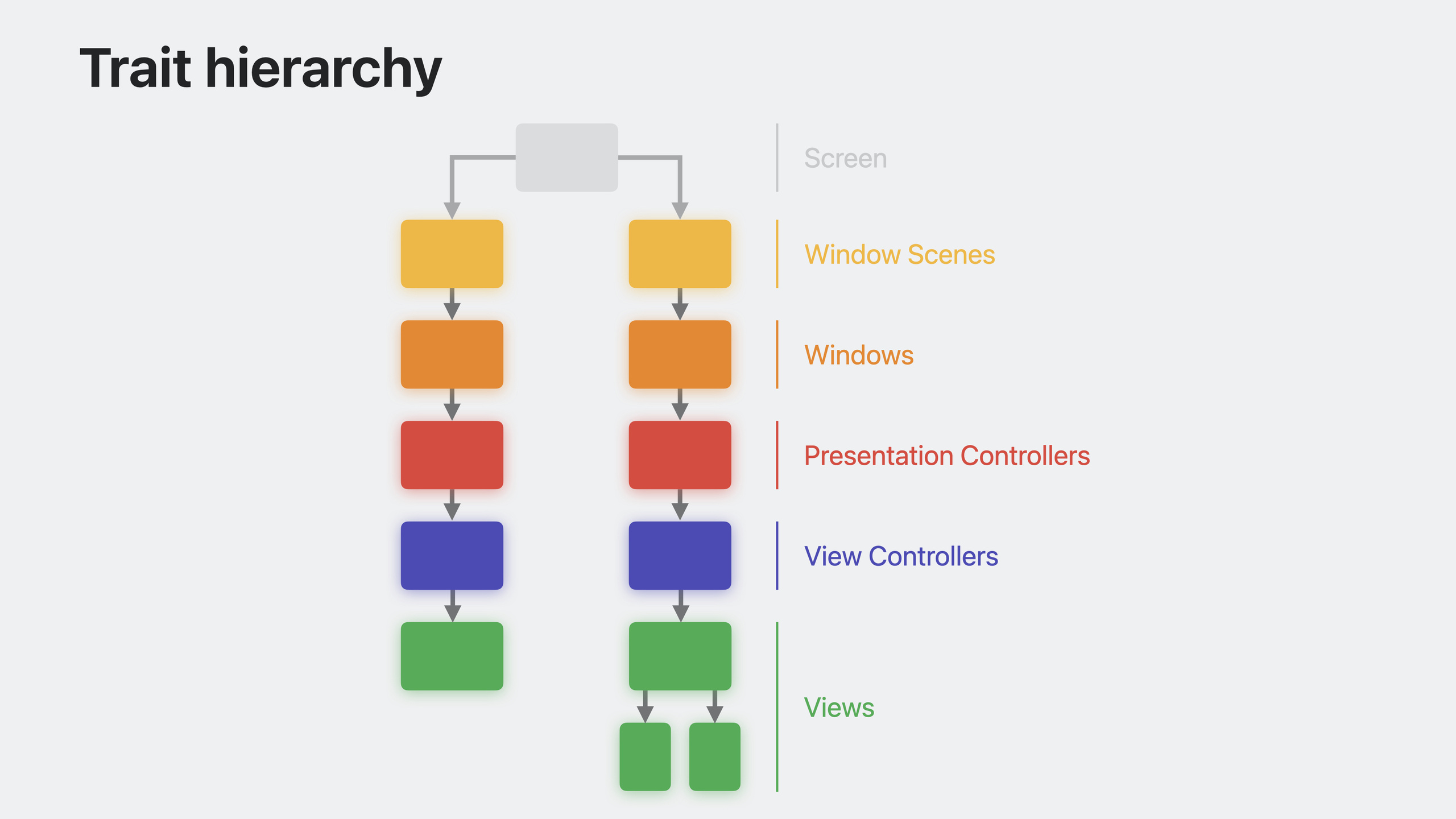
iOS 17 unifies the trait hierarchy for view controllers and views. Previously, a view controller’s traits inherited directly from its parent controller, and views inherited from their owning controller—causing trait propagation to “break” at the controller’s view in the view hierarchy. Now propagation is linear: view controllers inherit traits from their view’s superview, and traits flow naturally through the view hierarchy.
An important consequence: accessing the trait collection in viewWillAppear may return stale values because the view hasn’t joined the hierarchy yet. viewIsAppearing is a better alternative and is back-deployable to iOS 13.
Custom traits
iOS 17 lets you define your own traits via the UITraitDefinition protocol. This opens a new data propagation pattern—no delegates, no closures, no singletons; data automatically propagates to deeply nested components.
When defining traits, prefer value types for associated data. Bool, Int, Double, or Int raw value enums are most efficient. Custom structs need an efficient Equatable implementation because the system frequently compares trait values to detect changes.
If a trait affects color resolution, set affectsColorAppearance = true so the system automatically redraws views when the trait changes. This has higher overhead—use only for infrequently changing traits.
Trait overrides
iOS 17 adds a traitOverrides property on every trait environment (window scene, window, view controller, view, presentation controller). Overrides modify trait values for that object and all its descendants.
traitOverrides supports checking whether an override exists (contains) and removing overrides (remove). Always read trait values from traitCollection—reading traitOverrides directly throws when not set.
Performance: each override has a small cost; set them only where needed. When traits change, the system updates trait collections for all descendants—minimize how often you modify overrides. If a trait affects only a few deep views, apply the override to the nearest common ancestor rather than the root.
Observing trait changes
traitCollectionDidChange is deprecated in iOS 17. The problem: the system doesn’t know which traits you care about, so any trait change triggers a callback—not scalable.
The new registerForTraitChanges API supports closure and target-action callbacks. Register only the traits you care about; callbacks fire only when those traits change. No subclassing required—you can observe from anywhere.
Semantic system trait sets are also provided: systemTraitsAffectingColorAppearance, systemTraitsAffectingImageLookup—pass them directly to the registration method.
Registration cleans up automatically; advanced scenarios can manually unregister using the returned token.
UIKit and SwiftUI bridging
Custom UIKit traits and custom SwiftUI environment keys can be bridged. Make your environment key conform to UITraitBridgedEnvironmentKey and implement read and write methods. UIKit trait overrides then sync automatically to SwiftUI’s environment, and SwiftUI environment modifiers sync to UIKit traits.
This solves data propagation pain in mixed UI architectures. Whether SwiftUI is embedded in UIKit or UIKit in SwiftUI, data flows both ways.
Detailed Content
Creating and modifying trait collections
(01:51)
// Build a new trait collection instance from scratch
let myTraits = UITraitCollection { mutableTraits in
    mutableTraits.userInterfaceIdiom = .phone
    mutableTraits.horizontalSizeClass = .regular
}

// Get a new instance by modifying traits of an existing one
let otherTraits = myTraits.modifyingTraits { mutableTraits in
    mutableTraits.horizontalSizeClass = .compact
    mutableTraits.userInterfaceStyle = .dark
}
Key points:
UITraitCollectiongains a closure initializermodifyingTraitscreates a modified copy from an existing trait collectionUIMutableTraitsis the new mutable container protocol
Defining a simple custom trait
(09:06)
struct ContainedInSettingsTrait: UITraitDefinition {
    static let defaultValue = false
}

let traitCollection = UITraitCollection { mutableTraits in
    mutableTraits[ContainedInSettingsTrait.self] = true
}

let value = traitCollection[ContainedInSettingsTrait.self]
// true
Key points:
- Conform to
UITraitDefinition - Must provide
defaultValue - Value type is inferred from defaultValue (Bool here)
Adding property syntax for custom traits
(10:23)
struct ContainedInSettingsTrait: UITraitDefinition {
    static let defaultValue = false
}

extension UITraitCollection {
    var isContainedInSettings: Bool { self[ContainedInSettingsTrait.self] }
}

extension UIMutableTraits {
    var isContainedInSettings: Bool {
        get { self[ContainedInSettingsTrait.self] }
        set { self[ContainedInSettingsTrait.self] = newValue }
    }
}

let traitCollection = UITraitCollection { mutableTraits in
    mutableTraits.isContainedInSettings = true
}

let value = traitCollection.isContainedInSettings
// true
Key points:
- Add a read-only property to
UITraitCollection - Add a read-write property to
UIMutableTraits - Always write both extensions when defining a custom trait
Defining a theme trait that affects color appearance
(11:00)
enum MyAppTheme: Int {
    case standard, pastel, bold, monochrome
}

struct MyAppThemeTrait: UITraitDefinition {
    static let defaultValue = MyAppTheme.standard
    static let affectsColorAppearance = true
    static let name = "Theme"
    static let identifier = "com.myapp.theme"
}

extension UITraitCollection {
    var myAppTheme: MyAppTheme { self[MyAppThemeTrait.self] }
}

extension UIMutableTraits {
    var myAppTheme: MyAppTheme {
        get { self[MyAppThemeTrait.self] }
        set { self[MyAppThemeTrait.self] = newValue }
    }
}
Key points:
affectsColorAppearance = truetriggers automatic redraw when the trait changesnameis used for debug outputidentifieruses reverse-DNS format; supports encoding and other features- Int raw value enums are most efficient
Using a custom theme trait
(12:33)
let customBackgroundColor = UIColor { traitCollection in
    switch traitCollection.myAppTheme {
    case .standard:    return UIColor(named: "StandardBackground")!
    case .pastel:      return UIColor(named: "PastelBackground")!
    case .bold:        return UIColor(named: "BoldBackground")!
    case .monochrome:  return UIColor(named: "MonochromeBackground")!
    }
}

let view = UIView()
view.backgroundColor = customBackgroundColor
Key points:
- Read custom traits in dynamic color provider closures
- With
affectsColorAppearance = true, views update automatically when the theme changes - No manual change observation or refresh needed
Managing trait overrides
(18:05)
func toggleThemeOverride(_ overrideTheme: MyAppTheme) {
    if view.traitOverrides.contains(MyAppThemeTrait.self) {
        // There's an existing theme override; remove it
        view.traitOverrides.remove(MyAppThemeTrait.self)
    } else {
        // There's no existing theme override; apply one
        view.traitOverrides.myAppTheme = overrideTheme
    }
}
Key points:
containschecks whether an override existsremoveremoves the override and restores the inherited value- Assign directly to set an override
Registering for trait changes with a closure
(21:28)
// Register for horizontal size class changes on self
registerForTraitChanges(
    [UITraitHorizontalSizeClass.self]
) { (self: Self, previousTraitCollection: UITraitCollection) in
    self.updateViews(sizeClass: self.traitCollection.horizontalSizeClass)
}

// Register for changes to multiple traits on another view
let anotherView: MyView
anotherView.registerForTraitChanges(
    [UITraitHorizontalSizeClass.self, ContainedInSettingsTrait.self]
) { (view: MyView, previousTraitCollection: UITraitCollection) in
    // Handle the trait change for this view...
}
Key points:
- Register only traits you actually depend on to avoid irrelevant callbacks
- The closure’s first parameter is the observed object—no weak self needed
- When observing self, write
(self: Self, ...)
Registering for trait changes with target-action
(22:48)
// Register for horizontal size class changes on self
registerForTraitChanges(
    [UITraitHorizontalSizeClass.self],
    action: #selector(UIView.setNeedsLayout)
)

// Register for changes to multiple traits on another view
let anotherView: MyView
anotherView.registerForTraitChanges(
    [UITraitHorizontalSizeClass.self, ContainedInSettingsTrait.self],
    target: self,
    action: #selector(handleTraitChange(view:previousTraitCollection:))
)

@objc func handleTraitChange(view: MyView, previousTraitCollection: UITraitCollection) {
    // Handle the trait change for this view...
}
Key points:
- Action methods can have 0, 1, or 2 parameters
- First parameter is the changed object; second is the previous trait collection
- Target defaults to the registration caller when omitted
Bridging UIKit traits and SwiftUI environment keys
(26:19)
enum MyAppTheme: Int {
    case standard, pastel, bold, monochrome
}

// Custom UIKit trait
struct MyAppThemeTrait: UITraitDefinition {
    static let defaultValue = MyAppTheme.standard
    static let affectsColorAppearance = true
}

extension UITraitCollection {
    var myAppTheme: MyAppTheme { self[MyAppThemeTrait.self] }
}

extension UIMutableTraits {
    var myAppTheme: MyAppTheme {
        get { self[MyAppThemeTrait.self] }
        set { self[MyAppThemeTrait.self] = newValue }
    }
}

// Custom SwiftUI environment key
struct MyAppThemeKey: EnvironmentKey {
    static let defaultValue = MyAppTheme.standard
}

extension EnvironmentValues {
    var myAppTheme: MyAppTheme {
        get { self[MyAppThemeKey.self] }
        set { self[MyAppThemeKey.self] = newValue }
    }
}

// Bridge SwiftUI environment key with UIKit trait
extension MyAppThemeKey: UITraitBridgedEnvironmentKey {
    static func read(from traitCollection: UITraitCollection) -> MyAppTheme {
        traitCollection.myAppTheme
    }

    static func write(to mutableTraits: inout UIMutableTraits, value: MyAppTheme) {
        mutableTraits.myAppTheme = value
    }
}
Key points:
- Make
EnvironmentKeyconform toUITraitBridgedEnvironmentKey readreads from UIKit traits and returns to SwiftUIwritewrites SwiftUI environment values into UIKit traits- Both sides access the same data
Setting traits from UIKit, reading in SwiftUI
(27:01)
// UIKit trait override applied to the window scene
let windowScene: UIWindowScene
windowScene.traitOverrides.myAppTheme = .monochrome

// Cell in a UICollectionView configured to display a SwiftUI view
let cell: UICollectionViewCell
cell.contentConfiguration = UIHostingConfiguration {
    CellView()
}

// SwiftUI view displayed in the cell, which reads the bridged value from the environment
struct CellView: View {
    @Environment(\.myAppTheme) var theme: MyAppTheme

    var body: some View {
        Text("Settings")
            .foregroundStyle(theme == .monochrome ? .gray : .blue)
    }
}
Key points:
- Window scene trait overrides propagate automatically to SwiftUI environment
- SwiftUI reads bridged values with
@Environment - SwiftUI automatically tracks dependencies; views update when traits change
Setting environment from SwiftUI, reading in UIKit
(28:16)
// SwiftUI environment value applied to a UIViewControllerRepresentable
struct SettingsView: View {
    var body: some View {
        SettingsControllerRepresentable()
            .environment(\.myAppTheme, .standard)
    }
}

final class SettingsControllerRepresentable: UIViewControllerRepresentable {
    func makeUIViewController(context: Context) -> SettingsViewController {
        SettingsViewController()
    }

    func updateUIViewController(_ uiViewController: SettingsViewController, context: Context) {
        // Update the view controller...
    }
}

// UIKit view controller contained in the SettingsControllerRepresentable
class SettingsViewController: UIViewController {
    override func viewWillLayoutSubviews() {
        super.viewWillLayoutSubviews()
        title = settingsTitle(for: traitCollection.myAppTheme)
    }

    func settingsTitle(for theme: MyAppTheme) -> String {
        switch theme {
        case .standard:   return "Standard"
        case .pastel:     return "Pastel"
        case .bold:       return "Bold"
        case .monochrome: return "Monochrome"
        }
    }
}
Key points:
- SwiftUI’s
.environmentmodifier is equivalent to UIKit trait overrides - UIKit code reads bridged values with
traitCollection.myAppTheme - Two-way bridging—data flows seamlessly between frameworks
Core Takeaways
1. Replace deep data passing with custom traits
- What to build: Change context passed via delegates, closures, or NotificationCenter into custom traits
- Why it’s worth doing: Traits propagate along the hierarchy automatically; deeply nested components read directly—cleaner code
- How to start: Define a
UITraitDefinition, settraitOverrideson a common ancestor, read fromtraitCollectionwhere needed
2. Add multi-theme support to your app
- What to build: Use a custom theme trait for in-app theme switching (standard, pastel, bold, monochrome, etc.)
- Why it’s worth doing: Dynamic colors redraw automatically when traits change—no manual view refresh
- How to start: Define
MyAppThemeTrait, setaffectsColorAppearance = true, create dynamic colors withUIColor { traitCollection in ... }
3. Migrate traitCollectionDidChange to registerForTraitChanges
- What to build: Replace
traitCollectionDidChangeoverrides withregisterForTraitChanges - Why it’s worth doing: Observe only traits you care about, reducing unnecessary callbacks and improving performance
- How to start: Find
traitCollectionDidChangeimplementations and replace withregisterForTraitChanges([traits you care about]) { ... }
4. Bridge data in mixed UIKit/SwiftUI projects
- What to build: Make shared data a bridged trait/environment key
- Why it’s worth doing: No extra sync logic—setting on one side automatically updates the other
- How to start: Define a UIKit trait and SwiftUI EnvironmentKey; make the key conform to
UITraitBridgedEnvironmentKey
5. Use traitOverrides for localized UI adjustments
- What to build: Override traits on specific view controllers or views for local size class, theme, or style adjustments
- Why it’s worth doing: More declarative than manual state passing; descendant views inherit automatically
- How to start: Add
view.traitOverrides.xxx = valueon the view that needs adjustment
Related Sessions
- What’s new in UIKit — UIKit updates overview, including viewIsAppearing and the trait system
- Animate symbols in your app — SF Symbols animation effects
- Build better document-based apps — Building document-based apps; trait usage in complex UI
Comments
GitHub Issues · utterances