
Highlight
In iOS 17,
EKEventEditViewControllerruns in a separate process—add events without requesting calendar permission. New write-only permission lets apps write without reading. Virtual conference extensions let video call apps appear directly in the calendar location picker.
Core Content
Three roles for calendar integration
Apps integrate with Calendar in three common roles:
- Adding events: bookings, ticket purchases, meetups—write confirmation details to Calendar
- Displaying events: custom calendar widgets, schedule planners
- Two-way management: view and edit existing events, create new calendars
Different roles require different permissions and implementation approaches.
Three permission levels
iOS 17 splits calendar permission into three levels:
- No permission: add events via
EventKitUIor Siri Event Suggestions—no permission needed - Write-only: write events directly to Calendar but can’t read existing events
- Full access: read, modify, and delete existing events; create new calendars
Permission requests should follow the principle of least privilege. Most apps that only need to add events can use EventKitUI with no permission prompt at all.
EventKitUI: add events with zero permission
EKEventEditViewController runs in a separate process in iOS 17. You create an event, fill in properties, and present the editor—the user confirms and the event saves directly to Calendar. Your app never touches calendar data, so no permission is required.
This is the simplest and safest integration path. Users can choose a calendar and modify times in the editor with full control.
Siri Event Suggestions: lightweight adding
Suited for restaurant reservations, flights, concert tickets, and similar scenarios. Create an INReservation object, wrap it in an INInteraction, and donate it to the system. Events appear in Calendar’s inbox where users can add or dismiss them with one tap.
No permission prompt, no UI—ideal for background automatic suggestions.
Write-only access: custom UI scenarios
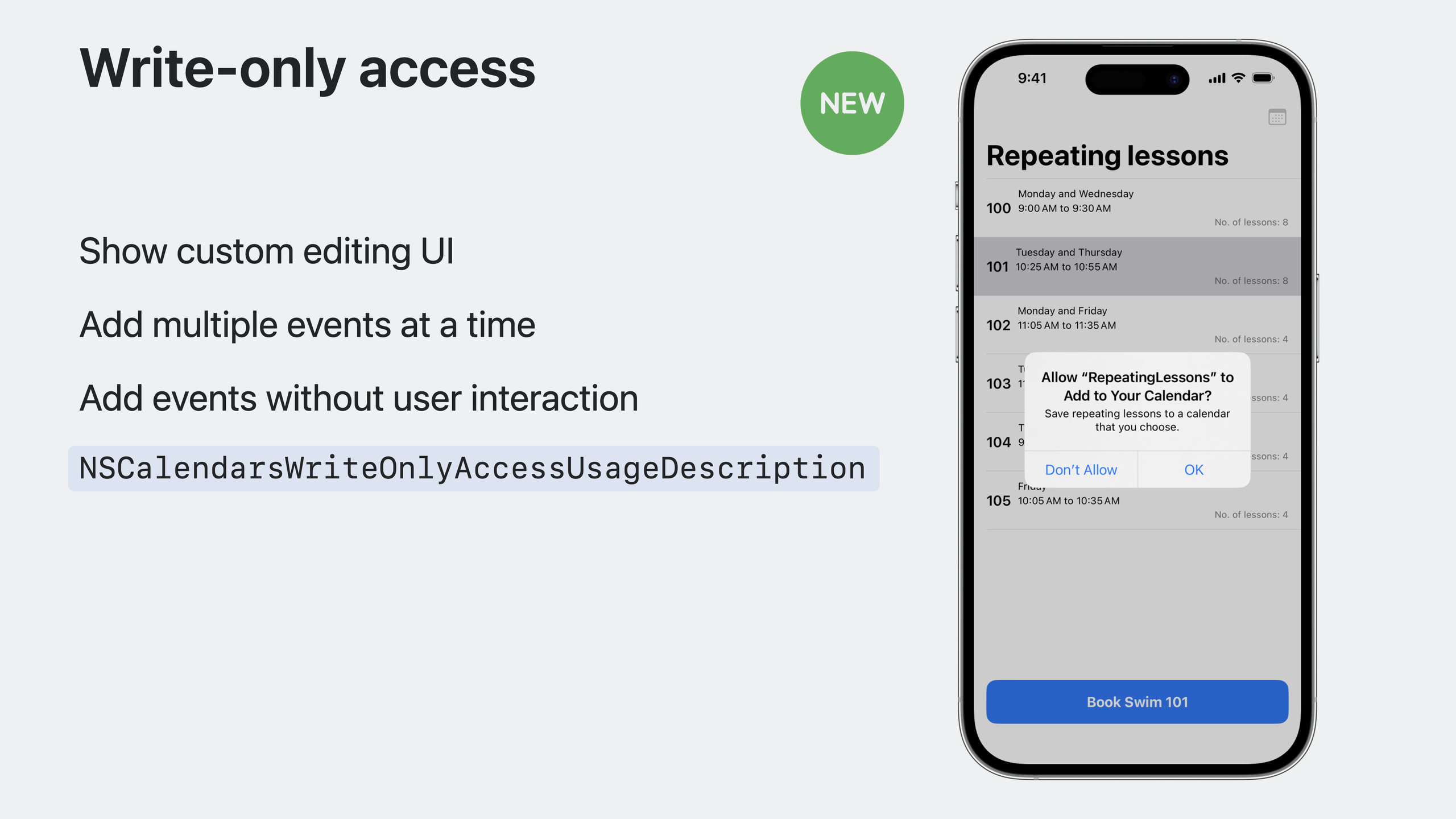
If your app needs a custom editing interface, batch event creation, or silent event adding, request write-only permission. iOS 17 adds requestWriteOnlyAccessToEvents().
Limitations: can’t read existing events (including ones you added), can’t read the calendar list, can’t create new calendars.
Full access: use with care
Only request when core features require displaying, updating, or deleting existing events. Configure NSCalendarsFullAccessUsageDescription in Info.plist.
With full access, create query predicates with predicateForEvents and fetch results with events(matching:). Note that the returned array is unordered—you need to sort it yourself.
Virtual conference extension
Video call apps can implement EKVirtualConferenceProvider so Calendar shows your meeting options when adding a location. After the user selects one, the calendar event displays your brand icon and a join button that opens your app directly.
Implement just two methods: fetchAvailableRoomTypes() to provide room types, and fetchVirtualConference() to return meeting links and details for the selected type.
Detailed Content
Adding events with EventKitUI
(05:49)
import EventKitUI

// Create the event store
let store = EKEventStore()

// Create an event and fill in details
let event = EKEvent(eventStore: store)
event.title = "WWDC23 Keynote"
let startDateComponents = DateComponents(year: 2023, month: 6, day: 5, hour: 10)
let startDate = Calendar.current.date(from: startDateComponents)!
event.startDate = startDate
event.endDate = Calendar.current.date(byAdding: .hour, value: 2, to: startDate)!
event.timeZone = TimeZone(identifier: "America/Los_Angeles")
event.location = "1 Apple Park Way, Cupertino, CA, United States"
event.notes = "Kick off an exhilarating week of technology and community."

// Create the editor view controller
let eventEditViewController = EKEventEditViewController()
eventEditViewController.event = event
eventEditViewController.eventStore = store
eventEditViewController.editViewDelegate = self

// Present the editor
present(eventEditViewController, animated: true)
Key points:
EKEventEditViewControllerruns in a separate process in iOS 17- No calendar permission required
- Users can modify event details and choose a calendar in the editor
- Implement
EKEventEditViewDelegateto know whether the user tapped “Add”
Siri Event Suggestions
(09:17)
import Intents
import CoreLocation

// Create a reservation reference
let spokenPhrase = "Lunch at Caffè Macs"
let reservationReference = INSpeakableString(
    vocabularyIdentifier: "df9bc3f5",
    spokenPhrase: spokenPhrase,
    pronunciationHint: nil
)

// Set the time range
let duration = INDateComponentsRange(start: myEventStart, end: myEventEnd)

// Set the location
let location = CLPlacemark(
    location: myCLLocation,
    name: "Caffè Macs",
    postalAddress: myAddress
)

// Create the restaurant reservation
let reservation = INRestaurantReservation(
    itemReference: reservationReference,
    reservationStatus: .confirmed,
    reservationHolderName: "Jane Appleseed",
    reservationDuration: duration,
    restaurantLocation: location
)

// Create the intent and response
let intent = INGetReservationDetailsIntent(reservationContainerReference: reservationReference)
let intentResponse = INGetReservationDetailsIntentResponse(code: .success, userActivity: nil)
intentResponse.reservations = [reservation]

// Create and donate the interaction
let interaction = INInteraction(intent: intent, response: intentResponse)
interaction.donate()
Key points:
INSpeakableStringrequires a uniquevocabularyIdentifierINDateComponentsRangedefines the event time rangeINRestaurantReservationis a subclass ofINReservation; flight, hotel, and other subclasses existinteraction.donate()recommends the event to the system; it appears in Calendar’s inbox
Adding events with write-only permission
(12:41)
import EventKit

// Create the event store
let store = EKEventStore()

// Request write-only permission
guard try await store.requestWriteOnlyAccessToEvents() else { return }

// Create the event
let event = EKEvent(eventStore: store)
event.calendar = store.defaultCalendarForNewEvents
event.title = "WWDC23 Keynote"
event.startDate = myEventStartDate
event.endDate = myEventEndDate
event.timeZone = TimeZone(identifier: "America/Los_Angeles")
event.location = "1 Apple Park Way, Cupertino, CA, United States"
event.notes = "Kick off an exhilarating week of technology and community."

// Save the event
guard try store.save(event, span: .thisEvent) else { return }
Key points:
requestWriteOnlyAccessToEvents()is new in iOS 17- Info.plist needs
NSCalendarsWriteOnlyAccessUsageDescription - Must set
calendarusingdefaultCalendarForNewEvents - title, startDate, and endDate are required; other fields are optional
Fetching events (full access)
(15:51)
import EventKit

// Create the event store
let store = EKEventStore()

// Request full access
guard try await store.requestFullAccessToEvents() else { return }

// Create the query predicate: current month
guard let interval = Calendar.current.dateInterval(of: .month, for: Date()) else { return }
let predicate = store.predicateForEvents(
    withStart: interval.start,
    end: interval.end,
    calendars: nil
)

// Fetch events
let events = store.events(matching: predicate)

// Sort by start time
let sortedEvents = events.sorted {
    $0.compareStartDate(with: $1) == .orderedAscending
}
Key points:
requestFullAccessToEvents()is new in iOS 17- Info.plist needs
NSCalendarsFullAccessUsageDescription predicateForEventsspecifies a time range and optional calendar listevents(matching:)returns an unordered array—sort manually- Use the shortest time range possible for better performance
Virtual conference extension
(19:18)
import EventKit

class VirtualConferenceProvider: EKVirtualConferenceProvider {

    // Provide available meeting room types
    override func fetchAvailableRoomTypes() async throws -> [EKVirtualConferenceRoomTypeDescriptor] {
        let title = "My Room"
        let identifier = "my_room"
        let roomType = EKVirtualConferenceRoomTypeDescriptor(title: title, identifier: identifier)
        return [roomType]
    }

    // Provide meeting details based on the selected type
    override func fetchVirtualConference(
        identifier: EKVirtualConferenceRoomTypeIdentifier
    ) async throws -> EKVirtualConferenceDescriptor {
        let urlDescriptor = EKVirtualConferenceURLDescriptor(title: nil, url: myURL)
        let details = "Enter the meeting code 12345 to enter the meeting."
        return EKVirtualConferenceDescriptor(
            title: nil,
            urlDescriptors: [urlDescriptor],
            conferenceDetails: details
        )
    }
}
Key points:
- Create a Virtual Conference Extension target in Xcode
fetchAvailableRoomTypes()returns room types shown in Calendar’s location pickerfetchVirtualConference()returns meeting links for the user’s selected type- Use Universal Links in
EKVirtualConferenceURLDescriptorURLs to open your app directly conferenceDetailsappears in the event detail virtual conference section
Backward compatibility
import EventKit

let store = EKEventStore()

if #available(iOS 17.0, macOS 14.0, *) {
    // Use the new method on iOS 17+
    let granted = try await store.requestWriteOnlyAccessToEvents()
} else {
    // Use the compatibility method on older versions
    let granted = try await store.requestAccess(to: .event)
}
Key points:
- Before iOS 17, use
requestAccess(to:); after, userequestWriteOnlyAccessToEvents()orrequestFullAccessToEvents() - Pre–iOS 17 apps need
NSCalendarsUsageDescription - Apps using EventKitUI also need
NSContactsUsageDescription - Missing these description strings causes a crash
Core Takeaways
1. Ticketing app with one-tap calendar add
- What to build: After buying movie or concert tickets, add showtime info to the system calendar with one tap
- Why it’s worth doing:
EKEventEditViewControllerrequires no permission—high user trust - How to start: Create an
EKEventwith movie name, theater address, and start time; present the editor for user confirmation
2. Restaurant reservation assistant
- What to build: After booking a restaurant, automatically suggest an event in Calendar’s inbox with address and navigation
- Why it’s worth doing: Siri Event Suggestions need no permission or UI—a seamless experience
- How to start: Create an
INRestaurantReservation, donate it to the system; users add it from Calendar’s inbox with one tap
3. Team schedule management tool
- What to build: Read the user’s system calendar and show a unified view of work and personal schedules
- Why it’s worth doing: Full access fetches all calendar events to help users coordinate time
- How to start: Request
requestFullAccessToEvents(), query withpredicateForEvents, merge results with your own schedule data
4. Video conferencing app calendar integration
- What to build: Let users select your meeting service directly from the location picker when creating calendar events
- Why it’s worth doing: Virtual conference extensions put your brand in the system calendar with a one-tap join shortcut
- How to start: Create a Virtual Conference Extension target, implement the two protocol methods, configure Universal Links to return to your app
Related Sessions
- What’s new in privacy — Calendar permission improvements and privacy design
- Broaden your reach with Siri Event Suggestions — Siri Event Suggestions API in depth
- Build better document-based apps — Document-based app development
Comments
GitHub Issues · utterances