
Highlight
ShazamKit adds
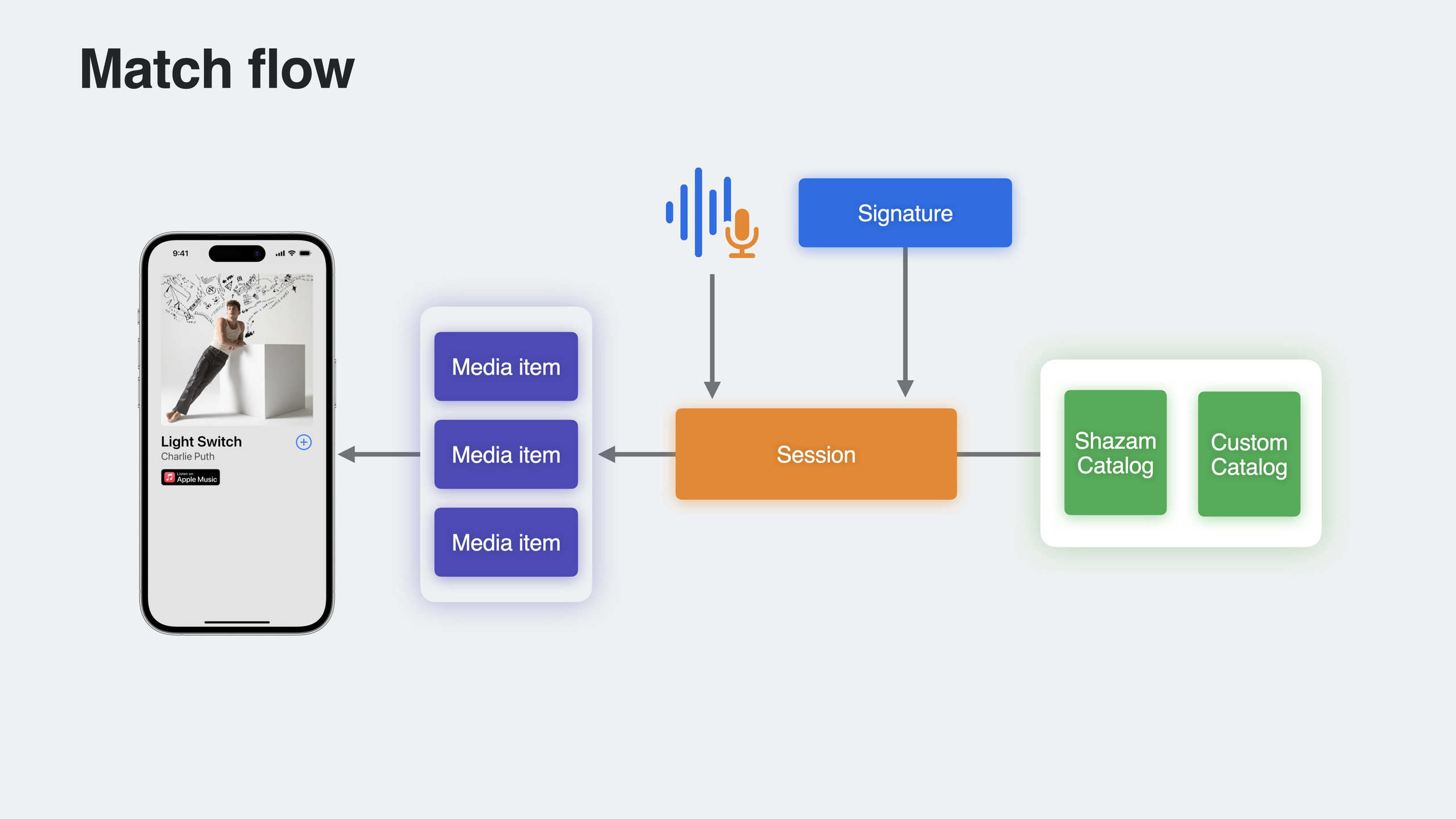
SHManagedSessionto automatically handle microphone recording and audio engine configuration—audio recognition in just a few lines of code.SHLibraryis redesigned with read, write, and delete support plus cross-device sync.SHSessiongains broader PCM format support and multi-match results.
Core Content
Before: manual audio engine setup for recognition
Using ShazamKit for audio recognition used to require manually configuring AVAudioEngine: installing a tap to receive PCM buffers, preparing the audio engine, requesting recording permission, starting recording, and passing buffers to SHSession. This workflow was unfriendly to developers unfamiliar with audio programming—lots of code and easy to get wrong.
Now: SHManagedSession in a few lines
iOS 17 introduces SHManagedSession, which automatically handles all recording-related work. You only need to create an instance, call result() or iterate results, and handle the returned match/noMatch/error.
SHManagedSession supports two modes:
- Single recognition: call
result()for one result - Continuous recognition: iterate the
resultsasync sequence for long-running listening
Call cancel() to stop recording and matching. prepare() can pre-allocate resources and start pre-recording for faster response on the next recognition request.
SHLibrary: read, write, and delete in one place
The old SHMediaLibrary could only write match results, and only entries with valid Shazam IDs. The new SHLibrary supports:
addItems(_:)to add media itemsitemsto read all entries added by the current appremoveItems(_:)to delete entries
Read and delete only affect content added by your app—they won’t expose the user’s Shazam records from other apps. SHLibrary conforms to Observable, so SwiftUI views refresh automatically.
More format support and multi-match
SHSession’s matchStreamingBuffer previously only supported PCM buffers at specific sample rates. It now supports most format settings and a wider sample rate range—ShazamKit handles format conversion automatically.
In custom catalogs, when multiple reference signatures are similar, ShazamKit now returns all matches sorted by match quality. You can filter to the entries you need in mediaItems.
Detailed Content
Single recognition
(06:46)
import ShazamKit

let managedSession = SHManagedSession()

let result = await managedSession.result()

switch result {
case .match(let match):
    print("Match found. MediaItemsCount: \(match.mediaItems.count)")
case .noMatch(_):
    print("No match found")
case .error(_, _):
    print("An error occurred")
}
Key points:
SHManagedSession()automatically handles microphone permission and recordingresult()is async and returns a single recognition result- Three possible states: match, noMatch, error
NSMicrophoneUsageDescriptionis required in Info.plist
Continuous recognition
(07:16)
let managedSession = SHManagedSession()

// Keep listening and return multiple results
for await result in managedSession.results {
    switch result {
    case .match(let match):
        print("Match found: \(match.mediaItems.first?.title ?? "")")
    case .noMatch(_):
        print("No match found")
    case .error(let error, _):
        print("Error: \(error.localizedDescription)")
    }
}
Key points:
resultsis an async sequence suited for long-running listening- Calling
cancel()terminates the async sequence - Each match is handled independently; new matches keep arriving
Complete Matcher implementation
(08:02)
import Foundation
import ShazamKit

struct MatchResult: Identifiable, Equatable {
    let id = UUID()
    let match: SHMatch?
}

@MainActor final class Matcher: ObservableObject {

    @Published var isMatching = false
    @Published var currentMatchResult: MatchResult?

    var currentMediaItem: SHMatchedMediaItem? {
        currentMatchResult?.match?.mediaItems.first
    }

    private let session: SHManagedSession

    init() {
        if let catalog = try? ResourcesProvider.catalog() {
            session = SHManagedSession(catalog: catalog)
        } else {
            session = SHManagedSession()
        }
    }

    func match() async {
        isMatching = true

        for await result in session.results {
            switch result {
            case .match(let match):
                Task { @MainActor in
                    self.currentMatchResult = MatchResult(match: match)
                }
            case .noMatch(_):
                print("No match")
                endSession()
            case .error(let error, _):
                print("Error \(error.localizedDescription)")
                endSession()
            }
            stopRecording()
        }
    }

    func stopRecording() {
        session.cancel()
    }

    func endSession() {
        isMatching = false
        currentMatchResult = MatchResult(match: nil)
    }
}
Key points:
- Initialize with a custom catalog via
SHManagedSession(catalog:) - Parameterless init uses the default Shazam music catalog
@MainActorand@Publishedlet SwiftUI respond to state changes automaticallystopRecording()callscancel()to stop recording
Warm-up preparation
(10:07)
let managedSession = SHManagedSession()

// Warm up in advance, allocate resources, and start prerecording
await managedSession.prepare()

// Respond faster when the user taps the recognition button
let result = await managedSession.result()
Key points:
prepare()pre-allocates resources needed for matching- Starts pre-recording to shorten time from request to result
- Optional—ShazamKit calls it automatically when needed
Responding to state changes in SwiftUI
(11:39)
struct MatchView: View {
    let session: SHManagedSession

    var body: some View {
        VStack {
            Text(session.state == .idle ? "Hear Music?" : "Matching")
            if session.state == .matching {
                ProgressView()
            } else {
                Button {
                    // start match
                } label: {
                    Text("Learn the Dance")
                }
            }
        }
    }
}
Key points:
session.statehas three values:.idle,.prerecording,.matchingSHManagedSessionconforms toObservable; SwiftUI refreshes automatically- Show a button in idle state, a progress indicator in matching state
Reading and writing the Shazam Library
(15:23)
import ShazamKit

// Add media items to Shazam Library
func add(mediaItems: [SHMediaItem]) async throws {
    try await SHLibrary.default.addItems(mediaItems)
}

// Read in SwiftUI
struct LibraryView: View {
    var body: some View {
        List(SHLibrary.default.items) { item in
            MediaItemView(item: item)
        }
    }
}

// Read in a non-UI context
func mostPopularGenre() async -> String? {
    let currentItems = await SHLibrary.default.items
    let genres = currentItems.flatMap { $0.genres }
    return highestOccurringGenre(from: genres)
}

// Delete media items
func remove(mediaItems: [SHMediaItem]) async throws {
    try await SHLibrary.default.removeItems(mediaItems)
}
Key points:
SHLibrary.defaultis a singleton synced across devicesaddItemswrites,itemsreads,removeItemsdeletes- Only entries added by your app can be accessed
- Conforms to
Observable; SwiftUI List refreshes automatically
Filtering multi-match results
(20:23)
func match(from televisionShowCatalog: SHCustomCatalog) async -> [SHMatchedMediaItem] {
    let managedSession = SHManagedSession(catalog: televisionShowCatalog)
    let result = await managedSession.result()

    if case .match(let match) = result {
        // Filter media items for a specific episode
        let filteredMediaItems = match.mediaItems.filter { $0.title == "Episode 2" }
        return filteredMediaItems
    }

    return []
}
Key points:
- Similar audio in custom catalogs returns multiple matches
match.mediaItemsis sorted by match quality- Use
filterto select entries by metadata - Annotate metadata when building catalogs to simplify filtering later
Core Takeaways
1. Social music recognition app
- What to build: At gatherings, automatically identify playing songs and generate a shared playlist
- Why it’s worth doing:
SHManagedSessionenables recognition in a few lines;SHLibrarysyncs across all devices - How to start: Use
SHManagedSessionfor continuous recognition, save matches withSHLibrary.default.addItems, displaySHLibrary.default.itemsin SwiftUI
2. Dance/fitness follow-along app
- What to build: Identify background music and load the corresponding dance tutorial or workout video
- Why it’s worth doing: The demo’s “learn the dance” scenario works out of the box; Managed Session handles recording automatically
- How to start: Recognize songs with
SHManagedSession, get song info frommatch.mediaItems.first, look up video resources by song ID
3. Live TV content recognition
- What to build: Identify TV programs and show real-time plot summaries or cast information
- Why it’s worth doing: Custom catalogs support multi-match results—the same intro can distinguish different episodes
- How to start: Generate a TV show catalog with Shazam CLI, annotate each episode with distinct metadata, use
filterto pick the current episode
4. Live concert setlist generator
- What to build: At concerts or festivals, automatically record each song performed and generate a setlist
- Why it’s worth doing: The
resultsasync sequence can listen through an entire show;SHLibrarysaves the record - How to start: Use
for await result in session.resultsfor continuous recognition, deduplicate, and generate a timestamped setlist
Related Sessions
- Create custom catalogs at scale with ShazamKit — Building custom audio catalogs at scale
- Add SharePlay to your app — SharePlay shared experiences
- Discover Continuity Camera for tvOS — Continuity Camera for tvOS
Comments
GitHub Issues · utterances