
Highlight
PyTorch 2.0’s MPS backend reaches Beta with support for the top 60 commonly used ops and automatic mixed precision. TensorFlow Metal plugin ships its 1.0 stable release. JAX gets Metal GPU acceleration for the first time, averaging 10× faster than CPU on M2 Max. MPSGraph adds the MPSGraphPackage serialization format and Int8 quantization support.
Core Content
PyTorch 2.0 MPS backend: from experimental to usable
Previously, training models with PyTorch on Mac had limited MPS backend op support—many models wouldn’t run or frequently fell back to CPU. PyTorch 2.0’s MPS backend reaches Beta, covering the 60 most-used Torch ops, including grid sampler, triangular solve, and topk. Test coverage also improved significantly, including gradient tests and ModuleInfo tests.
Several well-known models officially adopt MPS as the macOS backend: WhisperAI (speech-to-text), YOLO (object detection), and Stable Diffusion (image generation). In the demo, YOLOv5 on M2 Max with the MPS backend runs real-time object detection with noticeably higher frame rates than the CPU version.
Using Metal System Trace to find performance bottlenecks
PyTorch nightly adds MPS op profiling support. OS signposts record op execution time, CPU–GPU data copies, and CPU fallback operations into Metal System Trace.
The demo shows a 7-layer Sequential model where Softshrink activation falls back to CPU because MPS doesn’t support it. In the trace, large gaps on the GPU timeline are visible—the GPU waiting for CPU to finish Softshrink. The fix is to write a custom Metal op to replace it.
Four steps to a custom GPU op
(06:34)
Step 1: Implement the op in Objective-C and Metal. Use get_command_buffer to get the MPSStream command buffer and get_dispatch_queue for the serial dispatch queue; encode the custom kernel on that queue.
Step 2: Create Python bindings with pybind11.
Step 3: Compile the extension with torch.utils.cpp_extension.load().
Step 4: Import and use it in the training script.
After replacing Softshrink with the custom op, model efficiency improves dramatically—CPU fallbacks and data copies disappear.
Automatic mixed precision training
MPSGraph adds bfloat16 support. bfloat16 has 1 sign bit, 8 exponent bits, and 7 mantissa bits—better suited for deep learning than standard IEEE float16. The PyTorch MPS backend supports both float16 and bfloat16 mixed precision modes.
Enabling it is simple: wrap the training region with autocast as a context manager, and MPS automatically picks the right precision per layer. Convolutions and linear layers can use lower precision; reduction layers stay high precision. On PyTorch 2.0 + macOS Sonoma, the MPS backend is up to 5× faster than the previous generation.
TensorFlow Metal 1.0 stable release
The TensorFlow Metal plugin reaches version 1.0. It adds a grappler remapping optimizer that automatically identifies and fuses common computation patterns: convolution + add, matrix multiplication, optimizer ops, and RNN cells. These optimizations happen automatically at graph creation—no manual intervention.
Mixed precision supports global configuration—one line tf.keras.mixed_precision.set_global_policy('mixed_float16') enables it. Installation is also simplified: pip install TensorFlow and the tensorflow-metal plugin to enable acceleration automatically.
JAX lands on Metal
JAX is a high-performance numerical computing library based on NumPy, with automatic differentiation (grad), vectorization (vmap), and JIT compilation. This year JAX gained a Metal GPU acceleration backend.
On M2 Max MacBook Pro, JAX Metal acceleration averages 10× faster than CPU. See the Metal Developer Resources page for installation and environment setup details.
MPSGraphPackage: solving slow startup
Complex MPSGraphs can take a long time to compile on first launch, slowing app startup. MPSGraphPackage is a new serialization format that lets you precompile MPSGraphExecutable at build time and load it directly from file at runtime.
To create: use MPSGraphExecutable.serializationDescriptor to create a descriptor, then call serialize to write the file. To load: initialize MPSGraphExecutable with a compilation descriptor and file path.
The MPSGraphTool command-line tool can convert Core ML ML Program or ONNX models directly to MPSGraphPackage without manually rewriting inference code.
Int8 quantization reduces memory usage
MPSGraph adds symmetric and asymmetric Int8 quantization APIs. Using 8-bit integers instead of floats during inference saves memory bandwidth and reduces model memory footprint.
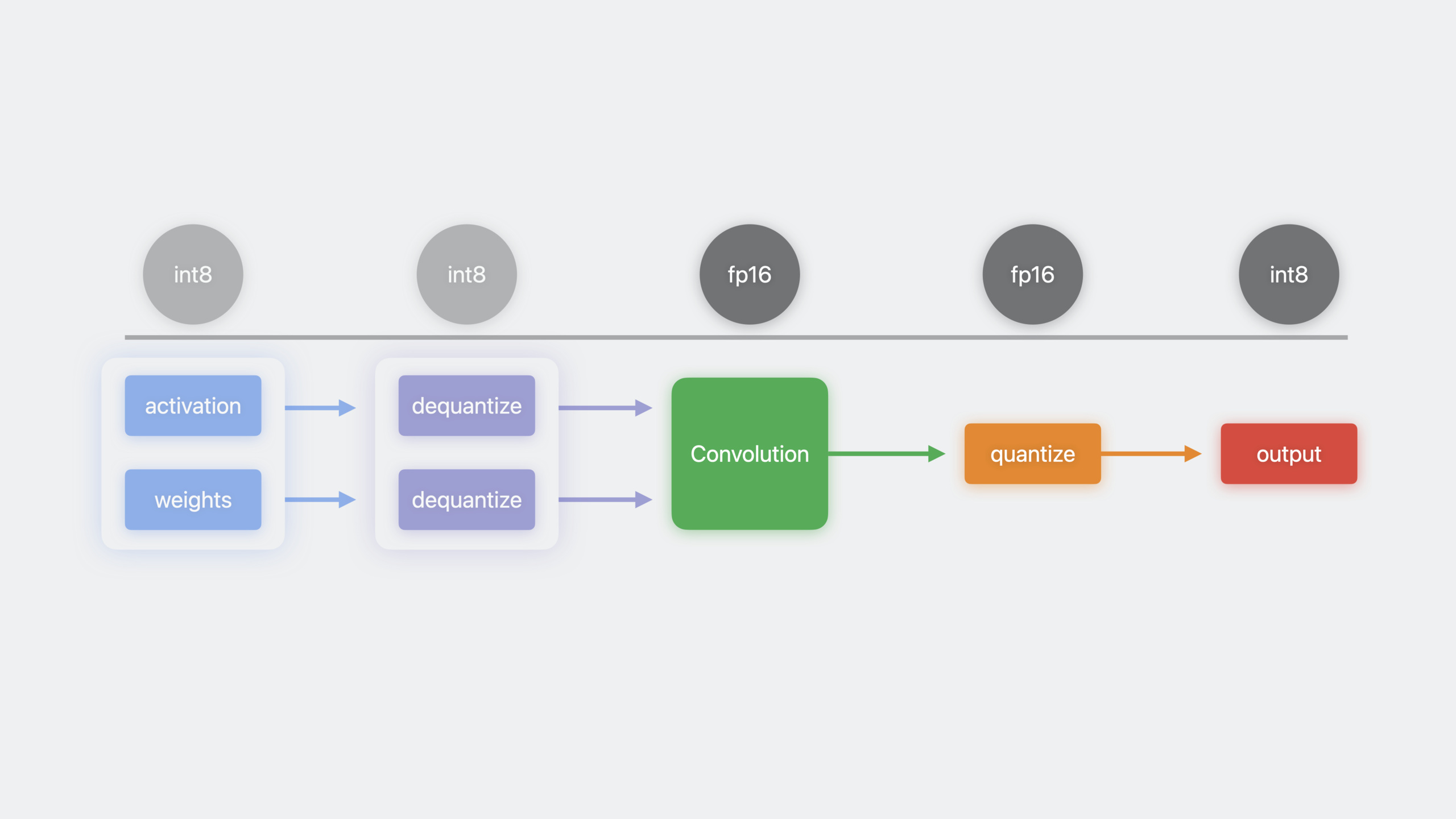
The flow: Int8 activation and weight inputs are dequantized to floats with dequantizeTensor, fed into convolution and other ops, then the output is quantized back to Int8 with quantizeTensor. MPSGraph automatically fuses these operations into a single kernel, reducing memory movement.
Detailed Content
Enabling PyTorch MPS profiling
(04:31)
import torch
import torch_mps

# Start the MPS profiler
torch.mps.profiler.start(mode="interval", wait_until_completed=False)

# Your training code
model = MyModel().to("mps")
for batch in dataloader:
    output = model(batch.to("mps"))
    loss = criterion(output, target)
    loss.backward()
    optimizer.step()

# Stop the profiler
torch.mps.profiler.stop()
Key points:
torch.mps.profiler.start()enables OS signpost recording- View the os_signpost timeline in Instruments’ Metal System Trace
- The timeline shows each op’s execution time, data type, and copy length
- Look for gaps on the GPU timeline—they usually correspond to CPU fallback
Custom Metal op implementation
(07:00)
// softshrink_metal.mm
#import <ATen/mps/MPSStream.h>
#import <ATen/mps/MPSAllocator.h>

void customSoftshrink(const at::Tensor& input, at::Tensor& output, float lambda) {
    // Get the MPSStream command buffer
    id<MTLCommandBuffer> commandBuffer = at::mps::get_command_buffer();
    id<MTLDevice> device = at::mps::GetMPSDevice();

    // Get the serial dispatch queue
    dispatch_queue_t queue = at::mps::get_dispatch_queue();

    dispatch_sync(queue, ^{
        id<MTLComputeCommandEncoder> encoder = [commandBuffer computeCommandEncoder];

        // Load the Metal shader
        id<MTLLibrary> library = [device newDefaultLibrary];
        id<MTLFunction> function = [library newFunctionWithName:@"softshrink_kernel"];
        id<MTLComputePipelineState> pipeline = [device newComputePipelineStateWithFunction:function error:nil];

        [encoder setComputePipelineState:pipeline];
        [encoder setBuffer:input.storage().data() offset:0 atIndex:0];
        [encoder setBuffer:output.storage().data() offset:0 atIndex:1];
        [encoder setBytes:&lambda length:sizeof(float) atIndex:2];

        MTLSize gridSize = MTLSizeMake(input.numel(), 1, 1);
        MTLSize threadGroupSize = MTLSizeMake(256, 1, 1);
        [encoder dispatchThreads:gridSize threadsPerThreadgroup:threadGroupSize];
        [encoder endEncoding];
    });

    // Wait synchronously (if serialization is needed)
    at::mps::synchronize();
}
Key points:
get_command_buffer()gets the current MPSStream command bufferget_dispatch_queue()gets the serial queue to serialize multi-threaded submissions- Encode the kernel inside
dispatch_syncto avoid race conditions synchronize()waits for the current command buffer to finish; usecommit()when serialization isn’t needed
Python bindings and compilation
(07:58)
# softshrink_binding.cpp
#include <torch/extension.h>
#include <pybind11/pybind11.h>

void customSoftshrink(const at::Tensor& input, at::Tensor& output, float lambda);

PYBIND11_MODULE(TORCH_EXTENSION_NAME, m) {
    m.def("custom_softshrink", &customSoftshrink, "Custom Softshrink kernel");
}

# Compile and load the extension
from torch.utils.cpp_extension import load

custom_ops = load(
    name="custom_softshrink",
    sources=["softshrink_binding.cpp", "softshrink_metal.mm"],
    extra_compile_args=["-std=c++17"]
)

# Use in the training script
from custom_ops import custom_softshrink

class CustomSoftshrink(torch.nn.Module):
    def __init__(self, lambd=0.5):
        super().__init__()
        self.lambd = lambd

    def forward(self, input):
        output = torch.empty_like(input)
        custom_softshrink(input, output, self.lambd)
        return output

# Replace Softshrink in the original model
model = nn.Sequential(
    nn.Linear(784, 256),
    CustomSoftshrink(),
    nn.Linear(256, 10)
).to("mps")
Key points:
PYBIND11_MODULEexposes C++ functions to Pythontorch.utils.cpp_extension.load()automatically compiles and loads the shared libraryextra_compile_argspasses additional compiler arguments- After replacing the original op, the model runs entirely on GPU via MPS with no CPU fallback
Automatic mixed precision training
(10:57)
import torch

model = MyModel().to("mps")
optimizer = torch.optim.Adam(model.parameters())
scaler = torch.cuda.amp.GradScaler()  # Also applies to MPS

for batch, target in dataloader:
    batch = batch.to("mps")
    target = target.to("mps")

    # autocast automatically chooses the appropriate precision for each layer
    with torch.autocast(device_type="mps", dtype=torch.float16):
        output = model(batch)
        loss = criterion(output, target)

    scaler.scale(loss).backward()
    scaler.step(optimizer)
    scaler.update()
    optimizer.zero_grad()
Key points:
torch.autocast(device_type="mps", dtype=torch.float16)enables mixed precision- Supports both float16 and bfloat16 modes
- Convolutions and linear layers automatically use half precision; reduction layers stay full precision
GradScalerprevents gradient underflow
MPSGraphPackage serialization
(16:34)
// Create and save MPSGraphPackage
MPSGraphExecutable *executable = [graph compileWithDevice:device
                                               feeds:feeds
                                            targetTensors:targets
                                     targetOperations:nil];

MPSGraphExecutableSerializationDescriptor *descriptor = [[MPSGraphExecutableSerializationDescriptor alloc] init];
[descriptor setMinimumDeploymentTarget:@"16.0"];

NSURL *packageURL = [NSURL fileURLWithPath:@"model.mpsgraphpackage"];
[executable serializeToURL:packageURL descriptor:descriptor error:nil];

// Load at runtime
MPSGraphExecutableCompilationDescriptor *compDescriptor = [[MPSGraphExecutableCompilationDescriptor alloc] init];
MPSGraphExecutable *loadedExecutable = [[MPSGraphExecutable alloc] initWithPackageURL:packageURL
                                                                        compilationDescriptor:compDescriptor];
Key points:
serializeToURL:descriptor:error:writes the precompiled executable to a fileminimumDeploymentTargetspecifies the minimum supported OS version- At runtime, load directly with
initWithPackageURL, skipping compilation - MPSGraphTool can convert Core ML or ONNX models directly
MPSGraphTool command-line conversion
# Convert Core ML model to MPSGraphPackage
mpsgraphtool --convert coreml --input model.mlpackage \
             --output model.mpsgraphpackage \
             --minimum-deployment-target "17.0"

# Convert ONNX model to MPSGraphPackage
mpsgraphtool --convert onnx --input model.onnx \
             --output model.mpsgraphpackage \
             --minimum-deployment-target "17.0"
Key points:
--convertspecifies the source model format: coreml or onnx--minimum-deployment-targetsets the minimum OS version- The converted package can be loaded and executed directly in your app
Core Takeaways
1. Local Stable Diffusion generator on Mac
- What to build: Run Stable Diffusion on Mac to generate images, fully offline
- Why it’s worth doing: PyTorch 2.0’s MPS backend officially supports Stable Diffusion; M2-series chips deliver usable speed
- How to start: Load a Stable Diffusion model with the
diffuserslibrary, setdevice="mps", enabletorch.autocastfor acceleration
2. Real-time video object detection app
- What to build: Detect and label objects in live camera footage
- Why it’s worth doing: YOLOv5 officially supports the MPS backend with frame rates sufficient for real-time use
- How to start: Load the model with
torch.hub.load('ultralytics/yolov5', 'yolov5s'),.to('mps')to the GPU, get frames withAVCaptureVideoDataOutput
3. Custom op acceleration for niche models
- What to build: Your research model has ops MPS doesn’t support—write a custom Metal kernel to replace them
- Why it’s worth doing: A single CPU-fallback op can slow the entire model; a custom kernel restores full GPU speed
- How to start: Use
torch.mps.profilerto locate fallback ops, then follow the four-step process: Objective-C + Metal implementation + Python bindings
4. Mobile model quantization deployment
- What to build: Quantize a trained float model to Int8 to reduce app size and runtime memory
- Why it’s worth doing: MPSGraph’s Int8 quantization API automatically fuses dequantize–compute–quantize, making inference faster
- How to start: Convert an ONNX model to MPSGraphPackage with MPSGraphTool, insert
quantizeTensoranddequantizeTensornodes in the graph
Related Sessions
- Improve Core ML integration with async prediction — Core ML async prediction API and performance optimizations
- Accelerate machine learning with Metal — WWDC22 Metal ML acceleration fundamentals
- Build customized ML models with Metal Performance Shaders Graph — Building custom ML models with MPSGraph
Comments
GitHub Issues · utterances