
Highlight
iOS 17’s Core ML inference engine automatically speeds up most models—no recompilation or code changes required. The new async prediction API lets developers run model inference concurrently with Swift Concurrency, with throughput improvements of up to 2×.
Core Content
Automatic speedups: benefit from upgrading the OS
Previously, improving model inference speed meant manually adjusting model precision, retraining, or changing architecture. iOS 17’s Core ML inference engine includes underlying optimizations that shorten prediction time for many models after an OS upgrade. This speedup comes with the system update—no need to recompile .mlmodel files or change a line of code.
Model loading lifecycle and caching
When Core ML loads a model, it checks the cache first. If a cache exists for that configuration and device combination, it takes the cached load path; otherwise, it triggers a device-specialized compilation and writes the result to cache. This uncached load can be slow, but subsequent loads are much faster.
Cache files live on disk, tied to the model path and configuration, and persist across app launches and device reboots. Caches are cleared only when disk space is low, after a system update, or when the compiled model is deleted or modified.
Use Core ML Instrument to observe load events: events labeled “prepare and cache” are uncached loads; those labeled “cached” are cache hits. Performance reports now also show uncached load time.
Async prediction API solves the concurrency bottleneck
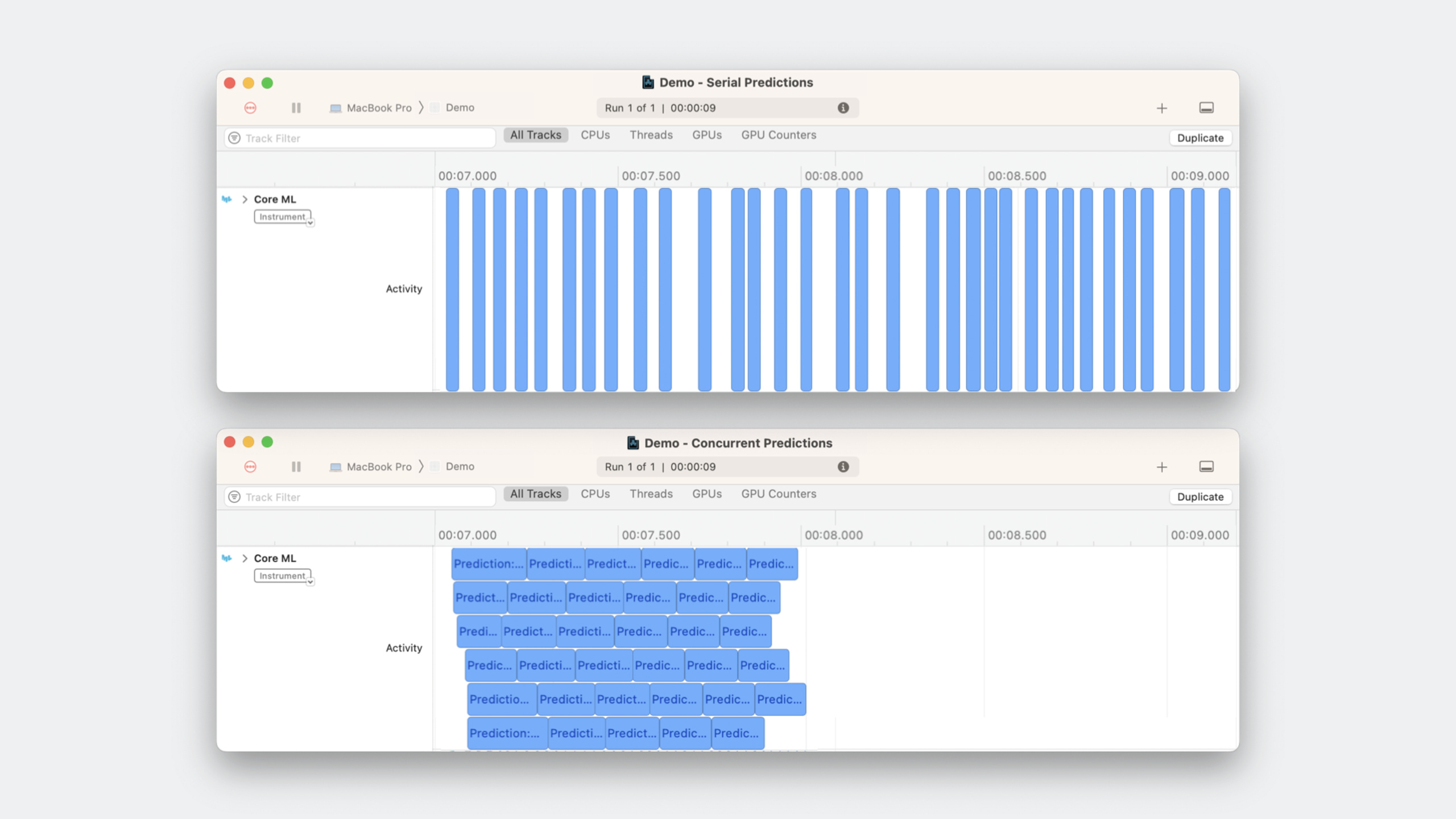
With the synchronous prediction API, models are not thread-safe and must run serially inside an actor. Input preparation and model inference end up on the same queue, leading to low GPU utilization and UI stutter.
iOS 17 introduces an async version of prediction(). It is thread-safe and supports Swift Concurrency. After converting ColorizingService from an actor to a plain class, multiple predictions can run concurrently. Combined with Task.cancel(), incomplete predictions are canceled when the user scrolls quickly.
In the demo, a LazyVGrid displays images. After switching to the async API, initial view coloring time dropped from 2 seconds to 1 second—a roughly 2× throughput improvement.
Memory control: don’t run unlimited concurrency
Concurrent predictions load multiple input/output sets at once, which can spike memory. Add flow control—for example, limit to at most 2 in-flight predictions. For camera stream data, drop stale frames instead of letting them pile up.
Detailed Content
Checking device compute availability
(08:29)
Some experiences require the Neural Engine to meet performance or power requirements. iOS 17 adds MLComputeDevice and availableComputeDevices APIs to check supported compute units at runtime.
import CoreML

let model = try await MLModel.load(contentsOf: modelURL)

// Check whether a Neural Engine is available
let hasNeuralEngine = model.availableComputeDevices.contains {
    if case .neuralEngine = $0 { return true }
    return false
}

if hasNeuralEngine {
    // Use a model that requires Neural Engine
}
Key points:
MLModel.load(contentsOf:)loads the model asynchronouslyavailableComputeDevicesreturns the list of compute units supported on the current deviceMLComputeDeviceis an enum with cases including.cpu,.gpu,.neuralEngine
Using the async prediction API
(17:33)
import CoreML

class ColorizingService {
    private let colorizerModel: Colorizer

    init() throws {
        let config = MLModelConfiguration()
        colorizerModel = try Colorizer(configuration: config)
    }

    func colorize(image: UIImage) async throws -> UIImage? {
        // Check whether the task has been cancelled
        guard !Task.isCancelled else { return nil }

        // Prepare input (resize to the dimensions required by the model)
        let resizedImage = image.resized(to: CGSize(width: 256, height: 256))
        guard let pixelBuffer = resizedImage.pixelBuffer else { return nil }

        // Asynchronous prediction
        let input = ColorizerInput(image: pixelBuffer)
        let output = try await colorizerModel.prediction(input: input)

        return UIImage(pixelBuffer: output.colorizedImage)
    }
}
Key points:
try await colorizerModel.prediction(input:)is the new async API- Check
Task.isCancelledat the start of the method to avoid preparing input for canceled tasks - Actor isolation is no longer required—multiple predictions can run concurrently
- Pair with SwiftUI’s
.taskmodifier so views cancel automatically when they disappear
Flow control to limit concurrency
(21:17)
actor ColorizingService {
    private let colorizerModel: Colorizer
    private var inFlightCount = 0
    private let maxInFlight = 2

    func colorize(image: UIImage) async throws -> UIImage? {
        // Wait until a slot is available
        while inFlightCount >= maxInFlight {
            try await Task.sleep(nanoseconds: 10_000_000) // 10ms
        }

        inFlightCount += 1
        defer { inFlightCount -= 1 }

        guard !Task.isCancelled else { return nil }

        let resizedImage = image.resized(to: CGSize(width: 256, height: 256))
        guard let pixelBuffer = resizedImage.pixelBuffer else { return nil }

        let input = ColorizerInput(image: pixelBuffer)
        let output = try await colorizerModel.prediction(input: input)

        return UIImage(pixelBuffer: output.colorizedImage)
    }
}
Key points:
- Use an actor to control
inFlightCountfor thread safety maxInFlight = 2limits the number of simultaneous predictionsdeferensures the counter decrements correctly when the method ends- For camera streams,
return nilinstead of waiting to drop stale frames
Choosing among three prediction APIs
(22:04)
| Scenario | Recommended API |
|---|---|
| Synchronous context, input interval much longer than model latency | Synchronous prediction(input:) |
| Inputs arrive in batches | predictions(from:) batch API |
| Async context, many inputs arriving individually over time | Async prediction(input:) |
ML Program and Pipeline model types benefit most from concurrent prediction. Before adding concurrency, profile with Instruments’ Core ML + Allocations template to confirm it helps your use case.
Core Takeaways
1. Real-time filter camera
- What to build: Apply real-time style transfer or portrait segmentation filters to the camera feed with a Core ML model
- Why it’s worth doing: The async prediction API keeps per-frame processing off the main thread; flow control prevents memory spikes
- How to start: Get frames with
AVCaptureVideoDataOutput, call asyncprediction()in.task, setmaxInFlight = 1to process only the latest frame
2. Batch photo smart classification
- What to build: Select 100 photos from the library and auto-classify them (landscape/portrait/food) with a Core ML model
- Why it’s worth doing: Concurrent prediction cuts total time from tens of seconds of serial work to a few seconds
- How to start: Pick images with
PhotosPicker, run predictions concurrently in aTaskGroup, limit concurrency to 3–5
3. Offline speech recognition assistant
- What to build: Fully offline speech-to-text plus intent recognition, no network required
- Why it’s worth doing: iOS 17 inference engine speedups plus the async API make on-device speech models more responsive
- How to start: Get audio streams with
SFSpeechRecognizer, feed chunks into a Core ML acoustic model, process results with an async sequence
4. Smart photo deduplication
- What to build: Scan the local photo library and find similar photos with an image embedding model
- Why it’s worth doing: Batch concurrent feature extraction dramatically shortens scan time
- How to start: Iterate photos with
PHAsset, extract features with Vision, compute a similarity matrix with a Core ML model
Related Sessions
- Optimize machine learning for Metal apps — PyTorch 2.0, TensorFlow, and JAX acceleration on Metal
- Deploy machine learning models with Core ML Tools — Model conversion, quantization, and compression
- Explore machine learning in Create ML — Interactive development and evaluation with Create ML
Comments
GitHub Issues · utterances