
Highlight
Core ML Tools 7 introduces three model compression techniques (pruning, quantization, and palettization) and two workflows (post-training compression and training-time compression). Combined with runtime optimizations in iOS 17 and macOS Sonoma, developers can shrink model size to 1/8 or smaller while achieving up to 75% inference speedup on the Apple Neural Engine.
Core Content
The problem: models keep growing, app size pressure rises
ResNet50 has 25 million parameters and occupies 50 MB at Float16 precision. Newer models like Stable Diffusion are even larger. The number of models deployed in apps is also increasing, so size pressure keeps building.
Compressing models brings three direct benefits:
- Deploy more models within the same memory budget
- Deploy larger, more capable models
- Smaller models mean less data movement, which can speed up inference
Apple’s approach: three compression techniques + two workflows
Core ML Tools 7 unifies compression APIs under the coremltools.optimize module:
coremltools.optimize.coreml: post-training compression, operating directly on converted Core ML modelscoremltools.optimize.torch: training-time compression, introducing compression during the PyTorch training pipeline
Detailed Content
How the three compression techniques work (02:35)
Pruning: Set the smallest weights to zero and store them as sparse matrices.
Original weight matrix:    After pruning (50% sparse):
[0.1, 0.9, 0.3]   [0,   0.9, 0.3]
[0.8, 0.2, 0.5]   [0.8, 0,   0.5]
[0.4, 0.7, 0.1]   [0.4, 0.7, 0  ]
Key points:
- Only non-zero values and zero positions are stored
- Model size scales linearly with sparsity: 50% sparse ≈ 50% size
- ResNet50 drops from 50 MB to about 28 MB at 50% sparsity
Quantization: Map Float16 weights to the INT8 range.
scale = 2.35, bias = 0
Original value -> scale/offset/round -> INT8
Minimum value -> -127
Maximum value -> 127
Key points:
- Each weight drops from 2 bytes to 1 byte—a 2× compression ratio
scaleandbiasare used to dequantize back to the original range- A non-zero bias can sometimes reduce quantization error
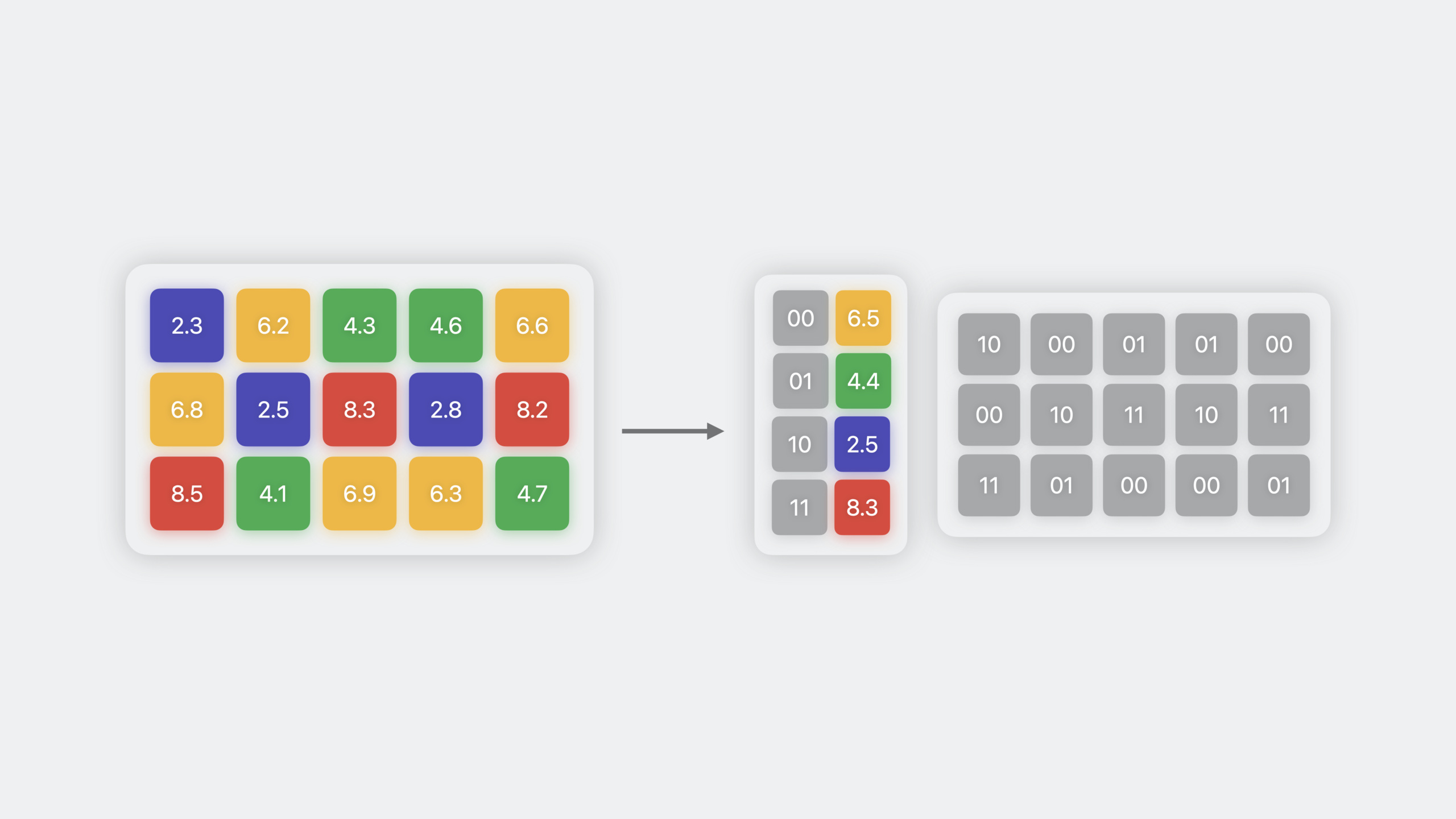
Palettization: Cluster similar weights and represent them with cluster centroids.
Original weights: [0.12, 0.11, 0.89, 0.91, 0.13, 0.88]
Cluster centers: {0: 0.12, 1: 0.89}
Index table: [0, 0, 1, 1, 0, 1]
Key points:
- 4 clusters = 2 bits per weight, 8× compression ratio
- 16 clusters = 4 bits per weight, 4× compression ratio
- Cluster centroids live in a lookup table; the original matrix becomes an index table
Post-training compression (06:02)
Compress a fully trained Core ML model directly—simple and fast:
import coremltools as ct
from coremltools.optimize.coreml import (
    OpMagnitudePrunerConfig,
    OpPalettizerConfig,
    OpLinearQuantizerConfig,
    OptimizationConfig,
    prune_weights,
    palettize_weights,
    quantize_weights
)

# Load the converted Core ML model
model = ct.models.MLModel("my_model.mlpackage")

# --- Pruning: target 75% sparsity ---
pruner_config = OpMagnitudePrunerConfig(
    target_sparsity=0.75
)
pruner_global_config = OptimizationConfig(
    global_config=pruner_config
)
pruned_model = prune_weights(model, pruner_global_config)

# --- Palettization: 6 bit ---
palettizer_config = OpPalettizerConfig(
    mode="kmeans",
    nbits=6
)
palettizer_global_config = OptimizationConfig(
    global_config=palettizer_config
)
palettized_model = palettize_weights(model, palettizer_global_config)

# --- Linear quantization: 8 bit ---
quantizer_config = OpLinearQuantizerConfig(
    mode="linear_symmetric"
)
quantizer_global_config = OptimizationConfig(
    global_config=quantizer_config
)
quantized_model = quantize_weights(model, quantizer_global_config)

# Save the compressed model
pruned_model.save("my_model_pruned.mlpackage")
Key points:
OptimizationConfigdescribes the compression method;global_configapplies it to all layers- You can also set different
op_configper layer - Post-training compression is a one-step process that does not require training data
- Higher compression ratios mean more accuracy loss—validate on real data
Training-time compression (08:08)
Introduce compression during PyTorch training so weights adapt to compression constraints:
import torch
import coremltools as ct
from coremltools.optimize.torch import (
    MagnitudePrunerConfig,
    MagnitudePruner,
    DKMPalettizerConfig,
    DKMPalettizer
)

# --- Training-time pruning ---
# 1. Define configuration
pruner_config = MagnitudePrunerConfig(
    target_sparsity=0.75
)

# 2. Create the pruner
pruner = MagnitudePruner(model, pruner_config)

# 3. Insert pruning layers
pruner.prepare()

# 4. Fine-tune training
for epoch in range(num_epochs):
    for batch in dataloader:
        optimizer.zero_grad()
        output = model(batch.input)
        loss = criterion(output, batch.target)
        loss.backward()
        optimizer.step()
    # Update the pruner internal state
    pruner.step()

# 5. Fold pruning masks into weights
pruner.finalize()

# 6. Convert to Core ML
compressed_model = ct.convert(model, inputs=[ct.ImageType(name="input", shape=(1, 3, 224, 224))])
compressed_model.save("pruned_model.mlpackage")

# --- Training-time palettization (DKM algorithm) ---
palettizer_config = DKMPalettizerConfig(
    global_config={"n_bits": 2}
)
palettizer = DKMPalettizer(model, palettizer_config)
palettizer.prepare()

# Fine-tune training...
for epoch in range(num_epochs):
    for batch in dataloader:
        # Training loop
        ...
    palettizer.step()

palettizer.finalize()

# Use the palettization pipeline during conversion
compressed_model = ct.convert(
    model,
    inputs=[ct.ImageType(name="input", shape=(1, 3, 224, 224))],
    pass_pipeline=ct.PassPipeline.DEFAULT_PALETTIZATION
)
Key points:
prepare()inserts compression-friendly layers into the modelstep()updates compression state during trainingfinalize()folds compressed weights back into model weights- DKM (Differentiable K-Means) is a differentiable k-means algorithm based on attention
- Set
pass_pipeline=DEFAULT_PALETTIZATIONduring conversion to use palettized representation
Runtime performance optimizations (20:44)
Runtime behavior differs significantly between iOS 16 and iOS 17:
| Feature | iOS 16 | iOS 17 |
|---|---|---|
| Supported compression types | Weight compression only | Weight compression + 8-bit activation quantization |
| Inference speed | Same as Float16 | Faster in specific scenarios |
The iOS 17 improvement: weights are decompressed just before computation, rather than being fully decompressed into memory upfront. For memory-constrained models (such as large models on the Neural Engine), this reduces memory bandwidth pressure and can speed up inference.
Measured speedups (iPhone 14 Pro Max):
- 4-bit palettized models: 5%–30% faster
- Sparse models: up to 75% faster
Performance optimization strategy (23:39)
Step 1: Quickly explore compression configurations with the optimize.coreml API
        ↓
Step 2: Profile on the target device with Xcode Core ML Performance Report
        ↓
Step 3: Filter for the configurations with the largest speedups
        ↓
Step 4: Evaluate accuracy for those configurations, and use optimize.torch training-time compression if needed
        ↓
Step 5: Choose the final model
Key points:
- Start with post-training compression for quick validation—no training data needed
- Use Xcode’s Core ML Performance Report to see where each layer runs (CPU/GPU/Neural Engine)
- When accuracy is insufficient, switch to training-time compression at the cost of longer training
- The final choice is a trade-off among compression ratio, accuracy, and speed
Core Takeaways
-
Compress Stable Diffusion for mobile use: Use 4-bit palettization to shrink Stable Diffusion from hundreds of MB to tens of MB. Why it’s worth doing: Stable Diffusion’s image generation is powerful, but the original model is too large to run on iPhone. After compression, on-device text-to-image becomes feasible. How to start: try 4-bit and 6-bit configurations with
palettize_weightsfromcoremltools.optimize.coreml, evaluate generation quality on a validation set, and pick the best balance. -
Compress an image segmentation model for real-time camera filters: Use training-time pruning to compress a portrait segmentation model by 50% while preserving edge accuracy. Why it’s worth doing: real-time camera apps need 30+ fps inference; smaller models increase Neural Engine throughput. How to start: load a pretrained segmentation model in PyTorch, set 50% target sparsity with
MagnitudePruner, fine-tune for 5–10 epochs, convert to Core ML, and test frame rate on device. -
Deploy a multilingual BERT model with 8-bit quantization: Quantize a BERT text classification model from Float16 to INT8, halving its size. Why it’s worth doing: BERT models are accurate but have large embedding layers. After quantization, they can run on memory-constrained devices like Apple Watch. How to start: apply 8-bit linear symmetric quantization with
quantize_weightsand verify classification accuracy on a test set. -
Build an automated model compression pipeline: Integrate Core ML Tools compression into CI/CD so every model update automatically tries multiple compression configurations. Why it’s worth doing: manually trying compression settings is time-consuming and easy to miss the optimal solution. Automation can quickly find the best compression ratio on each model iteration. How to start: write a Python script that iterates over different
nbits(palettization) andtarget_sparsity(pruning) combinations, evaluates model size and validation accuracy for each, and outputs a Pareto frontier.
Related Sessions
- Discover machine learning enhancements in Create ML — After training models in Create ML, use Core ML Tools to compress and reduce size
- Improve Core ML integration with async prediction — Core ML’s async prediction API for a smoother user experience with compressed models
- Explore Natural Language multilingual models — Training multilingual BERT models; compression makes them better suited for on-device deployment
Comments
GitHub Issues · utterances