
Highlight
On iOS 17, iPadOS 17, and macOS Sonoma, Apple introduces multilingual contextual embedding models based on BERT (Bidirectional Encoder Representations from Transformers) in the Natural Language framework, supporting 27 languages across three scripts. Developers can train multilingual text classification and word tagging models with Create ML, or integrate BERT embeddings as an input layer into PyTorch or TensorFlow models.
Core Content
The problem: language barriers in NLP model training
When building text classification or word tagging models, developers face a practical issue: each language requires separate training. Your app supports English users, so you train an English classifier—but when Italian and German users join, you need to collect new data, retrain, and redeploy.
It’s worse for low-resource languages. You want to support Vietnamese or Czech but can’t find enough labeled samples. Traditional static embeddings (like Word2Vec) are simple word-to-vector mappings that can’t leverage cross-language similarity.
Apple’s approach: multilingual BERT embeddings
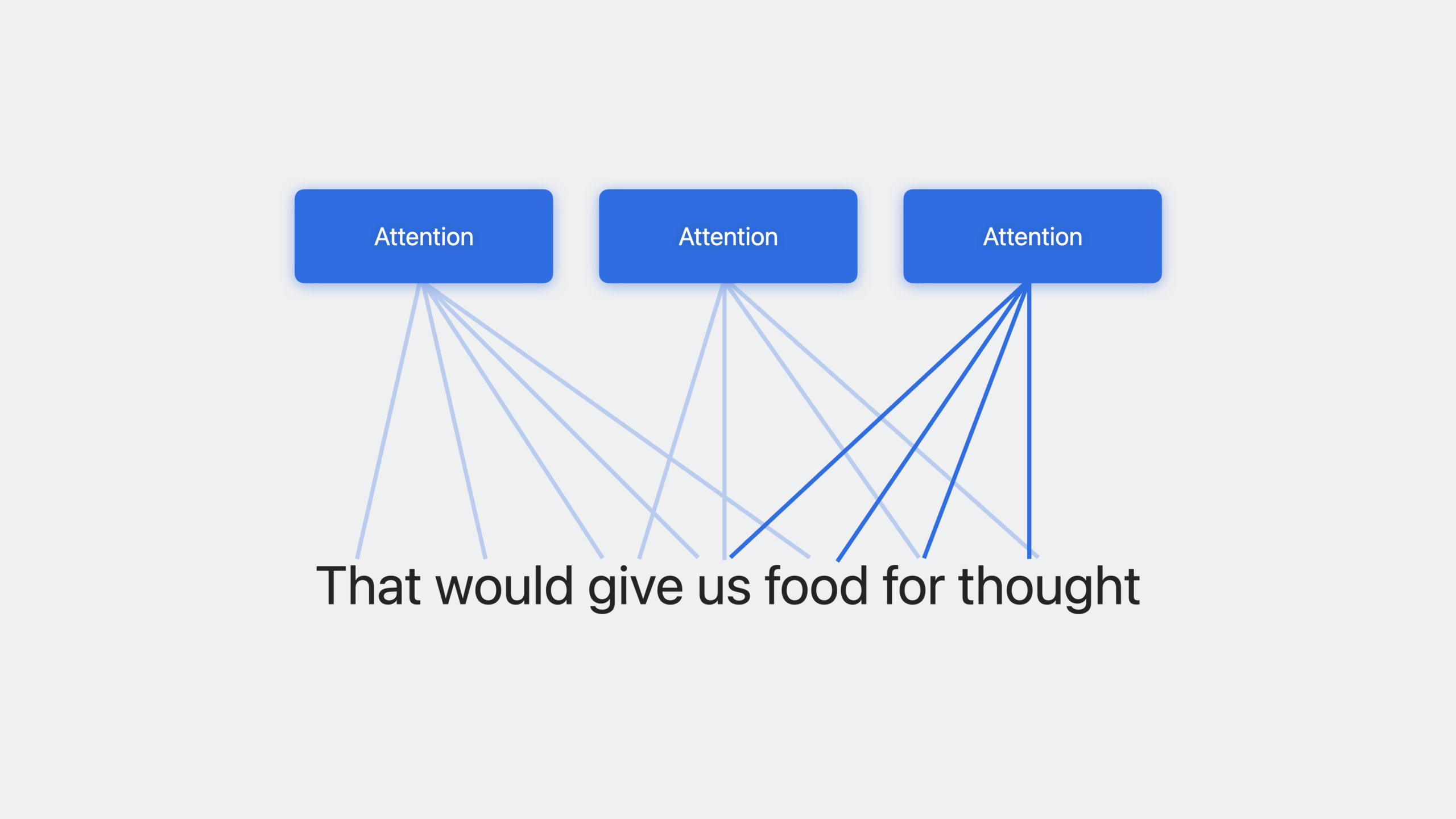
BERT’s core is the multi-headed self-attention mechanism in the Transformer architecture. It lets the model attend to different parts of text in multiple ways simultaneously, generating different vectors for the same word based on context. “food” gets different embedding vectors in “fast food joint” versus “food for thought.”
Apple trained three multilingual BERT models:
- Latin script model: covers English, French, German, Italian, Spanish, and more
- Cyrillic script model: covers Russian, Ukrainian, and more
- CJK model: covers Chinese, Japanese, and Korean
Together they support 27 languages. Because of cross-language similarity, training data in one language helps others—this is called the cross-lingual synergy effect.
Detailed Content
Training a multilingual text classifier with Create ML (06:54)
Training data can be in JSON, directory, or CSV format. Here’s a JSON example of multilingual training data:
[
  { "text": "Hey, want to grab lunch tomorrow?", "label": "personal" },
  { "text": "Ciao, vuoi pranzare domani?", "label": "personal" },
  { "text": "Meeting rescheduled to 3pm", "label": "business" },
  { "text": "La riunione è spostata alle 15", "label": "business" },
  { "text": "50% off all items this weekend!", "label": "commercial" },
  { "text": "¡50% de descuento este fin de semana!", "label": "commercial" }
]
Key points:
- Training data can mix multiple languages—BERT embeddings handle it automatically
- Labels can be any custom category, such as sentiment, topic, or priority
- JSON is most flexible; CSV and directory structures are also supported
Select BERT embeddings as the algorithm in the Create ML app (08:03):
// In the Create ML app Settings tab, choose:
// Algorithm: Transfer Learning
// Embedding: BERT
// Script: Latin (choose according to your language)
Key points:
- The BERT option appears in Create ML app model parameters
- You need to select the corresponding script (Latin, Cyrillic, or CJK)
- For multilingual training, choose “automatic” to let the model detect languages
- Training takes longer than traditional ELMo embeddings but delivers higher accuracy
Using the NLContextualEmbedding API (09:42)
Beyond Create ML, you can work with BERT embeddings directly through the Natural Language framework:
import NaturalLanguage

// Find an embedding model suitable for English
let embedding = NLContextualEmbedding(language: .english)

// Check whether the model has been downloaded
if !embedding.hasAvailableAssets {
    try? embedding.requestAssets()
}

// Get model attributes
let dimension = embedding.dimensionality
let identifier = embedding.modelIdentifier

// Apply to text
let string = "food for thought"
let result = try? embedding.embeddingResult(for: string, language: .english)

// Iterate over each word embedding vector
result?.enumerateTokens(in: string.startIndex..<string.endIndex) { vector, range in
    print("Token: \(string[range])")
    print("Vector dimension: \(vector.count)")
    return true
}
Key points:
NLContextualEmbeddingis a new class in the Natural Language framework- The
languageparameter specifies the target language; the framework automatically selects the corresponding BERT model hasAvailableAssetschecks whether model resources are downloaded—first use may require a downloadrequestAssets()can proactively trigger a download to avoid waiting during inferencemodelIdentifieris a string ensuring the same model is used for training and inferenceembeddingResultreturnsNLContextualEmbeddingResultcontaining vectors for each token
Using BERT embeddings with PyTorch/TensorFlow models (11:17)
BERT embeddings can serve as a universal input layer integrated into any training pipeline:
import NaturalLanguage
import CoreML

// Step 1: Get embedding vectors for training data on macOS
let embedding = NLContextualEmbedding(language: .english)
try? embedding.requestAssets()

let trainingTexts = ["example text 1", "example text 2"]
var embeddings: [[Double]] = []

for text in trainingTexts {
    let result = try? embedding.embeddingResult(for: text, language: .english)
    var vector: [Double] = []
    result?.enumerateTokens(in: text.startIndex..<text.endIndex) { v, _ in
        vector.append(contentsOf: v.map { Double($0) })
        return true
    }
    embeddings.append(vector)
}

// Step 2: Pass embedding vectors into PyTorch/TensorFlow training
// In Python:
// import torch
// x = torch.tensor(embeddings)
// model = YourCustomModel()
// output = model(x)

// Step 3: Convert the trained model to Core ML
// Use coremltools.convert()

// Step 4: During on-device inference, use NLContextualEmbedding again to get input embeddings
// Then pass them into the Core ML model
Key points:
- Use
NLContextualEmbeddingon macOS during training to extract embedding vectors - Pass vectors as NumPy/PyTorch tensors into your model training
- Convert the trained model to
.mlpackagewith Core ML Tools - During on-device inference, repeat the embedding extraction step, ensuring the same
modelIdentifieris used for training and inference - The session demonstrates fine-tuning Stable Diffusion with BERT embeddings for multilingual text-to-image generation
Core Takeaways
-
Add multilingual message auto-classification to your chat app: Train a classifier with BERT embeddings to automatically categorize user messages as personal, work, ads, and more. Why it’s worth doing: modern chat apps have users worldwide—traditional approaches require separate models per language. BERT’s multilingual capability lets one model cover 27 languages. How to start: collect message samples in various languages, train a classifier with BERT embeddings in Create ML, and deploy to iOS 17+ devices.
-
Build a cross-language content moderation system: Use multilingual BERT embeddings to detect inappropriate content. Why it’s worth doing: content moderation typically covers only major languages, leaving low-resource languages as blind spots. BERT’s cross-lingual synergy means even with limited training data for a small language, the model can leverage knowledge from similar languages. How to start: label inappropriate content samples in English and several major languages, train a classifier with BERT, and test generalization to untrained languages.
-
Integrate BERT embeddings into custom Core ML models: If you’re already training models in PyTorch, use BERT embeddings as an input layer replacing traditional word embeddings. Why it’s worth doing: BERT’s context-aware capability far exceeds static embeddings, significantly improving performance on ambiguous text. How to start: extract embedding vectors for training data with
NLContextualEmbeddingon macOS, replace your model’s input layer, and convert with Core ML Tools after training. -
Implement on-device multilingual search enhancement: Use BERT embeddings to improve in-app text search. Why it’s worth doing: traditional keyword matching can’t understand semantic similarity. BERT embeddings place semantically similar terms like “car” and “vehicle” close in vector space, enabling semantic search. How to start: precompute BERT embedding vectors for your document library, compute embeddings for query text at search time, and rank results by cosine similarity.
Related Sessions
- Discover machine learning enhancements in Create ML — BERT text classification and multi-label image classification in Create ML
- Improve Core ML integration with async prediction — Core ML’s async prediction API to improve model inference responsiveness
- Use Core ML Tools for machine learning model compression — Reduce BERT model size with model compression techniques
Comments
GitHub Issues · utterances