
Highlight
iOS 17 and macOS Sonoma’s Speech Synthesis framework adds three capabilities: SSML support for more expressive synthesis, Speech Synthesis Provider to plug custom speech engines into the system as Audio Unit Extensions, and Personal Voice so users can generate synthetic speech from their own voice for assistive communication.
Core Content
Many people rely on speech synthesis to interact with their devices. For them, the choice of synthetic voice is deeply personal. Apple already offers rich system voices, but third-party developers and users with special needs want more.
SSML (Speech Synthesis Markup Language) is a W3C standard that describes speech properties in XML. Previously, AVSpeechSynthesizer accepted only plain text—you could not control pauses, rate, pitch, and other details. You can now pass SSML directly for more natural, expressive synthesis.
Speech Synthesis Provider is the biggest new capability this year. Built on the Audio Unit Extension architecture, it lets developers package their own synthesis engine as an extension and add it to the system voice list. Users can select your voice in Settings; VoiceOver, Siri, and third-party apps can all use it.
Personal Voice is an accessibility feature. After users record their voice, the device generates personalized synthetic speech locally. This matters greatly for people with conditions such as ALS that may affect speech—they can communicate with their own voice.
Detailed Content
SSML speech markup
(02:10) SSML uses XML tags to control speech properties. <break> inserts pauses; <prosody> controls rate and pitch:
<speak>
    Hello
    <break time="1s"/>
    <prosody rate="200%">nice to meet you!</prosody>
</speak>(02:29) Pass SSML into AVSpeechUtterance:
let ssml = """
    <speak>
        Hello
        <break time="1s" />
        <prosody rate="200%">nice to meet you!</prosody>
    </speak>
"""

guard let ssmlUtterance = AVSpeechUtterance(ssmlRepresentation: ssml) else {
    return
}

self.synthesizer.speak(ssmlUtterance)
Key points:
AVSpeechUtterance(ssmlRepresentation:)is the new initializer that accepts an SSML string- Returns Optional—nil when SSML is malformed
- SSML is the standard input format for WebSpeech and Apple’s first-party synthesizers
- Supported tags include
break,prosody, and more; see the W3C specification for the full set
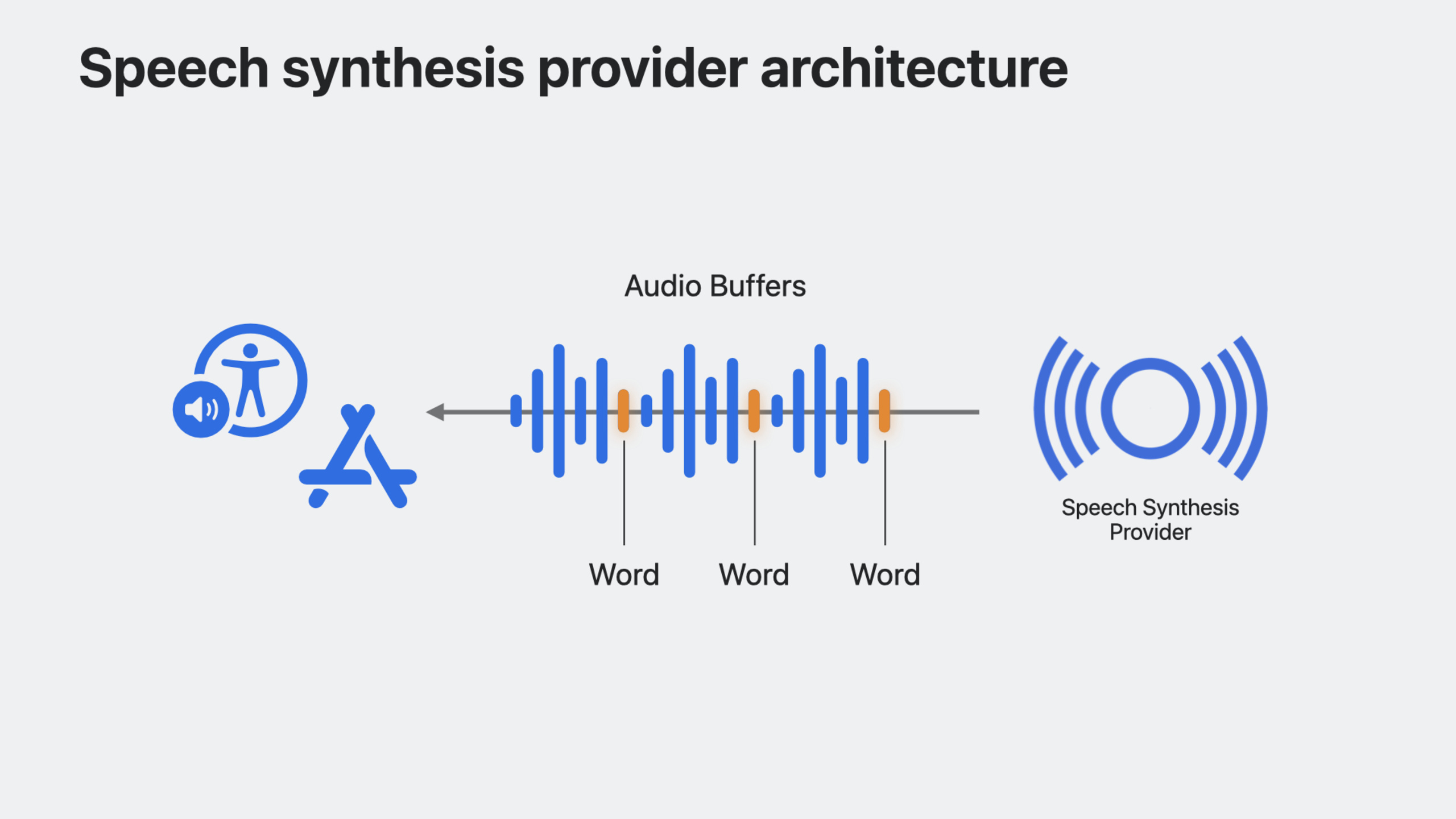
Speech Synthesis Provider architecture
(03:21) The Provider is based on Audio Unit Extension and runs in a separate extension process. The system handles audio session management and playback; the extension only renders SSML to audio.
When creating the project, choose Audio Unit Extension, type “Speech Synthesizer,” and provide four-character subtype and manufacturer identifiers.
The host app shows available voices and handles purchase flow:
struct ContentView: View {
    var body: some View {
        List {
            Section("My Awesome Voices") {
                ForEach(availableVoices) { voice in
                    HStack {
                        Text(voice.name)
                        Spacer()
                        Button("Buy") {
                            // Buy this voice...
                        }
                    }
                }
            }
        }
    }

    var availableVoices: [WWDCVoice] {
        return [
            WWDCVoice(name: "Screen Reader Voice", id: "com.example.screen-reader-voice"),
            WWDCVoice(name: "Reading Voice", id: "com.example.reading-voice")
        ]
    }
}
Key points:
WWDCVoiceis a custom struct in the example storing voice name and identifier- Host app and extension share purchased voice lists via App Group
UserDefaults - After purchase, call
AVSpeechSynthesisProviderVoice.updateSpeechVoices()to refresh the system voice list
(05:13) Update the system voice list after purchase:
func purchase(voice: WWDCVoice) {
    purchasedVoices.append(voice)

    // Write to shared UserDefaults
    updatePurchasedVoices()

    // Notify the system the voice list changed
    AVSpeechSynthesisProviderVoice.updateSpeechVoices()
}(06:25) Listen for system voice list changes:
.onReceive(NotificationCenter.default
    .publisher(for: AVSpeechSynthesizer.availableVoicesDidChangeNotification)) { _ in
        systemVoices = AVSpeechSynthesisVoice.speechVoices()
}
Implementing the Audio Unit Extension
(06:53) The extension core subclasses AVSpeechSynthesisProviderAudioUnit and implements four key parts.
Declare available voices:
public class WWDCSynthAudioUnit: AVSpeechSynthesisProviderAudioUnit {
    public override var speechVoices: [AVSpeechSynthesisProviderVoice] {
        get {
            let voices: [String : String] = groupDefaults.value(forKey: "voices") as? [String : String] ?? [:]
            return voices.map { key, value in
                return AVSpeechSynthesisProviderVoice(
                    name: value,
                    identifier: key,
                    primaryLanguages: ["en-US"],
                    supportedLanguages: ["en-US"]
                )
            }
        }
    }
}
Key points:
speechVoicesreturns an array ofAVSpeechSynthesisProviderVoice- Reads purchased voices from App Group
UserDefaults - Each voice needs name, identifier, primary language, and supported languages
Receive synthesis requests:
public override func synthesizeSpeechRequest(speechRequest: AVSpeechSynthesisProviderRequest) {
    currentBuffer = getAudioBuffer(for: speechRequest.voice, with: speechRequest.ssmlRepresentation)
    framePosition = 0
}
Key points:
synthesizeSpeechRequestreceives synthesis requests from the systemspeechRequest.ssmlRepresentationcontains the SSML textspeechRequest.voicespecifies which voice to use- Generate an audio buffer and track the current frame position
Cancel requests:
public override func cancelSpeechRequest() {
    currentBuffer = nil
}
Render audio frames:
public override var internalRenderBlock: AUInternalRenderBlock {
    return { [weak self]
        actionFlags, timestamp, frameCount, outputBusNumber, outputAudioBufferList, _, _ in
        guard let self else { return kAudio_ParamError }

        var unsafeBuffer = UnsafeMutableAudioBufferListPointer(outputAudioBufferList)[0]
        let frames = unsafeBuffer.mData!.assumingMemoryBound(to: Float32.self)

        var sourceBuffer = UnsafeMutableAudioBufferListPointer(self.currentBuffer!.mutableAudioBufferList)[0]
        let sourceFrames = sourceBuffer.mData!.assumingMemoryBound(to: Float32.self)

        for frame in 0..<frameCount {
            if frames.count > frame && sourceFrames.count > self.framePosition {
                frames[Int(frame)] = sourceFrames[Int(self.framePosition)]
                self.framePosition += 1
                if self.framePosition >= self.currentBuffer!.frameLength {
                    break
                }
            }
        }

        return noErr
    }
}
Key points:
internalRenderBlockis called periodically by the system to fill the requested number of audio frames- Copy data from the previously generated audio buffer into the output buffer
- When all frames are rendered, set
actionFlagstoofflineUnitRenderAction_Completeto notify the system
Personal Voice
(11:10) Personal Voice lets users record their voice and generate synthetic speech locally on device. Request authorization before use:
func fetchPersonalVoices() async {
    AVSpeechSynthesizer.requestPersonalVoiceAuthorization() { status in
        if status == .authorized {
            personalVoices = AVSpeechSynthesisVoice.speechVoices().filter {
                $0.voiceTraits.contains(.isPersonalVoice)
            }
        }
    }
}(11:34) Synthesize speech with Personal Voice:
func speakUtterance(string: String) {
    let utterance = AVSpeechUtterance(string: string)
    if let voice = personalVoices.first {
        utterance.voice = voice
        synthesizer.speak(utterance)
    }
}
Key points:
requestPersonalVoiceAuthorizationrequests user permission to access Personal Voice- After authorization, Personal Voice appears in
AVSpeechSynthesisVoice.speechVoices() - Filter with
voiceTraits.contains(.isPersonalVoice)to find Personal Voice entries - Personal Voice is mainly used in augmentative and alternative communication (AAC) apps and is a sensitive permission
Core Takeaways
-
Build a read-aloud app with SSML support
- Support SSML markup in text-to-speech so users can control pauses, rate, and pitch
- Why it’s worth doing: SSML makes machine reading closer to human expression and greatly improves long-form reading
- How to start: Add SSML tag insertion in the text editor and synthesize with
AVSpeechUtterance(ssmlRepresentation:)
-
Integrate your TTS engine into iOS
- If you have proprietary speech synthesis, package it as an Audio Unit Extension via Speech Synthesis Provider so system speech features can use it
- Why it’s worth doing: go beyond system voices and let users use your voice in VoiceOver, Siri, and more
- How to start: Create an Audio Unit Extension project, choose Speech Synthesizer, and implement the four core methods of
AVSpeechSynthesisProviderAudioUnit
-
Integrate Personal Voice in an AAC app
- Let users choose their Personal Voice as the synthesis voice in your AAC app
- Why it’s worth doing: for users who may lose the ability to speak, communicating in their own voice has enormous emotional value
- How to start: Call
requestPersonalVoiceAuthorization, filterisPersonalVoicevoices, and pass them toAVSpeechUtterance
Related Sessions
- Build accessible apps with SwiftUI and UIKit — Best practices for accessible app development, directly related to speech synthesis accessibility
- Meet Assistive Access — Cognitive accessibility features that complement speech synthesis in a complete accessibility ecosystem
- Design considerations for vision and motion — Design considerations for vision and motion disabilities, complementary to AAC app design principles
Comments
GitHub Issues · utterances