
Highlight
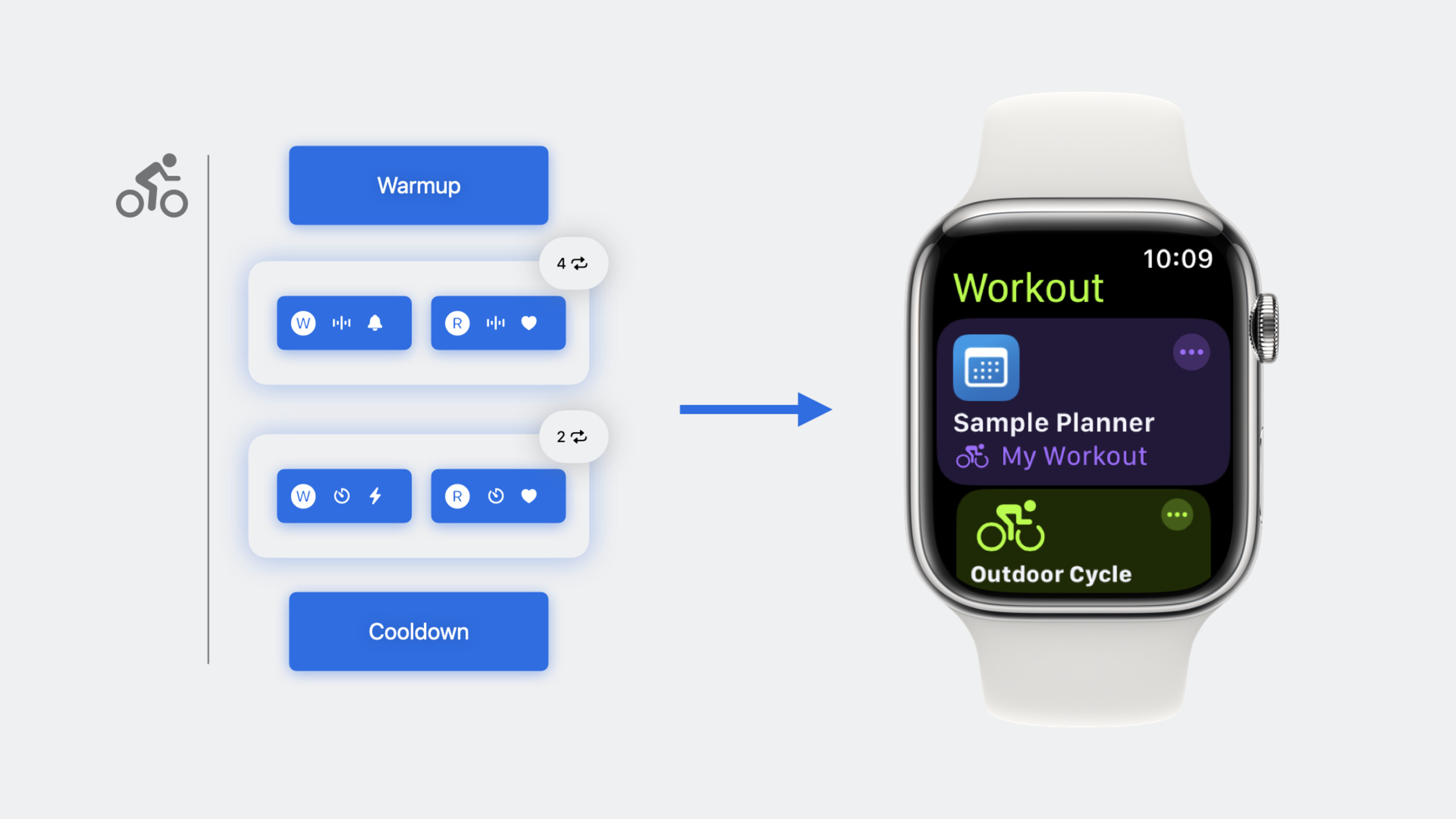
WorkoutKit is a brand-new Swift framework that lets developers create, preview, and schedule custom workout plans in iOS and watchOS apps and sync them to the Apple Watch Workout app. It supports four workout types—single-goal workouts, pacer workouts, triathlon workouts, and custom interval workouts—each with predefined models and system-level UI.
Core Content
Fitness app developers have long faced a challenge: users want to use custom workout plans on Apple Watch, but implementing this is complex and unintuitive.
Previously, to achieve this, developers had to rebuild the entire workout logic on watchOS, including timing, alerts, goal tracking, and UI display. The workload was enormous, and the user experience didn’t match the system Workout app—users are already accustomed to the Workout app’s interactions, and third-party implementations rarely achieve the same smoothness.
Apple introduced the WorkoutKit framework in iOS 17 and watchOS 10. This framework provides predefined workout models; developers only need to describe the workout content, and the system automatically handles UI and sync.
WorkoutKit supports four workout types.
Single-goal workout (SingleGoalWorkout): The simplest form—the user completes one goal: run 5 kilometers, burn 500 calories, or exercise for 30 minutes.
Pacer workout (PacerWorkout): Complete a set distance within a set time. When a user trains at marathon pace, running 10 kilometers in 50 minutes, the system shows in real time whether they’re within the target pace range.
Triathlon workout (SwimBikeRunWorkout): Supports seamless switching between swimming, cycling, and running. Athletes don’t need to manually stop and restart workouts when switching disciplines.
Custom interval workout (CustomWorkout): The most flexible type. Developers can define warm-up, cool-down, and multiple repeating workout blocks, each containing work and recovery phases with custom goals and alerts.
After building a workout, wrap it in a WorkoutPlan to open the system Workout app, export data, or schedule sync to Apple Watch via WorkoutScheduler.
Scheduled sync solves another pain point: users want to plan a week of workouts in advance without opening the app each time. Workout plans appear independently in the Apple Watch Workout app with your app’s icon and name.
Detailed Content
Single-goal workout (02:15)
SingleGoalWorkout is the simplest workout type, suited for “complete one goal” scenarios.
import WorkoutKit

// Create a 5 km running workout
let workout = SingleGoalWorkout(
    activity: .running,
    location: .outdoor,
    goal: .distance(.kilometers(5))
)

// Wrap it as a workout plan
let plan = WorkoutPlan(workout, id: "5k-run")
Key points:
activityspecifies the activity type (running, cycling, swimming, etc.)locationspecifies the environment (outdoor, indoor)goalcan be.distance,.time, or.energyWorkoutPlanprovides a unified interface to open or export workouts
Pacer workout (05:30)
PacerWorkout sets both distance and time goals, suited for pace training.
// Create a pace workout: run 10 km within 50 minutes
let workout = PacerWorkout(
    activity: .running,
    location: .outdoor,
    distance: .kilometers(10),
    time: .minutes(50)
)

let plan = WorkoutPlan(workout, id: "10k-pacer")
Key points:
- Pacer workouts show progress for both distance and time
- The system automatically determines whether the user is within the target pace range
- Suited for marathon training or tempo runs
Custom interval workout (08:45)
CustomWorkout supports structured training, suited for HIIT, Tabata, and similar scenarios.
// Create a work step: run 1 km at 8-10 mph
let workStep = WorkoutStep(
    goal: .distance(.kilometers(1)),
    alert: .speed(.milesPerHour(8...10), metric: .speed)
)

// Create a recovery step: lower heart rate below 140
let recoveryStep = WorkoutStep(
    goal: .time(.minutes(3)),
    alert: .heartRate(120...140)
)

// Create a workout block: repeat 4 times
let block = IntervalBlock(
    steps: [workStep, recoveryStep],
    iterations: 4
)

// Assemble the full workout: warmup + workout block + cooldown
let workout = CustomWorkout(
    activity: .running,
    location: .outdoor,
    displayName: "HIIT Run",
    warmup: WorkoutStep(goal: .time(.minutes(5))),
    blocks: [block],
    cooldown: WorkoutStep(goal: .time(.minutes(5)))
)

let plan = WorkoutPlan(workout, id: "hiit-run")
Key points:
WorkoutStepdefines a single phase withgoalandalertWorkoutGoalsupports four types: distance, time, energy, and openWorkoutAlertprovides real-time feedback: speed, heart rate, power, cadenceIntervalBlockcontrols repeat count viaiterationswarmupandcooldownare optional
Workout alert types (12:20)
WorkoutAlert offers multiple alert methods.
// Speed alert (range mode)
.speed(.milesPerHour(8...10), metric: .speed)

// Speed alert (threshold mode)
.speed(.above(.milesPerHour(8)), metric: .speed)

// Heart rate range alert
.heartRate(120...140)

// Heart rate range alert (using predefined zones)
.heartRate(zone: .zone3)

// Power alert
.power(.watts(200...250))

// Cadence alert
.cadence(.stepsPerMinute(85...95))
Key points:
- Each alert supports range and threshold modes
- The
metricparameter specifies the displayed metric type - Different activity types support different alerts (cycling supports power; swimming does not support cadence)
- The system provides haptic and audio feedback when the user deviates from the target
Triathlon workout (15:50)
SwimBikeRunWorkout supports seamless switching between three disciplines.
let workout = SwimBikeRunWorkout(
    activities: [
        .swim(.distance(.meters(1500))),
        .bike(.distance(.kilometers(40))),
        .run(.distance(.kilometers(10)))
    ],
    displayName: "Olympic-distance triathlon"
)

let plan = WorkoutPlan(workout, id: "olympic-triathlon")
Key points:
- The
activitiesarray defines the three disciplines in order - Each discipline can have its own goal
- The system automatically handles data recording when switching disciplines
Opening the Workout app (18:30)
After creating a WorkoutPlan, you can open the system Workout app or export data.
// Open the Workout app on Apple Watch
plan.openInWorkoutApp()

// Export as JSON data
let data = try plan.dataRepresentation(as: .json)
Key points:
openInWorkoutApp()directly starts the workout on Apple WatchdataRepresentationsupports export as JSON- Calling from iPhone automatically syncs the plan to Apple Watch
Scheduling workouts (21:00)
WorkoutScheduler supports planning workouts in advance and syncing them to Apple Watch on schedule.
// Request authorization
await WorkoutScheduler.shared.requestAuthorization()

// Check authorization status
let state = WorkoutScheduler.shared.authorizationState

// Schedule the workout plan
let scheduler = WorkoutScheduler.shared
let scheduledDate = Calendar.current.date(
    byAdding: .hour,
    value: 1,
    to: Date()
)!

try await scheduler.schedule(plan, at: scheduledDate)

// View scheduled workouts
let workouts = scheduler.scheduledWorkouts

// Mark as completed
try await scheduler.markComplete(plan, at: Date())

// Cancel the schedule
try await scheduler.remove(plan, at: scheduledDate)
Key points:
- You must request user authorization before the first schedule
maxAllowedScheduledWorkoutCountlimits the number of schedulable workouts- Scheduled workouts appear at the top of the Apple Watch Workout app
- Call
markCompleteafter finishing a workout to update status
Checking support (24:15)
Different activity types support different goals and alerts—check before building.
// Check whether the activity type is supported
CustomWorkout.supportsActivity(.running)

// Check whether the goal is supported
CustomWorkout.supportsGoal(
    .heartRate(.above(160)),
    activity: .running,
    location: .outdoor
)

// Check whether the alert is supported
CustomWorkout.supportsAlert(
    .power(.watts(200...250)),
    activity: .cycling,
    location: .indoor
)
Key points:
- Swimming does not support power and cadence alerts
- Indoor running does not support distance goals (GPS unavailable)
- Call
supportsGoalandsupportsAlertfirst to avoid runtime errors
Core Takeaways
-
What to do: Add custom workout plan features to your fitness app so users can train with preset routines. Why it’s worth it: WorkoutKit uses system-level UI—users don’t need to learn new interactions. How to start: Begin with
SingleGoalWorkout, add a “Create Workout Plan” button in your app, then gradually expand toCustomWorkout. -
What to do: Provide pace training plans for marathon runners. Why it’s worth it:
PacerWorkoutshows real-time pace progress—a marathon training essential. How to start: Create a “Pace Training” template page where users enter distance and finish time, generate aPacerWorkout, and schedule it for race day. -
What to do: Provide a customizable interval workout editor for HIIT enthusiasts. Why it’s worth it:
CustomWorkoutsupports flexible phase definitions and real-time alerts, fully meeting HIIT’s structured needs. How to start: Design a drag-and-drop “Workout Editor” where users add work/recovery phases, set goals and alerts, and generate aCustomWorkoutsynced to Apple Watch. -
What to do: Provide one-tap workout plans for triathlon athletes. Why it’s worth it:
SwimBikeRunWorkoutautomatically handles discipline switching without losing workout data. How to start: Preload common templates like Olympic distance and half Ironman; users generate and schedule workouts with one tap. -
What to do: Use
WorkoutSchedulerfor workout calendar management. Why it’s worth it: Users can plan a week of workouts in advance; plans automatically appear in the Apple Watch Workout app, improving retention. How to start: Add a “Workout Calendar” view in your app showing scheduled workouts with CRUD support, callingscheduleandremoveto sync with the system.
Related Sessions
- Build custom swimming workouts with WorkoutKit — In-depth guide on building swimming workouts with WorkoutKit, including different settings for pool and open water
- What’s new in HealthKit — Learn about the latest HealthKit features and updates to use with WorkoutKit for workout data
- What’s new in watchOS — Explore system-level new features in watchOS, including improvements to the Workout app
Comments
GitHub Issues · utterances