
Highlight
URLSession in iOS 17 adds pause/resume APIs for upload tasks (Upload Task) matching download tasks (Download Task), introduces an IETF-standard resumable upload protocol, and adds finer-grained control for background transfers.
Core Content
When building an app that transfers large files, network interruptions are the norm, not the exception. Users enter elevators, switch Wi-Fi, or walk into dead zones—and multi-GB downloads or uploads in progress may abort and require starting over. Before iOS 17, URLSession had cancelByProducingResumeData for download tasks, but upload tasks had no equivalent API. If you wanted resumable file uploads, you had to implement chunking logic at the application layer yourself.
iOS 17 fills this gap for upload tasks. URLSessionUploadTask now supports cancelByProducingResumeData() to pause uploads and generate resume data, and uploadTask(withResumeData:) to continue from the resume point. The API shape is identical to download tasks—zero learning cost.
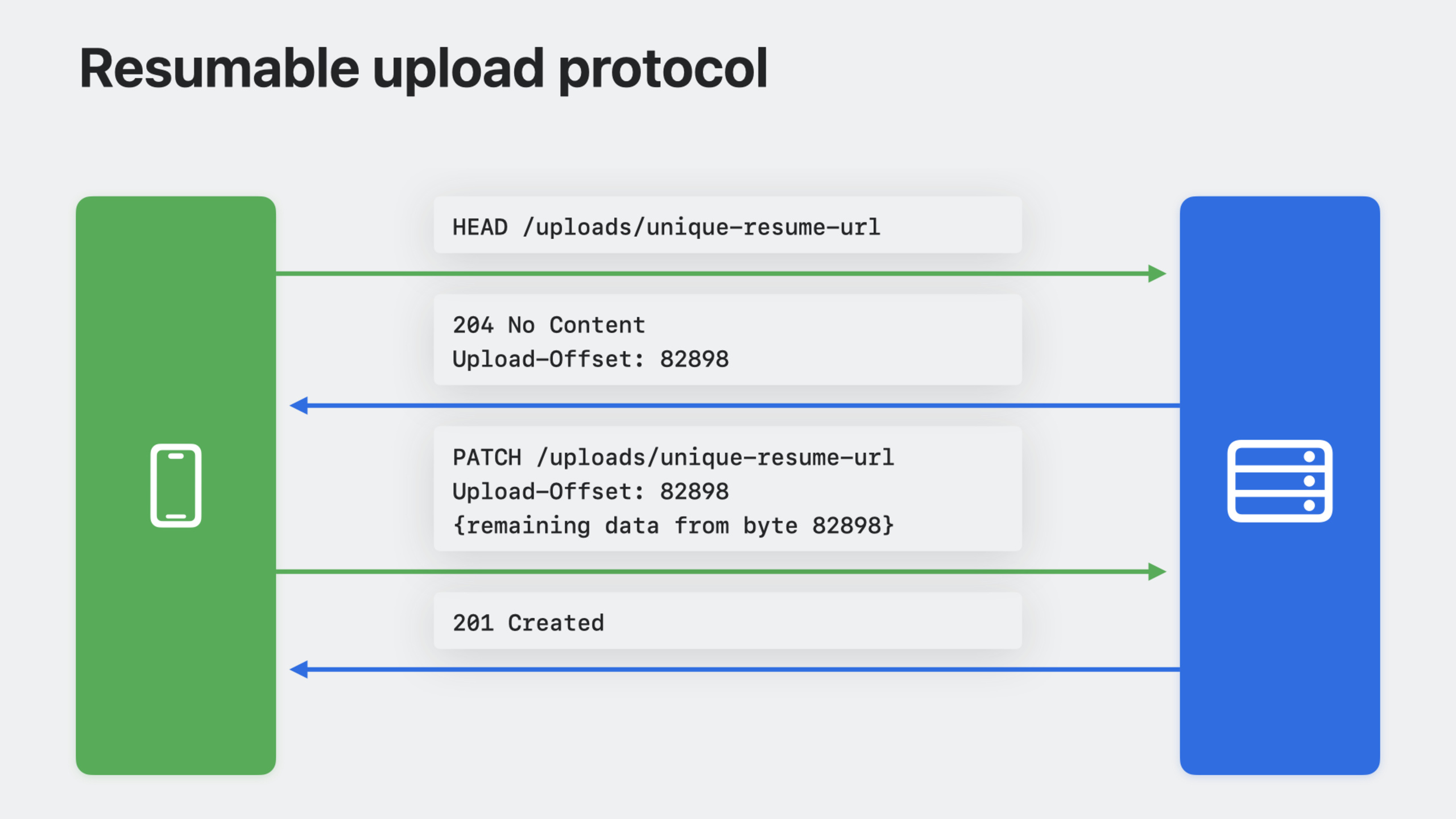
But client APIs alone are not enough. Pause/resume requires server cooperation—the server must understand where the client continues uploading. iOS 17 introduces a resumable upload protocol based on the latest IETF standard draft. Apple also published a SwiftNIO server reference implementation to help backend teams integrate quickly.
Additionally, Background URLSession in iOS 17 gains finer control: you can set earliest begin time for tasks, estimate transfer byte counts to optimize system scheduling, and declare whether constrained networks are allowed.
Detailed Content
Pausing and resuming download tasks (04:53)
URLSession download pause/resume is based on HTTP Range requests. The server declares range support via the Accept-Ranges response header and identifies resource versions via ETag. After interruption, the client sends a Range request with an If-Range header to ensure the resource has not changed.
After creating a download task, use cancelByProducingResumeData() instead of ordinary cancel():
let downloadTask = session.downloadTask(with: request)
downloadTask.resume()

guard let resumeData = await downloadTask.cancelByProducingResumeData() else {
    // Download cannot be resumed
    return
}
Resume data is a binary blob containing downloaded bytes, the original request, and server validation information. Use it to create a new download task and continue from the breakpoint:
let downloadTask = session.downloadTask(with: request)
downloadTask.resume()

guard let resumeData = await downloadTask.cancelByProducingResumeData() else {
    // Download cannot be resumed
    return
}

let newDownloadTask = session.downloadTask(withResumeData: resumeData)
newDownloadTask.resume()
Key points:
cancelByProducingResumeData()is async and waits for the system to generate resume data before returning- Resume data cannot be serialized locally—it may contain temporary file paths that become invalid after app restart
- Returning
nilmeans the server does not support resume; you must download from the beginning
If a download is unexpectedly interrupted by a network error, resume data can be extracted from URLError (06:34):
do {
    let (url, response) = try await session.download(for: request)
} catch let error as URLError {
    guard let resumeData = error.downloadTaskResumeData else {
        // Download cannot be resumed
        return
    }
}
Key points:
URLError.downloadTaskResumeDatais only included in download task errors- When handling errors, check whether resume data exists before deciding to retry from scratch
Pausing and resuming upload tasks (08:29)
Before iOS 17, upload tasks could only be fully cancelled with cancel()—no recovery mechanism. The new API is fully symmetric with download tasks.
Pause upload:
let uploadTask = session.uploadTask(with: request, fromFile: fileURL)
uploadTask.resume()

guard let resumeData = await uploadTask.cancelByProducingResumeData() else {
    // Upload cannot be resumed
    return
}
Resume upload:
let uploadTask = session.uploadTask(with: request, fromFile: fileURL)
uploadTask.resume()

guard let resumeData = await uploadTask.cancelByProducingResumeData() else {
    // Upload cannot be resumed
    return
}

let newUploadTask = session.uploadTask(withResumeData: resumeData)
newUploadTask.resume()
Recover upload from error (09:22):
do {
    let (data, response) = try await session.upload(for: request, fromFile: fileURL)
} catch let error as URLError {
    guard let resumeData = error.uploadTaskResumeData else {
        // Upload cannot be resumed
        return
    }
}
Key points:
- Upload resume data and download resume data are different types and cannot be mixed
- For brief interruptions when the server is reachable, URLSession automatically attempts upload recovery without manual handling
- Upload resume requires server support for the latest IETF resumable upload protocol draft
Resumable upload protocol and SwiftNIO server implementation (13:15)
After the client pauses an upload, resuming sends a special HTTP request asking “how many bytes have I uploaded, and where do I continue?” The server returns an offset based on previously received data; the client continues sending from that offset.
This protocol requires server-side implementation. Apple provides the ready-to-use NIOResumableUpload module in SwiftNIO.
SwiftNIO server code without resumable upload support:
NIOTSListenerBootstrap(group: NIOTSEventLoopGroup())
    .childChannelInitializer { channel in
        channel.configureHTTP2Pipeline(mode: .server) { channel in
            channel.pipeline.addHandlers([
                HTTP2FramePayloadToHTTPServerCodec(),
                ExampleChannelHandler()
            ])
        }.map { _ in () }
    }
    .tlsOptions(tlsOptions)
After adding resumable upload support (14:06):
import NIOResumableUpload

let uploadContext = HTTPResumableUploadContext(origin: "https://example.com")

NIOTSListenerBootstrap(group: NIOTSEventLoopGroup())
    .childChannelInitializer { channel in
        channel.configureHTTP2Pipeline(mode: .server) { channel in
            channel.pipeline.addHandlers([
                HTTP2FramePayloadToHTTPServerCodec(),
                HTTPResumableUploadHandler(context: uploadContext, handlers: [
                    ExampleChannelHandler()
                ])
            ])
        }.map { _ in () }
    }
    .tlsOptions(tlsOptions)
Key points:
HTTPResumableUploadContextuses theoriginparameter to declare the domain allowed for resumable uploadsHTTPResumableUploadHandlerwraps the original business handler and automatically handles protocol handshakes- This module is HTTP/2-based; configure the HTTP/2 pipeline first
NIOResumableUploadis a separate Swift package and must be imported separately
Informational response delegate method (15:48)
The resumable upload protocol relies on HTTP informational responses (1xx status codes) to negotiate resume parameters. iOS 17 adds a new URLSessionTaskDelegate method to receive these responses:
protocol URLSessionTaskDelegate : URLSessionDelegate {
    optional func urlSession(_ session: URLSession, task: URLSessionTask,
                             didReceiveInformationalResponse response: HTTPURLResponse)
}
Key points:
- Informational responses (such as
100 Continue,104 Upload Resumption) are not treated as final responses - This method is called once for each informational response received
- For resumable uploads, the system uses this mechanism internally for protocol negotiation; manual intervention is usually unnecessary
Background URLSession best practices (18:19)
Background URLSession lets transfer tasks continue after the app is suspended. iOS 17 adds finer control options:
// Configuring your background session
let configuration = URLSessionConfiguration.background(withIdentifier: "com.example.app")
configuration.isDiscretionary = true
configuration.allowsConstrainedNetworkAccess = false
let session = URLSession(configuration: configuration, delegate: self, delegateQueue: nil)

// Configuring your background task
let backgroundTask = session.uploadTask(with: url, fromFile: fileURL)
backgroundTask.earliestBeginDate = .now.addingTimeInterval(60 * 60)
backgroundTask.countOfBytesClientExpectsToSend = 500 * 1024
backgroundTask.countOfBytesClientExpectsToReceive = 200
Key points:
isDiscretionary = true: System runs transfers only on Wi-Fi with sufficient battery—suitable for non-urgent contentallowsConstrainedNetworkAccess = false: Prohibits low data mode, hotspot, and other constrained networksearliestBeginDate: Sets earliest start time for the task, e.g., defer to off-peak hourscountOfBytesClientExpectsToSend/Receive: Estimates transfer bytes to help the system optimize scheduling and power consumption- Background URLSession delegate must be set; otherwise completion callbacks cannot be received
Core Takeaways
1. Build a resumable download manager with progress bars
URLSession download pause/resume APIs are mature enough. Combined with URLSessionDownloadDelegate progress callbacks, wrap a ResumableDownloadManager managing multiple download task states (downloading/paused/completed), progress, and resume data. On manual pause, call cancelByProducingResumeData() and store resume data locally (handle temporary file path invalidation). Rebuild tasks on next launch.
2. Add large video resume upload for social apps
Use the new upload resume API for a WeChat Moments-like video upload experience: start uploading immediately after the user selects a video, automatically pause and save resume data when leaving the app or going to background, and auto-continue on next open. Key point: resume data lifecycle management—serialize resume data to disk and clean up after recovery.
3. Provide SwiftNIO resumable upload integration for backend teams
If your team uses a Swift backend (Vapor or bare SwiftNIO), directly import the NIOResumableUpload module and integrate using the session code template. Key configuration: HTTPResumableUploadContext’s origin parameter and pipeline handler order. No extra client code needed—URLSession upload resume API automatically uses the standard protocol.
4. Background content preloading system
Combine Background URLSession’s earliestBeginDate and isDiscretionary for offline preloading in news or video apps. While the app is in foreground, create background tasks for each resource to preload, scheduled for early morning. The system completes downloads automatically on Wi-Fi + charging; content is ready when users open the app in the morning.
Related Sessions
- Ready, set, relay: Protect app traffic with network relays — How to use relays to protect app network traffic privacy
- Reduce network delays with L4S — How L4S reduces network latency and improves real-time app responsiveness
- What’s new in Background Assets — How Background Assets pre-download content before app launch
Comments
GitHub Issues · utterances