
Highlight
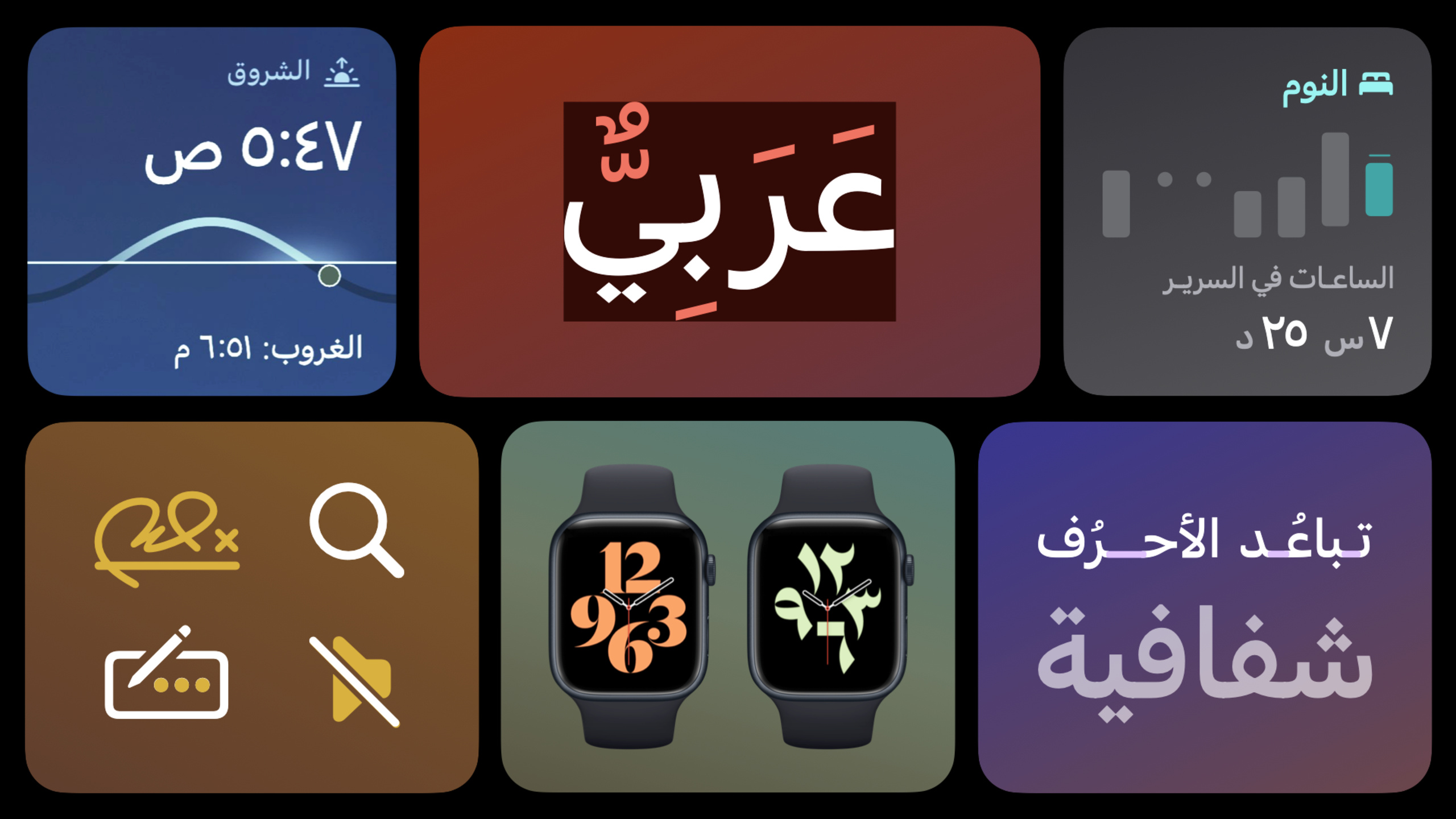
The Apple design team systematically explained the methodology for optimizing applications for Arabic users, covering UI directional flipping, Arabic text typography characteristics (ligatures, font weight, optical size), icon mirroring strategies, and the choice of Western Arabic numerals and Eastern Arabic numerals, helping developers reach the approximately 660 million Arabic-writing users around the world.
Core Content
Why you need to pay attention to Arabic
Arabic is the third largest writing system in the world, spoken by approximately 660 million people in more than 22 countries. If your app wants to reach this group of users, it’s not enough to do language translation—it must also adapt to the directionality of the UI.
Arabic is written from right to left (RTL). This feature not only affects text arrangement, but also permeates the entire layout, navigation logic and interaction design.
UI Directionality: Start with Wireframes
(02:58)
Take the Today tab of the App Store as an example: In the English version, users enter from the Today tab on the left, browse story cards, and finally reach the product page on the right. In the Arabic version, the entire process is reversed: the Today tab is on the right, the story cards slide from right to left, and the product pages are on the left.
The user’s mental model is also reversed - like flipping through an Arabic book, starting from the right page and advancing to the left page.
The good news is that when using Apple’s native frameworks like SwiftUI, most of the RTL adaptation is done automatically. Developers only need to focus on a few special components.
Which elements are flipped and which remain the same
(04:35)
Elements that need to be flipped:
- The order and position of titles, buttons, and navigation bars
- Align paragraphs right
- Interaction direction of carousels and slideable elements
- Temperature scale (lowest temperature on the right, highest temperature on the left)
- Pagination indicators are arranged from right to left
- Progress direction of dates, months, and years in the calendar
- Time axis in the chart (early years on the right, late years on the left)
- Controls such as switches and segment controllers
Elements that remain unchanged:
- Pictures, videos, background content. The sun always rises in the east and should not be flipped because of words
- Clock hand direction (matches physical clock)
- The angle of the magnifying glass icon (reflects right-handed usage and is universally applicable)
Core Features of Arabic Writing
(07:32)
Arabic has two major characteristics that directly affect UI design:
Higature Features: The position of a letter in a word (beginning, middle, end, independent) determines its glyph shape. The same letter may have 4 different forms. This makes Arabic font files much larger than Latin fonts.
Vertical space requirements: Arabic is generally more compact than Latin, but slightly taller - especially when using vocalization marks. If your app makes heavy use of Zhuyin, you may need to increase the vertical spacing to avoid clipping.
SF Arabic font family
(09:34)
Apple offers SF Arabic fonts specifically designed for Arabic:
- Full range of font weights: from Ultralight to Black, consistent with the SF Latin font family
- Optical Size: Large font sizes are used for titles, with a more modern structure; small font sizes are used for body text, increasing angles and contrast to improve readability. The system automatically selects the appropriate form based on the font size.
- SF Arabic Rounded (New): Newly added in WWDC 2022, giving the application a more intimate and lively feel
Notes on typesetting
(12:39)
Case Compensation: Arabic text has no case. Latin, when capitalized, is visually “heavier” than Arabic. Compensate by increasing the Arabic text size by 10%.
Character spacing (Tracking): The hyphenated characteristics of Arabic make character spacing complex. If the font used is not optimized for character spacing, it is recommended to set it to 0 tracking. Apple system fonts automatically handle natural spacing through the Kashida (ligature stretching) mechanism.
Transparency Handling: Non-optimized fonts may show visible seams between letters when transparency is applied. System fonts avoid this problem by applying transparency to the entire word.
Icon Mirroring Strategy
(14:25)
There are over 300 Arabic and RTL-specific variants in SF Symbols. The system API automatically displays the correct localized version.
Icons that need to be mirrored:
- Icons with text direction meaning (such as list row alignment direction)
- Icons related to writing direction (such as pen angle)
- Speaker direction (adjusted to RTL natural direction)
- Calendar dot progress direction
Icons that remain the same:
- Magnifying glass (angle for right-hand use worldwide)
- Clock hands (match physical clock)
- Slash direction (maintain Apple ecological consistency)
In the SF Symbols App, you can see the Arabic variant and other non-Latin script variants by looking at the Localization section of the Info panel after selecting the symbol.
Arabic numeral system
(17:16)
The numbers 0-9 we use every day are actually called “Western Arabic numerals” because they originated from the Arab world.
The Arab world also uses another “Eastern Arabic numerals”: ٠ ١ ٢ ٣ ٤ ٥ ٦ ٧ ٨ ٩
Using Distribution:
- Western Arabic numerals: Morocco, Algeria, Tunisia and other West African Arab countries
- Eastern Arabic numerals: parts of the Levant and Gulf countries
- Mixed use of both: Egypt, Saudi Arabia, etc.
The system will automatically select according to the country where the user is located, and the user can also switch manually. Numbers in the app should support both forms, or validate which one to use based on the target market.
Detailed Content
Use SwiftUI to automatically adapt RTL
(02:18)
SwiftUI’s RTL adaptation is mostly automatic:
import SwiftUI

struct ContentView: View {
    var body: some View {
        NavigationView {
            List {
                Section("Settings") {
                    Toggle("Notifications", isOn: .constant(true))
                    NavigationLink("Account") { AccountView() }
                }
            }
            .navigationTitle("Today")
        }
    }
}
Key points:
NavigationViewThe navigation bar buttons and titles are automatically right-aligned in Arabic environments -ListandFormThe cell layout is automatically mirrored -ToggleThe switch direction automatically adapts- The text direction is automatically determined by the system based on the content language
- Developers do not need to write conditional code to handle RTL
Handling mixed text directions
When the interface contains both Arabic and Latin content, the system automatically determines the orientation based on the language of each text fragment:
Text("Welcome to التطبيق") // The system automatically handles direction based on contentKey points:
- Unicode Bidirectional Algorithm (Bidi Algorithm) automatically handles mixed orientation text
- Latin words in Arabic maintain LTR direction
- Numbers generally maintain LTR orientation in Arabic text
- Use Unicode direction control characters (e.g.
\u{202B}RTL Embedding) can manually control complex scenes
Icon directionality judgment
(15:01)
To determine whether an icon needs mirroring, ask yourself two questions:
-
Does the orientation of this icon suggest a reading/writing direction?
- Yes → Mirroring is required (such as list rows, text layout icons)
- No → Leave as is (e.g. magnifying glass, clock)
-
Does the orientation of this icon reflect the orientation of the physical world?
- Yes → Leave as is (sunrise direction, clock hands)
- No → Depends on UI orientation
Localized icons in SF Symbols automatically display the correct version. Custom icons require RTL variants to be provided manually.
Localization of digital display
(18:38)
useNumberFormatterHandle digital localization automatically:
let formatter = NumberFormatter()
formatter.locale = Locale.current  // The system automatically chooses the numeral form based on user settings
formatter.numberStyle = .decimal

let formatted = formatter.string(from: 1234)  // May output "١٢٣٤" or "1234"
Key points:
Locale.currentAutomatically reflect users’ regional and digital preferences- System applications such as calculators, calendars, and clocks all follow this rule
- Hardcoding numeric strings bypasses localization and should be avoided
- For specific markets, the locale can be explicitly set to validate numeric forms
Core Takeaways
-
Designed for a global audience: With Arabic reaching 660 million users, RTL adaptation is more than just translation. Using the SwiftUI native framework can significantly reduce adaptation costs and enable applications to be globalized from the first day. Entry: Xcode Project Settings → Localizations → Add Arabic.
-
Cultural details enhance the experience: The calendar app displays the Islamic lunar month start marks, and the weather app uses the temperature scale direction familiar to local users. These details make users feel respected. Entrance: Research the cultural habits of the target market in UI design, and refer to the Arabic version of Apple’s native applications.
-
Bilingual interface optimization: Mixed use of Arabic and English is common in the Middle East market. SF Arabic has the same style as the SF Latin font family, and the bilingual interface is natural and harmonious. Note the 10% increase in size for Arabic text next to uppercase Latin text. Entry: use system fonts
Font.system(), automatically get SF Arabic. -
SF Symbols Localization Check: Browse all the icons used by your app in the SF Symbols App and check the Localization panel for Arabic variants. Icon evaluation without variants requires manual creation of RTL versions. Entrance: SF Symbols App → Select icon → Info panel → Localization.
-
Number format automatic adaptation: Financial or data applications ensure that all numbers are displayed through
NumberFormatterHandle, don’t hardcode numeric strings. This way the system will automatically select Western or Eastern Arabic numerals based on the user’s region. Entrance: allText("\(value)")Replaced with the version using Formatter.
Related Sessions
- Get it right (to left) — Technical details of RTL adaptation from a development perspective
- Build global apps: Localization by example — Learn application localization through examples
- Meet the expanded San Francisco font family — Introduction to SF Arabic and SF Arabic Rounded fonts
Comments
GitHub Issues · utterances