
Highlight
Apple provides a proactive in-app purchase recovery mechanism through StoreKit 2 and original StoreKit, which allows the application to automatically detect the user’s purchase status (new customer, active subscriber, inactive subscriber) when it is launched, without the user having to click “Restore Purchase” or enter a password to display personalized interface content.
Core Content
Pain points of traditional experience
A user downloads your app from the App Store and faces three options after opening it: purchase, log in, and restore purchase. For paid subscribers, especially on new devices, it’s hard to know which one to click.
This process adds friction. Users may make a mistake and purchase again, or they may be lost because they cannot find the purchased content.
The core idea of active recovery
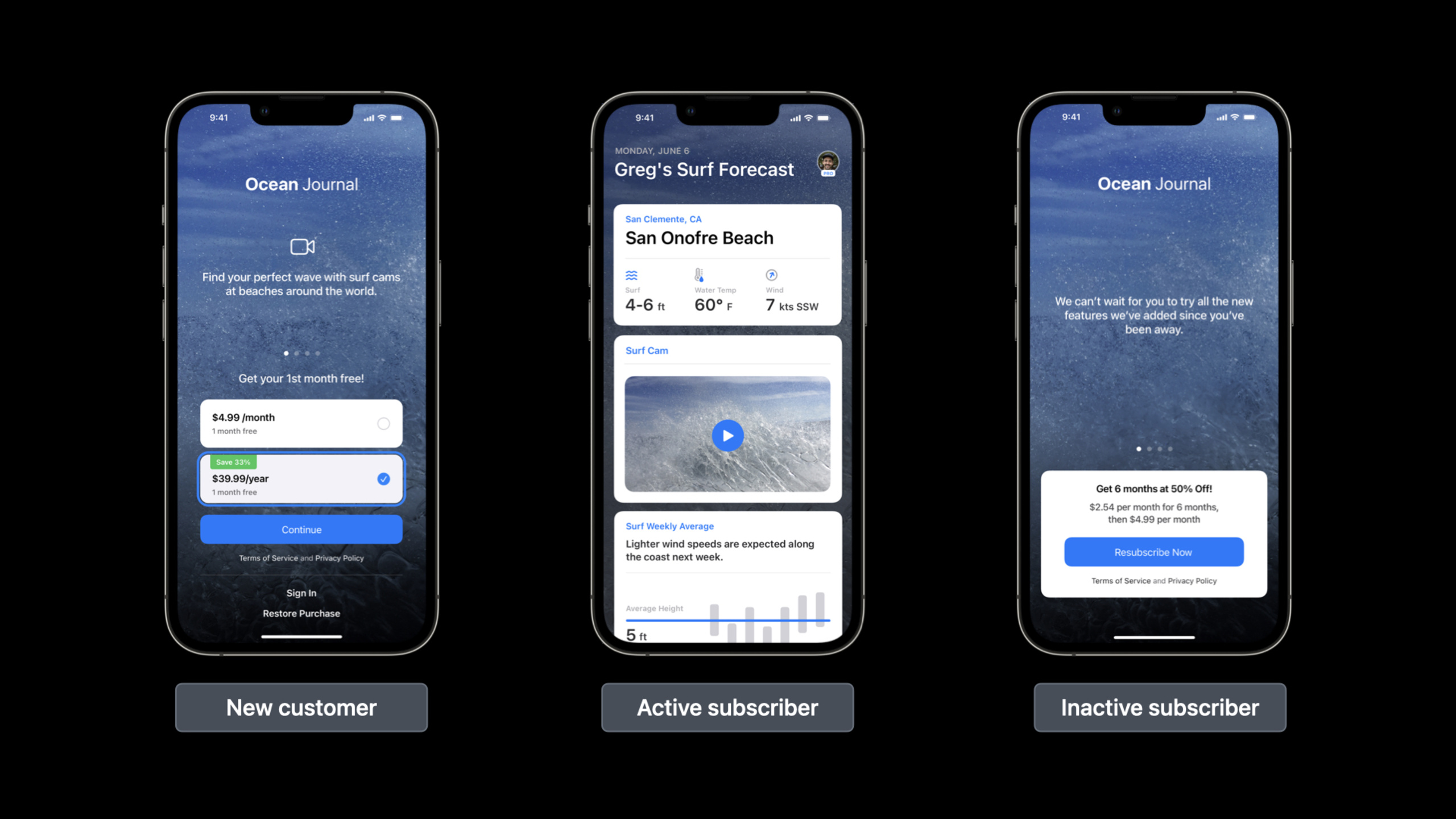
Apple’s solution is simple: When the app starts, it uses StoreKit data already on the device to proactively check the user’s transaction history. Based on the results, users are divided into three categories and different interfaces are displayed respectively:
New Customer: There is no purchase record, and the default product promotion interface is displayed.
Active Subscriber: With valid transactions, all features are unlocked directly and the purchase button is hidden.
Inactive Subscribers: Purchased in the past but expired or canceled, display recall offer.
This process is completely automatic and requires no action from the user.
Three core customer statuses
(03:28)
There are three purchase types available for active recovery: non-consumable, non-renewing subscription, and auto-renewable subscription. They are all persisted in the user’s transaction history.
New Customer: Signed in with an Apple ID but without any current or past in-app purchases. Show a default merchandising interface, such as the Ocean Journal app showing a monthly/annual subscription trial.
Purchased and Active: The customer has a valid transaction and the app must grant access. The interface directly displays unlocked content, such as live beach cams, without any purchase buttons.
INACTIVE: Purchased in the past but has expired or been canceled (refund, family sharing revocation). Show promotional offers or discount codes to such users to recall. Users in the billing retry period are prompted to update their payment information.
Billing retry and grace period
(05:27)
When a subscription fails to auto-renew, Apple enters a billing retry period of up to 60 days. If Billing Grace Period is enabled in App Store Connect, users can continue to use the service during retries. Apps should gently prompt users to update payment information during this time, rather than interrupting service.
Detailed Content
StoreKit 2 implements three steps
(10:07)
After the app is launched and before the purchase button is displayed, three steps must be completed:
Step 1: Monitor transaction updates
(11:16)
func listenForTransactions() -> Task<Void, Error> {
    return Task.detached {
        for await result in Transaction.updates {
            do {
                let transaction = try self.checkVerified(result)
                await self.updateCustomerProductStatus()
                await transaction.finish()
            } catch {
                print("Transaction failed verification")
            }
        }
    }
}
Key points:
Transaction.updatesReturn outstanding transactions or transaction updates- The authenticity of the transaction must be verified first (
checkVerified), and then deliver the content - Must be called after delivery
transaction.finish(), otherwise the transaction will continue to return - Listening should start as soon as the app starts, as transactions may come from family sharing, code redemption, auto-renewal, etc.
Step 2: Determine customer product status
(12:27)
func updateCustomerProductStatus() async {
    var purchasedCars: [Product] = []
    var purchasedSubscriptions: [Product] = []
    var purchasedNonRenewableSubscriptions: [Product] = []

    for await result in Transaction.currentEntitlements {
        do {
            let transaction = try checkVerified(result)

            switch transaction.productType {
            case .nonConsumable:
                if let car = cars.first(where: { $0.id == transaction.productID }) {
                    purchasedCars.append(car)
                }
            case .nonRenewable:
                if let nonRenewable = nonRenewables.first(where: { $0.id == transaction.productID }),
                   transaction.productID == "nonRenewing.standard" {
                    let currentDate = Date()
                    let expirationDate = Calendar(identifier: .gregorian).date(
                        byAdding: DateComponents(year: 1),
                        to: transaction.purchaseDate
                    )!
                    if currentDate < expirationDate {
                        purchasedNonRenewableSubscriptions.append(nonRenewable)
                    }
                }
            case .autoRenewable:
                if let subscription = subscriptions.first(where: { $0.id == transaction.productID }) {
                    purchasedSubscriptions.append(subscription)
                }
            default:
                break
            }
        } catch {
            print("Verification failed")
        }
    }

    self.purchasedCars = purchasedCars
    self.purchasedNonRenewableSubscriptions = purchasedNonRenewableSubscriptions
    self.purchasedSubscriptions = purchasedSubscriptions

    subscriptionGroupStatus = try? await subscriptions.first?.subscription?.status.first?.state
}
Key points:
Transaction.currentEntitlementsReturns all transactions the user may have access to- Non-renewable subscriptions do not have a built-in expiration mechanism and need to be calculated manually (such as the purchase date plus one year)
- Auto-renewable subscription passes
subscription?.status.first?.stateGet renewal status - Renewal status includes:
.subscribed、.expired、.revoked、.inBillingRetryPeriod、.inGracePeriod
Step 3: Personalize the interface based on status
(13:45)
if store.purchasedCars.isEmpty &&
   store.purchasedNonRenewableSubscriptions.isEmpty &&
   store.purchasedSubscriptions.isEmpty {
    // New customer: show the default promotional interface
    VStack {
        Text("SK Demo App")
            .bold()
            .font(.system(size: 50))
        Text("Head over to the shop to get started!")
        NavigationLink { StoreView() } label: { Text("Shop") }
    }
} else {
    // Has purchase history: show purchased content
    List {
        Section("My Cars") {
            ForEach(store.purchasedCars) { product in
                NavigationLink { ProductDetailView(product: product) } label: {
                    ListCellView(product: product, purchasingEnabled: false)
                }
            }
        }
    }
}
Key points:
- Show new customer interface when there are no active transactions
- Display the purchased content list when there are active transactions, disable the purchase function
- Display different prompts for inactive subscribers (expiration, cancellation, billing retry)
Original StoreKit implementation (iOS 7+)
(16:06)
For older versions that don’t support StoreKit 2, use original StoreKit+verifyReceiptEndpoint:
public func getReceipt() {
    if let appStoreReceiptURL = Bundle.main.appStoreReceiptURL,
       FileManager.default.fileExists(atPath: appStoreReceiptURL.path) {
        do {
            let receiptData = try Data(contentsOf: appStoreReceiptURL, options: .alwaysMapped)
            let receiptString = receiptData.base64EncodedString(options: [])
            // Send to the server for verification
            sendToServer(receiptString)
        } catch {
            print("Couldn't read receipt data: \(error)")
        }
    }
}
Key points:
- from
Bundle.main.appStoreReceiptURLGet app receipt - The receipt is sent to the server, which calls Apple’s
verifyReceiptEndpoint verification - In Sandbox and TestFlight, receipts only exist after completing the purchase or restore
- If there is no receipt, it will be treated as a new customer
Server status synchronization
(05:17)
Each transaction has a uniqueoriginalTransactionID, persists across the user’s Apple ID and the store. It is recommended to use this ID to associate a user account (either anonymous or user-created) on your server.
With App Store Server Notifications Version 2, the server can learn transaction status changes in real time: refund, cancellation, renewal, billing retry, expiration, etc. Version 2 supports 28 different event types and subtypes.
Summary of best practices
(19:08)
- Keep the “Restore Purchases” button as a fallback for users to switch Apple IDs or troubleshoot issues
- Use CloudKit to securely sync purchase status data to a user’s multiple devices
- When supporting multiple products or subscription groups, determine the customer status of each product separately
- Consider the impact of cross-platform purchases (e.g. web) on customer status
- Comprehensive testing with Sandbox, TestFlight and Xcode StoreKit Testing
Core Takeaways
-
Zero Friction Subscription Experience: Fitness or learning apps automatically detect whether the user has an active subscription upon launch. Some will directly unlock all courses, while others will show trial offers. Entrance API:
Transaction.currentEntitlements+Product.SubscriptionInfo.RenewalState。 -
Lost user recall system: The music or video application recognizes that the user’s subscription has expired, and directly displays exclusive recall offers (such as half price for the first month) when it is launched. Entry API: Check
subscriptionGroupStatus == .expired, and then callProduct.subscription?.subscriptionOfferDisplay promotional offers. -
Automatic adaptation of family sharing: Children’s education applications detect new devices that have gained access through family sharing and automatically unlock all content without the need for parents to purchase it again. Entrance API:
Transaction.updatesMonitor home sharing authorization changes,checkVerifiedAutomatically delivered after transaction verification. -
Gentle reminder for billing issues: The SaaS tool application recognizes that the user is in the billing retry period and displays a non-intrusive banner at the top of the interface to prompt you to update the payment information while keeping the service available. Entrance API:
subscriptionGroupStatus == .inBillingRetryPeriod, directing the user tohttps://apps.apple.com/account/billing。 -
Cross-device status synchronization: After purchasing the Pro version of the Notes or Documents app on iPhone, the iPad will automatically recognize and unlock advanced features when it is turned on for the first time. Portal API: StoreKit 2 transactions are automatically synced to all devices with the same Apple ID,
Transaction.currentEntitlementsReturn consistent results on any device.
Related Sessions
- What’s new with in-app purchases — Latest updates to StoreKit, Server API and Server Notifications Version 2
- Explore in-app purchase integration and migration — Migrate to the latest App Store Server API and Server Notifications
- Reducing involuntary subscriber churn — Best practices for reducing involuntary subscriber churn
Comments
GitHub Issues · utterances