
Highlight
Xcode 14 introduces Swift Package Plugin, allowing developers to extend the build process with Swift code: custom command plug-ins automate publishing tasks, and build tool plug-ins generate source code or resource files before and after compilation, all implemented through the PackagePlugin API.
Core Content
From scripts to plugins: why you need this new tool
There may be a shell script in your project that you run manually before each release: generating version numbers, extracting the Git contributor list, and formatting the code. These scripts are scattered in various warehouses, new members do not know how to use them, and the CI environment and local environment behave inconsistently.
Swift Package Plugin also incorporates these workflows into the Swift Package system. Plug-ins, like libraries, can be version managed, relied on, and shared. More importantly, the plug-in is directly integrated into the right-click menu of Xcode and the command line of SwiftPM, eliminating the need to remember a bunch of script paths.
Two plug-in types
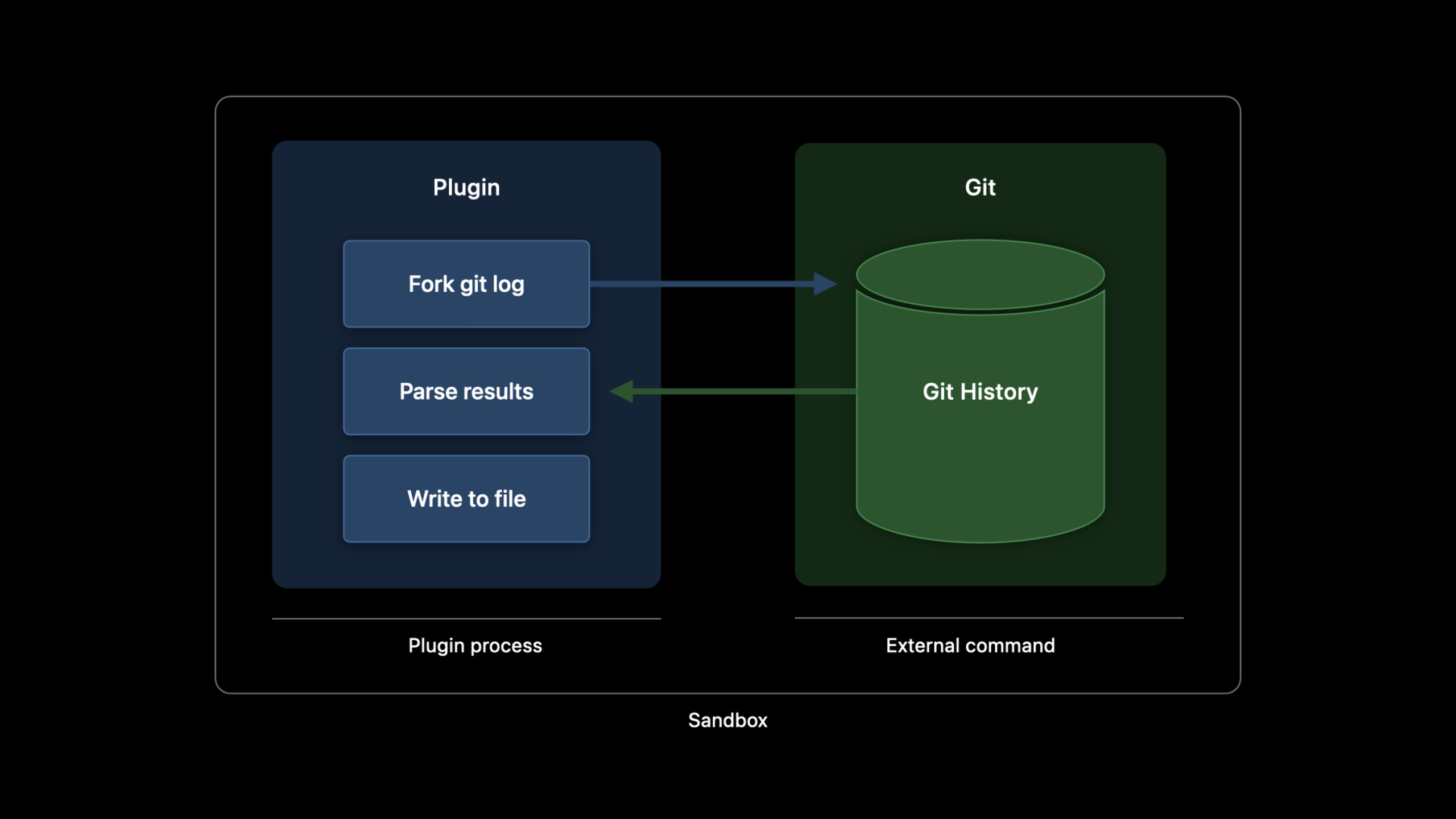
Custom command plug-in (Command Plugin): manually triggered by the user. Suitable for one-time tasks, such as generating CONTRIBUTORS files, tagging, and publishing to CocoaPods. There are two triggering methods: Xcode project navigation bar right-click menu, orswift packagecommand line.
Build Tool Plugin: Automatically runs during the build process. Suitable for code generation and resource processing. There are two types:
- In-build command: There are clear input and output files. The build system determines whether it needs to be re-executed by comparing the modification time of the input and output. Suitable for code generation scenarios.
- Pre-build command: There is no clear output, and it is executed every time it is built. Suitable for tasks such as extracting localized strings. Use with caution to avoid slowing down your build.
Sandbox and Permissions
The plug-in runs in a sandbox, network access is prohibited by default, and it can only write to the temporary directory. If the plug-in needs to write to the package root directory (such as generating CONTRIBUTORS.txt), the permission must be declared in the manifest and the reason must be given. When users run it for the first time, they will see a permission request dialog box, similar to the system permission prompt of macOS.
Detailed Content
Create a custom command plug-in: generate a list of contributors
(03:40)
Declare the plugin in Package.swift:
// swift-tools-version: 5.6

import PackageDescription

let package = Package(
    name: "MyPackage",
    products: [...],
    targets: [
        .plugin(
            name: "GenerateContributors",
            capability: .command(
                intent: .custom(
                    verb: "regenerate-contributors-list",
                    description: "Generates the CONTRIBUTORS.txt file based on Git logs"
                ),
                permissions: [
                    .writeToPackageDirectory(reason: "This command writes the new CONTRIBUTORS.txt to the source root.")
                ]
            )
        ),
    ]
)
Key points:
swift-tools-versionAt least 5.6, the plugin supports it starting from this version -.plugin()Define the plug-in target, corresponding toPlugins/subfolders under directory -capability: .command()Represents a custom command plug-in -intent: .custom(verb:description:)Define SwiftPM command actions and descriptions -permissionsDeclare the required permissions,.writeToPackageDirectoryAllow writing to package root directory -reasonIt will be displayed to the user to determine whether the user authorizes it.
Plug-in implementation code (Plugins/GenerateContributors/plugin.swift):
(05:06)
import PackagePlugin
import Foundation

@main
struct GenerateContributors: CommandPlugin {

    func performCommand(
        context: PluginContext,
        arguments: [String]
    ) async throws {
        let process = Process()
        process.executableURL = URL(fileURLWithPath: "/usr/bin/git")
        process.arguments = ["log", "--pretty=format:- %an <%ae>%n"]

        let outputPipe = Pipe()
        process.standardOutput = outputPipe
        try process.run()
        process.waitUntilExit()

        let outputData = outputPipe.fileHandleForReading.readDataToEndOfFile()
        let output = String(decoding: outputData, as: UTF8.self)

        let contributors = Set(output.components(separatedBy: CharacterSet.newlines))
            .sorted()
            .filter { !$0.isEmpty }

        try contributors.joined(separator: "\n")
            .write(toFile: "CONTRIBUTORS.txt", atomically: true, encoding: .utf8)
    }
}
Key points:
@mainMark the entry point and the plug-in is compiled into a standalone executable file- Realize
CommandPluginagreedperformCommand(context:arguments:)method -contextProvide package map information and plug-in working directory -argumentsReceive command line parameters passed in by the user - use
Foundation.ProcessCall external commands (such as Git) - The working directory when the plug-in is executed is the package root directory, just write the file directly
How to run:
# Command line
swift package regenerate-contributors-list

# Or right-click the package in Xcode and choose the plugin command
Create an In-build plugin: Generate type-safe constants from Asset Catalog
(14:56)
This plugin requires a helper executable to generate code. The structure is divided into two parts: the executable does the actual work, and the plugin plugs the executable into the build system.
Executable file (AssetConstantsExec/main.swift):
(15:03)
import Foundation

let arguments = ProcessInfo().arguments
if arguments.count < 3 {
    print("missing arguments")
    exit(1)
}
let (input, output) = (arguments[1], arguments[2])

struct Contents: Decodable {
    let images: [Image]
}

struct Image: Decodable {
    let filename: String?
}

var generatedCode = """
    import Foundation
    import SwiftUI

    """

try FileManager.default.contentsOfDirectory(atPath: input).forEach { dirent in
    guard dirent.hasSuffix("imageset") else {
        return
    }

    let contentsJsonURL = URL(fileURLWithPath: "\(input)/\(dirent)/Contents.json")
    let jsonData = try Data(contentsOf: contentsJsonURL)
    let assetCatalogContents = try JSONDecoder().decode(Contents.self, from: jsonData)
    let hasImage = assetCatalogContents.images.filter { $0.filename != nil }.isEmpty == false

    if hasImage {
        let basename = contentsJsonURL.deletingLastPathComponent().deletingPathExtension().lastPathComponent
        generatedCode.append("public let \(basename) = Image(\"\(basename)\", bundle: .module)\n")
    }
}

try generatedCode.write(to: URL(fileURLWithPath: output), atomically: true, encoding: .utf8)
Key points:
- The executable file receives two parameters: Asset Catalog path and output file path
- traverse
.imagesetdirectory, parsingContents.jsonDetermine whether there is an actual picture - generated for each valid image
public letconstant, of typeSwiftUI.Image bundle: .moduleLoad images from the package’s resource bundle
Package.swift declares:
(15:48)
.executableTarget(name: "AssetConstantsExec"),
.plugin(
    name: "AssetConstants",
    capability: .buildTool(),
    dependencies: ["AssetConstantsExec"]
),
Plug-in implementation:
(16:12)
import PackagePlugin

@main
struct AssetConstants: BuildToolPlugin {

    func createBuildCommands(
        context: PluginContext,
        target: Target
    ) async throws -> [Command] {
        guard let target = target as? SourceModuleTarget else {
            return []
        }

        return try target.sourceFiles(withSuffix: "xcassets").map { assetCatalog in
            let base = assetCatalog.path.stem
            let input = assetCatalog.path
            let output = context.pluginWorkDirectory.appending(["\(base).swift"])

            return .buildCommand(
                displayName: "Generating constants for \(base)",
                executable: try context.tool(named: "AssetConstantsExec").path,
                arguments: [input.string, output.string],
                inputFiles: [input],
                outputFiles: [output]
            )
        }
    }
}
Key points:
- Realize
BuildToolPluginagreedcreateBuildCommands(context:target:)method -target.sourceFiles(withSuffix: "xcassets")Find all Asset Catalogs in the target -context.pluginWorkDirectoryIt is the temporary working directory of the plug-in. The generated files are placed here. -context.tool(named:)Find the executable file path that the plug-in depends on -.buildCommand()Declare the in-build command and specify the input and output files for the build system to track - The output file will automatically participate in the target compilation
Use the plugin’s library target:
.target(
    name: "IconLibrary",
    dependencies: [],
    plugins: ["AssetConstants"]
),
Create Pre-build plug-in: automatically extract localized strings
(20:19)
This plug-in is released as a standalone package and can be relied upon by other packages.
Package.swift:
// swift-tools-version: 5.6

import PackageDescription

let package = Package(
    name: "GenstringsPlugin",
    products: [
        .plugin(name: "GenstringsPlugin", targets: ["GenstringsPlugin"]),
    ],
    targets: [
        .plugin(
            name: "GenstringsPlugin",
            capability: .buildTool()
        ),
    ]
)
Key points:
.plugin(name:targets:)Product declarations allow plugins to be relied upon by external packages- No
dependenciesexecutable file, directly calling system toolsxcrun genstrings
Plug-in implementation:
(20:44)
import PackagePlugin

@main
struct GenstringsPlugin: BuildToolPlugin {

    func createBuildCommands(
        context: PluginContext,
        target: Target
    ) async throws -> [Command] {
        guard let target = target as? SourceModuleTarget else {
            return []
        }

        let resourcesDirectoryPath = context.pluginWorkDirectory
            .appending(subpath: target.name)
            .appending(subpath: "Resources")
        let localizationDirectoryPath = resourcesDirectoryPath
            .appending(subpath: "Base.lproj")

        try FileManager.default.createDirectory(
            atPath: localizationDirectoryPath.string,
            withIntermediateDirectories: true
        )

        let swiftSourceFiles = target.sourceFiles(withSuffix: ".swift")
        let inputFiles = swiftSourceFiles.map(\.path)

        return [
            .prebuildCommand(
                displayName: "Generating localized strings from source files",
                executable: .init("/usr/bin/xcrun"),
                arguments: [
                    "genstrings",
                    "-SwiftUI",
                    "-o", localizationDirectoryPath.string
                ] + inputFiles.map(\.string),
                outputFilesDirectory: localizationDirectoryPath
            )
        ]
    }
}
Key points:
.prebuildCommand()Declare the pre-build command to be executed for each build- Call system
xcrun genstringstool extractionNSLocalizedStringcall --SwiftUIParameters support SwiftUI’s string localization syntax -outputFilesDirectorySpecify the output directory and do not declare a specific output file list - Generated
.stringsThe file is automatically added to the target resource bundle
External packages use this plugin:
(21:44)
// Package.swift
dependencies: [
    .package(path: "../GenstringsPlugin"),
],
targets: [
    .target(
        name: "MyLibrary",
        dependencies: [],
        plugins: [
            .plugin(name: "GenstringsPlugin", package: "GenstringsPlugin"),
        ]
    ),
]
Plug-in type selection decision
| Scenario | Plug-in Type | Reason |
|---|---|---|
| Generate CONTRIBUTORS, CHANGELOG | Command Plugin | Manually trigger, no need to run every build |
| Generate Swift code from Proto/GraphQL | In-build Build Tool | The input and output are clear, and the build system can determine whether it needs to be regenerated |
| Extract localized strings | Pre-build Build Tool | The output is not fixed, and the source files must be scanned for each build |
| Code formatting check | Command Plugin | Developers actively trigger, not suitable for automatically modifying built products |
Core Takeaways
1. Build a code generation tool chain for the team
- What to do: Migrate the code generation steps of Proto, GraphQL, OpenAPI and other projects in the project from Makefile to Swift Package Plugin
- Why is it worth doing: Plug-ins and project code are version managed together. New members do not need to install additional tool chains after cloning the repository. Xcode automatically generates code when building.
- How to start: Encapsulate the existing code generation logic into an executable target and write a BuildToolPlugin in
createBuildCommandsCall it in, declare the input schema file and output Swift file path
2. Automated version number and release process
- What to do: Create a Command Plugin to complete version number update, CHANGELOG generation, and Git labeling with one click
- Why it’s worth doing: Standardize the release process and reduce human errors. Plug-ins can call
ProcessTo execute Git commands, usewriteToPackageDirectoryPermission to modify version file - How to start: Implementation
CommandPlugin,existperformCommandRead Git tag history, generate CHANGELOG, and updatePackage.swiftOr the version number in plist, executiongit tag
3. Type-safe resource references
- What to do: Generate compile-time constants for images, colors, fonts and other resources in the project, replacing string hardcoding
- Why it’s worth doing: Spelling errors can be found during compilation, Xcode automatically completes resource names, and you can just rename the symbols during refactoring
- How to start: Refer to the AssetConstants example in Session, traverse the Asset Catalog or resource directory, and generate
public letconstant. The in-build command tells the build system to only rebuild when resources change
4. Localization workflow automation
- What: Automatically scan your code for new strings on every build, update
.stringstemplate file - Why it’s worth doing: Developers don’t need to run it manually after adding new copy.
genstrings, CI automatically checks whether there are unlocalized strings when building - How to start: Based on the GenstringsPlugin extension in Session, add missing string checking logic, or add a step of verification after the pre-build command
Related Sessions
- Meet Swift Package plugins — Basic concepts and introductory use of Swift Package Plugin
- Demystify parallelization in Xcode builds — Understand the parallel scheduling of the Xcode build system and optimize the impact of plug-ins on build speed
- Create Swift Packages — WWDC19’s introduction to creating Swift Packages, suitable for developers who are completely new to Packages
Comments
GitHub Issues · utterances