
Highlight
tvOS 16 via “Runs as Current User” entitlement and
kSecUseUserIndependentKeychainThis allows apps on Apple TV to segregate data by user just like the iPhone, and allows the whole family to share login credentials once and automatically load their respective profiles when switching users.
Core Content
Apple TV’s multi-user conundrum
Apple TV is a shared device in the living room that the whole family uses to watch videos and play games. But everyone’s preferences are different - my father likes to watch documentaries, my mother follows Korean dramas, and my children only watch cartoons. Streaming media apps usually solve this problem with profiles, where each person has their own viewing history and recommendations.
On the iPhone this is simple: the app saves the profile selectionUserDefaults, turn on automatic loading next time. However, Apple TV is a shared device. If no special processing is done, when switching family members, the App will not know that the person has changed and will still display the profile of the previous person.
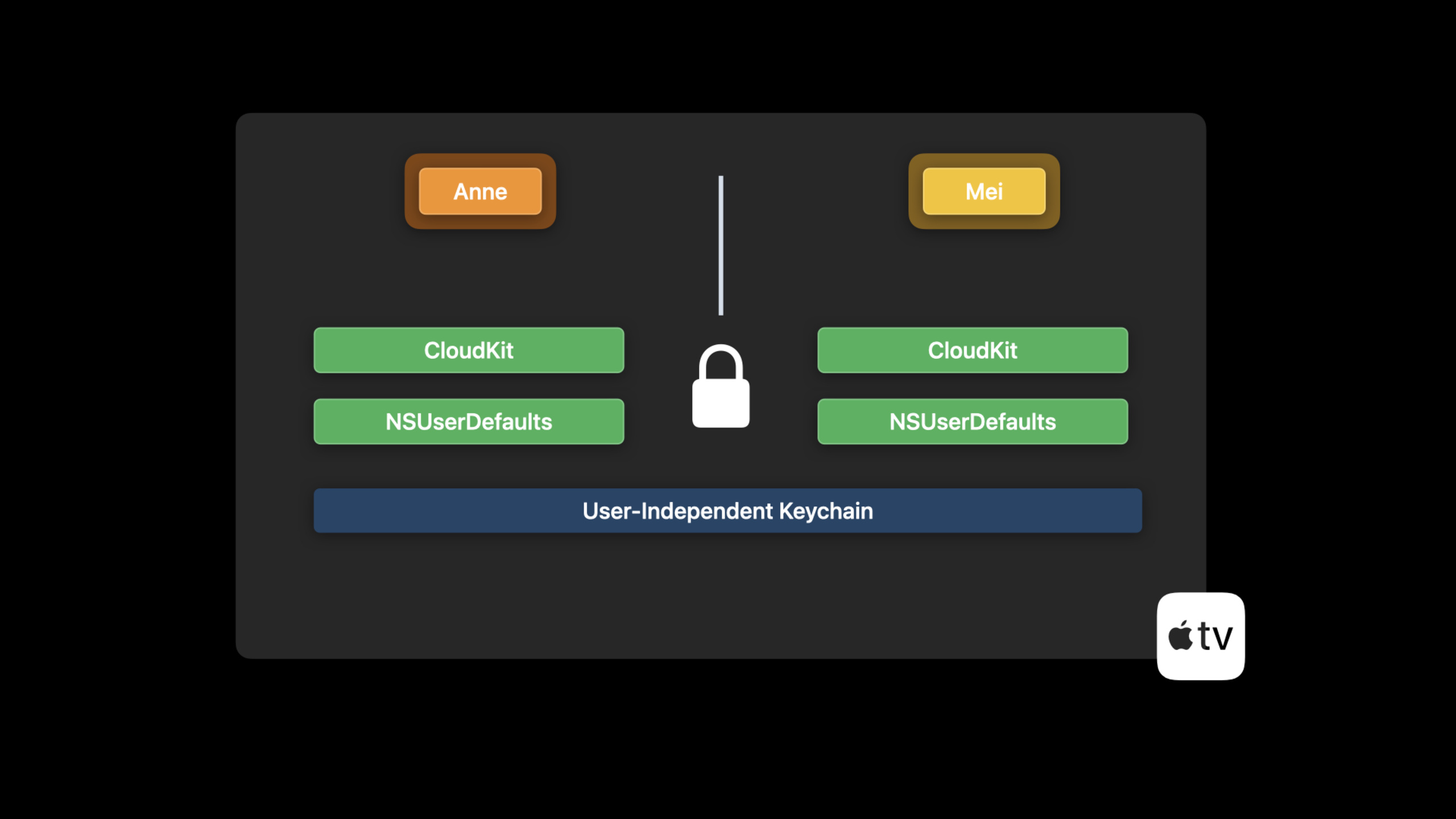
tvOS 14 introduces “Runs as Current User” entitlement, which allows apps to run as the current system user and automatically isolate data. But there is a contradiction here: the media app wants the whole family to share one account (pay only one price), but everyone has their own profile. If each user has a separate Keychain, everyone will have to log in again.
The solution for tvOS 16 is: users’ independent data (profile selection, viewing records) are stored in separateUserDefaults, the shared login credentials are saved to the user-independent Keychain.
Two kinds of data, two storage strategies
User related data: profile selection, game progress, personal settings. When “Runs as Current User” is enabled, this data is automatically segregated by user. The code on iOS does not need to be modified, it can work directly on tvOS.
User-independent data: Login credentials, subscription information for home sharing. use newkSecUseUserIndependentKeychainThe logo is stored and accessible to all users.
Complete process of switching users
- Press and hold the TV button on the Siri Remote to open Control Center
- Select another family member (tvOS 16 will automatically show iCloud Family members even if they haven’t been added to Apple TV yet)
- The system displays a switching prompt and gives the current App time to save its status.
- The app is restarted and runs as a new user
- Read the shared login credentials from the user-independent Keychain and skip the login interface
- For new users
UserDefaultsRead the profile selection and automatically load the corresponding content
New users need to select a profile when using it for the first time. After that, every time you switch, you will enter the content directly without any additional operations.
No more manual maintenance of user mappings
tvOS 16 obsoleteTVUserManagerHow to manually map system users to App profiles. The system now handles this mapping automatically, and developers only need to write iOS-style code.
Detailed Content
Enable Runs as Current User
(08:22)
In Xcode:
- Select tvOS target
- Open the Signing & Capabilities tab
- Click + Capability
- Search and add “User Management”
- Check “Runs as Current User”
No need to write any code. After adding entitlement, the App’s process will automatically start as the currently selected system user.UserDefaults、Keychain(Default), iCloud containers, etc. are isolated by user.
Store shared login credentials
(05:25)
func save(username: String, password: String) {
    guard let passwordData = password.data(using: .utf8) else {
        return
    }

    let attributes: [CFString: AnyObject] = [
        kSecAttrService: "MyApp" as AnyObject,
        kSecClass: kSecClassGenericPassword,
        kSecAttrAccount: username,
        kSecValueData: passwordData,
        kSecUseUserIndependentKeychain: kCFBooleanTrue
    ]

    let status = SecItemAdd(attributes as CFDictionary, nil)
    if status == errSecSuccess {
        self.credentials = (username, password)
    }
}
Key points:
kSecUseUserIndependentKeychainset tokCFBooleanTrueIndicates that the deposited user has nothing to do with Keychain- All users can read and write this Keychain item
- Other properties (
kSecAttrService、kSecAttrAccountetc.) remains unchanged - Also add it when querying
kSecUseUserIndependentKeychain: kCFBooleanTrueto find
Read shared credentials
func loadCredentials() -> (username: String, password: String)? {
    let query: [CFString: AnyObject] = [
        kSecAttrService: "MyApp" as AnyObject,
        kSecClass: kSecClassGenericPassword,
        kSecReturnAttributes: kCFBooleanTrue,
        kSecReturnData: kCFBooleanTrue,
        kSecMatchLimit: kSecMatchLimitOne,
        kSecUseUserIndependentKeychain: kCFBooleanTrue
    ]

    var result: AnyObject?
    let status = SecItemCopyMatching(query as CFDictionary, &result)

    guard status == errSecSuccess,
          let item = result as? [String: AnyObject],
          let username = item[kSecAttrAccount as String] as? String,
          let passwordData = item[kSecValueData as String] as? Data,
          let password = String(data: passwordData, encoding: .utf8) else {
        return nil
    }

    return (username, password)
}
Store and read user profile selections
class ProfileData {
    private let selectedProfileKey = "SelectedProfile"

    func saveSelectedProfile(_ profileId: String) {
        // Automatically save to the current user's UserDefaults
        UserDefaults.standard.set(profileId, forKey: selectedProfileKey)
    }

    func loadSelectedProfile() -> String? {
        return UserDefaults.standard.string(forKey: selectedProfileKey)
    }
}
Key points:
- The code is exactly the same as on iOS
- After enabling “Runs as Current User”, the system automatically
UserDefaultsIsolate to current user -Each family member has his or her ownUserDefaultssandbox -TVUserManagerThe manual mapping method of has been deprecated and is no longer required
Application type decision table
| Application Type | Recommended Solution |
|---|---|
| Media/Streaming Media (with profile) | Runs as Current User + User-independent Keychain |
| Game (Personal Progress) | Runs as Current User only |
| Generic content (recipes, weather, etc.) | No changes required |
Core Takeaways
1. Build a seamless multi-user switching experience for streaming apps
- What to do: Let the video app on Apple TV remember the profile of each family member and load it automatically when switching users
- Why it’s worth doing: tvOS 16 only needs to add an entitlement and a Keychain logo to achieve an iPhone-level personalized experience
- How to start: Add User Management capability in Xcode and enable “Runs as Current User”; use it when logging in
kSecUseUserIndependentKeychainSave credentials; profile select saveUserDefaults
2. Design a personal training profile for a home fitness app
- What: Fitness app supports multiple family members on Apple TV, each with their own training plan and progress
- Why it’s worth doing: Fitness data naturally needs to be isolated by user. “Runs as Current User” allows gamification progress, achievements, and rankings to be calculated independently.
- How to start: After enabling entitlement, training records and achievements are saved
UserDefaultsor CloudKit (automatically segregated by user); family subscription information is stored independently of the user Keychain
3. Build a parent-controlled multi-child mode for educational apps
- What: Children’s educational app supports multiple children on Apple TV, with individual learning progress and content filtering settings
- Why it’s worth doing: Each child’s age is different, and the suitable content and difficulty are also different. System-level user isolation eliminates the need for parents to manually switch their children’s accounts within the app
- How to start: Use
UserDefaultsStore each child’s age, learning progress, and content preferences; parental control passwords are stored independently of the user Keychain to prevent children from bypassing
4. Implement family shared archives for game apps
- What to do: Single-player gaming on Apple TV so each family member has their own save and progress
- Why it’s worth doing: Just enable “Runs as Current User”, no additional code required. Game Center, iCloud archives, and local archives are automatically isolated
- How to start: Add User Management capability and check “Runs as Current User”. If the game has a Family Sharing subscription, use a user-independent Keychain to save subscription status
Related Sessions
- Simplify sign-in for your tvOS apps — The iPhone assisted login introduced in tvOS 15 makes TV login as easy as scanning a QR code
- Meet Passkeys — Passwordless authentication technology, already supported by tvOS 16, replacing traditional password login
- Support multiple users in tvOS apps — Basic introduction to WWDC20, understand the underlying mechanism of Runs as Current User
Comments
GitHub Issues · utterances