
Highlight
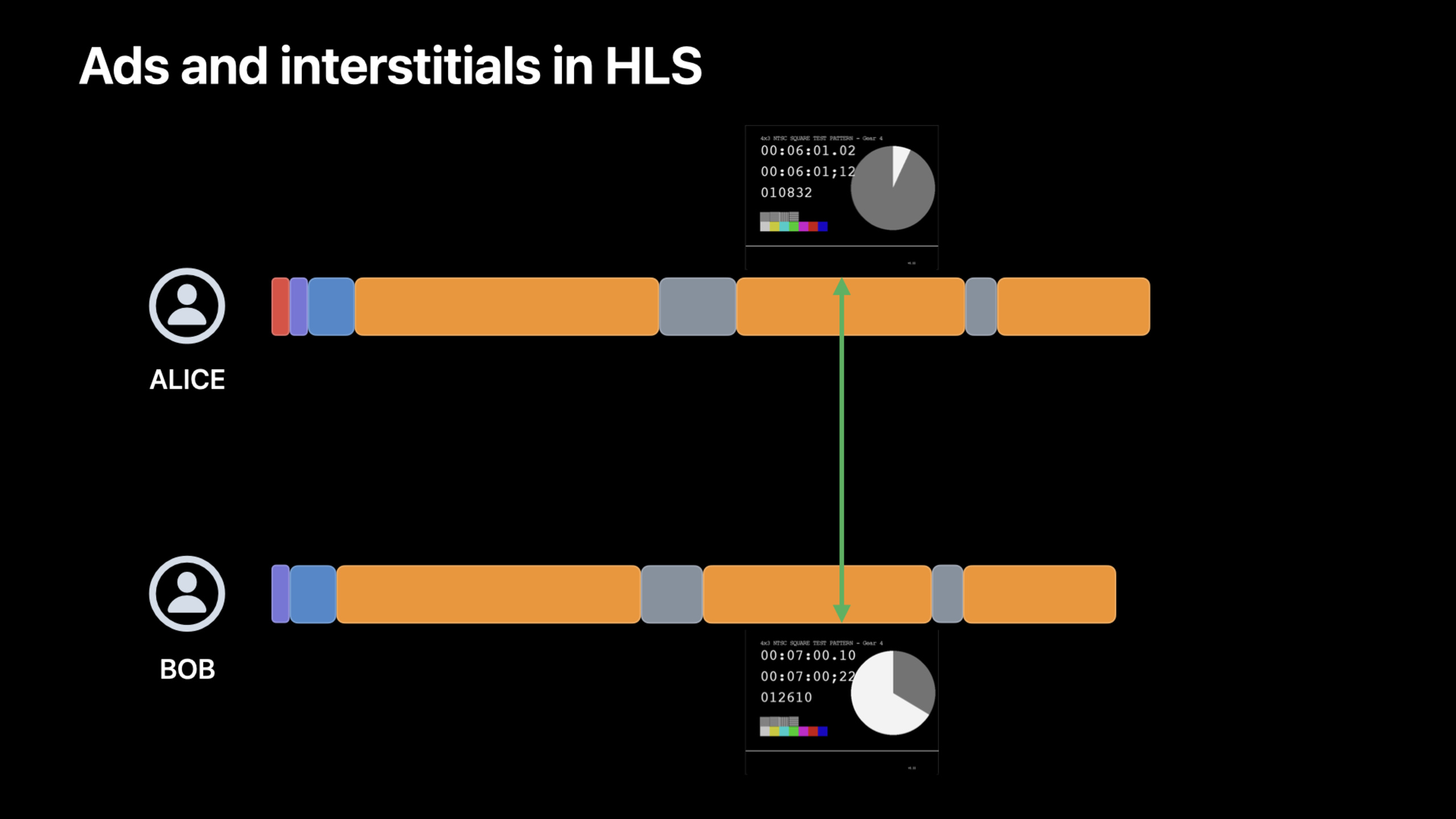
SharePlay’s coordinated playback supports advertising and interstitial content scenarios: Pass
AVPlayerPlaybackCoordinatorDelegateMark advertising time range to matchsuspensionReasonsThatTriggerWaitingConfigure a waiting policy to allow different participants to automatically resume synchronization after watching ads of different lengths.
Core Content
Problem: Ads complicate synchronized playback
You and your friends are watching a show together on FaceTime, and the progress is exactly the same. But you are in different regions and see different ads - your ad is 15 seconds, his is 30 seconds, and some people don’t watch the ad at all. After the commercial ended, everyone’s positions were confused.
The basic coordinated playback of SharePlay is very simple: putgroupSessionrelated toplaybackCoordinator, everyone’s playback control instructions are synchronized in real time. But advertising breaks this consistency because different content is inserted into everyone’s “presentation timeline.”
Two user experience strategies
When the advertising duration is inconsistent, there are two ways to deal with it:
Waiting strategy: The person who finished watching the ad first waits until everyone has finished watching before continuing together. The advantage is that no one misses the main content, but the disadvantage is that people waiting have to stare at the pause screen.
Catch-up Strategy: Those who finish watching the ad first continue to watch the main content, while others jump over to catch up after the ad ends. The advantage is that it is smooth and there is no waiting, but the disadvantage is that some people may miss part of the program content.
These two strategies passsuspensionReasonsThatTriggerWaitingArray configuration. The default behavior is not to wait (catch-up strategy), put"playingInterstitial"Adding to the array enables the wait strategy.
Stitched Ads: Manually Mark Time Range
For VOD content, ad segments are stitched directly into the main HLS playlist (separated by discontinuity tags). Developers need toAVPlayerPlaybackCoordinatorDelegatetells the system which time ranges are ads.
After the system obtains these time ranges, participants will be processed according to the configured waiting policy when entering the advertising period. If someone drags the progress bar into the advertisement range, the entire SharePlay group will jump to the beginning of that advertisement.
One key constraint: SharePlay requires that the main content (the actual show minus the ads) be of equal length. The ads can be different, but the feature film must be the same length.
HLS Interstitials: More flexible ad scheduling
HLS Interstitials introduced at WWDC21 treat ads as separate objects from the main content timeline. Advertisements are referenced through multi-bitrate playlist URIs, which can be inserted on the server side or dynamically scheduled on the client side using the AVFoundation API.
When using HLS Interstitials, AVFoundation automatically handles coordinated playback, and developers only need to configure the waiting strategy. This method is more suitable for dynamic targeted advertising and live broadcast scenarios.
Best Practices
In a live broadcast scenario, if some people do not have ads and some people have ads, it is recommended to use HLS Interstitials and add a default waiting policy. People who don’t have ads can continue to watch the live broadcast, and people who have ads will automatically catch up after it ends. This is very practical in live broadcasts of sports events - users without ads watch the live footage, and those with ads come back just in time for the game to start.
In VOD scenarios, if content integrity is important, the waiting strategy is recommended. Available while waitingGroupSessionMessengerShare your ad schedule to let those waiting know how long they have to wait, while using another player to show trailers or other content to keep them engaged.
Detailed Content
Mark ad time range
(05:13)
class MyAVPlayerCoordinatorDelegate: NSObject, AVPlayerPlaybackCoordinatorDelegate {
    func playbackCoordinator(
        _ coordinator: AVPlayerPlaybackCoordinator,
        interstitialTimeRangesFor playerItem: AVPlayerItem
    ) -> [NSValue] {
        return interstitialTimeRanges
    }
}
Key points:
- Realize
AVPlayerPlaybackCoordinatorDelegateprotocol -interstitialTimeRangesForreturn[NSValue], each element is represented byNSValue(timeRange:)packagedCMTimeRange- These time ranges must be sample accurate, calculated based on actual media duration - For stitched ads, the time range is usually accumulated by adding up the HLS playlist
EXTINFThe duration of the label is obtained
Configure waiting strategy
// Enable the waiting strategy: participants who finish ads wait for others
playbackCoordinator.suspensionReasonsThatTriggerWaiting = ["playingInterstitial"]

// Default behavior (catch-up strategy): do not wait
playbackCoordinator.suspensionReasonsThatTriggerWaiting = []
Key points:
suspensionReasonsThatTriggerWaitingDecide which pause reasons trigger waits -"playingInterstitial"Indicates that other participants are waiting while the interstitial content (advertisement) is played- while waiting
player.timeControlStatusbecome.waitingToPlayAtSpecifiedRate player.reasonForWaitingToPlayfor.waitingForCoordinatedPlayback
Check wait status
if player.timeControlStatus == .waitingToPlayAtSpecifiedRate,
   player.reasonForWaitingToPlay == .waitingForCoordinatedPlayback {
    // The user is waiting for other participants
    showWaitingUI()
}
Share ad schedules using GroupSessionMessenger
import GroupActivities

// Send the ad schedule
let messenger = GroupSessionMessenger(session: groupSession)
try await messenger.send(adSchedule)

// Receive the ad schedule
Task {
    for await (schedule, participant) in messenger.messages(of: AdSchedule.self) {
        updateWaitingTime(with: schedule)
    }
}
Key points:
GroupSessionMessengerPass custom data between SharePlay participants- After sharing the ad schedule, people waiting can know exactly how long they have to wait.
- You can display other content during the waiting period to improve user experience
HLS Interstitials Playlist Example
HLS Interstitials are used in the main content playlistEXT-X-DATERANGELabel tag ads:
#EXTM3U
#EXT-X-VERSION:6
#EXT-X-TARGETDURATION:10

#EXT-X-DATERANGE:ID="ad1",CLASS="com.apple.hls.interstitial",
START-DATE="2022-06-06T12:00:00Z",
X-ASSET-URI="https://example.com/ad-variant.m3u8"

#EXTINF:10,
segment1.ts
#EXTINF:10,
segment2.ts
Key points:
EXT-X-DATERANGEofCLASSset to"com.apple.hls.interstitial"X-ASSET-URIMulti-bitrate playlist pointing to ads- AVFoundation automatically parses and processes these tags, no need to manually mark time ranges
Core Takeaways
1. Add SharePlay function for video apps to watch together
- What: Let users watch video content in your app simultaneously during FaceTime calls
- Why it’s worth it: SharePlay turns solo viewing into a social experience,
AVPlaybackCoordinatorHandles most of the synchronization complexity and has low access cost - How to get started: Create
GroupActivityTo define what can be shared, useGroupSessionManage sessions, putgroupSessionrelated toAVPlayerofplaybackCoordinator
2. Build a hierarchical subscription video service
- What to do: Design a subscription model where free users can watch ads and paying users can avoid ads, while supporting SharePlay
- Why it’s worth doing:
suspensionReasonsThatTriggerWaitingAllow users of different levels to watch together, and show additional content to paying users during the waiting period - How to start: Use HLS Interstitials to schedule ads, configure the default waiting policy, use
GroupSessionMessengerSynchronize subscription level information among participants
3. Social viewing experience for live events
- What to do: When a sports event is broadcast live, let users from different regions watch it together and each see localized ads.
- Why it’s worth doing: HLS Interstitials + default waiting policy allows users without ads to continue watching the scene, and users with ads will automatically catch up after they finish, so they won’t miss key moments
- How to start: Use the server to insert HLS Interstitials and return different advertising playlists by region. The client does not need additional code to handle synchronization.
4. Interactive content during the waiting period
- What: Show interactive content instead of a static wait screen while the user is waiting for someone else to finish an ad in SharePlay
- Why it’s worth doing:
GroupSessionMessengerAd schedules can be shared so you know exactly how long to wait, while a second player shows trailers, outtakes or interactive polls - How to start: Monitoring
timeControlStatuschange, switch to the backup player when entering the waiting state, receiveGroupSessionMessengerThe waiting countdown is updated after the scheduled message
Related Sessions
- Make a great SharePlay experience — Design principles and best practices for building great SharePlay experiences
- Coordinate media playback in SharePlay — Basic implementation guide for SharePlay coordinated playback
- Explore HLS variants for adaptive bitrate — HLS multi-bitrate playlist and dynamic content scheduling
- What’s new in AVFoundation — AVFoundation’s asynchronous API and reactive media processing
Comments
GitHub Issues · utterances