
Highlight
Swift-DocC in Xcode 14 supports writing documents for App projects, supports Objective-C/C API, DocC Archive can be directly published to static hosting services such as GitHub Pages, and a new web navigation sidebar is also added.
Core Content
Where is the document written and who should it be shown to?
Swift-DocC was introduced in Xcode 13 last year, but only supports the Swift framework. Many developers want to write internal documentation for App projects or write documentation for Objective-C projects, but it doesn’t work.
Xcode 14 extends Swift-DocC to four new scenarios:
- App project documentation: When team members collaborate, they need to understand the project structure and API usage
- Objective-C and C API documentation: Mixed language projects can unify documentation tools
- One-click publishing to website: DocC Archive is directly compatible with static hosting
- Web navigation sidebar: The experience of browsing documents has been greatly improved.
From source code comments to complete documentation site
The content of Swift-DocC is divided into three layers: reference documentation for a single API, conceptual articles, and step-by-step tutorials. Xcode 14 allows all three levels of content to be generated from source code and Documentation Catalog.
Detailed Content
Write documentation comments for Swift API
(03:18)
/// A view that displays a sloth.
///
/// This is the main view of ``SlothyApp``.
/// Create a sloth view by providing a binding to a sloth.
///
///

```swift
/// @State private var sloth: Sloth
///
/// var body: some View {
///     SlothView(sloth: $sloth)
/// }
///
struct SlothView: View
**Key points:**
- use`///`DocC can only recognize if it starts with three slashes.
- The first paragraph is the summary, which appears below the page title
- Subsequent paragraphs enter the Overview area
- `` `SlothyApp` `` Wrap with double backticks, DocC will automatically convert to API link
- The link is verified during construction, and a warning will be reported if it fails.
- Markdown code block syntax to insert sample code

### Write parameter documentation for initializers and methods

([04:25](https://developer.apple.com/videos/play/wwdc2022/110368/?time=265))

```swift
struct SlothView: View {
    /// Creates a view that displays the specified sloth.
    ///
    /// - Parameter sloth: The sloth the user will edit.
    init(sloth: Binding<Sloth>) {
        // ...
    }
}
Key points:
- ParameterList describing each parameter- Parameter descriptions are displayed in a separate Parameters area
- For multiple parameters
- Parameters:pack
Objective-C API Documentation
(05:24)
/// A sound that can be played.
///
/// Use an instance of this type to play a sound
/// to the user in response to an action or
/// event.
@interface SLOSound : NSObject

/// Creates a sound given its name and path on
/// disk.
///
/// - Parameters:
///   - name: The name of the sound.
///   - filePath: The path to the sound file on disk.
- (id)initWithName:(NSString *)name
          filePath:(NSString *)filePath;

@end
Key points:
- Xcode 14 starts supporting DocC documentation for Objective-C and C
- The syntax is the same as Swift, use
///and Markdown - The bilingual API page has a language switching button, which displays according to the language you are currently using.
Documentation Catalog and top-level pages
(06:48)
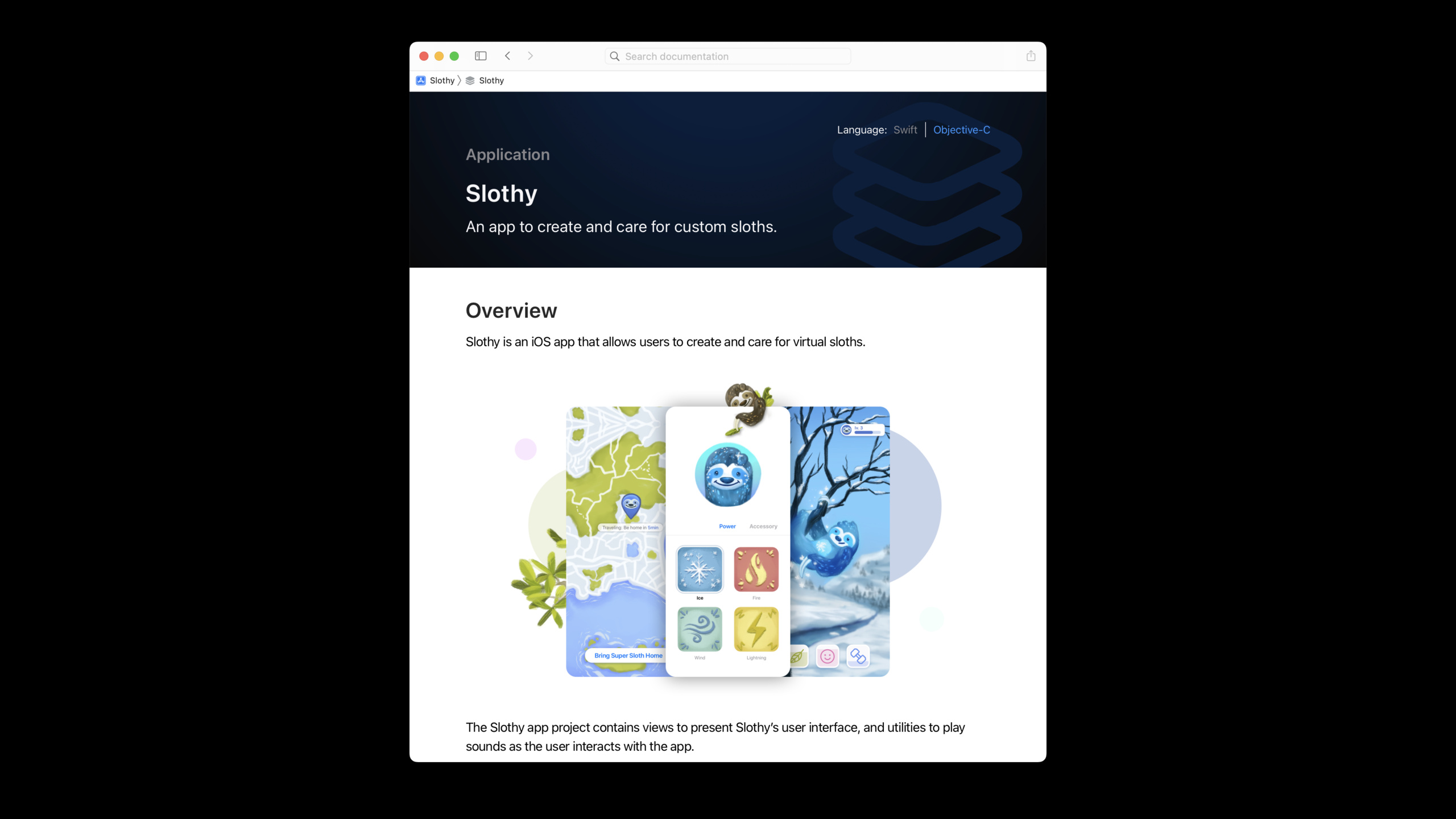
Right-click on the project source code folder and select New File → Documentation Catalog. Xcode automatically creates a document directory that contains the top-level page file:
# ``Slothy``
An app to create and care for custom sloths.
## Overview
Slothy is an iOS app that allows users to create and care for virtual sloths.

The Slothy app project contains views to present Slothy's user interface, and utilities to play sounds as the user interacts with the app.Key points:
- Documentation Catalog supplements source code documents and stores conceptual articles and media files
- For top-level pages
# ``ModuleName``syntax statement - Support rich media such as embedded images
- This is the first page contributors see when they open the document
Publish to GitHub Pages
(08:03)
DocC Archive itself is a complete static website. Archives generated by Xcode 14 are directly compatible with most web servers and hosting services.
The URL of GitHub Pages has a specific base path (username.github.io/repo-name), you need to tell DocC:
// Set in Build Settings
DocC Archive Hosting Base Path = sloth-creator
Then Build Documentation, export Archive from the document window, copy the content to the docs directory of the warehouse, and submit for push.
Key points:
- Directly copy Archive content to your own domain name to the root directory of the Web server
- GitHub Pages, etc. need to set Hosting Base Path
- DocC Archive is a static file and is supported by any static hosting service
Swift Package Manager plugin automation
(14:03)
Swift-DocC provides the Swift Package Manager plug-in to automate the document building process. With CI tools such as GitHub Actions, documents are automatically rebuilt and deployed to GitHub Pages after each update.
Command line build method:
# Xcode project
xcodebuild docbuild -scheme MyScheme

# Swift Package (using the DocC plugin)
swift package --allow-writing-to-directory ./docs \
    generate-documentation --target MyTarget \
    --output-path ./docs
Web navigation sidebar
(14:46)
The DocC web page in Xcode 14 has a new left navigation bar:
- Click the disclosure triangle to expand/collapse the type hierarchy
- You can see the subpage list without opening the page
- The filter bar at the bottom supports filtering symbols by keywords
- The sidebar status is maintained when jumping between pages, making it easier to track the browsing path
Core Takeaways
-
Add DocC documentation to team projects Even for apps that are not released to the public, internal documentation can help new members get started quickly. from
///Start with comments and write a summary and parameter description for each public API. -
Publish framework documentation to GitHub Pages The open source Swift Package coupled with online documentation greatly improves the user experience. Set up the Hosting Base Path, use GitHub Actions to automatically deploy, and update the document synchronously every time it is released.
-
Documentation for Objective-C legacy code Mixed language projects can now be documented using unified tools. Add to core Objective-C classes
///Comments can be viewed directly by team members in Xcode. -
Use Documentation Catalog to write project guidelines Not just API reference, use Markdown files in Catalog to write architecture descriptions, development specifications, and access guides. These contents are versioned together with the code and will not be out of date.
-
Integrate documentation build checks in CI put
xcodebuild docbuildorswift package generate-documentationJoin the CI process. DocC link verification can help you find dead links in the document after the API name is changed.
Related Sessions
- Improve the discoverability of your Swift-DocC content — Learn more about the new navigation sidebar and document organization tips
- Build interactive tutorials using DocC — Create interactive step-by-step tutorials with DocC
- Create Swift Package plugins — Swift-DocC’s Swift Package Manager plugin usage
- What’s new in Xcode 14 — Overview of all new features in Xcode 14
Comments
GitHub Issues · utterances