
Highlight
Xcode 14 supports the simultaneous development of iOS client and Swift server-side applications in the same workspace, using web frameworks such as Vapor to build HTTP services, and reusing data models between clients and servers by sharing Swift Packages to achieve end-to-end Swift full-stack development.
Core Content
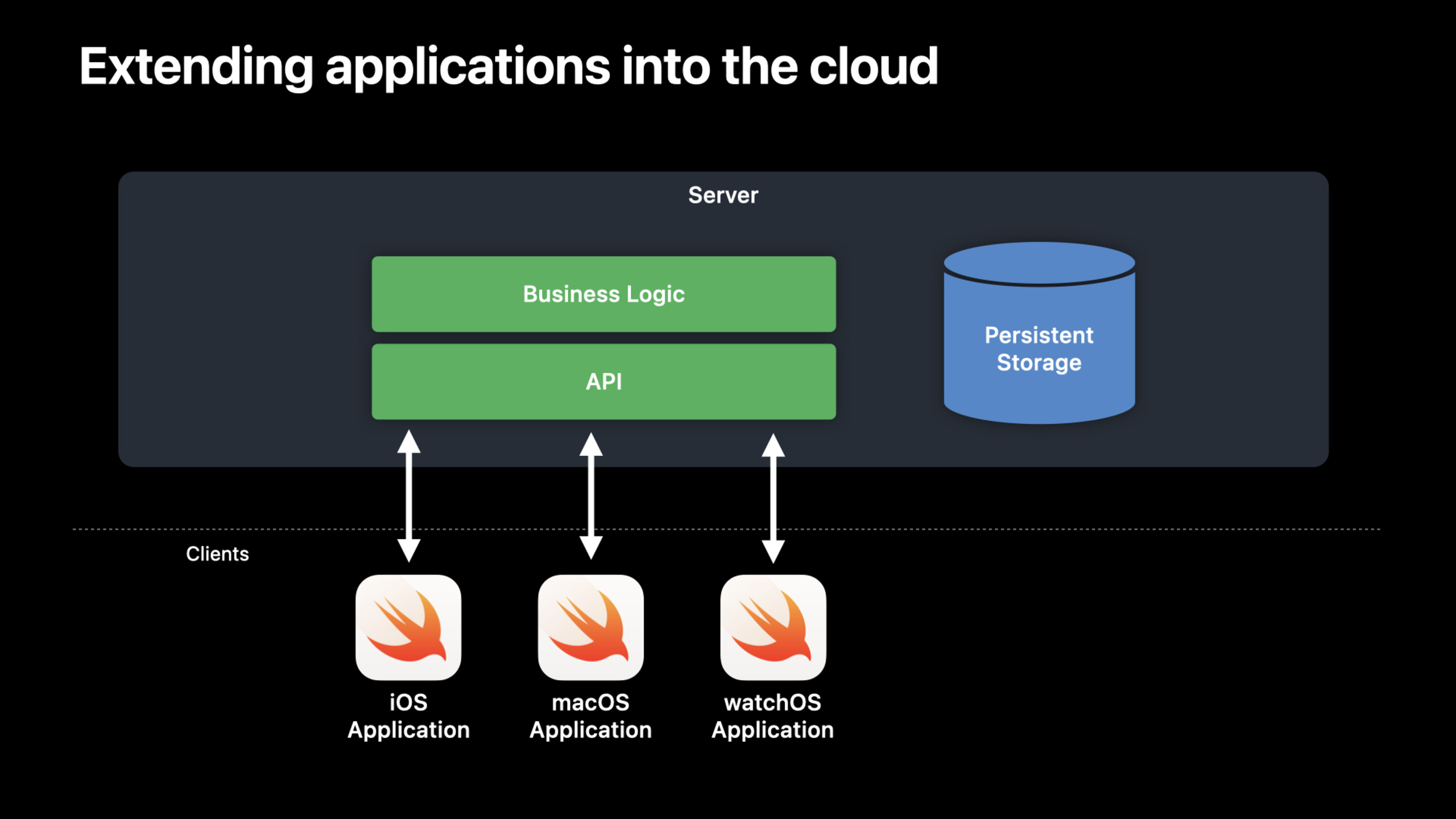
Many applications start on a single device and need to be expanded to multiple devices as the number of users grows, often eventually requiring a server component to handle background tasks, compute-intensive work, or centralized data storage.
The traditional approach is to use Swift on the client side and other languages on the server side. This has brought about problems such as technology stack fragmentation, code duplication, and high team collaboration costs.
Swift, as a general programming language, can unify the client and server technology stacks. Xcode 14 further enhances this capability: you can develop iOS Apps and Swift server applications at the same time in the same workspace, share code, and debug unifiedly.
Basic structure of server application
A Swift server application is a Swift Package that defines an executable target (01:36):
// swift-tools-version: 5.7
import PackageDescription

let package = Package(
    name: "MyServer",
    platforms: [.macOS("12.0")],
    products: [
        .executable(name: "MyServer", targets: ["MyServer"]),
    ],
    dependencies: [
        .package(url: "https://github.com/vapor/vapor.git", .upToNextMajor(from: "4.0.0")),
    ],
    targets: [
        .executableTarget(
            name: "MyServer",
            dependencies: [.product(name: "Vapor", package: "vapor")]
        ),
        .testTarget(
            name: "MyServerTests",
            dependencies: ["MyServer"]
        ),
    ]
)
Key points:
platformsSpecifies macOS 12.0, server application running on Mac or Linux -productsDeclare executable file- Rely on Vapor framework to handle HTTP routing and request responses
Server side code usage@mainMark the entry point (02:00):
import Vapor

@main
public struct MyServer {
    public static func main() async throws {
        let webapp = Application()
        webapp.get("greet", use: Self.greet)
        webapp.post("echo", use: Self.echo)
        try webapp.run()
    }

    static func greet(request: Request) async throws -> String {
        return "Hello from Swift Server"
    }

    static func echo(request: Request) async throws -> String {
        if let body = request.body.string {
            return body
        }
        return ""
    }
}
Key points:
ApplicationIs the type of web application provided by Vapor -get/postDefine HTTP endpoints- For processing functions
async throws, naturally supports Swift concurrency
Local testing
Select MyServer scheme in Xcode, select “My Mac” as the target, and click Run. The console will display server startup information:
Server starting on http://127.0.0.1:8080Test the endpoint with curl (03:42):
curl http://127.0.0.1:8080/greet; echo
curl http://127.0.0.1:8080/echo --data "Hello from WWDC 2022"; echo
Call from iOS App
Create a client abstraction layer and encapsulate the server API into Swift methods (04:10):
import Foundation

struct MyServerClient {
    let baseURL = URL(string: "http://127.0.0.1:8080")!

    func greet() async throws -> String {
        let url = baseURL.appendingPathComponent("greet")
        let (data, _) = try await URLSession.shared.data(for: URLRequest(url: url))
        guard let responseBody = String(data: data, encoding: .utf8) else {
            throw Errors.invalidResponseEncoding
        }
        return responseBody
    }

    enum Errors: Error {
        case invalidResponseEncoding
    }
}
Called in a SwiftUI view (05:00):
import SwiftUI

struct ContentView: View {
    @State var serverGreeting = ""

    var body: some View {
        Text(serverGreeting)
            .padding()
            .task {
                do {
                    let client = MyServerClient()
                    self.serverGreeting = try await client.greet()
                } catch {
                    self.serverGreeting = String(describing: error)
                }
            }
    }
}
Key points:
- Network requests are naturally asynchronous, use
async/awaitdeal with -.taskModifier to automatically start an asynchronous task when the view appears - Remember to start the server in Xcode before running the iOS App
Detailed Content
Food Truck Example: Complete Server-Side Application
Session uses a Food Truck App to demonstrate full-stack development. The server provides the donut menu API, and the iOS client displays the menu.
Data model
The server and client need a consistent data model (09:51):
enum Model {
    struct Donut: Codable {
        var id: Int
        var name: String
        var date: Date
        var dough: Dough
        var glaze: Glaze?
        var topping: Topping?
    }

    struct Dough: Codable {
        var name: String
        var description: String
        var flavors: FlavorProfile
    }

    struct Glaze: Codable {
        var name: String
        var description: String
        var flavors: FlavorProfile
    }

    struct Topping: Codable {
        var name: String
        var description: String
        var flavors: FlavorProfile
    }

    public struct FlavorProfile: Codable {
        var salty: Int?
        var sweet: Int?
        var bitter: Int?
        var sour: Int?
        var savory: Int?
        var spicy: Int?
    }
}
Key points:
- All models follow
Codable, for JSON encoding and decoding - Flavor profiles represent various flavor intensities with optional integers
- These models are initially copied from the iOS App and later extracted into a shared package
Server-side architecture
Server-side layered design:
import Foundation
import Vapor

@main
struct FoodTruckServerBootstrap {
    public static func main() async throws {
        let foodTruckServer = FoodTruckServer()
        try await foodTruckServer.bootstrap()

        let webapp = Application()
        webapp.get("donuts", use: foodTruckServer.listDonuts)
        try webapp.run()
    }
}

struct FoodTruckServer {
    private let storage = Storage()

    func bootstrap() async throws {
        try await self.storage.load()
    }

    func listDonuts(request: Request) async -> Response.Donuts {
        let donuts = await self.storage.listDonuts()
        return Response.Donuts(donuts: donuts)
    }

    enum Response {
        struct Donuts: Content {
            var donuts: [Model.Donut]
        }
    }
}
Key points:
FoodTruckServerIt is the business logic layer and does not directly handle HTTP -StorageIt is the data access layer and uses actors to ensure thread safety. -Response.DonutsFollow Vapor’sContentProtocol, automatically encoded as JSON
Storage layer: Use Actors to protect mutable state
The storage layer uses JSON files as data sources, usingactorAvoiding data races (12:30):
actor Storage {
    let jsonDecoder: JSONDecoder
    var donuts = [Model.Donut]()

    init() {
        self.jsonDecoder = JSONDecoder()
        self.jsonDecoder.dateDecodingStrategy = .iso8601
    }

    func load() throws {
        guard let path = Bundle.module.path(forResource: "menu", ofType: "json") else {
            throw Errors.menuFileNotFound
        }
        guard let data = FileManager.default.contents(atPath: path) else {
            throw Errors.failedLoadingMenu
        }
        self.donuts = try self.jsonDecoder.decode([Model.Donut].self, from: data)
    }

    func listDonuts() -> [Model.Donut] {
        return self.donuts
    }

    enum Errors: Error {
        case menuFileNotFound
        case failedLoadingMenu
    }
}
Key points:
actorMake sure todonutsAll accesses to arrays are serial- No need to manually use locks or dispatch queues
-
Bundle.moduleIs an accessor generated by SwiftPM for resource files -iso8601Date decoding strategies handle standard date formats
Resource files are declared in the Package manifest (12:23):
.executableTarget(
    name: "FoodTruckServer",
    dependencies: [.product(name: "Vapor", package: "vapor")],
    resources: [
        .copy("menu.json")
    ]
)
Test server API
After starting the server, test with curl and jq (14:42):
# View the full menu
curl http://127.0.0.1:8080/donuts | jq .

# Extract only donut names
curl http://127.0.0.1:8080/donuts | jq '.donuts[] .name'
Shared data model
The client and server initially each maintain a copy of the data model code. A better approach is to extract into a shared Swift Package:
- Create a Swift Package named “Shared” and put it in the Xcode workspace
- put
ModelCode moved to Shared package - Add Shared dependencies to both the server Package and iOS App
- Both ends use shared model definitions
Advantages of doing this:
- Avoid code duplication
- Serialization is safer, and both ends are updated synchronously when the model changes.
- Compilation time checks to ensure consistent data structures
Storage strategy selection
Session mentioned several data storage solutions (11:12):
Static files: When the data changes rarely or is maintained manually, use JSON/CSV files directly. Suitable for menu, configuration and other scenarios.
iCloud: User data or global data sets can be used directly from the iOS App using the CloudKit API without the need to deploy a separate server.
Database: Dynamic or transactional data. The Swift open source community provides a variety of database drivers: PostgreSQL, MySQL, MongoDB, Redis, DynamoDB, etc.
Core Takeaways
1. Real-time collaboration whiteboard
What to do: Use Swift server + SwiftUI client to create a multi-person real-time collaborative whiteboard that supports stroke synchronization.
Why it’s worth doing: The WebSocket server is written in Swift, shares the stroke data model with the iOS/macOS client, and uses one set of code to understand the entire system.
How to get started: Handle live connections with Vapor’s WebSocket extension, usingactorManage room status, used by clientsURLSessionWebSocketTaskconnect.
2. Personal data synchronization service
What to do: Add private cloud sync capabilities to an existing iOS app, with user data stored on a self-hosted server.
Why it’s worth doing: Using Swift to write the server side can reuse the client sideCodableModel, there is no need to maintain two sets of data structure definitions.
How to start: Define a shared Package to store the data model, use Vapor on the server to provide CRUD API, and use Vapor on the clientURLSession + JSONDecoderConsumption.
3. Home Media Server
What to do: Run Swift server on Mac or Raspberry Pi, manage family photo and video library, iOS App for browsing and playback.
Why it’s worth doing: SwiftAVFoundationThe knowledge can be partially reused on the server side to process media metadata and transcoding logic.
How to get started: Provide a media file streaming API with Vapor, usingFileManagerScan the media directory to generate an index, and the client uses SwiftUI to display the grid.
4. IoT Device Management Center
What to do: Use the Swift server to collect home sensor data (temperature, humidity), and the iOS App displays historical trends and real-time alarms.
Why it’s worth doing: The Swift server can run on lightweight devices, usingasync/awaitHandle large numbers of concurrent device connections.
How to get started: Define a sensor data model sharing package. The server uses UDP/TCP to receive device reports, stores them in SQLite or InfluxDB, and provides a query API.
5. Team internal tool platform
What to do: Use Swift full-stack development team internal tools (e.g. code review assistant, release management system).
Why it’s worth doing: The team is already familiar with Swift, the full-stack unified technology stack reduces maintenance costs, and the Xcode workspace debugs the front-end and back-end at the same time.
How to get started: Use Vapor to provide REST API, integrate GitHub/GitLab Webhook, and use SwiftUI on the client to display to-do items and statistical charts.
Related Sessions
- Meet Swift Package plugins — Automate server-side code generation and deployment workflows with plugins
- Swift Concurrency — In-depth understanding
async/awaitandactor, write high-concurrency server code - Swift Regex — Use Swift Regex to parse request parameters, route matching and log analysis
Comments
GitHub Issues · utterances