
Highlight
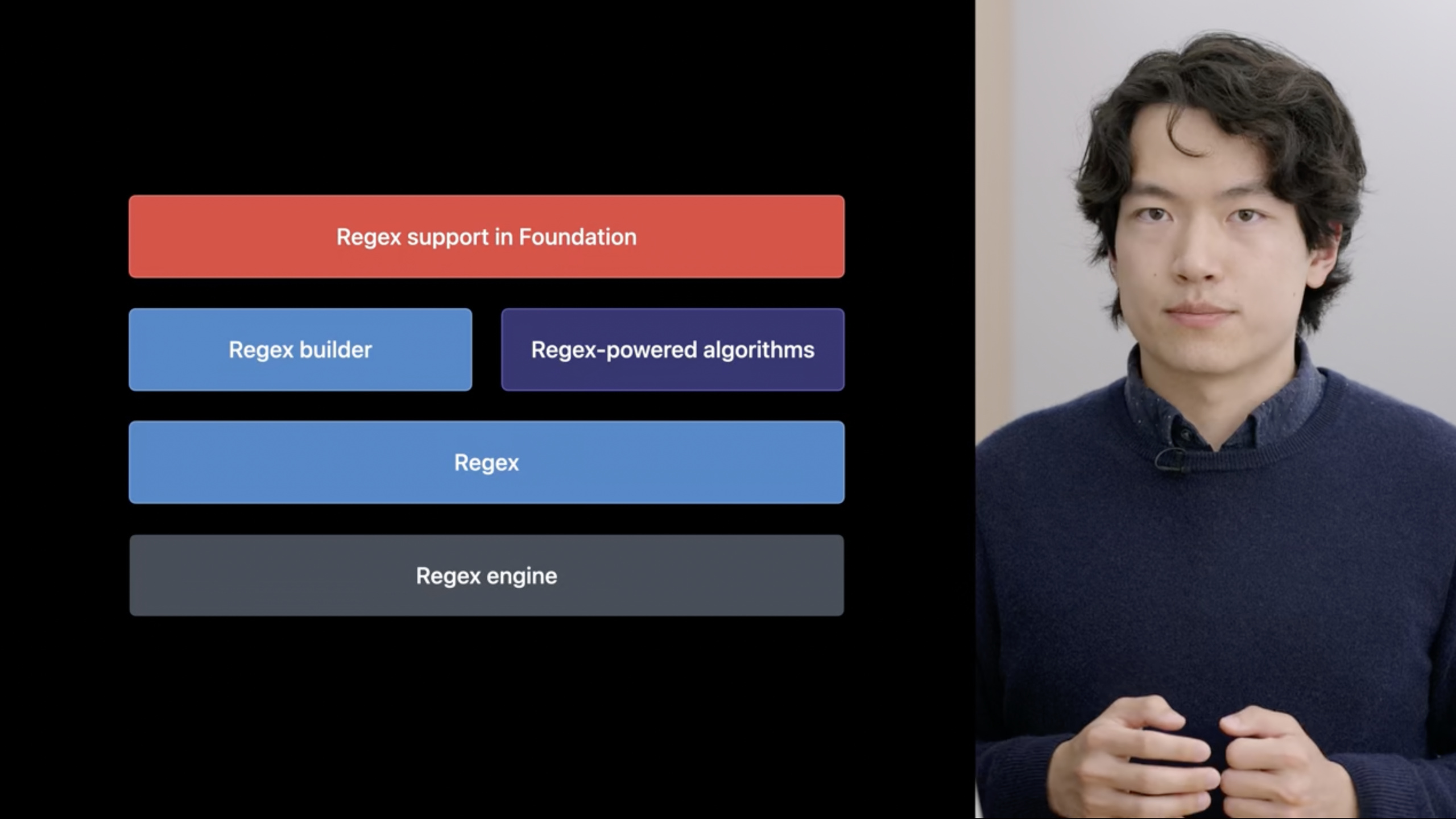
Swift 5.7 introduces string handling
Regextypes, regular literal syntax, andRegexBuilderDSL that allows developers to match, extract, and transform string content in a type-safe manner, and embed Foundation’s date/number parsers directly into regular expressions.
Core Content
Manipulating strings is one of the most common tasks in programming. From log parsing to data verification, developers write various string matching codes every day.
Before Swift 5.7, processing regular expressions mainly relied onNSRegularExpression. This API comes from the Objective-C era and is cumbersome to use: the matching result isNSTextCheckingResult, the capture group must be accessed through numeric index, and the types are allStringorRange, it is easy to make mistakes.
Swift 5.7 brings a new regular solution. The core is three things:
RegexType: a new regular type in the standard library, strongly typed and composable- Regular literal: The compiler checks syntax, and Xcode supports syntax highlighting
RegexBuilderDSL: Use Swift code to describe regular patterns, with readability close to natural language
The combination of these three turns string processing from “black magic” into ordinary Swift code.
From string to type-safe matching
Let’s say you want to extract user IDs from a piece of text:
name: John Appleseed, user_id: 100Used beforeNSRegularExpressionA bunch of boilerplate code needs to be written. Now using Swift Regex, there are three writing methods to choose from.
Create from string (runtime parsing):
let regex = try Regex(#"user_id:\s*(\d+)"#)Regular literal (compile time check):
let regex = /user_id:\s*(\d+)/RegexBuilder DSL (best readability):
import RegexBuilder

let regex = Regex {
    "user_id:"
    OneOrMore(.whitespace)
    Capture(.localizedInteger)
}
Created by three writing methodsregexAllRegexType, which can be passed to the unified matching algorithm.
List of matching algorithms
The Swift standard library isStringandSubstringExtended a batch of regularity-driven algorithms (03:49):
let input = "name:  John Appleseed,  user_id:  100"
let regex = /user_id:\s*(\d+)/

input.firstMatch(of: regex)           // Find the first match
input.wholeMatch(of: regex)           // The entire string must match
input.prefixMatch(of: regex)          // Prefix match
input.starts(with: regex)             // Whether it starts with the pattern
input.replacing(regex, with: "456")   // Replace the matched content
input.trimmingPrefix(regex)           // Remove the prefix-matched portion
input.split(separator: /\s*,\s*/)     // Split by regex
Regularity can also be used inswitchIn the statement:
switch "abc" {
case /\w+/:
    print("It's a word!")
}
Parse bank statement
Foundation’s parser can be directly embeddedRegexBuilder(05:14):
let statement = """
    DSLIP    04/06/20 Paypal  $3,020.85
    CREDIT   04/03/20 Payroll $69.73
    """

let regex = Regex {
    Capture(.date(format: "\(month: .twoDigits)/\(day: .twoDigits)/\(year: .twoDigits)"))
    OneOrMore(.whitespace)
    OneOrMore(.word)
    OneOrMore(.whitespace)
    Capture(.currency(code: "USD").sign(strategy: .accounting))
}here.date()and.currency()It is a parser provided by Foundation that supports localization and handles various edge cases. You don’t need to write date parsing logic yourself.
Detailed Content
Use Capture to extract data
Matching is only the first step, extracting data is the key.CaptureYou can save the matched substring and append it to the output tuple (10:28):
let regex = Regex {
   "a"
   Capture("b")
   "c"
   /d(e)f/
}

if let match = "abcdef".wholeMatch(of: regex) {
    let (wholeMatch, b, e) = match.output
    // wholeMatch = "abcdef"
    // b = "b"
    // e = "e"
}
Key points:
match.outputis a tuple, the first element is the entire match, followed by eachCapture- Parentheses in regular literals()Also a capture group- The type of the output tuple is determined at compile time
Practical combat: parsing XCTest logs
Let’s say you want to parse test suite logs:
Test Suite 'RegexDSLTests' started at 2022-06-06 09:41:00.001
Test Suite 'RegexDSLTests' failed at 2022-06-06 09:41:00.001.
Test Suite 'RegexDSLTests' passed at 2022-06-06 09:41:00.001.
The first step is to write the basic regular rules (06:24):
import RegexBuilder

let regex = Regex {
    "Test Suite '"
    /[a-zA-Z][a-zA-Z0-9]*/
    "' "
    ChoiceOf {
        "started"
        "passed"
        "failed"
    }
    " at "
    OneOrMore(.any)
    Optionally(".")
}
Key points:
ChoiceOfMatch one of multiple options -OptionallyMatch zero or one time- Regular literals
/[a-zA-Z][a-zA-Z0-9]*/Can be embedded in DSL
plusCaptureExtract data (11:10):
let regex = Regex {
    "Test Suite '"
    Capture(/[a-zA-Z][a-zA-Z0-9]*/)
    "' "
    Capture {
        ChoiceOf {
            "started"
            "passed"
            "failed"
        }
    }
    " at "
    Capture(OneOrMore(.any))
    Optionally(".")
}

for line in testInputs {
    if let (whole, name, status, dateTime) = line.wholeMatch(of: regex)?.output {
        print("\(name), \(status), \(dateTime)")
    }
}
Dealing with greedy matching problems
Run the above code and you will finddateTimeIncludes the final period. The reason isOneOrMore(.any)The default is eager and will match as many characters as possible (11:51).
The fix is to change to reluctant mode:
Capture(OneOrMore(.any, .reluctant))Key points:
.reluctantLet duplicates match as few characters as possible- The engine will first try to match the following pattern, and then backtrack to consume more characters if it fails.
- can also be used
.repetitionBehavior(.reluctant)Modify the default behavior of the entire regex
Transforming Capture: from substring to specific type
The captured content defaults toSubstring, usually needs to be converted to a more meaningful type.CapturesupporttransformClosure (15:20):
Regex {
    Capture {
        OneOrMore(.digit)
    } transform: {
        Int($0)  // The output type becomes Int?
    }
}
If the conversion may fail, useTryCapture, which will “flatten” the optional type (15:55):
Regex {
    TryCapture {
        OneOrMore(.digit)
    } transform: {
        Int($0)  // The output type is Int, not Int?
    }
}
Key points:
TryCaptureThe transform returnsOptional, but the output type is non-optional- When the conversion fails, the engine will automatically backtrack and try other matching paths.
- Suitable for use with failable initializers
Processing dates with the Foundation parser
Convert the status to an enumeration and the timestamp toDate(16:21):
enum TestStatus: String {
    case started, passed, failed
}

let regex = Regex {
    "Test Suite '"
    Capture(/[a-zA-Z][a-zA-Z0-9]*/)
    "' "
    TryCapture {
        ChoiceOf { "started"; "passed"; "failed" }
    } transform: {
        TestStatus(rawValue: String($0))
    }
    " at "
    Capture(.iso8601(
        timeZone: .current,
        includingFractionalSeconds: true,
        dateTimeSeparator: .space))
    Optionally(".")
}
// Output type: Regex<(Substring, Substring, TestStatus, Date)>
Key points:
.iso8601()Is a date parser provided by Foundation- The last element of the output tuple is directly
DateType - No need to do secondary analysis manually
Custom parser: access to C library
If you want to plug into an existing C parser, you can doCustomConsumingRegexComponentProtocol (19:16):
import Darwin

struct CDoubleParser: CustomConsumingRegexComponent {
    typealias RegexOutput = Double

    func consuming(
        _ input: String,
        startingAt index: String.Index,
        in bounds: Range<String.Index>
    ) throws -> (upperBound: String.Index, output: Double)? {
        input[index...].withCString { startAddress in
            var endAddress: UnsafeMutablePointer<CChar>!
            let output = strtod(startAddress, &endAddress)
            guard endAddress > startAddress else { return nil }
            let parsedLength = startAddress.distance(to: endAddress)
            let upperBound = input.utf8.index(index, offsetBy: parsedLength)
            return (upperBound, output)
        }
    }
}
Using a custom parser (20:13):
let regex = Regex {
    "Test Case "
    OneOrMore(.any, .reluctant)
    "("
    Capture {
        CDoubleParser()
    }
    " seconds)."
}

if let match = input.wholeMatch(of: regex) {
    print("Time: \(match.1)")  // Double type
}
Key points:
consumingThe method returns the upper bound index of the match and the parsed result- return
nilIndicates that the match fails and the engine will backtrack - This is a bridge to existing parsing libraries (such as JSON, YAML parsers)
Core Takeaways
1. Log parser
What to do: Write an Xcode build log parser for your project that extracts compilation errors and warnings.
Why it’s worth doing: UseRegexBuilderTo describe the log format, useTryCaptureConvert error information into structured data, which is easier to maintain than regular strings.
How to start: Define aBuildLogEntrystructure, useRegexBuildermatcherror: / warning:prefix, useCaptureExtract file name, line number and error description.
2. Smart Clipboard Tool
What to do: Make a macOS tool that automatically recognizes clipboard content and extracts key information (such as delivery number, mobile phone number, URL).
Why it’s worth doing: Swift RegexfirstMatchandwholeMatchCan be used directly on clipboard strings, withTryCaptureConvert the matching result to a specific type.
How to start: UseNSPasteboardMonitor clipboard changes, try multiple regular patterns on text content, and display the extraction results after successful matching.
3. Configuration file validator
What to do: Write a validation tool for the team’s internal configuration file format, check for syntax errors and give friendly prompts.
Why it’s worth doing:RegexBuilderThe readability makes the configuration rules clear at a glance, and new members can quickly understand the verification logic.
How to start: Define each line of the configuration file as aRegex,usewholeMatchVerification, returning the specific error location and expected format when it fails.
4. Data migration script
What to do: Write a script to migrate the text logs of the old system to the new database, use regular expressions to extract fields and convert types.
Why it’s worth doing:TryCaptureCooperateDate / Int / DoubleInitializer, one line of regular expression can complete the extraction + conversion, no secondary parsing is required.
How to get started: Use Foundation.date()and.currency()Parser to handle date and amount fields, customCustomConsumingRegexComponentHandle special formats.
Related Sessions
- Meet Swift Regex — Getting started with Swift Regex, introducing basic syntax and core concepts
- What’s new in Foundation — How Foundation’s formatters and parsers work with RegexBuilder
- Swift Concurrency — Understand the Swift concurrency model and write high-performance parsing tools with string processing
Comments
GitHub Issues · utterances