
Highlight
Swift 5.7 introduces Regex at the language level and supports
/.../Three creation methods: literal, runtime construction and Regex Builder, advanced features such as strong type capture, Foundation parser embedding, Unicode correct processing, and Local traceback control.
Core Content
Pain points of string parsing
You are working with a financial investigator to develop a transaction analysis tool. The data they give you is a bunch of plain text strings:
DEBIT 03/05/2022 Doug's Dugout Dogs $33.27Fields are separated by “more than two spaces” or “tabs” - no one remembers why. The date format is ambiguous, you can only hope it is month/day/year.
(01:16) UseStringTry the set algorithm?split(whereSeparator: \.isWhitespace)would split “Doug’s Dugout Dogs” into three fields. Drop down to index level and parse manually? The code is verbose and error-prone:
var slice = transaction[...]

func extractField() -> Substring {
    let endIdx = {
        var start = slice.startIndex
        while true {
            guard let spaceIdx = slice[start...].firstIndex(where: \.isWhitespace) else {
                return slice.endIndex
            }
            if slice[spaceIdx] == "\t" {
                return spaceIdx
            }
            let afterSpaceIdx = slice.index(after: spaceIdx)
            if afterSpaceIdx == slice.endIndex || slice[afterSpaceIdx].isWhitespace {
                return spaceIdx
            }
            start = afterSpaceIdx
        }
    }()
    defer { slice = slice[endIdx...].drop(while: \.isWhitespace) }
    return slice[..<endIdx]
}

let kind = extractField()
let date = try Date(String(extractField()), strategy: Date.FormatStyle(date: .numeric))
let account = extractField()
let amount = try Decimal(String(extractField()), format: .currency(code: "USD"))
This code is over 20 lines long and only handles field splitting. You need better tools.
Regex literal: concise syntax
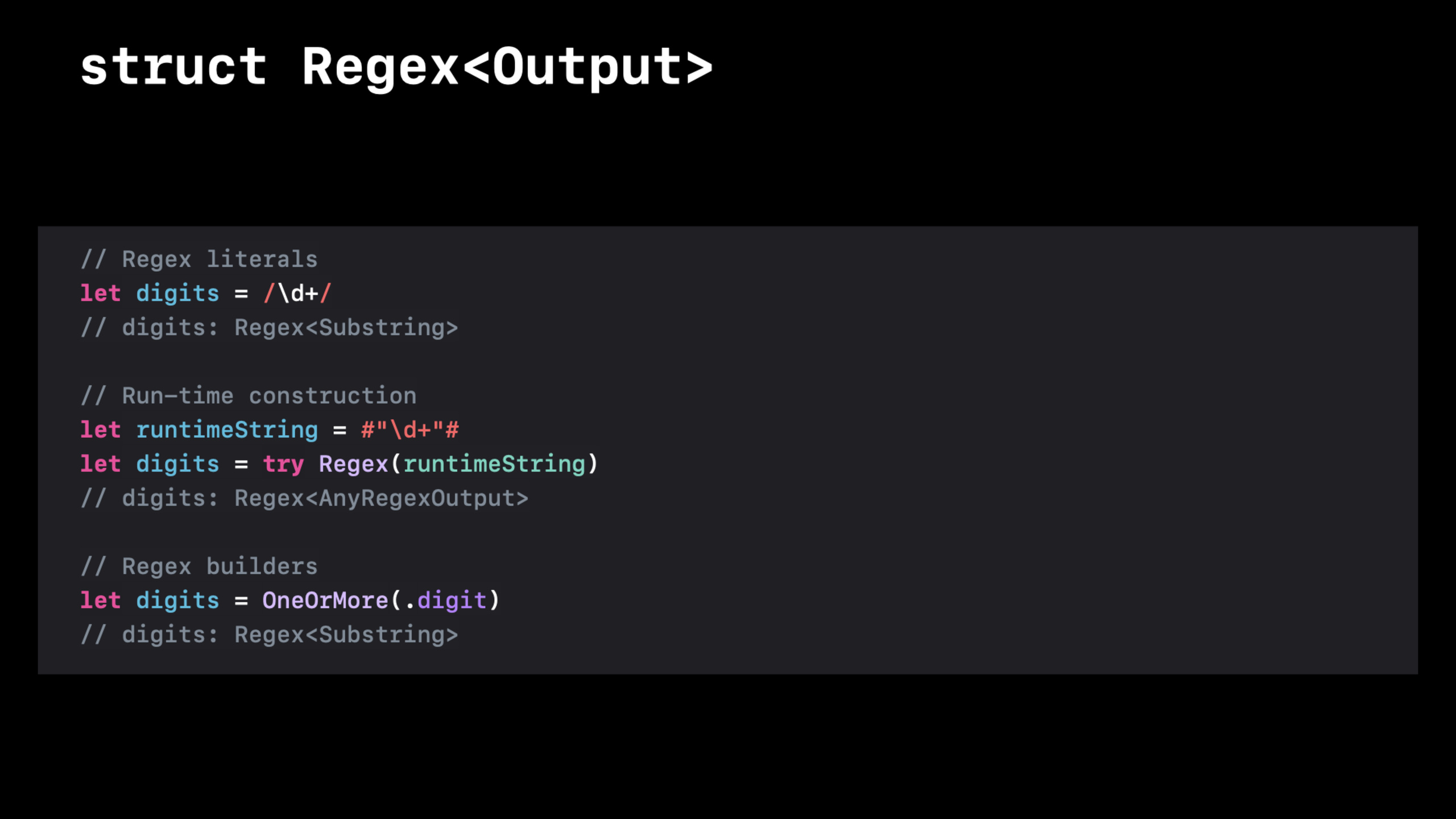
(02:47) Swift 5.7 introduces/.../Regex literal syntax is compatible with mainstream regular dialects such as Perl, Python, Ruby, and Java:
let digits = /\d+/
// digits: Regex<Substring>
Key points:
- The compiler understands regular syntax and provides syntax highlighting and compile-time error checking
- The output type is generic
Regex<Output>, containing capture type information
First use regular expressions to solve the field splitting problem:
let transaction = "DEBIT     03/05/2022    Doug's Dugout Dogs         $33.27"

let fragments = transaction.split(separator: /\s{2,}|\t/)
// ["DEBIT", "03/05/2022", "Doug's Dugout Dogs", "$33.27"](03:56)\s{2,}Matches two or more whitespace characters,|means or,\tMatches tab characters. One line of code replaces more than 20 lines of indexing.
Still availablereplacingUnify the delimiters:
let normalized = transaction.replacing(/\s{2,}|\t/, with: "\t")
// DEBIT\t03/05/2022\tDoug's Dugout Dogs\t$33.27
Regex Builder: Declarative string processing
(03:44) The literal is concise, but complex regular expressions are difficult to read. Regex Builder provides a declarative syntax:
import RegexBuilder

let fieldSeparator = /\s{2,}|\t/

let transactionMatcher = Regex {
    /CREDIT|DEBIT/
    fieldSeparator
    One(.date(.numeric, locale: Locale(identifier: "en_US"), timeZone: .gmt))
    fieldSeparator
    OneOrMore {
        NegativeLookahead { fieldSeparator }
        CharacterClass.any
    }
    fieldSeparator
    One(.localizedCurrency(code: "USD").locale(Locale(identifier: "en_US")))
}
Key points:
Regex { ... }Is a declarative builder, similar to SwiftUI’s ViewBuilder- Can mix literals (
/CREDIT|DEBIT/) and the builder component -One(.date(...))Embed directly into Foundation’s date parser -One(.localizedCurrency(...))Embed currency parser
(06:55)NegativeLookaheadis a key component. It “peeps” at the following input but does not consume it, ensuring that field contents stop matching when a delimiter is encountered:
OneOrMore {
    NegativeLookahead { fieldSeparator }  // Peek: continue only if the next item is not a separator
    CharacterClass.any                    // Match any character
}NoNegativeLookahead,CharacterClass.anyIt will greedily match to the end of the line and then backtrack all the way, which is inefficient.
Strong type capture
(09:04) UseCaptureExtract the fields of interest, the types are directly reflected inRegexIn the generic parameters:
let transactionMatcher = Regex {
    Capture { /CREDIT|DEBIT/ }
    fieldSeparator

    Capture { One(.date(.numeric, locale: Locale(identifier: "en_US"), timeZone: .gmt)) }
    fieldSeparator

    Capture {
        OneOrMore {
            NegativeLookahead { fieldSeparator }
            CharacterClass.any
        }
    }
    fieldSeparator

    Capture { One(.localizedCurrency(code: "USD").locale(Locale(identifier: "en_US"))) }
}
// transactionMatcher: Regex<(Substring, Substring, Date, Substring, Decimal)>
Key points:
- The 0th capture is the entire matched text (
Substring) - The 1st capture is the transaction type (
Substring) - The 2nd capture is the date (
Date, directly output by the Foundation parser) - The 3rd capture is the institution name (
Substring) - The 4th capture is the amount (
Decimal, directly output by the Foundation parser)
Directly access strongly typed properties when using:
func parseLine(_ line: Substring) throws -> MailmapEntry {
    let regex = /\h*([^<#]+?)??\h*<([^>#]+)>\h*(?:#|\Z)/

    guard let match = line.prefixMatch(of: regex) else {
        throw MailmapError.badLine
    }

    return MailmapEntry(name: match.1, email: match.2)
}
Runtime construction and expansion delimiters
(03:20) Some regular expressions need to be constructed from user input at runtime:
let runtimeString = #"\d+"#
let digits = try Regex(runtimeString)
// digits: Regex<AnyRegexOutput>
Key points:
- Runtime constructs may throw syntax errors
- The output type is
AnyRegexOutput, because the capture information is not known at compile time
(10:53) For regular expressions containing slashes, use extended delimiters#/.../#:
let regex = #/
  (?<date>     \d{2} / \d{2} / \d{4})
  (?<middle>   \P{currencySymbol}+)
  (?<currency> \p{currencySymbol})
/#
// Regex<(Substring, date: Substring, middle: Substring, currency: Substring)>
Key points:
#/.../#Allow unescaped slashes inside regular expressions- Whitespace is ignored in extended syntax mode, and indentation can be used to improve readability.
-
(?<name>...)It is a named capture, and the output type is labeled
Unicode is handled correctly
(12:45) Swift’s String handles Unicode extended grapheme clusters (character level) by default. Regex also follows this model:
let aZombieLoveStory = "🧟♀️💖🧠"
// Characters: 🧟♀️, 💖, 🧠
aZombieLoveStory.unicodeScalars
// U+1F9DF, U+200D, U+2640, U+FE0F, U+1F496, U+1F9E0(14:12) Swift String follows Unicode Canonical Equivalence."café"and"cafe\u{301}"The comparison results in equality even though the underlying Unicode scalars are different.
Regex also matches at the character level by default:
input.firstMatch(of: /.\N{SPARKLING HEART}./)
// 🧟♀️💖🧠 - matches three characters
input.firstMatch(of: /.\N{SPARKLING HEART}./.matchingSemantics(.unicodeScalar))
// ️💖🧠 - matches three Unicode scalars; note the leading variation selectorKey points:
- Default
.matchingSemantics(.graphemeCluster)Match Swift Character -.matchingSemantics(.unicodeScalar)Match Unicode scalar level - Use the default behavior in most scenarios, switch only when precise control is required
Local traceback control
(21:45) The regular backtracking mechanism is a double-edged sword. Global backtracking is suitable for searches and fuzzy matching, but it can cause performance issues for exact matching:
let fieldSeparator = /\s{2,}|\t/
// With 8 spaces, match all 8; if a later match fails, backtrack to 7, 6, ...LocalThe builder creates a local lookback scope, discarding untried alternatives after a successful match:
let fieldSeparator = Local { /\s{2,}|\t/ }

let transactionMatcher = Regex {
    Capture { /CREDIT|DEBIT/ }
    fieldSeparator          // Match all whitespace, without backtracking on later failures

    TryCapture(field) { timestamp ~= $0 ? $0 : nil }
    fieldSeparator

    TryCapture(field) { details ~= $0 ? $0 : nil }
    // ...
}
Key points:
Local { ... }Equivalent to atomic non-capturing group- Suitable for precisely specified tokens, such as field separators
- Limit the search space and improve matching efficiency
Detailed Content
TryCapture: Execute custom logic in matching
(18:55)TryCaptureAllows you to use closures to participate in the matching process and implement runtime verification:
let transactionMatcher = Regex {
    Capture { /CREDIT|DEBIT/ }
    fieldSeparator

    TryCapture(field) { timestamp ~= $0 ? $0 : nil }  // Runtime verification with the timestamp regex
    fieldSeparator

    TryCapture(field) { details ~= $0 ? $0 : nil }    // Runtime verification with the details regex
    fieldSeparator

    // ...
}
Key points:
TryCaptureThe closure returnsnilIndicates that the match failed- Closures actively participate in matching and can perform any verification during the matching process
- Suitable for integrating existing runtime rules or custom parsing logic
Reusable Regex components
(27:05) Encapsulate common patterns intoRegexComponent, reused in different places:
struct MailmapLine: RegexComponent {
    @RegexComponentBuilder
    var regex: Regex<(Substring, Substring?, Substring)> {
        ZeroOrMore(.horizontalWhitespace)

        Optionally {
            Capture(OneOrMore(.noneOf("<#")))
        }
        .repetitionBehavior(.reluctant)

        ZeroOrMore(.horizontalWhitespace)

        "<"
        Capture(OneOrMore(.noneOf(">#")))
        ">"

        ZeroOrMore(.horizontalWhitespace)
        /#|\Z/
    }
}

// Usage
let match = line.prefixMatch(of: MailmapLine())
Key points:
RegexComponentProtocols allow custom types to be used as regular components -@RegexComponentBuilderProperty wrappers enable builder syntax- Can mix literals and builders inside components
Embed Foundation parser
struct DatedMailmapLine: RegexComponent {
    @RegexComponentBuilder
    var regex: Regex<(Substring, Substring?, Substring, Date)> {
        // ... previous mailmap pattern ...

        Capture(.iso8601.year().month().day())  // Produces Date directly

        ZeroOrMore(.horizontalWhitespace)
        /#|\Z/
    }
}
Key points:
.iso8601.year().month().day()Is Foundation’s date parsing strategy- The capture type is directly
Date, no subsequent manual conversion is required - Any type that conforms to the parsing strategy can be embedded in the Regex Builder
Core Takeaways
1. Replace all string indexing operations with Regex
Check all items usedString.index、Substringrange operations,.components(separatedBy:)Where strings are parsed. Especially log parsing, CSV/TSV processing, configuration file reading, and user input validation. Swift Regex’s strong type capture makes parsing results directly available, reducing intermediate conversions.
Entrance:split(separator:)、prefixMatch(of:)、firstMatch(of:)、replacing(_:with:)
2. Use Regex Builder instead of NSRegularExpression
Still used in projectsNSRegularExpressionIn place, migrate to Regex Builder. Declarative syntax is more readable and avoids strong type captureNSTextCheckingResultIndexing operations are handled correctly by Unicode by default. You can start with simple mode and migrate gradually.
Entrance:import RegexBuilder,Regex { ... }
3. Encapsulation business-specific RegexComponent
Encapsulate regular patterns reused in the project intoRegexComponent. For example, email verification, mobile phone number format, order number rules, log timestamps, etc. Reusing components ensures consistency, and you only need to change one place when modifying.
Entrance:struct EmailPattern: RegexComponent { ... }
4. Use Local to control performance-sensitive regular expressions
For scenarios where large amounts of text are processed (log analysis, data cleaning, real-time filtering), check whether there are unnecessary global backtrackings in the regex. Field delimiters, fixed format tokens and other precise patterns are usedLocal { ... }Packages,limit the search space.
Entrance:Local { /pattern/ }
Related Sessions
- What’s new in Swift — Overview of new features in Swift 5.7, including the introduction background of Regex and RegexBuilder
- Design protocol interfaces in Swift — Swift 5.7 generic improvements, Regex’s strong type capture relies on these language features
- Meet Swift Async Algorithms — Asynchronous algorithm library that can be used with Regex to process streaming text data
Comments
GitHub Issues · utterances