
Highlight
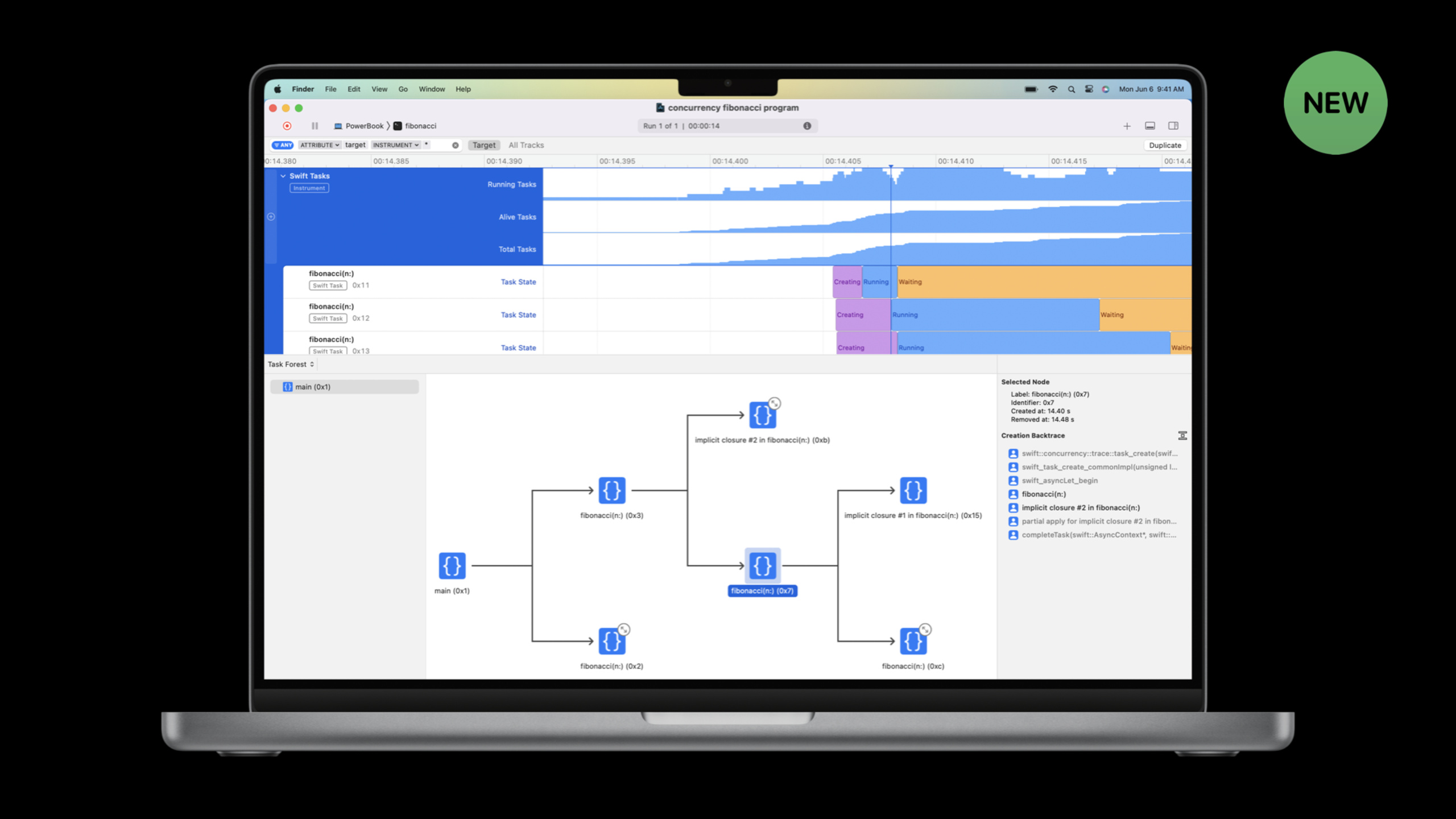
Instruments 14 adds a new Swift Concurrency template that can visualize the running status of Tasks and Actors. Mike and Harjas used a file compression App to demonstrate how to locate the three major performance problems of Main Actor blocking, Actor serial competition, and thread pool exhaustion, and refactored the code to transform the App from “UI stuck” to “multi-core parallelism and smooth interface.”
Core Content
Swift Concurrency makes it easier to write concurrent code correctly, but writing it correctly does not mean writing it quickly. Mike and Harjas pointed out three types of common performance problems: Main Actor blocking leading to UI freezes, Actor serial competition leading to reduced parallelism, and misuse of Continuation leading to leaks or crashes. The new Swift Concurrency template in Instruments 14 is specifically designed to capture and visualize these issues. (00:28)
The demo app is called File Squeezer, and its function is to compress files in folders in batches. Works fine with small files, UI freezes completely with large files. Harjas uses Command-I to start Instruments, select the Swift Concurrency template, and record a piece of running data. (04:18)
Let’s look at the top-level statistics first: Running Tasks displays the number of tasks executed simultaneously, Alive Tasks displays the number of surviving tasks, and Total Tasks displays the cumulative number of tasks created. Harjas noticed that there is only one Running Tasks most of the time, indicating that all work is forced to be serialized. He used the Pin function to pin the longest task to the timeline. Narrative View showed that this task first ran on the background thread for a short period of time, and then occupied the main thread for a long time. This is Main Actor blocking. (08:42)
The root of the problem isCompressionStatekind. The entire class is marked@MainActor,andcompressFileMethods perform time-consuming computations. Although the calculation is wrapped inTask {}, but because the Task is created in the context of the Main Actor, it inherits the isolation domain of the Main Actor, and time-consuming calculations still run on the main thread. (10:24)
The solution is to split the state.filesThe properties are@Published, must be updated on the Main Actor; butlogsJust internal state, no main thread required. So create a newParallelCompressorActor, move log status and compression logic into it.CompressionStateKeep UI relatedfiles,passawaitcallParallelCompressormethod. (11:49)
After the change, the UI is no longer stuck, but the compression speed is still not fast enough. Harjas used Instruments again to analyze and found that a large number of tasks in the Task Summary were in the Enqueued state - they were queued and waiting to be entered.ParallelCompressorActor. The reason iscompressFileThe method runs completely within the Actor isolation domain, and only one task can perform compression at the same time. (14:43)
The second reconstruction: putcompressFilemarked asnonisolated, taking it out of Actor isolation. In this way, compression calculations can be executed in parallel on any thread in the thread pool, and only access is requiredlogsOnly briefly enters the Actor. at the same timeTask {}Change toTask.detached {}, ensuring that new tasks do not inherit the Actor context from which they were created. (17:46)
After the modification, the App can compress all files at the same time, and the UI remains responsive. Instruments Verification DisplayParallelCompressorTasks on Actors are short and the queue length is always controllable.
Detailed Content
Diagnosis and repair of Main Actor blocking
(04:18) The initial code for File Squeezer puts all the logic in@MainActorIn category:
@MainActor
class CompressionState: ObservableObject {
    @Published var files: [FileStatus] = []
    var logs: [String] = []

    func update(url: URL, progress: Double) {
        if let loc = files.firstIndex(where: {$0.url == url}) {
            files[loc].progress = progress
        }
    }

    func compressAllFiles() {
        for file in files {
            Task {
                let compressedData = compressFile(url: file.url)
                await save(compressedData, to: file.url)
            }
        }
    }

    func compressFile(url: URL) -> Data {
        log(update: "Starting for \(url)")
        let compressedData = CompressionUtils.compressDataInFile(at: url) { uncompressedSize in
            update(url: url, uncompressedSize: uncompressedSize)
        } progressNotification: { progress in
            update(url: url, progress: progress)
            log(update: "Progress for \(url): \(progress)")
        } finalNotificaton: { compressedSize in
            update(url: url, compressedSize: compressedSize)
        }
        log(update: "Ending for \(url)")
        return compressedData
    }

    func log(update: String) {
        logs.append(update)
    }
}
Key points:
@MainActorLet the entire class run on the main thread -compressFileis a time-consuming operation, but because it@MainActorclass, so it is also executed on the main thread -Task {}Inherits the Main Actor context, so asynchronous tasks also run on the main thread- The Task State Summary of Instruments can locate the longest task. After Pin to the timeline, the Narrative View shows that the task is running on the main thread for a long time.
Fix: Putlogsand compression logic split into independent Actors:
actor ParallelCompressor {
    var logs: [String] = []
    unowned let status: CompressionState

    init(status: CompressionState) {
        self.status = status
    }

    func compressFile(url: URL) -> Data {
        log(update: "Starting for \(url)")
        let compressedData = CompressionUtils.compressDataInFile(at: url) { uncompressedSize in
            Task { @MainActor in
                status.update(url: url, uncompressedSize: uncompressedSize)
            }
        } progressNotification: { progress in
            Task { @MainActor in
                status.update(url: url, progress: progress)
                await log(update: "Progress for \(url): \(progress)")
            }
        } finalNotificaton: { compressedSize in
            Task { @MainActor in
                status.update(url: url, compressedSize: compressedSize)
            }
        }
        log(update: "Ending for \(url)")
        return compressedData
    }

    func log(update: String) {
        logs.append(update)
    }
}

@MainActor
class CompressionState: ObservableObject {
    @Published var files: [FileStatus] = []
    var compressor: ParallelCompressor!

    init() {
        self.compressor = ParallelCompressor(status: self)
    }

    func compressAllFiles() {
        for file in files {
            Task {
                let compressedData = await compressor.compressFile(url: file.url)
                await save(compressedData, to: file.url)
            }
        }
    }
}
Key points:
ParallelCompressoris an independent actor, protectinglogsStatus- Progress callback
Task { @MainActor in ... }Jump back to the main thread to update the UI -CompressionStateonly keep@PublishedUI state -compressAllFilespassawaitCall Actor method
Diagnosis and repair of Actor serial competition
(14:43) After the first refactoring, Instruments shows that a large number of tasks are waiting to enter in the Enqueued stateParallelCompressor. The reason iscompressFileCompletely executed within the Actor isolation domain, only one task can be running at the same time.
Fix: PutcompressFilemarked asnonisolated,useTask.detachedCreate independent tasks:
actor ParallelCompressor {
    var logs: [String] = []
    unowned let status: CompressionState

    init(status: CompressionState) {
        self.status = status
    }

    nonisolated func compressFile(url: URL) async -> Data {
        await log(update: "Starting for \(url)")
        let compressedData = CompressionUtils.compressDataInFile(at: url) { uncompressedSize in
            Task { @MainActor in
                status.update(url: url, uncompressedSize: uncompressedSize)
            }
        } progressNotification: { progress in
            Task { @MainActor in
                status.update(url: url, progress: progress)
                await log(update: "Progress for \(url): \(progress)")
            }
        } finalNotificaton: { compressedSize in
            Task { @MainActor in
                status.update(url: url, compressedSize: compressedSize)
            }
        }
        await log(update: "Ending for \(url)")
        return compressedData
    }

    func log(update: String) {
        logs.append(update)
    }
}

@MainActor
class CompressionState: ObservableObject {
    @Published var files: [FileStatus] = []
    var compressor: ParallelCompressor!

    init() {
        self.compressor = ParallelCompressor(status: self)
    }

    func compressAllFiles() {
        for file in files {
            Task.detached {
                let compressedData = await self.compressor.compressFile(url: file.url)
                await save(compressedData, to: file.url)
            }
        }
    }
}
Key points:
nonisolatedLet the method escape from Actor isolation and be executed in any thread- because
nonisolated, to access Actor state (e.g.log) need to be addedawait Task.detachedDo not inherit the Actor context when created, ensuring that tasks are freely scheduled in the thread pool -selfExplicit capture is required in detached task- Compression calculations can now be truly parallelized, limited only by the number of CPU cores
Swift Concurrency template functionality for Instruments
(04:58) The Swift Concurrency template for Instruments 14 contains multiple views:
Swift Tasks Instrument Statistics:
- Running Tasks: Number of tasks executed simultaneously -Alive Tasks: The current number of alive tasks
- Total Tasks: The cumulative number of tasks created
Task Forest:
- Graphically display the parent-child task relationship in structured concurrency
- Located in the lower half of the window
Task Summary:
- Display the time consumption of each task in different states (Running, Suspended, Enqueued, etc.)
- Right click on the task to pin it to the timeline
The timeline after Pin Task contains:
- Task status track
- Create call stack in extension details
- Narrative View: Explain the current status of the task, such as “Which Task is waiting for”
- Pin subtasks, threads or actors can be continued from the Narrative View
Swift Actors Instrument:
- Display the queue length and task execution time of each Actor
- Used to verify whether the Actor has been occupied for a long time
Thread pool exhaustion and misuse of Continuation
(19:46) Mike added two frequently asked questions:
Thread pool exhausted:
- Swift Concurrency requires that tasks must continue to move forward
- Blocking calls (synchronous file IO, network requests, lock waits) occupy threads but do not use CPU
- The thread pool is limited, and too many blocking tasks will cause other tasks to be unable to execute, leading to deadlock in extreme cases.
- Solution: Use asynchronous API to replace blocking calls; when blocking calls must be used, put them in Dispatch Queue and then use Continuation to bridge
Continuation misuse:
-withCheckedContinuationThe callback must be called and can only be called once
- Called zero times: task hangs forever, memory leaks
- Called twice: program crashes or behaves abnormally
- use
withCheckedContinuation(rather thanwithUnsafeContinuation) can detect misuse at runtime - Instruments will mark the task in the Continuation waiting state on the timeline
Core Takeaways
-
What to do: Run Instruments’ Swift Concurrency template through your concurrency code.
Why it’s worth doing: Harjas’ demonstration shows that it is difficult to judge with the naked eye which thread a Task is running on and how long the Actor queue is. Instruments visualizes the timeline, task status, and Actor queue, changing the positioning problem from “guessing” to “seeing”.
How to start: Press Command-I in Xcode, select the Swift Concurrency template, and record a piece of running data containing a typical workload. First check whether Running Tasks is close to the number of CPU cores, and then check whether any tasks are Enqueued for a long time. -
What to do: Review everything in the code
@MainActorMarked classes to remove time-consuming operations.
Why it’s worth doing: The root of the problem with File Squeezer is that the entire class is marked@MainActor, causing all methods to run on the main thread. The correct approach is to only@PublishedProperties and UI updates stay in the Main Actor, other states use independent Actors ornonisolatedMethod protection.
How to start: Search in the project@MainActor, check whether each marked class/method performs time-consuming operations (file reading and writing, network requests, large amounts of calculations). If so, split the time-consuming logic into independent Actors or detached tasks. -
What to do: Add to Actor’s method
nonisolatedMark to separate the calculation logic from Actor serialization.
Why it’s worth doing: After the first reconstruction, File Squeezer’s UI is no longer stuck, but the compression is still serial. The reason iscompressFileCompletely within the Actor isolation domain. marknonisolatedFinally, the calculation is executed in parallel in the ordinary thread pool and only enters the Actor briefly when writing the log.
How to start: Examine your Actor methods and ask yourself “Is this method spending most of its time doing computations or accessing Actor state?” If it’s the former, addnonisolated, change the status access toawait。
Related Sessions
- Eliminate data races using Swift Concurrency — explore swift’s approach to eliminating data races and its effect on app architecture.
- Swift concurrency: Behind the scenes — dive deep into the swift concurrency runtime and learn how async/await and actors work under the hood.
- Meet async/await in Swift — learn how to use async/await to write asynchronous code that is easier to read and maintain.
Comments
GitHub Issues · utterances