
Highlight
MusicKit greatly expands its capabilities in 2022: new Curator and Radio Show types, search Top Results and Suggestions, ranking API, audio quality metadata (Spatial Audio / Lossless), and most importantly - complete user music library literacy.
Core Content
Directory content enhancement
(01:12)
MusicKit adds two new content types:
Curator: Brand curators such as Nike, Shazam, Beats by Dr. Dre, and the Apple editorial team. Each Curator hasname、url、artworkandkind(editorialorexternal) attribute, andplaylistsThe relationship can get all playlists created by this curator.
Radio Show: Such as “New Music Daily by Zane Lowe”, alsoplaylistsrelation.
A new inverse relationship is added to the Playlist type:curatorandradioShow, making it easy to trace the playlist back to the creator.
Search experience upgrade
(03:37)
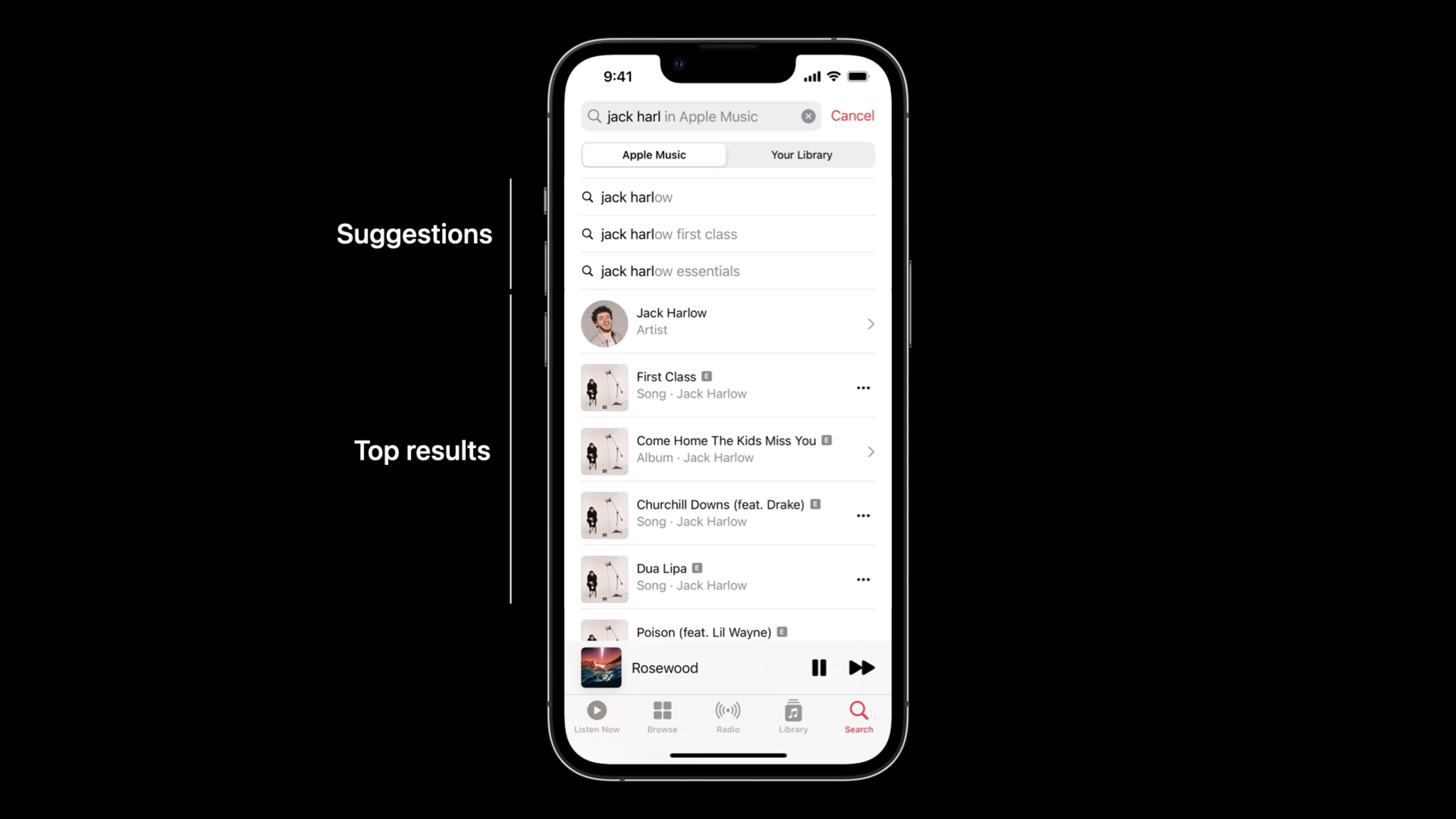
Top Results: set in the search requestincludeTopResults = true, returns a list of the most relevant results across types, sorted by relevance.
var searchRequest = MusicCatalogSearchRequest(
    term: "Hello",
    types: [Artist.self, Album.self, Song.self]
)
searchRequest.includeTopResults = true
let searchResponse = try await searchRequest.response()
print("\(searchResponse.topResults)")
Key Points:
-topResultsContains results for all request types, mixed in a single collection
- Sort by relevance, don’t care about specific types
- First screen display suitable for search interface
Suggestions: Provides music-related auto-completion suggestions.
let request = MusicCatalogSearchSuggestionsRequest(term: "shaz")
let response = try await request.response()
Key Points:
- Each suggestion has
displayTerm(suitable for display) andsearchTerm(for actual searching) - After the user selects suggestion, use
searchTermPerform a formal search
Ranking API
(05:41)
let request = MusicCatalogChartsRequest(
    kinds: [.dailyGlobalTop, .mostPlayed, .cityTop],
    types: [Song.self, Playlist.self]
)
let response = try await request.response()
print("\(response.playlistCharts.first)")
Key Points:
- Supports Top Songs, Top Albums, city rankings, and daily global Top 100
- Filter by music type
- Built-in paging support, no manual processing required
MusicDataRequest
Audio quality metadata
(06:58)
MusicKit exposedaudioVariantsProperties that let you know which audio formats a song or album supports:
let album = …
let detailedAlbum = try await album.with(.audioVariants)
print("\(detailedAlbum.debugDescription)")
Key Points:
-audioVariantsyesAudioVariantarray
- Contains
dolbyAtmos(spatial audio),lossless(lossless audio) etc. - New
isAppleDigitalMasterBoolean value identifying the highest quality digital master tape
The currently playing audio quality can also be obtained:
@ObservedObject var musicPlayerState = ApplicationMusicPlayer.shared.state

var body: some View {
    if musicPlayerState.audioVariant == .dolbyAtmos {
        Image("dolby-atmos-badge")
    }
}
User database access
(12:21)
The biggest update this year: The app can access users’ personal music libraries.
MusicLibraryRequest: Load library content locally from the device without going through the network.
let request = MusicLibraryRequest<Playlist>()
let response = try await request.response()
Key Points:
- Specify the requested type (Playlist, Album, Song, etc.) through generic parameters
- Supports chain filtering and sorting
-
includeDownloadedContentOnly = trueOnly return downloaded content
Filtering Example:
var request = MusicLibraryRequest<Album>()
request.filter(matching: \.isCompilation, equalTo: true)
request.filter(matching: \.genres, contains: danceGenre)
request.includeDownloadedContentOnly = true
let response = try await request.response()MusicLibrarySectionedRequest: Get library content by group.
var request = MusicLibrarySectionedRequest<Genre, Album>()
request.sortItems(by: \.artistName, ascending: true)
let response = try await request.response()
Key Points:
- The first generic parameter is the grouping type, the second is the content type
-
sortItemsSort content,sortSectionsSort groups - Each group passes
itemsProperty accesses the content below it
Database write operation
(22:01)
MusicKit now supports modifying a user’s music library:
// Add a song to a playlist
Task {
    try await MusicLibrary.shared.add(selectedTrack, to: playlist)
    isShowingPlaylistPicker = false
}
Supported operations include:
- Add content to the library
- Create playlists
- Edit playlist metadata and track listings
- Add songs to existing playlist
Detailed Content
Complete search interface implementation
struct MusicSearchView: View {
    @State private var searchTerm = ""
    @State private var suggestions: [MusicCatalogSearchSuggestion] = []
    @State private var topResults: MusicItemCollection<MusicCatalogSearchable> = []

    var body: some View {
        NavigationStack {
            List {
                // Search suggestions
                if !suggestions.isEmpty {
                    Section("Suggestions") {
                        ForEach(suggestions) { suggestion in
                            Button(suggestion.displayTerm) {
                                searchTerm = suggestion.searchTerm
                                performSearch()
                            }
                        }
                    }
                }

                // Top Results
                if !topResults.isEmpty {
                    Section("Top Results") {
                        ForEach(topResults) { item in
                            switch item {
                            case let song as Song:
                                SongRow(song: song)
                            case let album as Album:
                                AlbumRow(album: album)
                            case let artist as Artist:
                                ArtistRow(artist: artist)
                            default:
                                EmptyView()
                            }
                        }
                    }
                }
            }
            .searchable(text: $searchTerm)
            .onChange(of: searchTerm) { _ in
                loadSuggestions()
            }
            .onSubmit(of: .search) {
                performSearch()
            }
        }
    }

    func loadSuggestions() async {
        let request = MusicCatalogSearchSuggestionsRequest(term: searchTerm)
        let response = try? await request.response()
        suggestions = response?.suggestions ?? []
    }

    func performSearch() async {
        var request = MusicCatalogSearchRequest(
            term: searchTerm,
            types: [Song.self, Album.self, Artist.self]
        )
        request.includeTopResults = true
        let response = try? await request.response()
        topResults = response?.topResults ?? []
    }
}
Key Points:
-MusicCatalogSearchSuggestionsRequestProvide autocomplete suggestions
-includeTopResults = trueGet the most relevant results across genres
-topResultsyesMusicCatalogSearchableA collection of types that need to be processed by type conversion
Database playlist display
struct LibraryPlaylistsView: View {
    @State private var playlists: MusicItemCollection<Playlist> = []

    var body: some View {
        List {
            Section(header: Text("Library Playlists").fontWeight(.semibold)) {
                ForEach(playlists) { playlist in
                    PlaylistCell(playlist)
                }
            }
        }
        .task {
            await loadPlaylists()
        }
    }

    @MainActor
    private func loadPlaylists() async throws {
        let request = MusicLibraryRequest<Playlist>()
        let response = try await request.response()
        playlists = response.items
    }
}
Key Points:
-MusicLibraryRequestLoad locally from the device without consuming network traffic
- use
@MainActorMake sure UI updates are executed on the main thread - returned
Album、SongThe types are the same as the structure returned by the directory request, and the capabilities are the same.
Filtered database query
func fetchDanceCompilations() async throws -> MusicItemCollection<Album> {
    var request = MusicLibraryRequest<Album>()

    // Return only compilations
    request.filter(matching: \.isCompilation, equalTo: true)

    // Return only the Dance genre
    let danceGenre = Genre(id: " dance", name: "Dance")
    request.filter(matching: \.genres, contains: danceGenre)

    // Return only downloaded content
    request.includeDownloadedContentOnly = true

    let response = try await request.response()
    return response.items
}
Key Points:
- Filter conditions can be combined in chains
- Xcode auto-completion only displays key paths supported by the current type
-
includeDownloadedContentOnlySupport offline scenarios
Specify the source when loading extended attributes
// Load the album's tracks from the catalog
let catalogTracks = try await album.with(.tracks)

// Load the same album's tracks from the library
let libraryTracks = try await album.with(.tracks, preferredSource: .library)
Key Points:
-preferredSource: .libraryLoad from user database first
- Attributes that exist only in the catalog or only in the database are not affected
preferredSourceinfluence - This feature can be used regardless of whether the original item comes from a catalog request or a repository request
Core Takeaways
1. Add music recommendations to fitness apps
- What: Display the user’s personal recommended playlist and recently played content before the workout begins
- Why it’s worth doing: MusicKit
MusicPersonalRecommendationsRequestandMusicRecentlyPlayedRequestAutomatically handle authentication and get personalized content with one line of code - How to start: Use
MusicPersonalRecommendationsRequest()To get recommendations, useMusicRecentlyPlayedRequest<Song>()Get recently played songs
2. Add music sharing to social apps
- What: Let users search for songs in the Apple Music catalog and share to chat or feed
- Why it’s worth doing:
MusicCatalogSearchRequestofincludeTopResultsMake the search experience closer to native Apple Music so users can find the songs they want to share without leaving your app - How to start: Integrated search suggestions + Top Results, users can get songs after selection
urlproperties to share
3. Add background music to the Focus/Pomodoro App
- What to do: Create focus time playlists based on content from your user library
- Why it’s worth doing:
MusicLibraryRequestYou can filter by type, downloaded status, and matchMusicLibrarySectionedRequestDisplay grouped by type - How to start: Use
MusicLibrarySectionedRequest<Genre, Song>()Group by music type to let users choose according to their mood
4. Add collaborative playlists to party/event apps
- What to do: Let event attendees add songs to a shared playlist
- Why it’s worth doing: MusicKit now supports creating playlists and adding songs, which can realize the function of “everyone chooses songs together”
- How to start: Use
MusicLibrary.shared.add(track, to: playlist)To add selected songs to a playlist, useMusicCatalogSearchRequestHave participants search for songs
Related Sessions
- Meet Apple Music API — Apple Music REST API cross-platform access
- Create a more responsive media app — AVFoundation media application optimization
- What’s new in Swift — Swift language annual update
Comments
GitHub Issues · utterances