
Highlight
iOS 16 adds 12 new sub-categorization capabilities to the SMS message filtering extension. Developers can automatically classify text messages from unknown senders into sub-folders of Transactional and Promotional, instead of simply marking them as spam.
Core Content
SMS inbox clutter
(01:08)
In many countries, SMS has become the main channel for companies to notify customers - bank transaction reminders, marketing activities, express delivery notifications, and appointment reminders. The messages, which come from short codes, alphanumeric codes and regular phone numbers, are mixed into inboxes, making it difficult for users to find personal messages from family and friends.
iOS offers a “Filter Unknown Senders” feature, but even filtered folders can quickly pile up if multiple messages are received every day.
How the Message Filter Extension works
(02:04)
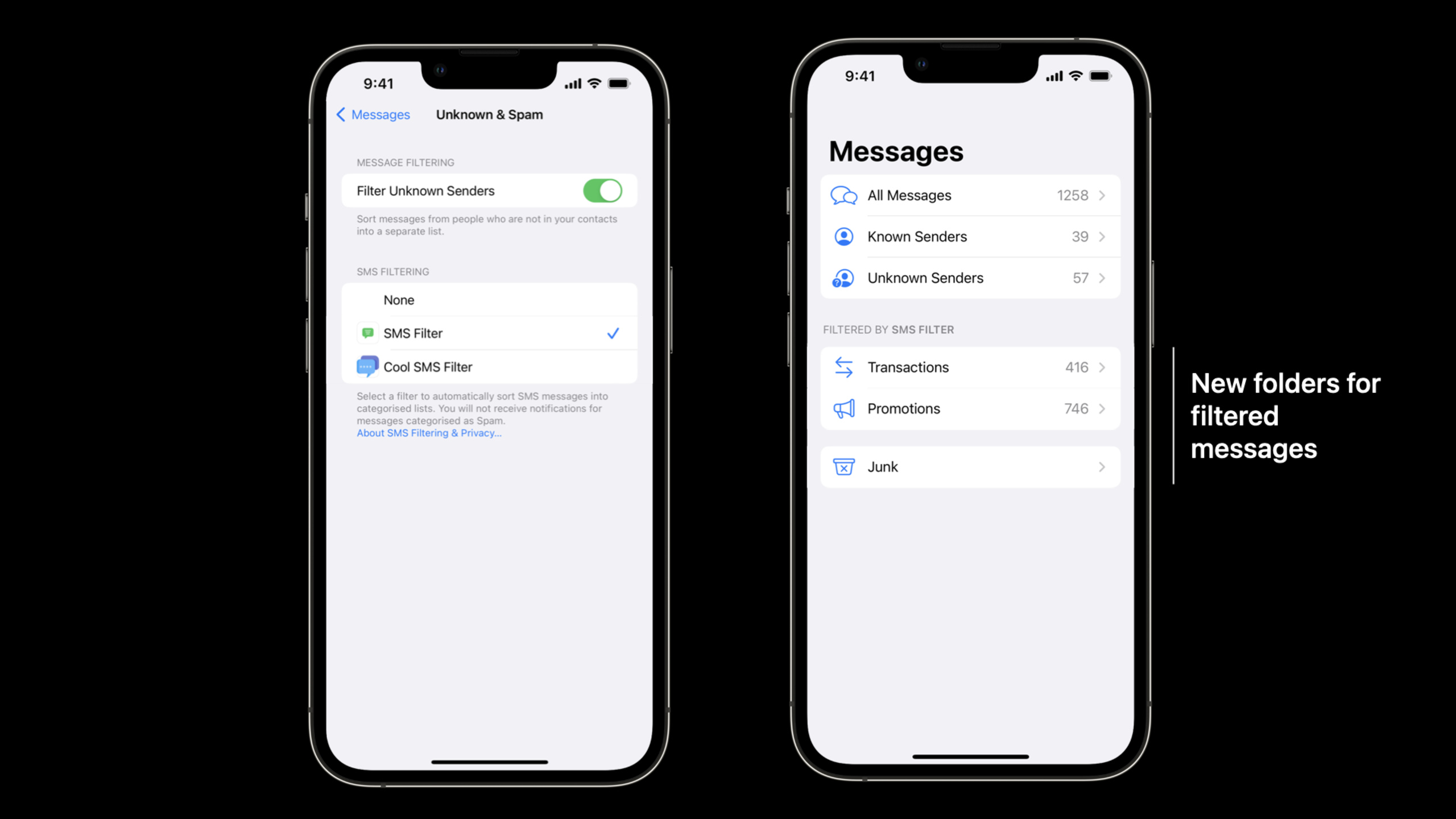
iOS provides an extended sandbox-based model for classifying messages from unknown senders. After users install the filtering app from the App Store, they turn on filtering in Settings > Messages > Unknown & Spam and select a filter. Note that only one filter can be active at the same time.
Starting with iOS 14, the Messages app displays three folders: Transactions, Promotions, and Junk. This classification structure remains consistent regardless of which filter is used.
Subcategory enhancements for iOS 16
(03:37)
Prior to iOS 16, developers could only sort messages into three top-level categories. iOS 16 adds 12 new subcategories to make classification more refined:
Transactional Subcategory:
- Finance
- Orders
- Health
- Public Services
- Weather
- Reminders -Rewards
Promotional subcategory:
- Coupons (coupons)
- Offers
Taking the Indian market as an example, users often receive a large number of financial transaction text messages. These messages can now be organized into the Finance subfolder under Transactions.
Two-stage filtering process
(04:44)
The filtering process is divided into two stages:
Configuration Phase: When the user selects a filter in settings, the new iOS 16 API requests the capabilities supported by the filter. The filter returns a list of supported categories and subcategories, and updates the Messages app’s inbox folder after iOS verification.
Runtime Classification Phase: Every time a text message is received from an unknown sender, iOS queries the filters to determine which category and subcategory the message belongs to. The filter must return capabilities declared during the configuration phase.
Detailed Content
Create Message Filter Extension
(06:32)
In Xcode, add the Message Filter Extension target to your project. After creating,MessageFilterExtension.swiftThe required function templates are automatically generated.
Declare supported subcategories
(07:02)
accomplishhandle(_capabilitiesRequest:context:completion:)Method declaration capabilities:
func handle(
    _ capabilitiesRequest: ILMessageFilterCapabilitiesQueryRequest,
    context: ILMessageFilterExtensionContext,
    completion: @escaping (ILMessageFilterCapabilitiesQueryResponse) -> Void
) {
    let response = ILMessageFilterCapabilitiesQueryResponse()
    // Select up to 5 subcategories
    response.transactionalSubActions = [
        .transactionalFinance,
        .transactionalOrders,
        .transactionalHealth
    ]
    response.promotionalSubActions = [
        .promotionalCoupons,
        .promotionalOffers
    ]
    completion(response)
}
Key points:
- Declare up to 5 subcategories
-
transactionalSubActionsSet transaction category subcategory -promotionalSubActionsSet promotion subcategories - After declaration, the message application will display the corresponding subfolder
Message classification logic
(08:16)
accomplishhandle(_queryRequest:context:completion:)Method handles incoming messages:
func handle(
    _ queryRequest: ILMessageFilterQueryRequest,
    context: ILMessageFilterExtensionContext,
    completion: @escaping (ILMessageFilterQueryResponse) -> Void
) {
    guard let message = queryRequest.messageBody else { return }
    let response = ILMessageFilterQueryResponse()

    switch message {
    case _ where message.contains("debited"):
        response.filterAction = .transaction
        response.filterSubAction = .transactionalFinance
    case _ where message.contains("coupon"):
        response.filterAction = .promotion
        response.filterSubAction = .promotionalCoupons
    default:
        response.filterAction = .allow
    }

    completion(response)
}
Key points:
queryRequest.messageBodyGet message text -filterActionSet top-level categories (.transaction、.promotion、.junk、.allow)filterSubActionSet subcategories- If the returned action and sub-action combinations do not match, iOS will ignore the sub-action and only use the action
- Messages that cannot be classified are returned
.allow, and let it go into your regular inbox
Classification result display
Once configured, the Messages app will display subfolders. For example:
- Transactions > Finance: Bank SMS containing the “debited” keyword
- Transactions > Orders: SMS containing order information
- Promotions > Coupons: Marketing text messages containing the “coupon” keyword
Updates to Apple India SMS Filter
(11:03)
Apple’s SMS filters in India also make use of iOS 16’s new capabilities, with new Finance, Orders, and Reminders subfolders. Bank transactions go into Finance, takeout/delivery messages go into Orders, and important events and to-do items go into Reminders.
Core Takeaways
-
What: Develop localized SMS classification tools for specific markets (e.g. India, Southeast Asia)
-
Why it’s worth doing: These markets use a lot of text messages. Banks, e-commerce, and public services all rely on text message notifications, and there is a strong demand for classification.
-
How to start: Create Message Filter Extension and configure classification rules based on common local SMS template keywords
-
What to do: Build an intelligent financial assistant to automatically organize bank transaction text messages
-
Why it’s worth doing: The Finance subcategory gives bank text messages a dedicated place to further extract transaction data.
-
How to start: Identify the bank SMS format in the Extension, extract the amount, time, and merchant information, and store it in the App’s database to generate a consumption report
-
What to do: Develop promotional information aggregation tool
-
Why it’s worth it: Coupons and Offers subcategories let users never miss offers while keeping their inbox tidy
-
How to start: Classify promotional text messages into corresponding folders, and provide unified discount code management and expiration reminders in the App
-
What to do: Create an enterprise-grade SMS management solution
-
Why is it worth doing: Enterprise internal systems (OA, ERP, monitoring alarms) often send notifications through SMS, which need to be distinguished from marketing SMS.
-
How to start: Customize filters for the enterprise and classify internal system text messages into Reminders or Public Services to ensure that important notifications are not drowned
Related Sessions
- What’s new in Foundation — New features of the Foundation framework
- What’s new in Swift — New features of Swift language
- Create your Privacy Nutrition Label — Guide to creating a privacy nutrition label
Comments
GitHub Issues · utterances