
Highlight
Create ML brought three core updates at WWDC22: the interactive model evaluation tool helps developers locate data problems, the Continuity Camera real-time preview makes model testing more intuitive, and the Create ML Components framework adds action repetition counting capabilities.
Core Content
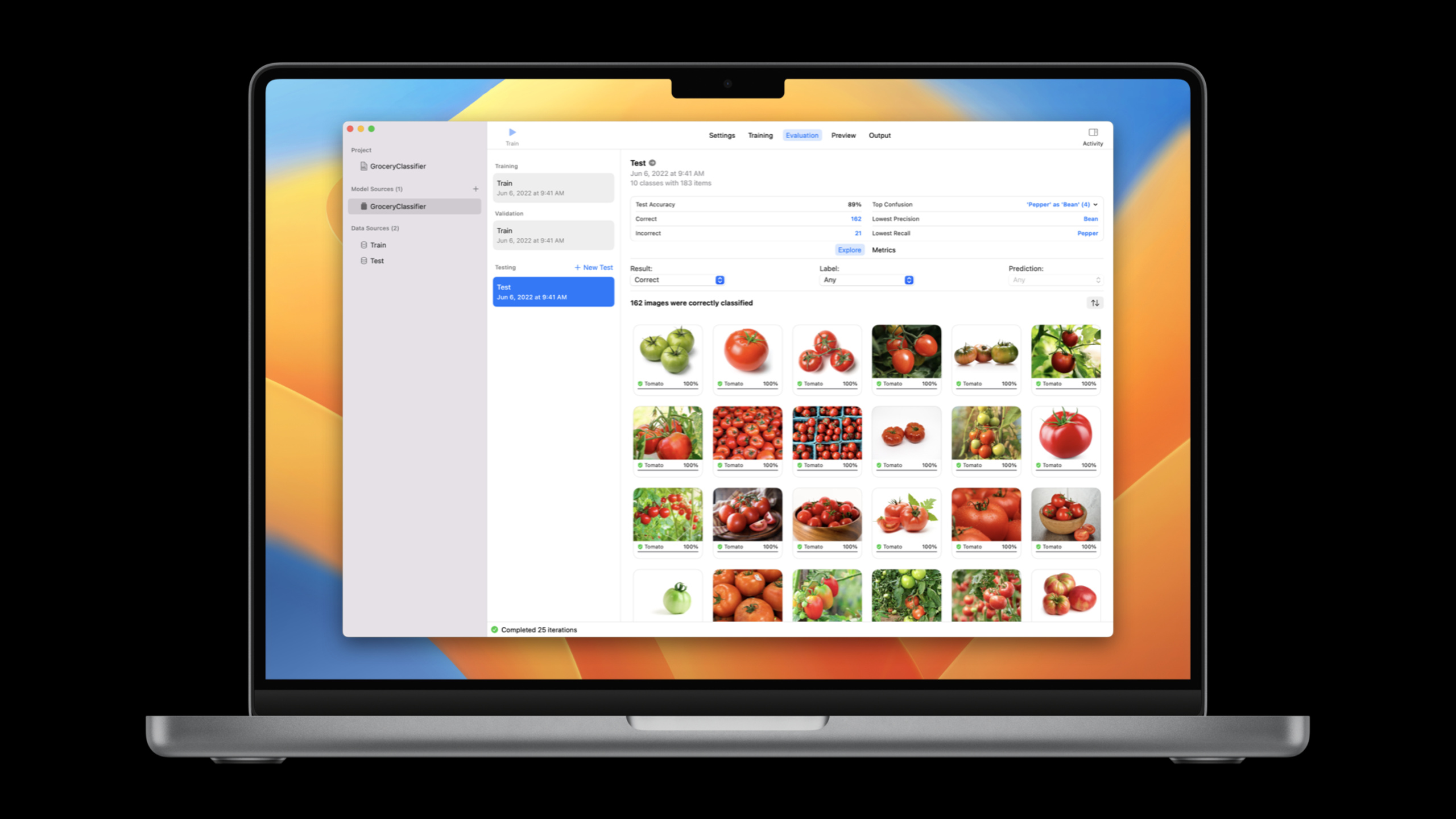
After training a model, you’ll typically look at an accuracy number. 89% sounds great, but that number masks a lot of problems. The Create ML app’s new evaluation tool lets you dig behind the numbers to see exactly which examples the model made errors on and why. (02:26)
Take an ingredient image classifier as an example. After 25 epochs of training, the test accuracy is 89%. In the Metrics tab, you can see detailed statistics for each category. The accuracy for the tomato category is 91%, meaning the model is wrong 9% of the time when it says “this is a tomato.” (04:36)
Click on the accuracy number to see three images that were misclassified as tomatoes. The first one is labeled as a potato, but it actually looks like a tomato—a labeling error. All three pictures are labeled incorrectly, and the model performance will improve after correction. (05:16)
Continuing to explore the failure cases, we found that a picture labeled as a carrot was predicted to be a potato. When you zoom in, it’s obviously a foot, not a carrot. The shape changes of carrots in the training data are not rich enough, and the model learns incorrectly. (06:46)
There is another interesting situation: there are multiple vegetables in a picture, labeled as eggplant. The model only sees one category, but the image content is complex. At this time, you need to consider whether you should use an object detector (Object Detector) instead of an image classifier. (07:57)
The Top Confusion in the Summary area shows the most common confused pair: Pepper misclassified as Bean. After checking, it was found that the model could correctly identify bell peppers, but spicy peppers and beans were both green and easily confused. The samples of chili peppers in the training data may not be diverse enough. (08:37)
Detailed Content
Assessment Workflow
The evaluation process for Create ML applications is divided into several levels: (03:43)
- Top-level summary: correct number, incorrect number, main confusing pairs, quickly locate the direction of the problem
- Metrics table: precision, recall, false positive, false negative for each category, customizable display columns
- Explore view: Click on any number to enter the sample level and view the original image, predicted label, and real label
- Detailed Prediction: Expand a single image to display the model’s confidence distribution for all categories
Currently, the Explore view supports image classifiers, gesture classifiers, and object detection templates. (11:18)
Real-time preview
In addition to evaluating labeled data, you can also do quick tests with unlabeled samples. The Preview tab supports two methods: (10:15)
- Drag image: Drag the test image sent by your colleague to see the model prediction results
- Live Camera: Use iPhone or iPad as Continuity Camera to test directly against the real thing
Live preview currently supports image classifier, gesture action classifier, and body action classifier templates. (11:26) On macOS Ventura, you can choose any connected camera, including Continuity Camera.
Create ML Components and Repeat Counting
The Create ML framework expanded to tvOS 16 this year. (11:59) The bigger change is the introduction of Create ML Components, which exposes the underlying building blocks and allows developers to assemble custom pipelines.
One specific new ability is action repetition counting (Repetition Counting). It is based on a pre-trained model, requires no training data, and is suitable for all types of full-body repetitive movements. (15:26)
import CreateMLComponents

// Create a repetition counter
let counter = HumanBodyActionCounter()

// Count from video frames
for frame in videoFrames {
    let count = try await counter.count(frame)
    print("Current count: \(count)")
}
Key points:
HumanBodyActionCounterIt is class-agnostic and suitable for various whole-body repetitive movements such as fitness movements (jumping jacks, squats), dance movements (rotation, movement combinations), etc.- No training required, used directly as runtime API
- Can be combined with Action Classification to simultaneously identify action types and counts
- Integrate into apps with just a few lines of code
Framework platform support
The Create ML framework supports macOS, iOS, iPadOS and tvOS, but platform support for different tasks varies: (12:24)
- Tabular classifiers and regressors: all platforms
- Tasks involving video: requires macOS (larger data volume and computational requirements)
Core Takeaways
1. Use assessment tools to conduct data quality audits
Don’t just look at the accuracy numbers. If you go through the error samples in the test set one by one, you will find a large number of labeling errors and data deviations. The Explore view of the Create ML app makes this process visual, and you can click on the numbers to see the corresponding images. Record the issues found in a Finder tab as a guide for the next round of data collection.
2. Use Continuity Camera for real scene verification
Just because a model performs well on the test set does not mean it will perform well in the real environment. Use your iPhone as a Continuity Camera to test the model directly against the real thing. Pay attention to light angle, background complexity, and occlusion conditions, which may not be covered in the static test set.
3. Add repeat counting to your fitness or sports app
If you are making a fitness app, you can useHumanBodyActionCounterImplement automatic counting function. When the user does squats, push-ups, and jumping jacks, the application automatically counts and gives feedback. Combined with action classification, it can also identify which action the user does and then count it accordingly. No need to collect training data, just a few lines of code.
4. Consider upgrading from classifier to detector
If multiple targets often appear in your application scenario (for example, there are multiple vegetables and multiple people in a picture), the image classifier will be unable to meet its requirements. If you find this to be the case during evaluation, consider switching to the Object Detection template. The Create ML app supports both templates, making switching inexpensive.
Related Sessions
- Get to know Create ML Components — Get started with the Create ML Components framework and learn how the underlying building blocks fit together
- Compose advanced models with Create ML Components — Compose advanced models with Create ML Components, including asynchronous timing components
- Explore the machine learning development experience — Overview of machine learning development experience
- Classify hand poses and actions with Create ML — Classify hand poses and actions with Create ML
Comments
GitHub Issues · utterances