
Highlight
App Store policy requires all apps to obtain user consent through the AppTrackingTransparency framework before tracking user data across company apps/websites; tracking definitions include correlating data collected by this app with other company data for advertising or ad measurement, and sharing user data with data brokers.
Core Content
Your app is connected to a third-party advertising SDK, but you are not sure whether you need to request tracking permission. The consequences of getting this question wrong are serious: the app may be rejected, or the app may be removed from the shelves due to continued tracking violations even after the user rejects it.
(01:14) App Tracking Transparency (ATT) defines “tracking” very specifically. Tracking refers to two situations:
- Association of user or device data collected by this App with data collected by other companies’ Apps, websites or offline assets for targeted advertising or ad measurement
- Share user or device data with data broker
Key criterion: Whether the data crosses company boundaries. Sharing data between different apps owned by the same company does not constitute tracking.
(01:44) Several specific examples:
- Does not constitute tracking: The user searched for waffles in App A, and App A used its own data to show the user a breakfast ad. The data does not leave the company that owns App A.
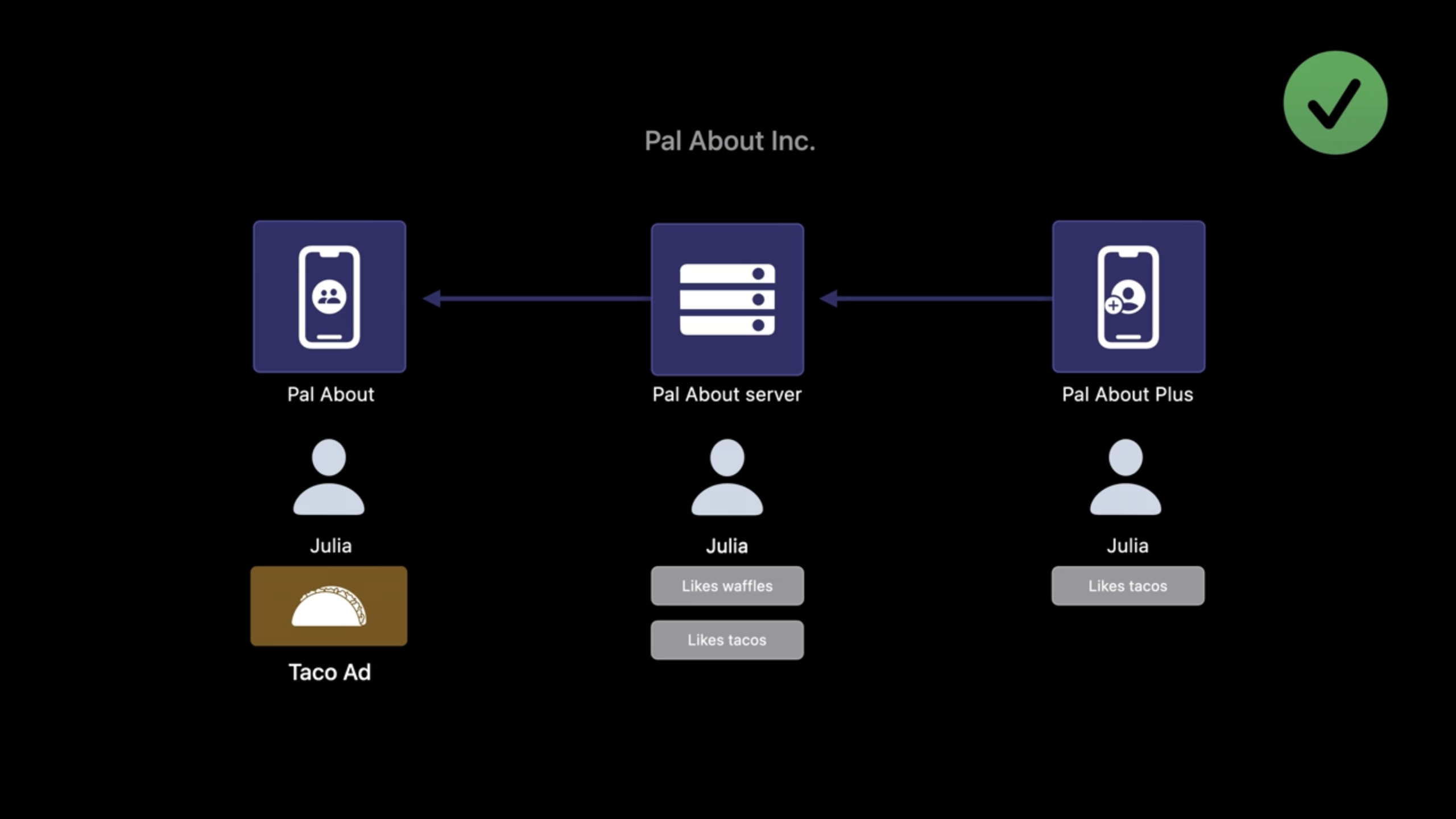
- Does not constitute tracking: App A’s company also has another App B. The server associates the user’s data in the two Apps for advertising in App A. The same company does not constitute tracking.
- Constitution Tracking: App A obtained the user’s email address, and another company’s food delivery app also obtained the same email address. The food delivery app shares the user’s nighttime ordering habits and email address with App A, and App A associates waffle interests with ordering habits to display ads. The data crosses company boundaries and tracking permissions need to be requested.
(04:36) Even if the identifier is hashed, it is still tracking as long as it is used to correlate data across companies. Hashing does not change the nature of the trace.
(05:03) The behavior of third-party SDKs also counts against your App. If an advertising SDK shares user data with an ad network, which then correlates the data with data from other companies, your app needs to request tracking permissions. Even if the SDK only returns aggregated reports, permissions are required whenever cross-company data correlation occurs under the hood.
(07:06) Sharing data with data brokers also requires permissions. Data brokers are companies that regularly collect, sell, or disclose end-user personal information to third parties and have no direct relationship with those users. Sharing with data brokers requires permissions, regardless of whether the data is linked to other company data.
Detailed Content
Implement tracking permission requests
(08:45) If it is determined that tracking is needed, the implementation steps are as follows:
1. Add usage description in Info.plist
<key>NSUserTrackingUsageDescription</key>
<string>Your data will be used to provide a personalized advertising experience</string>
Key points:
- The purpose description string will be displayed in the system pop-up window
- Be clear and concise so users understand why permissions are being requested.
- No need to include the App name, the system will automatically display it
- If this key is not added, the app will crash when calling the request method
2. Request tracking authorization
import AppTrackingTransparency

func requestTrackingPermission() {
    ATTrackingManager.requestTrackingAuthorization { status in
        switch status {
        case .authorized:
            // The user allowed tracking
            print("Tracking authorized")
        case .denied:
            // The user denied tracking
            print("Tracking denied")
        case .notDetermined:
            // Not requested yet (rare)
            print("Tracking not determined")
        case .restricted:
            // Restricted (for example, by parental controls)
            print("Tracking restricted")
        @unknown default:
            break
        }
    }
}
Key points:
- This is a one-time pop-up window, the system will remember the user’s choice
- The window will pop up again only after uninstalling and reinstalling
- The state must be checked while the application is running and cannot be assumed to be unchanged
3. Check and track authorization status
func checkTrackingStatus() {
    let status = ATTrackingManager.trackingAuthorizationStatus

    if status == .authorized {
        // Tracking-related operations can be performed
        let idfa = ASIdentifierManager.shared().advertisingIdentifier
    } else {
        // The user has not authorized tracking; use an alternative
    }
}
Key points:
- Check the status every time you start the app
- Users can change authorization status at any time in settings
- only if the status is
.authorizedto continue tracking
Alternatives after user rejection
(11:31) If a user refuses tracking, there are two important rules:
- Cannot restrict functions: Any function of the App cannot be conditioned on the user’s consent to tracking.
- IDFA returns all zeros:
advertisingIdentifierwill return00000000-0000-0000-0000-000000000000
Alternatives include:
- First Party Ads: Display ads using data collected by the app itself
- Contextual Advertising: Serve ads based on current content rather than user portraits
- SKAdNetwork: privacy-preserving ad attribution technology provided by Apple
- Private Click Measurement: Private click measurement for advertising effect analysis
Privacy Nutrition Labels
(12:04) Filling out the privacy nutrition label and requesting tracking authorization are two separate steps that both need to be completed. The Privacy Nutrition Label, completed in App Store Connect, discloses to users the type of data an app collects and how it is used. The ATT framework is implemented in code and requests user permission at runtime.
Fingerprint recognition is permanently disabled
(12:34) Regardless of whether the user consents to tracking, fingerprinting is always prohibited. Fingerprinting refers to the use of device signals (browser configuration, device configuration, location, network connection, etc.) to identify a device or user. Even if there is another purpose for collecting this data, if it is actually used to generate fingerprints, it is a violation of the Apple Developer Program License Agreement.
Core Takeaways
Elegantly integrate ATT permission requests in the app
Don’t use the ATT pop-up as the first interaction when users first open the app. Let users experience core functions first, and then request permissions at the right time (for example, just before displaying personalized content). Write a clear purpose description in the Info.plist and tell users what value it will bring to them by allowing tracking. The entry API isATTrackingManager.requestTrackingAuthorization。
Compliance review for advertising SDK
List all third-party SDKs in the app and confirm whether they involve cross-company data association. Ask the SDK provider directly: “Will your SDK link this app’s user data with data from other companies?” Keep a record of the communication. If an SDK involves tracking but your app doesn’t need that functionality, consider removing it or finding an alternative.
Implement advertising strategies that do not rely on IDFA
Design two sets of advertising strategies: one uses IDFA for precise delivery when tracking authorization is obtained; the other uses contextual advertising (matching ads based on the current page content) or first-party data when the user refuses. Using SKAdNetwork for advertising attribution not only protects user privacy but also meets the needs of advertisers.
Related Sessions
- What’s new in SKAdNetwork — Privacy-preserving advertising attribution technology
- Meet privacy-preserving ad attribution — Private click measurement ad attribution
- Create your Privacy Nutrition Label — Create an App Privacy Nutrition Label
Comments
GitHub Issues · utterances