
Highlight
Metal Mesh Shaders replace traditional vertex shaders with programmable Object Shader and Mesh Shader two stages, allowing geometry to be generated directly on the GPU and sent directly to the rasterization pipeline without additional computing channels or intermediate buffers, supporting scenarios such as procedural hair rendering and GPU-driven meshlet culling.
Core Content
The vertex shader stage of the traditional rendering pipeline has a fundamental limitation: it can only process geometry data that already exists in device memory on a vertex-by-vertex basis. If you want to generate procedural geometry on the GPU (such as adding hair to a model), the traditional approach requires two steps: first use the computing kernel to generate geometric data and write it into memory, and then use the rendering channel to read the data and draw it. This introduces additional memory allocations, synchronization barriers, and code complexity.
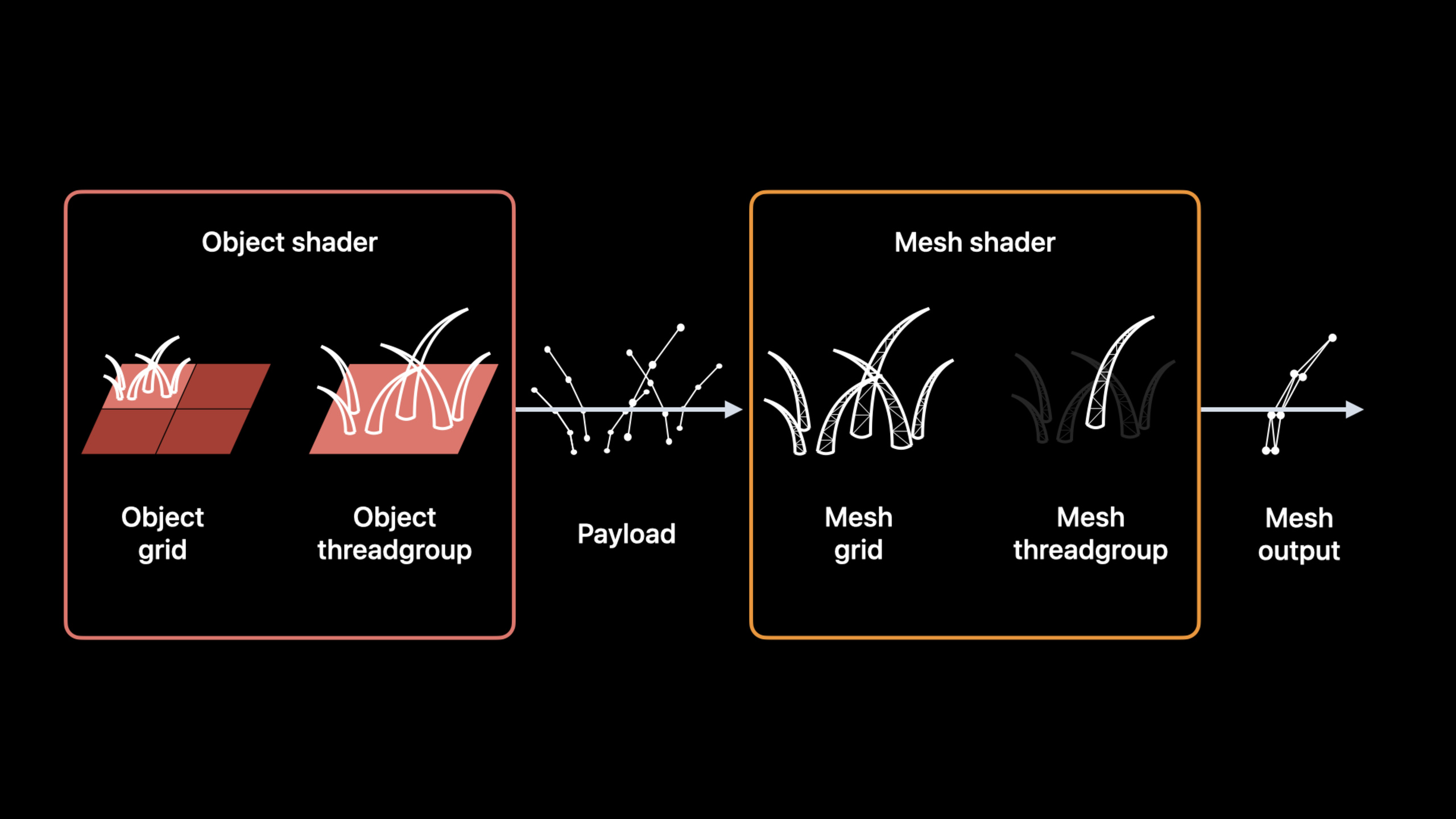
(01:19) Mesh Shaders replace vertex shaders with two new programmable stages: Object Shader and Mesh Shader. Object Shader receives input data, processes and outputs the payload to Mesh Shader. The Mesh Shader uses the payload data to generate procedural geometry, which is fed directly into the rasterizer and fragment shader. During the entire process, the geometric data only exists inside the draw call and does not need to allocate device memory.
(04:22) Object Shaders and Mesh Shaders are launched similar to compute kernels: dispatched in a threadgroup grid. Threads within each thread group can communicate with each other. Each Object thread group can dynamically generate a Mesh grid and programmatically control the size of the grid.
Mesh draw calls and traditional draw calls use the same type of render command encoder and can be mixed in the same render pass.
Detailed Content
Procedural hair rendering
(05:20) Take hair rendering on a plane as an example. The input geometry is divided into tiles, each tile corresponding to an Object thread group. The Object thread group calculates the number of hairs that the tile needs to generate and the curve control points of each hair, and outputs them as the payload. The Object thread group then starts a Mesh, where each Mesh thread group generates one hair.
Object Shader(MSL):
[[object]]
void objectShader(object_data CurvePayload *payloadOutput [[payload]],
                  const device void *inputData [[buffer(0)]],
                  uint hairID [[thread_index_in_threadgroup]],
                  uint triangleID [[threadgroup_position_in_grid]],
                  mesh_grid_properties mgp)
{
    if (hairID < kHairsPerBlock)
        payloadOutput[hairID] = generateCurveData(inputData, hairID, triangleID);
    if (hairID == 0)
        mgp.set_threadgroups_per_grid(uint3(kHairPerBlockX, kHairPerBlockY, 1));
}
Key points:
[[object]]Property Marker This is the Object Shader -object_dataaddress space and[[payload]]Attribute definition payload output -mesh_grid_propertiesParameters used to programmatically set the Mesh grid size- Only threads with thread index 0 set the grid size to avoid contention
Initialization Object phase:
let meshPipelineDescriptor = MTLMeshRenderPipelineDescriptor()
meshPipelineDescriptor.objectFunction = objectFunction
meshPipelineDescriptor.payloadMemoryLength = payloadLength
meshPipelineDescriptor.maxTotalThreadsPerObjectThreadgroup = hairsPerBlock
Key points:
- use
MTLMeshRenderPipelineDescriptoralternative to traditionalMTLRenderPipelineDescriptor payloadMemoryLengthSpecify the payload size, the upper limit is 16KB- Each Object thread group can generate up to 1024 Mesh thread groups
Define Metal Mesh type:
struct VertexData    { float4 position [[position]]; };
struct PrimitiveData { float4 color; };

using triangle_mesh_t = metal::mesh<
    VertexData,               // Vertex type
    PrimitiveData,            // Primitive type
    10,                       // Maximum vertex count
    6,                        // Maximum primitive count
    metal::topology::triangle // Topology type
>;

[[mesh]]
void myMeshShader(triangle_mesh_t outputMesh, ...);
Key points:
metal::meshIt is a built-in type of Metal that defines vertex data type, primitive data type, maximum number of vertices, maximum number of primitives, and topology type.- Topology type supports point, line, triangle
- The maximum number of vertices of the Mesh Shader is 256, and the maximum number of primitives is 512
- the whole
metal::meshSize cannot exceed 16KB
Mesh Shader(MSL):
[[mesh]] void myMeshShader(triangle_mesh_t outputMesh,
                           uint tid [[thread_index_in_threadgroup]])
{
    if (tid < kVertexCount)
        outputMesh.set_vertex(tid, calculateVertex(tid));

    if (tid < kIndexCount)
        outputMesh.set_index(tid, calculateIndex(tid));

    if (tid < kPrimitiveCount)
        outputMesh.set_primitive(tid, calculatePrimitive(tid));

    if (tid == 0)
        outputMesh.set_primitive_count(kPrimitiveCount);
}
Key points:
[[mesh]]Property tag This is the Mesh Shader -Threads in the thread group collaborate to encode vertices, indices and metadata -set_vertex、set_index、set_primitiveSet vertex, index and primitive properties separately- Only one thread sets the total number of primitives to avoid competition
Initialization Mesh Phase:
meshPipelineDescriptor.meshFunction = meshFunction
meshPipelineDescriptor.maxTotalThreadsPerMeshThreadgroup = vertexCountPerHair
Create Mesh rendering pipeline:
let meshPipeline: MTLRenderPipelineState

do {
    let (pipeline, reflection) = try device.makeRenderPipelineState(
        descriptor: meshRenderPipelineDescriptor,
        options: [])
    meshPipeline = pipeline
} catch {
    print("The device can't create a mesh pipeline state: \(error)")
    return
}
Coded Mesh Drawing:
let encoder = commandBuffer.makeRenderCommandEncoder(descriptor: descriptor)
encoder.setRenderPipelineState(meshPipeline)

// Bind resources for each stage
encoder.setObjectBuffer(objectBuffer, offset: 0, index: 0)
encoder.setMeshTexture(meshTexture, index: 2)
encoder.setFragmentBuffer(fragmentBuffer, offset: 0, index: 0)

// Define threadgroup sizes
let objectGridDimensions = MTLSize(width: trianglesPerModel, height: 1, depth: 1)
let threadsPerObject = MTLSize(width: hairsPerBlock, height: 1, depth: 1)
let threadsPerMesh = MTLSize(width: threadsPerHair, height: 1, depth: 1)

// Encode the Mesh draw command
encoder.drawMeshThreadgroups(objectGridDimensions,
                             threadsPerObjectThreadgroup: threadsPerObject,
                             threadsPerMeshThreadgroup: threadsPerMesh)
encoder.endEncoding()
Key points:
- use
drawMeshThreadgroupsReplace traditional draw call - Object grid dimensions, Object thread group size, and Mesh thread group size need to be specified
- Resource binding is divided into
setObjectBuffer、setMeshTexture、setFragmentBufferthree stages
GPU-driven Meshlet culling
(13:16) Another important application of Mesh Shaders is the efficient processing of scene rendering with large amounts of geometry. The core idea is to split the scene mesh into smaller unit meshlets and then perform fine-grained culling on the GPU.
The traditional GPU-driven pipeline requires two passes: a compute pass that does frustum culling, LOD selection, and encoding draw commands into device memory; and a render pass that executes those draw commands. Mesh Shaders can combine these two passes into a single render pass.
(14:35) The Object Shader performs frustum culling on each model, calculates the LOD of the visible meshlets, and then launches the mesh. Mesh Shader receives the meshlet ID list as payload, encoding the correspondingmetal::meshobject. Invisible meshlets will not start the Mesh thread group and will be eliminated directly in the Object stage.
Advantages of this architecture:
- No intermediate buffer to store draw commands
- No synchronization barrier between calculation pass and rendering pass
- Only visible geometry will enter the rasterization and fragment shading stages
Core Takeaways
Add procedural hair/grass to 3D characters
Generate fur or grass in real time on the GPU with Mesh Shaders. When the character moves, the Object Shader dynamically adjusts the hair density (LOD) of each area according to the distance and perspective, making it dense near and sparse far away. Mesh Shader generates each hair as an independent mesh. No precomputed hair geometry is required, and no large intermediate buffers are required. The entry API isMTLMeshRenderPipelineDescriptoranddrawMeshThreadgroups。
Implementing GPU-driven scene renderer
Split large scenes into meshlets and use Object Shader to perform frustum culling, occlusion culling, and LOD selection in parallel on the GPU. Only visible meshlets enter the Mesh Shader to generate geometry. This can significantly reduce scene management overhead on the CPU side while reducing the cost of processing invisible geometry on the GPU.
Use programmed geometry for particle effects
Scenes that require a large amount of dynamic geometry, such as explosions and magic effects, can use Mesh Shaders to directly generate particle meshes on the GPU. Each Object thread group manages a particle system, calculates the position and size of each particle based on time parameters, and the Mesh Shader generates the corresponding billboard or geometry. The entire process does not require CPU involvement, and there is no need to write particle data back to memory.
Related Sessions
- Discover Metal 3 — Overview of new features in Metal 3
- Scale compute workloads across Apple GPUs — Scale compute workloads across Apple GPUs
- Program Metal in C++ with metal-cpp — Write Metal code in C++
Comments
GitHub Issues · utterances