
Highlight
Safari adds support for HTML dialog elements, SSML support in the Web Speech API, and better support for ARIA custom controls in 2022, allowing developers to build accessible web applications with less code.
Core Content
Assistive Technology Overview
About one in seven people worldwide has some form of disability that affects how they interact with devices and the web. Apple offers several accessibility tools: VoiceOver (screen reader), Switch Control (switch control), Voice Control (voice control), and Full Keyboard Access (full keyboard access).
(00:36)
These tools rely on semantic information about web pages to work. Safari has built-in accessibility support for semantic HTML elements (button, h1-h6, table, list, etc.), which is the preferred option. But when semantic HTML cannot meet the needs, custom controls need to be created in JavaScript and supplemented with ARIA attributes.
Accessibility of custom controls
Session uses a pizza slice selector as an example. This is a custom interactive control: the user clicks on different locations on the pizza tray to select the number of slices.
(02:42)
The initial implementation has only click events and is completely unusable for visually impaired users. Transformation steps:
- Add
role="slider"to let assistive technologies know that the control is a slider - Add
tabindex="0", allowing keyboard users to focus on this control - Add ARIA attributes:
aria-valuemin、aria-valuemax、aria-valuenow、aria-valuetext4. Handle keyboard events: use the up, down, left and right arrow keys to adjust the value
Here’s a key detail: On iOS, when a VoiceOver user swipe up to increase the slider value and swipe down to decrease the slider value, Safari will automatically simulate the corresponding arrow key events. So you only need to listen to keyboard events to support VoiceOver gestures and keyboard operations at the same time.
SSML speech synthesis
The SpeechSynthesis interface of the Web Speech API adds support for SSML (Speech Synthesis Markup Language) in Safari.
(07:09)
SSML can control many aspects of speech synthesis:
<break>:Insert pause -<phoneme>: Control word pronunciation -<prosody>:Adjust pitch, speaking speed and volume -<lang>:Specify language area
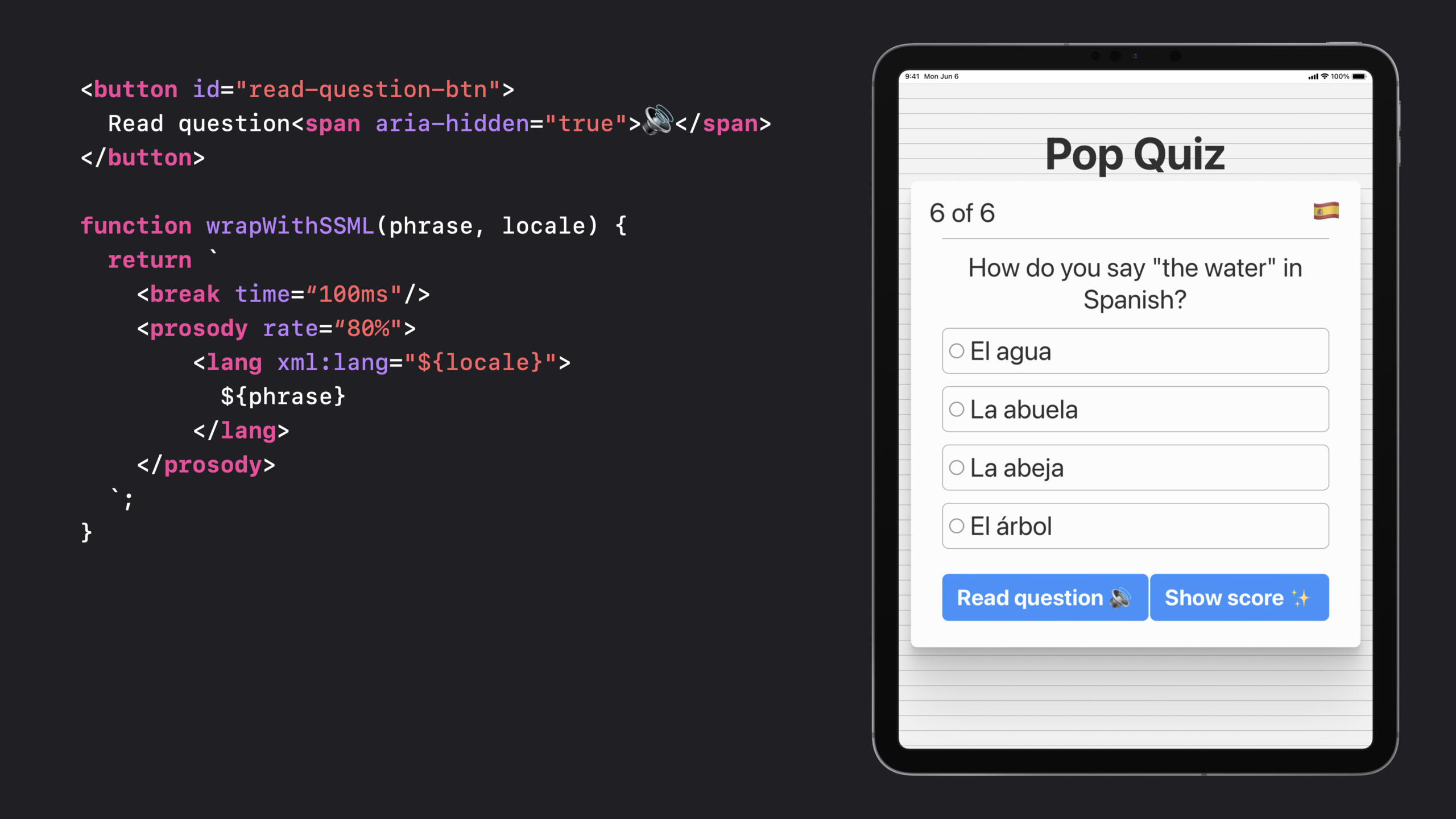
The example of Session is a language learning test: click the “Read Questions” button, the English questions are pronounced in American English, the Spanish options are pronounced in Mexican Spanish, and there is a short pause before each option.
HTML Dialog element
Safari adds support for HTML<dialog>The support of elements makes it easy to implement barrier-free modal boxes.
(10:50)
<dialog>Automatic processing:
- Focus management
- Escape key to close
- iOS scrub gesture turned off (swipe left and right quickly)
- Elements outside the modal are not visible to assistive technologies
Cooperatearia-labelledbyandautofocusproperties to further optimize the experience for screen reader users.
Detailed Content
Custom slider control
HTML structure:
<div id="pizza-input"
     role="slider" tabindex="0"
     aria-valuemin="0" aria-valuemax="8"
     aria-valuenow="4" aria-valuetext="4 slices">
</div>
Key points:
role="slider"Tell assistive technology this is a slider control -tabindex="0"Allows keyboards and assistive technologies to focus on the element -aria-valueminandaria-valuemaxDefine value range -aria-valuenowRepresents the current value -aria-valuetextProvide a more user-friendly description than a number (“4 slices” is easier to understand than “4”)
JavaScript implementation:
class PizzaControl {
  constructor(id) {
    this.control = document.getElementById(id);
    this.sliceCount = 4;

    // Click event: calculate the slice count based on the click location
    this.control.addEventListener("click", (event) => {
      const newSliceCount = this.computeSliceCount(event);
      this.update(newSliceCount);
    });

    // Keyboard event: support adjustment with arrow keys
    this.control.addEventListener("keydown", (event) => {
      const key = event.key;
      if (key === "ArrowRight" || key === "ArrowUp")
        this.update(this.sliceCount + 1);
      else if (key === "ArrowLeft" || key === "ArrowDown")
        this.update(this.sliceCount - 1);
    });
  }

  update(newSliceCount) {
    // Clamp to the 0-8 range
    this.sliceCount = Math.max(0, Math.min(newSliceCount, 8));

    // Visual update
    this.renderSlices(this.sliceCount);

    // Update ARIA attributes at the same time
    this.control.setAttribute("aria-valuenow", this.sliceCount);
    const sliceModifier = this.sliceCount === 1 ? "slice" : "slices";
    this.control.setAttribute("aria-valuetext",
      `${this.sliceCount} ${sliceModifier}`);
  }
}
Key points: -Click event handling for mouse/touch interactions
- Keyboard events serve both keyboard users and VoiceOver users
-
update()Method to update both visual representation and ARIA properties - Rule: When updating a visual, the ARIA representation must be updated simultaneously
SSML speech synthesis
function wrapWithSSML(phrase, locale) {
  return `
    <break time="100ms"/>
    <prosody rate="80%">
      <lang xml:lang="${locale}">
        ${phrase}
      </lang>
    </prosody>
  `;
}

const readQuestionButton = document.getElementById("read-question-btn");

readQuestionButton.addEventListener("click", () => {
  const ssml = `
    <speak>
      How do you say
        ${wrapWithSSML("the water", "en-US")}
      in Spanish?
      ${wrapWithSSML("El agua", "es-MX")}
      ${wrapWithSSML("La abuela", "es-MX")}
      ${wrapWithSSML("La abeja", "es-MX")}
      ${wrapWithSSML("El árbol", "es-MX")}
    </speak>
  `;

  const utterance = new SpeechSynthesisUtterance(ssml);
  window.speechSynthesis.speak(utterance);
});
Key points:
- The entire SSML string is wrapped in
<speak>in element -<break>Insert 100ms pause to create rhythm between options -<prosody rate="80%">Reduce speaking speed to 80% to make it easier to hear -<lang xml:lang="...">Switch pronunciation language area -SpeechSynthesisUtteranceReceive SSML string and pass it tospeechSynthesis.speak()play
Buttons in HTML:
<button id="read-question-btn">
  Read question<span aria-hidden="true">🔊</span>
</button>
Key points:
- Speaker emoji
aria-hidden="true"Hide to prevent screen readers from reading meaningless emoji descriptions
Dialog modal box
Basic implementation:
<dialog id="show-score-modal">
  <form method="dialog">
    You got all six questions correct. Great work!
    <button type="submit">Close</button>
  </form>
</dialog>
const showScoreButton = document.getElementById("show-score-btn");
showScoreButton.addEventListener("click", () => {
document.getElementById("show-score-modal").showModal();
});Key points:
<dialog>Elements natively support modal behavior -method="dialog"Let the submit button in the form automatically close the dialog box -showModal()Display modal box, automatically manage focus and background occlusion
Optimized accessible version:
<dialog id="show-score-modal" aria-labelledby="modal-content">
  <form method="dialog">
    <span id="modal-content">
      You got all six questions correct. Great work!
    </span>
    <button type="submit" autofocus>Close</button>
  </form>
</dialog>
Key points:
aria-labelledbyPoints to the ID of the content element to read the content first when a screen reader opens it -autofocusPut the initial focus on the close button and the user can directly operate it- The system automatically handles the Escape key and iOS scrub gesture shutdown
Core Takeaways
Build an accessibility-first online quiz platform
- What: An online exam/quiz system that supports multiple question types, all interactions are screen reader friendly
- Why it’s worth doing: Custom controls (such as sliders, drag-and-drop sorting) are very common in quizzes, and ARIA + keyboard events can be used to create a good-looking and barrier-free experience
- How to start: Use
role、aria-*Properties and keyboard events to build custom controls, use<dialog>Display results and confirmation boxes, read questions using SSML
Make a voice-assisted cooking app
- What to do: A web cooking tutorial where users can use voice control to switch between steps while hearing the intonation read aloud
- Why it’s worth doing: In kitchen scenes where hands are wet/greasy, voice interaction and clear voice feedback are very practical.
- How to start: Use SpeechRecognition of Web Speech API to receive voice commands, and use SSML to control the speaking speed and pause of step reading.
Make a full keyboard operable picture editor
- What it does: A lightweight web image editor, all functions can be completed through the keyboard
- Why it’s worth it: Many creative tools only support the mouse and are not friendly to users with motor disabilities.
- How to get started: Settings for each tool
tabindexand keyboard shortcuts, use ARIA live region to broadcast the results of operations, use<dialog>Handle confirmation popup
Make a multi-language learning card App
- What to do: A language learning tool. The front of the card is a word, and the back is a definition and example sentence. It supports voice reading.
- Why it’s worth doing: SSML
<lang>Tags allow words in different languages to be read with correct pronunciation,<phoneme>Can handle special pronunciations - How to start: Wrap each word and example sentence in SSML, using
<prosody>To adjust the speaking speed, usearia-liveRegional broadcast of current card status
Related Sessions
- Support Full Keyboard Access in your iOS app — iOS Full Keyboard Access Support Guide
- What’s new in Safari and WebKit — New features in Safari and WebKit
- Meet Passkeys — Passkeys Passwordless Authentication
Comments
GitHub Issues · utterances