
Highlight
HLS Interstitials 2022 adds new ad scheduling options (CUE attribute), precise alignment of live broadcast scenes (SNAP attribute), and server-side ad optimization query parameters (HLS_start_offset and HLS_primary_id), making ad insertion more flexible, solving the live broadcast clock drift problem, and supporting optimization of ad delivery based on the remaining playback time.
Core Content
Launched in 2021, HLS Interstitials treats ads as standalone assets referenced through multivariant playlists, rather than traditionally spliced into the main content stream. Developers only need to use the DATERANGE tag in the playlist to specify the ad start time to implement ad scheduling. (00:09, 01:09)
This design simplifies the ad insertion process. In the past, it was necessary to use discontinuity tags in the main content to splice ads, but now it points directly to the ad’s multivariant playlist. If there are already spliced advertisements in the main content, they can be replaced by resume offset. The offset is equal to the duration of the replaced advertisement. (01:18, 01:57)
The 2022 update focuses on three directions: more precise ad scheduling control, clock drift processing in live broadcast scenarios, and server-side ad optimization.
Detailed Content
CUE attribute: Control the timing of ad playback
(02:26) The CUE attribute forces ads to be placed before and after the playback position, rather than based on a certain time point in the content timeline. It supports three values:
- PRE: The advertisement is played before the main content starts, suitable for premium ad spot (golden advertising space) in live broadcast scenarios.
- POST: The ad plays after the main content ends, suitable for the end credits at the end of the event.
- ONCE: The ad will only be played once and the user will not see it again if they return to the ad position. Suitable for rating screens or legal statements.
(02:46, 03:25) Example showing a mix of preroll, postroll and midroll. The preroll is set to ONCE to ensure that it is played only once; the midroll at 10 seconds is also set to ONCE, so that the user will go back to 10 seconds ago and will not play it again.
SNAP attribute: Resolving live clock drift
(03:40) In a live broadcast scenario, the packager and encoder may use different clocks. If the packager clock is faster than the encoder clock, and the program datetime label shows a difference of 800 seconds, the actual media duration will be slightly less than 800 seconds.
This clock drift can cause problems. When the ad starts playing at the scheduled time, the actual media time may fall within the slate; if the ad duration is used as an offset to return to the main content, the part of the main content behind the ad will be missed. (04:17)
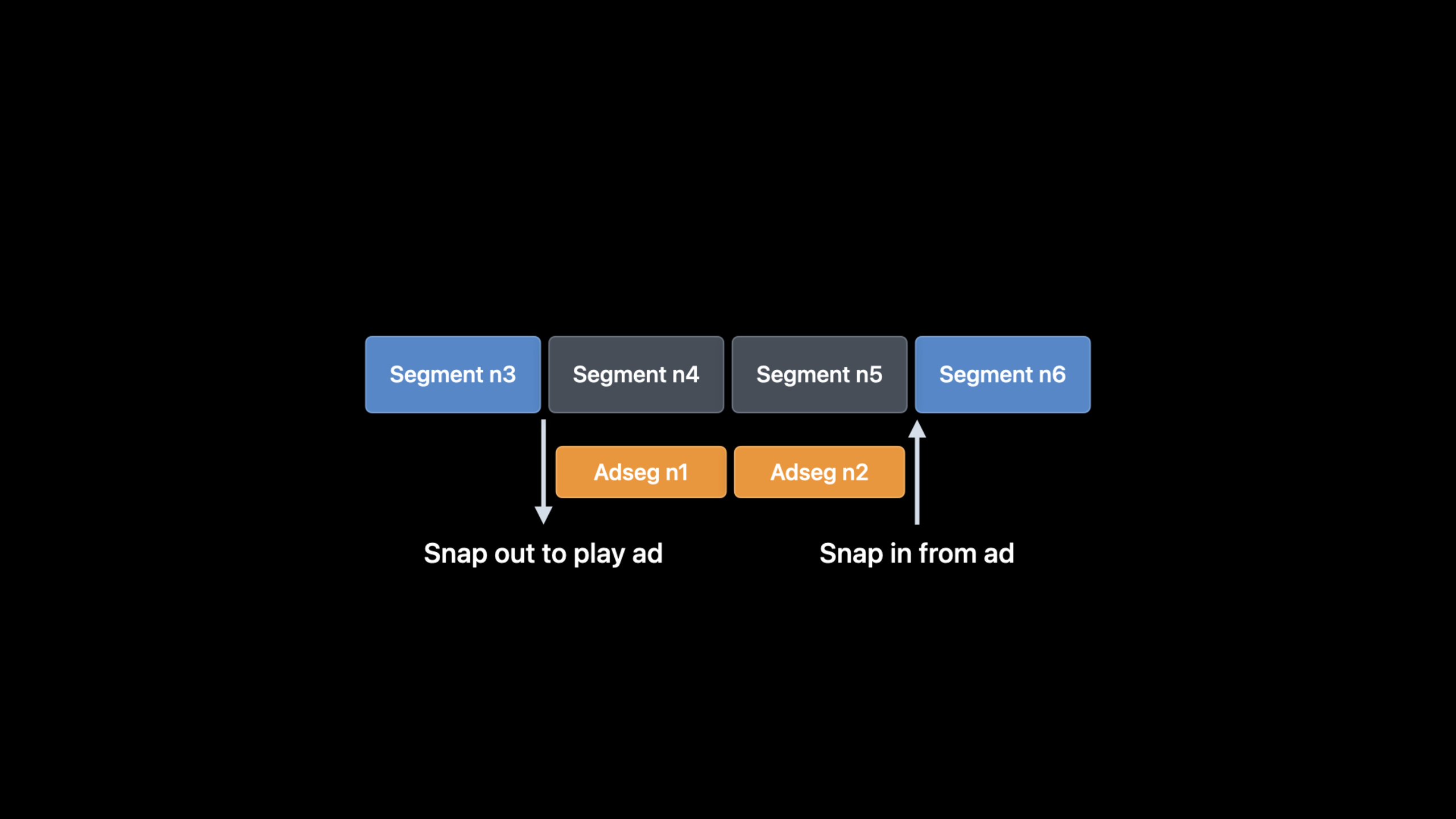
(04:37) The solution is the SNAP attribute. SNAP-OUT allows the advertisement to switch to the main content at a segment boundary close to the planned start time, and SNAP-IN allows the advertisement to switch back to the main content at a segment boundary close to the planned return time.
The example shows an ad in a live playlist with both SNAP-OUT and SNAP-IN set. (05:04)
HLS_start_offset: Optimize the advertising experience added during the live broadcast
(05:10) When joining the live broadcast midway, the server needs to know how long the current advertising pod has been playing so that it can display the most valuable advertising in the remaining time.
The HLS_start_offset query parameter is appended to the interstitial asset-list URL request. Under live broadcast content, it specifies the playback offset in the asset-list when joining the live broadcast; under VOD content, it specifies the offset when seeking to the replaced area. (05:54)
In the example, the 15-second ad is scheduled 5 seconds after the start of the playlist. When joining the live broadcast midway, the client is usually 3 target durations behind the live edge, and at this time the advertisement has been played for 10 seconds. After the server receives HLS_start_offset=10, it can place the most expensive advertisement in the last 5 seconds. (06:05, 06:20)
HLS_primary_id: associate play sessions across requests
(06:30) The server needs to track multiple ad requests for the same play session to avoid playing the same ad repeatedly.
The HLS_primary_id query parameter associates the ad request with the primary playback session. If the client sets the playback session ID request header for all HTTP requests, use this ID as the HLS_primary_id; otherwise generate a unique value for each main playback session and use it in main content and in-stream ad requests. (06:40)
AVFoundation API changes
(07:15) AVFoundationAVPlayerInterstitialControllerandAVPlayerInterstitialEventCUE and SNAP options are now supported.
cueProperty: Set preroll or postroll. -willPlayOnceAttribute: ONCE value corresponding to CUE. -alignsStartWithPrimarySegmentBoundaryAttribute: Corresponds to SNAP-OUT. -alignsResumptionWithPrimarySegmentBoundaryAttribute: Corresponds to SNAP-IN.
(07:58) Session example shows the client scheduling an ad pod at 10 seconds:
// Client schedules an ad pod at 10s into primary asset
let player = AVPlayer(url: movieURL)  // no ads in primary asset
let controller = AVPlayerInterstitialEventController(primaryPlayer: player)
let adPodTemplates = [AVPlayerItem(url: ad1URL), AVPlayerItem(url: ad2URL)]
let event = AVPlayerInterstitialEvent(primaryItem: player.currentItem,
                             time: CMTime(seconds: 10, preferredTimescale: 1))
event.templateItems = adPodTemplates
event.identifier = "Ad1"
event.restrictions = []
event.resumptionOffset = .zero
event.playoutLimit = .invalid
event.cue = .none

controller.events = [event]
player.currentItem.translatesPlayerInterstitialEvents = true
let vc = AVPlayerViewController()
vc.player = player
player.play()
Key points:
AVPlayerInterstitialEventCreate it with the primary item and time, then set the properties. -templateItemsIt is the list of advertisements in the advertising pod. -cueset to.noneIndicates that preroll/postroll is not used and is scheduled based on time. -translatesPlayerInterstitialEventsSet to true to have the player handle break events.
(08:06)AVPlayerInterstitialEventNow variable. When creating, you only need the primary item and start time, and then set the configuration properties. After the event is set to the controller, subsequent modifications will not take effect because the controller will copy the object; to modify it, the event needs to be reset.
Core Takeaways
-
What to do: Add premium preroll ad slots to your live stream. Why it’s worth doing: The PRE value of the CUE attribute allows the advertisement to be played before the start of the program, which is suitable for prime advertising slots in live broadcasts; the ONCE value ensures that the advertisement will not be played repeatedly after the user refreshes or reconnects. How to get started: Set up DATERANGE for preroll ads in a multivariant playlist
X-CUE="PRE,ONCE"。 -
What to do: Solve the loss of main content caused by live advertising clock drift. Why it’s worth doing: During the live broadcast, the packager and encoder clocks are not synchronized, which will cause the advertising cut and return position to be inaccurate, and the program content may be missed. How to get started: Setting up for DATERANGE
X-SNAP="OUT,IN", allowing ads to switch in and out at the nearest segment boundary. -
What to do: Optimize ad placement for users who join mid-stream. Why it’s worth doing: HLS_start_offset tells the server the remaining advertising time, so you can put the most expensive advertisement at the end. How to start: The server checks the HLS_start_offset parameter of the X-Asset-List request and adjusts the asset-list order according to the offset.
-
What to do: Avoid playing the same ad repeatedly in the same session. Why it’s worth it: Users have a poor experience seeing the same ad multiple times in a playback session. How to start: The client uses the playback session ID as the HLS_primary_id parameter, and the server tracks the played advertisement accordingly.
-
What: Use AVFoundation to schedule client-side ads. Why it’s worth doing:
AVPlayerInterstitialEventSupports new CUE and SNAP attributes, which can be consistent with HLS playlist behavior. How to get started: CreateAVPlayerInterstitialEvent,set upcue、willPlayOnce、alignsStartWithPrimarySegmentBoundaryand other properties.
Related Sessions
- Create a more responsive media app — Use AVFoundation to keep users focused, suitable for combination with Interstitials’ client scheduling
- Deliver reliable streams with HLS Content Steering — HLS Content Steering dynamically guides clients to different servers and can work with Interstitials to optimize streaming media quality
- Display ads and other interstitials in SharePlay — AVFoundation automatically manages ads in SharePlay
Comments
GitHub Issues · utterances