
Highlight
SwiftUI launched at WWDC22
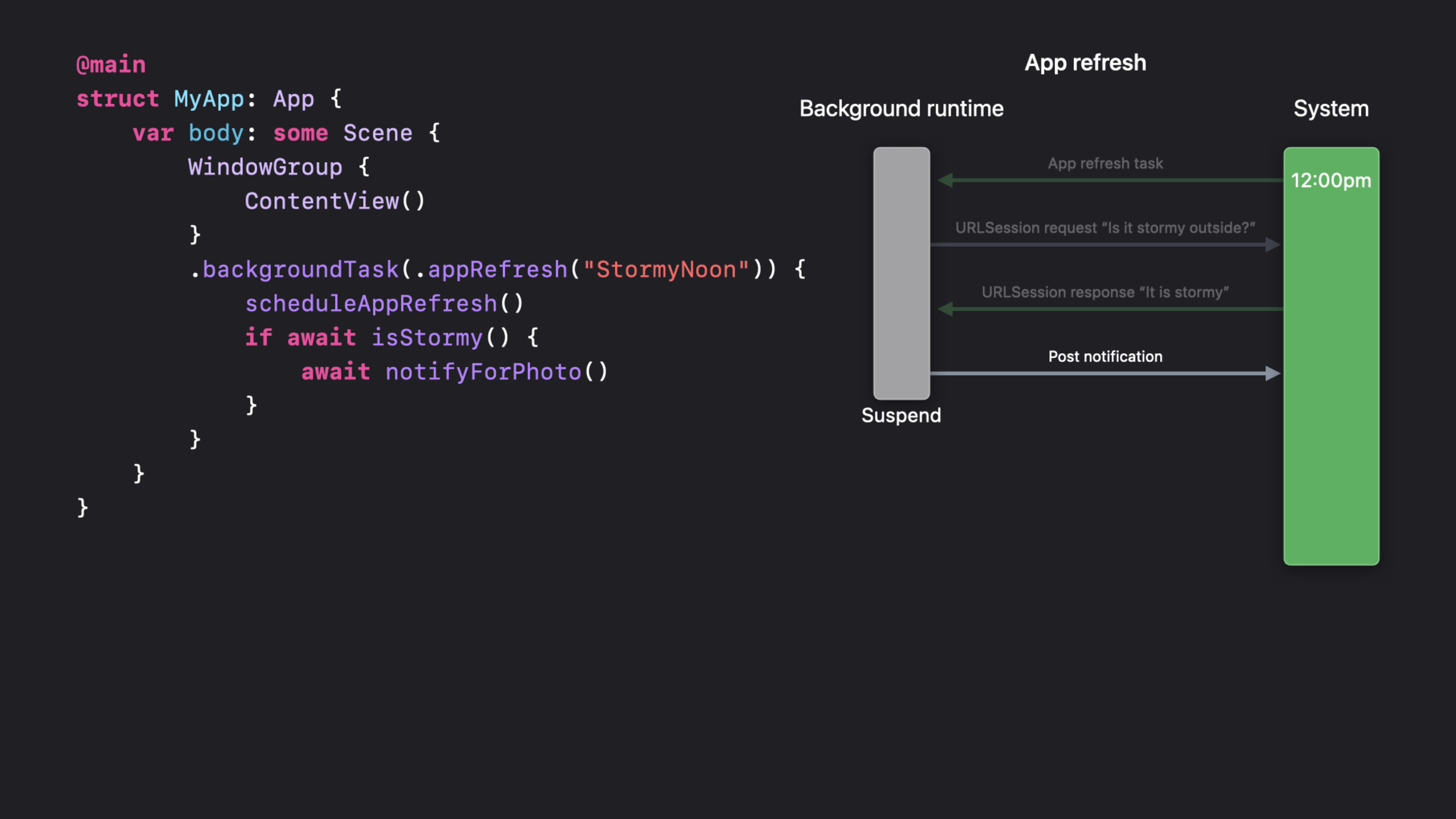
backgroundTaskScene modifiers allow background task processing to fully embrace Swift Concurrency. The background refresh code that used to nest completion handlers and manual state management can now be replaced by linear async/await writing. Session takes the stormy weather photography application Stormy as an example to demonstrate the complete background task life cycle from scheduling, execution to completion.
Core Content
Background tasks have always been an error-prone area of app development. Before SwiftUI, developers usedBGAppRefreshTaskTo handle background refresh, useBGProcessingTaskTo handle time-consuming operations, both are based on UIKit’s completion handler mode - after the task starts, you need to manually manage the state, remember to call the completion handler, and handle timeout cancellation. Once a step is missed, the system will consider the app to be using too much power and reduce future background execution opportunities.
WWDC22backgroundTaskModifiers change this paradigm. It hangs in SwiftUI’sScene, accepts a task type identifier and an asynchronous closure. When the system decides to wake up the App, the closure is called; when the closure returns, the system automatically considers the task completed. All the logic in the middle - network requests, database writes, notification scheduling - can be expressed linearly using async/await, and nested closures are no longer needed.
The example app used in the session, Stormy, is a stormy weather tracking app. Its background process is very simple: check the weather API at noon every day, and if it is predicted to rain that day, push a local notification to remind the user to go out and take photos and upload them. This process requires three steps of completion nesting under the old API (obtaining background tasks -> requesting the network -> scheduling notifications), while using the new API only requires onebackgroundTaskClosure, the internal three lines of await are completed.
Another important change is cross-platform unification.backgroundTaskHandles background refresh and background health data updates on watchOS, Timeline refresh on Widgets, and general background tasks on iOS/tvOS/Mac Catalyst. One set of APIs covers all scenarios, reducing platform-specific code.
Detailed Content
Register background tasks
The first step in the background task is toSceneRegister the processor.backgroundTask(_:action:)The modifier accepts two parameters: a task type identifier (a string) and an asynchronous closure.
@main
struct StormyApp: App {
    var body: some Scene {
        WindowGroup {
            ContentView()
        }
        .backgroundTask(.appRefresh("com.example.stormy.refresh")) {
            await refreshWeatherData()
        }
    }
}
Key points:
.appRefresh("identifier")is built-inBackgroundTaskOne of the types, corresponding to the old versionBGAppRefreshTask, used for short-term background data refresh.- The identifier string must be in Info.plist
BGTaskSchedulerPermittedIdentifiersstatement, otherwise the system will not wake up your app. - The system automatically marks the task as completed when the closure returns - manual calling is not required and should not be done
setTaskCompleted. - When a closure throws an error, the system also considers the task to be completed (but it may affect future scheduling priorities).
Schedule background refresh
Registering a handler just tells the system “I can handle this kind of task.” To actually trigger background wake-up, a scheduling request needs to be submitted while in the foreground.
import BackgroundTasks

func scheduleAppRefresh() {
    let request = BGAppRefreshTaskRequest(identifier: "com.example.stormy.refresh")
    request.earliestBeginDate = Date(timeIntervalSinceNow: 60 * 60) // One hour later
    do {
        try BGTaskScheduler.shared.submit(request)
    } catch {
        print("Scheduling failed: \(error)")
    }
}
Key points:
BGAppRefreshTaskRequestofearliestBeginDateIt is the earliest time the system wakes up the App, not the precise wake-up time. The system will decide the actual execution time on its own based on battery status, usage habits and other factors.- Each time a background task starts executing, the next refresh request should be scheduled immediately to form a “chain scheduling” - otherwise the background refresh chain will be interrupted.
-
BGTaskScheduler.shared.submitIt can be called repeatedly; no error will be reported if a request with the same identifier is submitted repeatedly, and the system only retains the latest one. - The actual execution of background tasks is limited by the total budget, and frequent requests will not increase the number of executions.
Use async/await to handle background logic
When a background task is executed,backgroundTaskThe closure runs on a background thread, but can use async/await to do any operation supported by Swift Concurrency.
func refreshWeatherData() async {
    // Step 1: Schedule the next refresh (chained scheduling)
    scheduleAppRefresh()

    // Step 2: Request weather data
    guard let weather = await fetchWeather() else { return }

    // Step 3: Check whether it will rain
    guard weather.precipitation > 50 else { return }

    // Step 4: Send a local notification
    await scheduleRainNotification(for: weather.location)
}
Key points:
await fetchWeather()Can be usedURLSession.shared.data(from:)For the async version, you can also use the delegate mode of background URLSession. The advantage of background URLSession is that downloading can continue after the App is suspended, without occupying the time quota of background tasks.- The code within the closure is completely linear: schedule first, then request, then judge, then notify. There is no nesting of completion handlers.
- Swift Concurrency
Task.isCancelledandTask.checkCancellation()Naturally adapted to background task timeout scenarios - the system gives background tasks a limited execution time (usually about 30 seconds). After the timeout, the task is canceled and the async function will throwCancellationError. - No need to call manually
setTaskCompleted(success:)——The closure is considered successful if it returns normally, and fails if it throws an error.
Select the correct background task type
SwiftUIBackgroundTaskSeveral built-in types are provided, corresponding to different usage scenarios:
| Type | Corresponds to old API | Purpose | Typical duration |
|---|---|---|---|
.appRefresh(_:) | BGAppRefreshTask | Short data refresh | ~30 seconds |
.urlSession(_:) | BGURLSessionTask | Background file download | Minutes |
.processing(_:) | BGProcessingTask | Database cleaning, indexing | Minutes |
.widgetRefresh(_:) | Widget Timeline | Widget data refresh | Determined by the system |
// Large background file download
.backgroundTask(.urlSession("com.example.download")) {
    // URLSession is configured for background mode
    // The system wakes the app and calls this closure when the download finishes
    await processDownloadedFiles()
}

// Database cleanup (time-consuming but not urgent)
.backgroundTask(.processing("com.example.cleanup")) {
    await database.cleanup()
}
Key points:
.urlSessionis a special type - the actual download is done in the background by the URLSession daemon, and the App itself may have been suspended. Only when the download completes (or fails) does the system wake up the app and call the closure. -.processingThe type requires the device to be powered on to execute, and is suitable for power-consuming operations such as database migration and index rebuilding.- Shared by all these mission types
backgroundTask(_:action:)Modifier interface, only the identifier prefix is different.
Chain scheduling: prevent background refresh interruption
A common pitfall with background tasks is broken refresh chains. The reason is that the developer only schedules a refresh when the app enters the background, but does not schedule it again after that refresh is executed, and the chain is broken.
The correct approach is to schedule the next one immediately every time the background task starts:
func refreshWeatherData() async {
    // Schedule the next run immediately, whether this execution succeeds or not
    scheduleAppRefresh()

    // Then run the actual refresh logic
    await doActualWork()
}
Key points:
scheduleAppRefresh()Place it in the first line of the closure to ensure that even if subsequent logic errors or times out, the next refresh request has been submitted.- Also available at the front desk
scenePhaseScheduling when changes occur, as a fallback strategy:onChange(of: scenePhase) { newPhase in if newPhase == .background { scheduleAppRefresh() } }。
Handle cancellation gracefully
The execution time of background tasks is controlled by the system. If the budget time is exceeded, the system will cancel the current task. Swift Concurrency’s cancellation mechanism handles this situation gracefully:
.backgroundTask(.appRefresh("com.example.stormy.refresh")) {
    scheduleAppRefresh()

    do {
        try Task.checkCancellation()
        let weather = await fetchWeather()
        try Task.checkCancellation()
        await scheduleRainNotification(for: weather.location)
    } catch is CancellationError {
        // The task was canceled by the system; keep completed work and continue next time
    }
}
Key points:
Task.checkCancellation()Will be thrown in canceled stateCancellationError, which can be placed between multiple checkpoints to exit early.- Also check
Task.isCancelledBoolean value, used when there is no need to throw an error. - Canceling doesn’t mean something went wrong with the app - it just means the system decided not to give it any more time. Work that was completed before cancellation (such as the next refresh scheduled) is still valid.
Core Takeaways
-
What to do: Migrate the background refresh logic of the existing app to
backgroundTaskmodifier. Why it’s worth doing: The old BGTaskScheduler API requires manual management of completion handlers and mutable states, which is prone to errors. The new API uses async/await to implement linear processes, and the closure is completed upon return. The consequence of the error is that the system reduces the background execution quota, which directly affects core functions such as push notifications and data synchronization. How to start: Add to the Scene of the App.backgroundTask(.appRefresh("your.id")), move the old callback logic into the async closure. In Info.plistBGTaskSchedulerPermittedIdentifiersdeclare the identifier in . Called when in the foregroundBGTaskScheduler.shared.submitScheduling requests. -
What to do: Schedule the next refresh on the first line of all background task closures to implement chain scheduling. Why it’s worth doing: The most common reason for the background task chain to break is that it is not scheduled again after execution. Once broken, the user’s data will no longer be automatically refreshed until the next time the app is manually opened. How to start: Put
scheduleAppRefresh()The call is placed inbackgroundTaskThe topmost part of the closure, before any await s. At the same time at the front deskscenePhasebecome.backgroundAlso called once as a backup. -
What to do: Change large file downloads to
.urlSessionType of background task. Why it’s worth doing:.appRefreshIt only takes about 30 seconds to execute and is not suitable for large file downloads..urlSessionLet the system daemon continue downloading after the App is suspended, and only wake up the App to process the results after completion, without timeout or background budget consumption. How to start: Configure a background modeURLSession,use.backgroundTask(.urlSession("your.id"))Register the handler and call it in the closureprocessDownloadedFiles()。 -
What: Insert between long operations of a background task
Task.checkCancellation(). Why it’s worth doing: There is a system quota for background task execution time. The task is canceled after the timeout, but if your code does not check the cancellation status, it will continue to execute until the next await point, wasting CPU and making the system think that your App does not comply with the cancellation protocol. How to start: Every timeawaitCalled beforetry Task.checkCancellation(). If cancellation fails justcatch is CancellationErrorReturn silently - saved progress will not be lost.
Related Sessions
- What’s new in SwiftUI — A comprehensive update of SwiftUI at WWDC22, including new APIs for navigation, layout, and background tasks.
- Visualize and optimize Swift concurrency — Use Instruments to analyze concurrency behavior in background tasks and locate actor contention and task priority issues.
- Meet Swift Async Algorithms — Swift asynchronous sequence library, streaming data processing scenarios for background tasks (such as paging pull) can be used directly.
- What’s new in Swift — An annual update at the language level of Swift, the underlying improvements of Swift Concurrency directly affect the stability of background tasks.
Comments
GitHub Issues · utterances