
Highlight
The Apple Display and Color Technology Team introduced native support for EDR (Extended Dynamic Range) on iOS and iPadOS, allowing developers to use pixel values beyond SDR white 1.0 to render brighter, more saturated content on the HDR displays of iPhone and iPad.
Core Content
Many apps can already handle HDR photos and videos, but the rendering end often gets stuck at the last step. There is highlight detail in the file, but it is suppressed to within SDR white when displayed. The flames, sun reflections, and metallic highlights are all still in the data, but they look like they’ve been clipped flat on the screen.
EDR (Extended Dynamic Range) solves this step. It continues to place SDR content on the 0 to 1 scale, and places brightness above SDR white above 1. This way, the same set of floating-point pixel representations can host both SDR bodies and HDR highlights (00:24).
What’s new in this session is: the EDR API comes to iOS and iPadOS (02:20). If your rendering pipeline is already used on macOSCAMetalLayerWhen exporting EDR, the idea of core switches, pixel formats, and color spaces remains the same when migrating to iPhone and iPad.
Apple is also bringing professional color workflows to the 12.9-inch iPad Pro into this link. Reference Mode will fix the SDR peak at 100 nits, fix the HDR peak at 1000 nits, get 10 times EDR headroom, and turn off dynamic display adjustments such as True Tone, automatic brightness, and Night Shift (02:40). Sidecar can also use iPad Pro as a reference display for Apple silicon Macs in Reference Mode (04:37).
Detailed Content
1. How does EDR pixel value represent brightness?
(06:09) Traditional SDR floating point representation treats 0 as black and 1 as SDR white. EDR follows this range: 0 to 1 is still SDR content, and values above 1 represent content that is brighter than SDR white.
let sdrWhite: Float = 1.0
let campfireHighlight: Float = 2.4
let displayableHighlight = min(campfireHighlight, screen.currentEDRHeadroom)
Key points:
sdrWhiteCorresponds to EDR 1.0 in transcript, which is SDR white. -campfireHighlightis a conceptual example that represents highlights as a floating point value greater than 1. -screen.currentEDRHeadroomIt is an API for querying the current headroom on iOS. The session uses it to determine how bright the current display environment can be. -minThe core constraint that represents the default EDR behavior: values exceeding the current headroom are clipped.
EDR values are expressed in linear space.2.0EDR is not twice as bright visually. Session specifically emphasizes that EDR will not tone map the HDR value back to 0 to 1; SDR content from 0 to 1 can always be displayed, content above 1 will be displayed within the current headroom, and the excess part will be cropped (06:24).
2. Decode HDR image to floating point bitmap
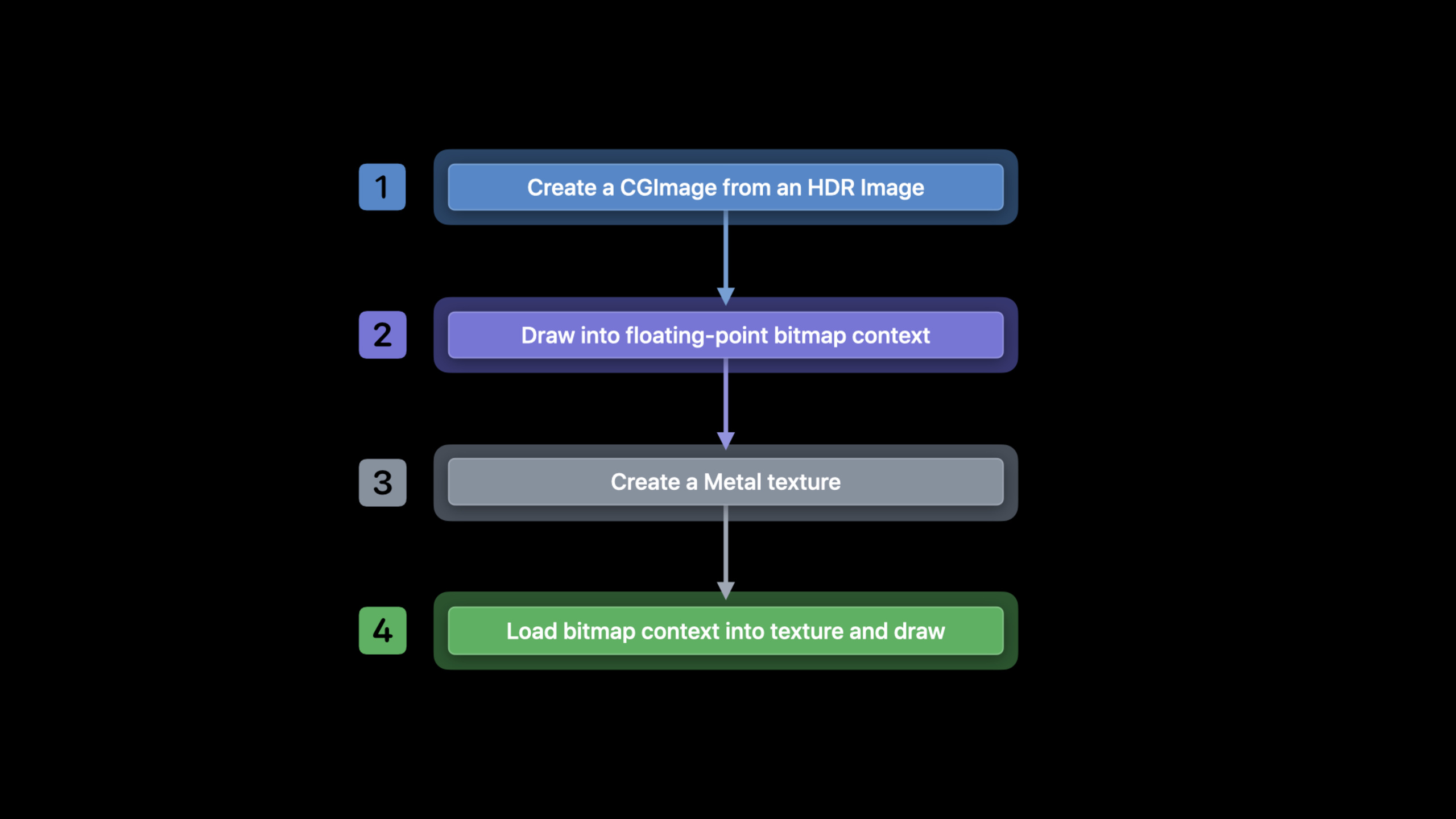
(08:18) The example workflow starts with an HDR still image. The original image is usually biplanar YUV. It is difficult to directly operate this format, so the session first uses Image I/O to read outCGImage, then useCGBitmapContextConvert to a 16-bit floating point bitmap more suitable for Metal.
// Create CGImage from HDR Image
let isr = CGImageSourceCreateWithURL(HDRImageURL, nil)
let img = CGImageSourceCreateImageAtIndex(isr, 0, nil)

// Draw into floating point bitmap context
let width  = img.width
let height = img.height

let info = CGBitmapInfo(rawValue: kCGBitmapByteOrder16Host |CGImageAlphaInfo.premultipliedLast.rawValue | CGBitmapInfo.floatComponents.rawValue)

let ctx = CGContext(data: nil, width: width, height: height, bitsPerComponent: 16,
    bytesPerRow: 0, space: layer.colorspace, bitmapInfo: info.rawValue)

ctx?.draw(in: img,
          image: CGRect(x: 0, y: 0, width: CGFloat(width), height: CGFloat(height)))
Key points:
CGImageSourceCreateWithURLCreate an Image I/O source from an HDR image URL. -CGImageSourceCreateImageAtIndexTake the first one from sourceCGImage。widthandheightdirectly fromCGImage, used to create bitmaps of the same size. -CGBitmapInfo.floatComponentsSpecifies that the bitmap uses floating-point components. -bitsPerComponent: 16Combined with the floating point component, a 16-bit floating point context is obtained. -space: layer.colorspaceLet the color space of the bitmap context match the color space to be rendered laterCAMetalLayer。ctx?.drawBundleCGImageDecode and draw into a floating point bitmap context.
If you need to have some HDR formats generate floating point buffers, the session mentioned that you can set a new onekCGImageSourceShouldAllowFloatoption (09:35).
3. Load bitmap data into Metal texture
(10:28) Bitmap is already in 16-bit floating point format, and Metal texture must also choose a matching format. Example usage of session.rgba16Float。
// Create floating point texture
let desc = MTLTextureDescriptor()

desc.pixelFormat = .rgba16Float
desc.textureType = .type2D

let texture = layer.device.makeTexture(descriptor: desc)

// Load EDR bitmap into texture
let data = ctx.data

texture.replace(region: MTLRegionMake2D(0, 0, width, height),
                mipmapLevel: 0,
                withBytes: &data,
                bytesPerRow: ctx.bytesPerRow)
Key points:
MTLTextureDescriptor()Describes the Metal texture to be created. -desc.pixelFormat = .rgba16FloatLet the texture use half-precision floating point RGBA, matching the previous bitmap context. -desc.textureType = .type2DIndicates that this is a 2D texture. -layer.device.makeTextureuseCAMetalLayerThe Metal device creates the texture. -ctx.dataGet the pixel data behind the bitmap context. -texture.replaceCopy the entire bitmap into the Metal texture. -bytesPerRow: ctx.bytesPerRowMaintain the row span of the source bitmap.
At this point, the App already has a Metal texture containing EDR values, which can be rendered by its own Metal pipeline (11:08).
4. Enable EDR on CAMetalLayer
(11:27) iOS and iPadOS are turned on in the same way as macOS: UseCAMetalLayer,OpenwantsExtendedDynamicRangeContent, select a pixel format and color space that supports EDR.
// Opt into using EDR
var layer = CAMetalLayer()
layer?.wantsExtendedDynamicRangeContent = true

// Use supported pixel format and color spaces
layer.pixelFormat = MTLPixelFormatRGBA16Float
layer.colorspace  = CGColorSpace(name: kCGColorSpaceExtendedLinearDisplayP3)
Key points:
CAMetalLayerIs the output layer of this rendering path. -wantsExtendedDynamicRangeContent = trueExplicitly let the layer enter EDR rendering. -pixelFormatTo match the content format; the example uses 16-bit floating point. -kCGColorSpaceExtendedLinearDisplayP3is extended linear display P3.- session emphasized that if using a linear color space, use the extended variant, otherwise the content will be clipped to SDR (12:22).
iOS supports two types of EDR rendering combinations: 16-bit floating point pixel buffer with linear color space, and 10-bit packed BGRA pixel buffer with PQ or HLG color space (12:22).
5. Determine rendering strategy based on headroom
(13:11) The available brightness for EDR is not a fixed value. The current headroom will be affected by factors such as device display technology and screen brightness. iOS puts related queries inUIScreensuperior.
// Query potential headroom
let screen = windowScene.screen
let maxPotentialEDR = screen.potentialEDRHeadroom
if (maxPotentialEDR < 1.5) {
    // SDR path
}

// Query current headroom
func draw(_ rect: CGRect) {
    let maxEDR = screen.currentEDRHeadroom
    // Tone-map to maxEDR
}

// Register for Reference Mode notifications
let notification = NotificationCenter.default
notification.addObserver(self,
                         selector: #selector(screenChangedEvent(_:)),
                         name: UIScreen.referenceDisplayModeStatusDidChangeNotification,
                         object: nil)

// Query for latest status and headroom
func screenChangedEvent(_ notification: Notification?) {
    let status          = screen.referenceDisplayModeStatus
    let maxPotentialEDR = screen.potentialEDRHeadroom
}
Key points:
windowScene.screenGet the location of the current sceneUIScreen。potentialEDRHeadroomIndicates the maximum headroom this display can provide. -maxPotentialEDR < 1.5It is a strategic judgment: if the potential headroom is too low, you can take the SDR path to save processing costs. -currentEDRHeadroomIndicates the headroom available at the current moment, suitable for reading in draw calls. -UIScreen.referenceDisplayModeStatusDidChangeNotificationNotifications are sent when the Reference Mode state changes. -referenceDisplayModeStatusTells the App whether Reference Mode is enabled, restricted, not enabled, or not supported.
UIScreenNo EDR headroom change notifications. The suggestion for session is to query it in the rendering callbackcurrentEDRHeadroom, and reread the state and potential headroom when the Reference Mode state changes (14:17).
6. Use CAEDRMetadata to hand over system tone mapping
(16:24) If it is processing video content, the App can use Apple’s built-in tone mapping. The entrance isCAEDRMetadata, which provides metadata construction methods for HLG and HDR10.
// Check if EDR metadata is available
let isAvailable = CAEDRMetadata.isAvailable

// Instantiate EDR metadata
// ...

// Apply EDR metadata to layer
let layer: CAMetalLayer? = nil
layer?.edrMetadata = metadata
Key points:
CAEDRMetadata.isAvailableUsed to check whether the current platform supports this set of tone mapping capabilities. -metadataRepresents EDR metadata created by HLG or HDR10 constructor. -layer?.edrMetadata = metadataSet metadata toCAMetalLayer.- After setting, the content rendered on this layer will be processed by the system tone mapper according to metadata.
HLG requires no parameters when constructing metadata. HDR10 has two constructors: one passes the minimum brightness, maximum brightness and mastering displayopticalOutputScale; Another way to pass MasterDisplayColourVolume SEI, ContentLightLevelInformation SEI andopticalOutputScale(17:22)。
// HLG
let edrMetadata = CAEDRMetadata.hlg

// HDR10 (Mastering Display luminance)
let edrMetaData = CAEDRMetadata.hdr10(minLuminance: minLuminance,
                                      maxLuminance: maxContentMasteringDisplayBrightness,
                                      opticalOutputScale: outputScale)

// HDR10 (Supplemental Enhancement Information)
let edrMetaData = CAEDRMetadata.hdr10(displayInfo: displayData,
                                      contentInfo: contentInfo,
                                      opticalOutputScale: outputScale)
Key points:
CAEDRMetadata.hlgContent for HLG color space. -hdr10(minLuminance:maxLuminance:opticalOutputScale:)Use mastering display brightness information to describe HDR10 content. -minLuminanceandmaxLuminanceThe unit is nits. -opticalOutputScaleDescribe how many nits EDR 1.0 corresponds to. Session mentions that it is usually set to 100. -hdr10(displayInfo:contentInfo:opticalOutputScale:)Using the SEI messages that come with the content is more suitable for preserving the author’s intent.
Core Takeaways
-
**Make a HDR photo comparison viewer. ** Allows users to switch between SDR and EDR display on the same photo. Used when EDR is enabled
CAMetalLayer.wantsExtendedDynamicRangeContentand.rgba16Floattexture; pushes highlights back to the SDR path when turned off. This allows you to intuitively see whether highlight details are still in the image data. -
**Add Reference Mode status prompt to the video editing app. ** Monitored on 12.9-inch iPad Pro
UIScreen.referenceDisplayModeStatusDidChangeNotification. When the status is enabled, the reference preview is displayed; when the status is limited, the user is prompted that the current environment cannot guarantee the reference response. -
**Press headroom to automatically select render cost. ** Read before rendering
potentialEDRHeadroom. If the potential headroom is too low, go to SDR preview; if it is enough, load the floating point texture and read itcurrentEDRHeadroomDo tone mapping. -
**Add system tone mapping to HDR10 playback layer. ** If the content has mastering display or SEI metadata, check first
CAEDRMetadata.isAvailable, then create HDR10 metadata and set it toCAMetalLayer.edrMetadata, reduce the cost of implementing tone mapping yourself.
Related Sessions
- Display EDR content with Core Image, Metal, and SwiftUI — Continue to talk about how to display EDR content in Core Image, SwiftUI, and Metal view architecture.
- Explore HDR rendering with EDR — Introducing the EDR rendering model and API on macOS, which is the prerequisite material for understanding the iOS API in this field.
- Edit and play back HDR video with AVFoundation — Talk about color space, transfer function and metadata in HDR video playback and editing.
Comments
GitHub Issues · utterances