
Highlight
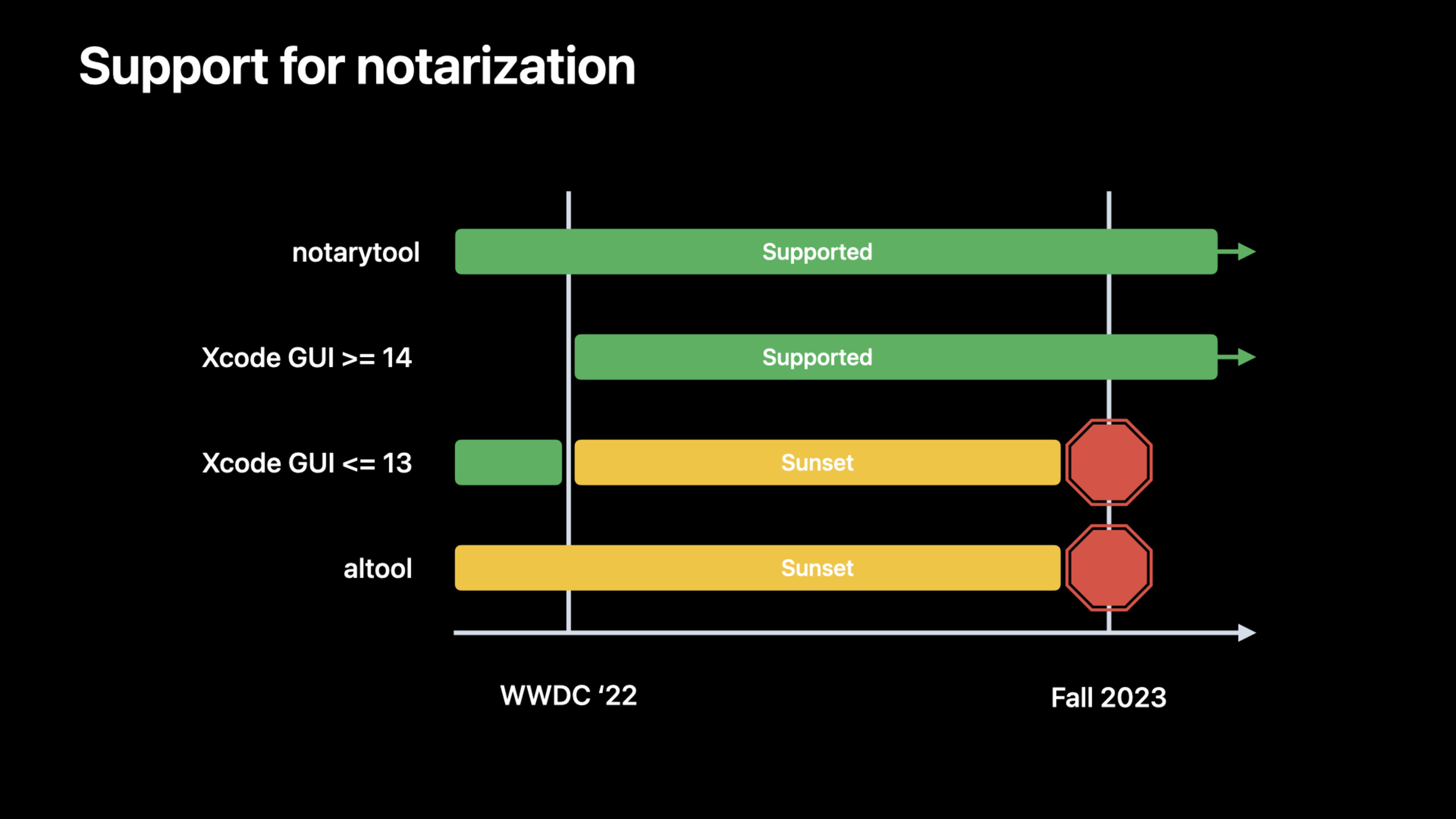
Apple provides three migration paths for macOS App notarization: altool will stop being used for notarization in the fall of 2023, Xcode 14 will be connected to the notarytool backend, and the new Notary REST API supports submitting and querying notarization tasks from CI environments such as Linux.
Core Content
If a Mac App is not distributed through the App Store, developers usually need to sign and notarize the Developer ID. The notary service analyzes uploaded software to help macOS block malicious content when users download third-party software.
There were two common pain points in this process in the past.
First, the old script is still callingaltool. The team maintains credentials, uploads, waits for results, and error handling. Second, the CI machine doesn’t have to be a Mac. For example, the Linux build node can produce archive files, but cannot directly run Xcode ornotarytoolComplete subsequent processes.
This session gave a clear migration route: the old altool notarization and Xcode 13 UI upload will stop working in the fall of 2023; the graphics process of Xcode 14 will use the same set of notarytool backends; the new Notary REST API allows any machine with Internet access to submit files, query status, and obtain history and details.
Detailed Content
altool exits, notarytool continues to be available
(01:11) In 2021 Apple releasednotarytool, asaltoolAn alternative to the notarization process. This 2022 session gives a deadline: notarization using altool will stop working in the fall of 2023. Xcode 13 UI uploads to the notary service will also stop after the same deadline.
notarytoolIt will continue to work natively, including the version built into Xcode 13. Apple still recommends upgrading to get the latest fixes and improvements.
# Conceptual illustration: old scripts need to migrate from altool to notarytool
# Use the 2021 "Faster and simpler notarization for Mac apps" session and the documentation as the source for exact parameters.

# before: xcrun altool ...
# after:  xcrun notarytool ...
Key points:
- The first line indicates that this is a migration prompt, not the complete command given in this session.
-
altoolis the old path that needs to be moved out. -notarytoolis the command line path that will continue to be available after fall 2023. - Specific migration details are expanded on in the WWDC 2021 session cited by Apple.
Xcode 14 connects the graphics process to the notarytool backend
(02:30) Migration is less stressful if teams use Xcode Organizer to upload notarizations. Xcode 14’s built-in notarization support moved to andnotarytoolThe same backend, so you get what Apple is offering in 2021notarytoolAnnounced ~4x performance improvement.
The focus of this part is “not changing the workflow”. The talk makes it clear that beyond updating Xcode, there is usually no need to change project settings or existing processes.
Xcode 13 UI notarization  ->  stops working after fall 2023
Xcode 14 UI notarization  ->  uses the notarytool backend
notarytool CLI            ->  continues past the deadline
Key points:
Xcode 13 UI notarizationCorresponds to the old UI upload method in lectures that would stop working after the deadline. -Xcode 14 UI notarizationCorresponds to new Xcode integration. -notarytool backendis why Xcode 14 gets performance improvements. -notarytool CLIStill a migration target that can be used by automation scripts.
Notary REST API: Create submission first, then upload to S3
(03:01) The new Notary REST API is the protagonist of this session. It is a JSON web service that uses JSON Web Token (JWT) authentication, similar to other App Store Connect APIs. Its goal is to allow machines not running macOS to interact with notary services.
Uploading is a two-step process. The first step is to send the file name and SHA-256 to the Notary API. The service returns temporary S3 credentials, bucket, object, and asubmission_id. The second step is to use S3 SDK to upload the file to the location provided by Apple.
# Upload file for notarization

def upload_file(token, filepath, sha256):
    data = { "sha256": sha256, "submissionName": os.path.basename(filepath) }
    resp = requests.post(
       "https://appstoreconnect.apple.com/notary/v2/submissions",
        json=data,
        headers={"Authorization": "Bearer " + token})

    output = resp.json()
    aws_info = output["data"]["attributes"]
    submission_id = output["data"]["id"]

    client = boto3.client(
        "s3",
        aws_access_key_id=aws_info["awsAccessKeyId"],
        aws_secret_access_key=aws_info["awsSecretAccessKey"],
        aws_session_token=aws_info["awsSessionToken"])
    client.upload_file(filepath, aws_info["bucket"], aws_info["object"])
Key points:
upload_file(token, filepath, sha256)Takes as input a JWT, file path and file hash. -dataContains only the basic file information mentioned in the speech: SHA-256 and commit name. -requests.post(...)Call the submissions endpoint of the Notary REST API. -Authorization: Bearer ...Use JWT authentication. -aws_infoSave temporary S3 upload information in the response. -submission_idIt is the ID for subsequent query of notarization status. -boto3.client("s3", ...)Create an S3 client with the returned temporary credentials. -client.upload_file(...)Upload the file to the bucket and object specified in the response.
This code also illustrates the boundaries of the REST API: the Notary API does not directly receive the entire file. It first creates the submission and returns the upload information, and then the file content goes to Amazon S3.
Query status: Waiting for In Progress to become the final result
(06:12) After uploading, please confirm that the notary service has processed the submission before distribution. The direct way to use REST API is to usesubmission_idQuery status. status will remainIn Progress, until it becomes the final state after the processing is completed, for exampleAcceptedorInvalid。
# Wait for completion

def watch_upload(submission_id, token):
    while True:
        resp = requests.get(
            "https://appstoreconnect.apple.com/notary/v2/submissions/" + submission_id,
            headers={"Authorization": "Bearer " + token})

        output = resp.json()
        current_status = output["data"]["attributes"]["status"]

        if current_status != "In Progress":
            return current_status # For example: Accepted or Invalid

        time.sleep(30) # Allow time for submission to progress
Key points:
watch_upload(submission_id, token)Continue tracking the same submission using the submission ID obtained during the upload phase. -requests.get(...)Access the Notary API endpoint for a single submission. -Authorizationheader continues to use the same JWT authentication method. -current_statusRead the current processing status in the response. -current_status != "In Progress"Indicates that the notary service has given the final result. -AcceptedandInvalidare examples of end states listed in the speech. -time.sleep(30)Avoid persistent requests; the speech example waits 30 seconds for submissions to advance.
The speech also added that after the submission is completed, the notarization log of this upload can be obtained through the API. For specific endpoints, please see the Notary API documentation.
Webhook: Decouple the upload system from subsequent automation
(06:49) Polling is not the only option. The Notary REST API also supports webhook workflow: the webhook URL is provided in the initial upload request. After the automatic analysis is completed, the ticket is created, and the final status is saved, the notary service will call this URL.
The speech clearly states that the notice containssubmission ID、team IDand a signature that verifies the notification comes from Apple.
upload request includes webhook URL
        │
        ▼
notary service analyzes submission
        │
        ▼
tickets are created and final status is saved
        │
        ▼
notary service calls webhook URL
        │
        ├─ submission ID
        ├─ team ID
        └─ signature
Key points:
webhook URLis the callback address provided in the initial upload request. -analyzes submissionCorresponds to the notary service’s automatic analysis of uploaded documents. -tickets are createdCorresponds to the steps to create a ticket after the analysis in the speech is completed. -final status is savedIndicates that the server has reached the final notarization status. -submission IDandteam IDLet the recipient know which commit and which team. -signatureUsed to verify the source of the notification.
This model is suitable for CI/CD. The upload machine is only responsible for submitting files. After another system receives the webhook, it can notify the submitter or start an automatic distribution process. Both parts do not have to wait using the same process.
Core Takeaways
-
WHAT TO DO: Put the still in use
altoolCI scripts are listed and migrated tonotarytoolor Notary REST API.
Why it’s worth doing: altool notarization will stop working in the fall of 2023, migration is a hard deadline.
How to start: First look for thealtoolInvoke, and then click whether to run macOS to selectnotarytoolor REST API. -
What to do: Add a notarized upload step to the Linux build node.
Why it’s worth it: The REST API supports submission from any internet-connected machine, no longer requiring the upload step to run on a Mac.
How to get started: Call with JWTPOST https://appstoreconnect.apple.com/notary/v2/submissions, after getting the S3 information, use the S3 SDK in the existing language to upload the file. -
What to do: Create a webhook callback service for the notarization results.
Why it’s worth doing: Webhook can separate the upload process from the subsequent notification and distribution processes, reducing long-term polling tasks.
How to start: Configure the webhook URL in the initial submission request; verify the signature after receiving the notification, and thensubmission IDQuery or trigger subsequent actions. -
What to do: Connect the notarization status and logs to the internal publishing panel.
Why it’s worth it: The REST API supports querying submission status, history, submission details, and notarization logs, so publishers don’t have to just look at the CI console.
How to start: Save the data returned from each uploadsubmission_id, call Notary API regularly or on demand to display status and log links.
Related Sessions
- Faster and simpler notarization for Mac apps — 2021 Introduction
notarytool, which is the prerequisite content for understanding the migration period of this site. - What’s new in App Store Connect — In the same year, we talk about App Store Connect and API automation updates, which is suitable for looking at changes in the publishing tool chain together.
- Deep dive into Xcode Cloud for teams — Expand teams CI/CD, App Store Connect API, and automation integration scenarios.
Comments
GitHub Issues · utterances