
Highlight
This Session provides an in-depth explanation of the performance optimization methods related to ray tracing in Metal 3. If you were already using Metal ray tracing last year, these improvements this year can make your rendering pipeline run faster and support larger scenes.
Core Content
The cost of ray tracing comes mainly from two things: firing a lot of rays, and repeatedly finding the geometry in the scene where the rays hit. Metal’s ray tracing API has put this path into the shader function. Developers usually generate rays in compute or fragment function, and then use intersector to query the acceleration structure.
(00:57) This process can do reflections, shadows and global illumination, but a large number of intersection tests will be performed on each frame. The larger a scene is, the easier it is for intersection functions and acceleration structure builds to become hot paths.
The changes in Metal 3 focus on these thermal paths. The first type of changes reduces memory accesses in shaders. The second type of changes speeds up the build, refit and parallel scheduling of the acceleration structure. The third category of changes enables Xcode 14 to check every primitive, every line of shader code, and shader stack overflows.
The main thread of this session is clear: move the data that must be read every time the light hits closer, split the data that must be constructed every frame into a form more suitable for GPU execution, and then use tools to confirm whether the bottleneck has really disappeared.
Detailed Content
Use per-primitive data to reduce indirect access of intersecting functions
(04:04) The talk starts with alpha testing. Transparent maps are commonly used in models such as leaves, fences, and hair. The intersection function needs to determine whether the triangle hit is established based on the texture alpha.
The minimal logic is simple.
float alpha = texture.sample(sampler, UV).w;
return alpha >= 0.5f;
Key points:
texture.sample(sampler, UV)Samples the map using the current UVs. -.wTake the alpha channel. -alpha >= 0.5fDetermine whether this hit passes the alpha test.
(05:46) The problem is that the true intersection function needs to find the texture and UV first. The old way of writing will take several layers from instance data and material buffer.
[[intersection(triangle, raytracing::triangle_data, raytracing::instancing)]]
bool alphaTestIntersection(float2               coordinates    [[barycentric_coord]],
                           unsigned int         primitiveIndex [[primitive_id]],
                           unsigned int         instanceIndex  [[instance_id]],
                           device GlobalData   *globalData     [[buffer(1)]],
                           device InstanceData *instanceData   [[buffer(0)]])
{
    device Material *materials = globalData->materials;
    InstanceData instance = instanceData[instanceIndex];
    float2 UV = calculateSamplingCoords(coordinates,
                                        instance.uvs[primitiveIndex * 3 + 0],
                                        instance.uvs[primitiveIndex * 3 + 1],
                                        instance.uvs[primitiveIndex * 3 + 2]);
    int materialIndex = instance.materialIndices[primitiveIndex];
    float alpha = materials[materialIndex].texture.sample(sam, UV).w;
    return alpha >= 0.5f;
}
Key points:
[[intersection(... )]]Declare this to be the intersection function used by triangle ray tracing. -coordinatesProvides barycentric coordinates for interpolating triangle vertex attributes. -primitiveIndexandinstanceIndexUsed to locate the current primitive and instance. -globalData->materialsFirst get the global material array. -instanceData[instanceIndex]Then get the UV and material index of the current instance. -calculateSamplingCoordsUse the primitive’s three UV interpolations to obtain the sampling coordinates. -instance.materialIndices[primitiveIndex]Find the material index. -materials[materialIndex].texture.sample(...)Jump ahead to materials and read about texture alpha.
(06:48) Metal 3 adds per-primitive data. Developers can store the data actually needed by the intersection function directly into the acceleration structure. The example in the lecture only saves the texture and the UVs of three vertices.
struct PrimitiveData
{
    texture2d<float> texture;
    float2 uvs[3];
};
Key points:
PrimitiveDataIt is a small piece of data associated with each primitive. -texture2d<float> texturePut the texture handle required by alpha test on the primitive. -float2 uvs[3]Save the UVs of the three vertices of the triangle.- Lecture reminder, you can store any data here, but keeping the size small will help get better performance.
(07:08) The intersection function is therefore shorter. It no longer receives global data, instance data, primitive id and instance id, and only reads a primitive data pointer.
// Alpha testing intersection function
[[intersection(triangle, raytracing::triangle_data, raytracing::instancing)]]
bool alphaTestIntersection(float2               coordinates    [[barycentric_coord]],
                     const device PrimitiveData *primitiveData [[primitive_data]])
{
    PrimitiveData ppd = *primitiveData;
    float2 UV = calculateSamplingCoords(coordinates,
                                        ppd.uvs[0],
                                        ppd.uvs[1],
                                        ppd.uvs[2]);
    float alpha = ppd.texture.sample(sam, UV).w;
    return alpha >= 0.5f;
}
Key points:
[[primitive_data]]Let the intersection function directly receive the data pointer of the current primitive. -PrimitiveData ppd = *primitiveDatais the only device memory load required by this function. -ppd.uvs[0...2]Provide triangle UVs directly to avoid further dereferencing from instance data. -ppd.texture.sample(sam, UV).wSample alpha directly using primitive-bound textures.- The return value still only expresses one thing: whether this hit passes the alpha test.
(08:54) To put this data into the acceleration structure, you need to set the buffer, element size, stride and offset on the geometry descriptor.
geometryDescriptor.primitiveDataBuffer = primitiveDataBuffer
geometryDescriptor.primitiveDataElementSize = MemoryLayout<PrimitiveData>.size
geometryDescriptor.primitiveDataStride = MemoryLayout<PrimitiveData>.stride
geometryDescriptor.primitiveDataBufferOffset = primitiveDataOffset
Key points:
primitiveDataBufferPoints to the Metal buffer that holds all primitive data. -primitiveDataElementSizeIndicates how many bytes each primitive stores. -primitiveDataStrideHandle the situation where the data in the buffer is not tightly arranged. -primitiveDataBufferOffsetHandle the situation where primitive data is not stored from the beginning of buffer.
(09:18) per-primitive data is not only used by the intersection function. It can also be taken from intersection result and intersection query and used for shading.
// Intersection function argument:
const device void *primitiveData [[primitive_data]]

// Intersection result:
primitiveData = intersection.primitive_data;

// Intersection query:
primitiveData = query.get_candidate_primitive_data();
primitiveData = query.get_committed_primitive_data();
Key points:
[[primitive_data]]Is the entrance to the intersection function parameters. -intersection.primitive_dataRead the same data from the final intersection result. -get_candidate_primitive_data()Read the primitive data of the candidate hit. -get_committed_primitive_data()Read the primitive data of the confirmed hit.
Apple has seen performance gains of 10 to 16 percent per-primitive data in its own test apps. This number comes from reducing memory accesses and pointer dereferences; the decision logic of the alpha test has not changed.
Reuse the buffer on the intersection function table
(10:18) The ray tracing kernel and intersection function often require the same resources. In the old process, the application would bind resources to the intersection function table and then bind the same resource to the main ray tracing kernel.
Metal 3’s Metal Shading Language allows shaders to access the buffer and visible function tables directly from the intersection function table.
device int *buffer = intersectionFunctionTable.get_buffer<device int *>(index);

visible_function_table<uint(uint)> table =
    intersectionFunctionTable.get_visible_function_table<uint(uint)>(index);

uint result = table[0](parameter);
Key points:
get_buffer<device int *>(index)Read the bound buffer by index from the intersection function table. -get_visible_function_table<uint(uint)>(index)Read the visible function table by function type. -table[0](parameter)Call the visible function in table.- This capability reduces duplicate bindings and is suitable for scenarios where the intersection function and the main kernel share resources.
Initiate ray tracing from indirect command buffer
(11:15) Indirect command buffer is used for GPU-driven pipelines. Metal 3 brings support for ray tracing. There is only one descriptor flag to enable it.
let icbDescriptor = MTLIndirectCommandBufferDescriptor()

icbDescriptor.supportRayTracing = true
Key points:
MTLIndirectCommandBufferDescriptor()Create an ICB description object. -supportRayTracing = trueDeclaring this ICB will schedule graphics or compute functions using ray tracing.- ray tracing is still used in the usual way in these functions.
This change is useful for GPU-driven renderers. Applications can let the GPU encode the subsequent work and then perform ray tracing queries in the scheduled shader.
Speed up the build, refit and parallel execution of acceleration structure
(13:16) When a game loads a new level, it usually loads models and textures, and also builds primitive acceleration structures for the model. After entering the main loop, dynamic characters and animation models are often updated with refit; when scene objects are added, removed, or moved significantly, the instance acceleration structure usually requires a complete rebuild.
(14:39) Metal 3 increases acceleration structure build to up to 2.3 times and refit to up to 38% on Apple Silicon. For many small primitive acceleration structures, Metal will also try to execute build, compact, and refit in parallel, which can achieve a maximum build improvement of 2.8 times.
(15:43) To obtain parallel benefits, multiple builds need to use the same acceleration structure command encoder and cannot share the same scratch buffer. The pattern given in the talk is to use a small set of scratch buffers in rotation.
for (index, accelerationStructure) in accelerationStructures.enumerated() {
    encoder.build(accelerationStructure: accelerationStructure,
                  descriptor: descriptors[index],
                  scratchBuffer: scratchBuffers[index % numScratchBuffers],
                  scratchBufferOffset: 0)
}
Key points:
accelerationStructures.enumerated()Traverse a set of acceleration structures that need to be constructed. -encoder.build(...)Encode multiple builds consecutively on the same encoder. -descriptors[index]Provide a description for each acceleration structure. -scratchBuffers[index % numScratchBuffers]Rotate from the scratch buffer pool to prevent all builds from grabbing the same scratch buffer. -scratchBufferOffset: 0Indicates that each scratch buffer is used from the starting position.
Use the more compact vertex format directly
(16:29) Previously the acceleration structure required three-component, full-precision floating point vertex data. When using half precision, normalized integer, or 2D planar geometry, the application may first unpack and copy to a temporary buffer just to build the acceleration structure.
Metal 3 allows acceleration structure builds to directly consume more vertex formats. Set the entry point on the triangle geometry descriptor.
let geometryDescriptor = MTLAccelerationStructureTriangleGeometryDescriptor()

geometryDescriptor.vertexFormat = .uint1010102Normalized
Key points:
MTLAccelerationStructureTriangleGeometryDescriptor()Describes the geometry of a set of triangles. -vertexFormatDeclare the actual format of the vertices in the vertex buffer. -.uint1010102Normalizedis the compact normalized integer format from the lecture example.- The build phase can directly read this format, avoiding the need to prepare an additional full-precision temporary copy for the acceleration structure.
Set transformation matrix for geometry descriptor
(17:37) The new transformation matrix can be used with the compact vertex format. For example, the model can normalize the coordinates to the range of 0 to 1 and store them as normalized integer; then provide scale and offset matrices at runtime to change the vertices back to their original positions.
var scaleTransform =
    MTLPackedFloat4x3(columns: (
        MTLPackedFloat3Make( scale.x,      0.0,      0.0),
        MTLPackedFloat3Make(     0.0,  scale.y,      0.0),
        MTLPackedFloat3Make(     0.0,      0.0,  scale.z),
        MTLPackedFloat3Make(offset.x, offset.y, offset.z))

let transformBuffer = device.makeBuffer(length: MemoryLayout<MTLPackedFloat4x3>.size,
                                        options: .storageModeShared)!

transformBuffer.contents().copyMemory(from: &scaleTransform,
                                      byteCount: MemoryLayout<MTLPackedFloat4x3>.size)
Key points:
MTLPackedFloat4x3The 4x3 transformation matrix used when saving the build acceleration structure.- Save the first three columns
scale.x、scale.y、scale.z. - Save in the fourth column
offset.x、offset.y、offset.z。 makeBufferCreate a Metal buffer that can hold the matrix. -copyMemoryCopy the CPU side matrix to buffer.
(18:51) Then give this buffer to the geometry descriptor.
let geometryDescriptor = MTLAccelerationStructureTriangleGeometryDescriptor()

geometryDescriptor.transformationMatrixBuffer = transformBuffer
geometryDescriptor.transformationMatrixBufferOffset = 0
Key points:
transformationMatrixBufferPointer to the buffer holding the matrix. -transformationMatrixBufferOffsetSpecifies the starting position of the matrix within buffer.- When building acceleration structure, Metal will use this matrix to pre-transform vertex data.
(19:05) The same capability can also reduce the number of instances. For a simple and overlapping set of boxes and spheres, each geometry descriptor can be set with its own transformation matrix and then merged into a primitive acceleration structure. The speech explained that the primitive acceleration structure generated in this way takes less time to build and intersects faster.
Assign acceleration structure from heap
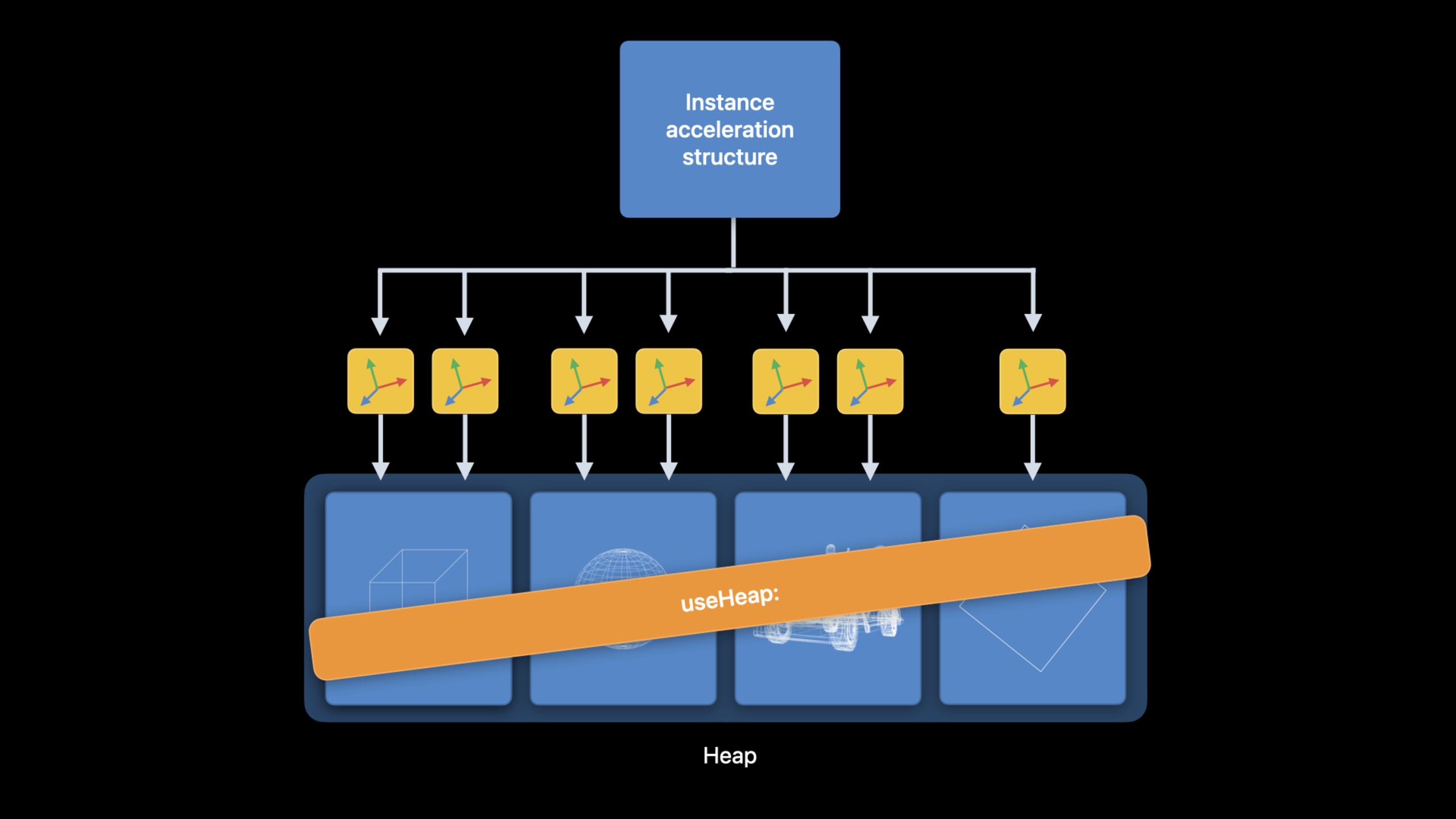
(21:04) Metal 3 supports allocating acceleration structures from the heap. This reuses heap memory, avoids expensive buffer allocations, and reducesuseResource:call.
In large scenes, the instance acceleration structure will indirectly reference many primitive acceleration structures. When using command encoder, the old way requires calling for each primitive acceleration structureuseResource:. If they all come from the same heap, you can use it onceuseHeap:Cover these resources.
(22:33) There are two allocation methods. The first one directly lets the heap create the acceleration structure according to the descriptor. The second method first queries the device for size and alignment, and then creates it based on size.
let heap = device.makeHeap(descriptor: heapDescriptor)!

let accelerationStructure = heap.makeAccelerationStructure(descriptor: descriptor)

let sizeAndAlign = device.heapAccelerationStructureSizeAndAlign(descriptor: descriptor)

let accelerationStructure = heap.makeAccelerationStructure(size: sizeAndAlign.size)
Key points:
makeHeap(descriptor:)Create a heap for resource allocation. -heap.makeAccelerationStructure(descriptor:)Use descriptor to create acceleration structure directly in heap. -heapAccelerationStructureSizeAndAlign(descriptor:)Query the size and alignment requirements corresponding to the descriptor. -heap.makeAccelerationStructure(size:)Allocate the acceleration structure from the heap using the final size.
You also have to deal with residency and synchronization when using a heap. Lecture reminder: To be called during ray tracing passuseHeap:;Heap resources are not tracked by Metal hazard by default. You can choose to turn on resource hazard tracking, or you can use it manually.MTLFencesandMTLEventssynchronous.
Verify performance and correctness with Xcode 14 tools
(24:16) Xcode 14’s Metal Debugger adds several tool support for ray tracing.
The Acceleration Structure Viewer can view primitive or instanced motion. It also adds primitive highlight mode, which can expand the data of each primitive. This directly corresponds to the per-primitive data in the first half of this session.
(25:55) Shader Profiler supports intersection functions, visible functions, and dynamic libraries. Developers can see the execution cost of each line of code in the ray tracing pipeline, broken down by instruction category.
(27:02) The Shader Debugger also has access to linked functions and dynamic libraries. When using a visible function table or dynamic library, the debugger can follow the actual executed function.
(28:05) Runtime Shader Validation can diagnose GPU runtime errors such as out-of-bounds memory accesses and null texture reads. Metal 3 also adds stack overflow detection. If there are intersection function, visible function, dynamic library or function pointer calls in the shader, the developer needs to set a sufficient maximum call stack depth for the pipeline descriptor. When set too low, Shader Validation will indicate where stack overflow occurs.
Core Takeaways
-
What: Transform the intersection function for renderers that use alpha-tested geometry. Why it’s worth doing: Per-primitive data put texture and UV into acceleration structure, the test application in the speech achieved a performance improvement of 10% to 16%. How to start: Define smaller
PrimitiveData,existMTLAccelerationStructureTriangleGeometryDescriptorsettings onprimitiveDataBuffer、primitiveDataElementSize、primitiveDataStrideandprimitiveDataBufferOffset。 -
What: Merge a large number of primitive acceleration structure builds in the level loading phase into the same encoder. Why it’s worth doing: Metal 3 will try to execute build, compact and refit in parallel, which can improve GPU utilization when the number of small builds is large. How to start: Use the same acceleration structure command encoder to encode multiple
build, and prepare a scratch buffer pool to prevent all builds from sharing the same scratch buffer. -
What: Let the compressed vertex format participate directly in acceleration structure build. Why it’s worth doing: The new vertex format supports reducing temporary full-precision vertex copies, reducing memory footprint and preparation costs. How to start: In
MTLAccelerationStructureTriangleGeometryDescriptorsettings onvertexFormat, cooperate when necessarytransformationMatrixBufferRestore model coordinates. -
What: Combine multiple simple overlapping instances into a primitive acceleration structure. Why it’s worth doing: The talk points out that reducing instance count can reduce transform and switching overhead when ray hits instance. How to start: Create an independent geometry descriptor for each object, set its own transformation matrix, and then put these descriptors into the same
MTLPrimitiveAccelerationStructureDescriptor。 -
What: Put primitive acceleration structures of large scenes into the same heap. Why it’s worth doing: Once
useHeap:Can replace a lot ofuseResource:Call and reuse heap memory. How to start: Usedevice.makeHeap(descriptor:)Create a heap byheap.makeAccelerationStructure(...)Allocate acceleration structure, called before ray tracing passuseHeap:。
Related Sessions
- Discover Metal 3 — Overview of Metal 3, covering resource loading, offline compilation, MetalFX, Mesh Shaders, ray tracing, and tool updates.
- Go bindless with Metal 3 — Explains acceleration structures and debugging improvements in bindless rendering, argument buffers, and heap.
- Target and optimize GPU binaries with Metal 3 — Move GPU binary generation forward to the build phase to reduce startup and runtime compilation overhead.
- Boost performance with MetalFX Upscaling — Use MetalFX Upscaling to improve the rendering performance of Metal applications.
- Load resources faster with Metal 3 — Optimize loading of large resources and level data using Metal 3 fast resource loading.
Comments
GitHub Issues · utterances