
Highlight
GPU Software Engineer Jaideep Joshi introduces Metal 3’s Fast Resource Loading feature, an asynchronous resource loading API designed specifically for games and graphics-intensive apps.
Core Content
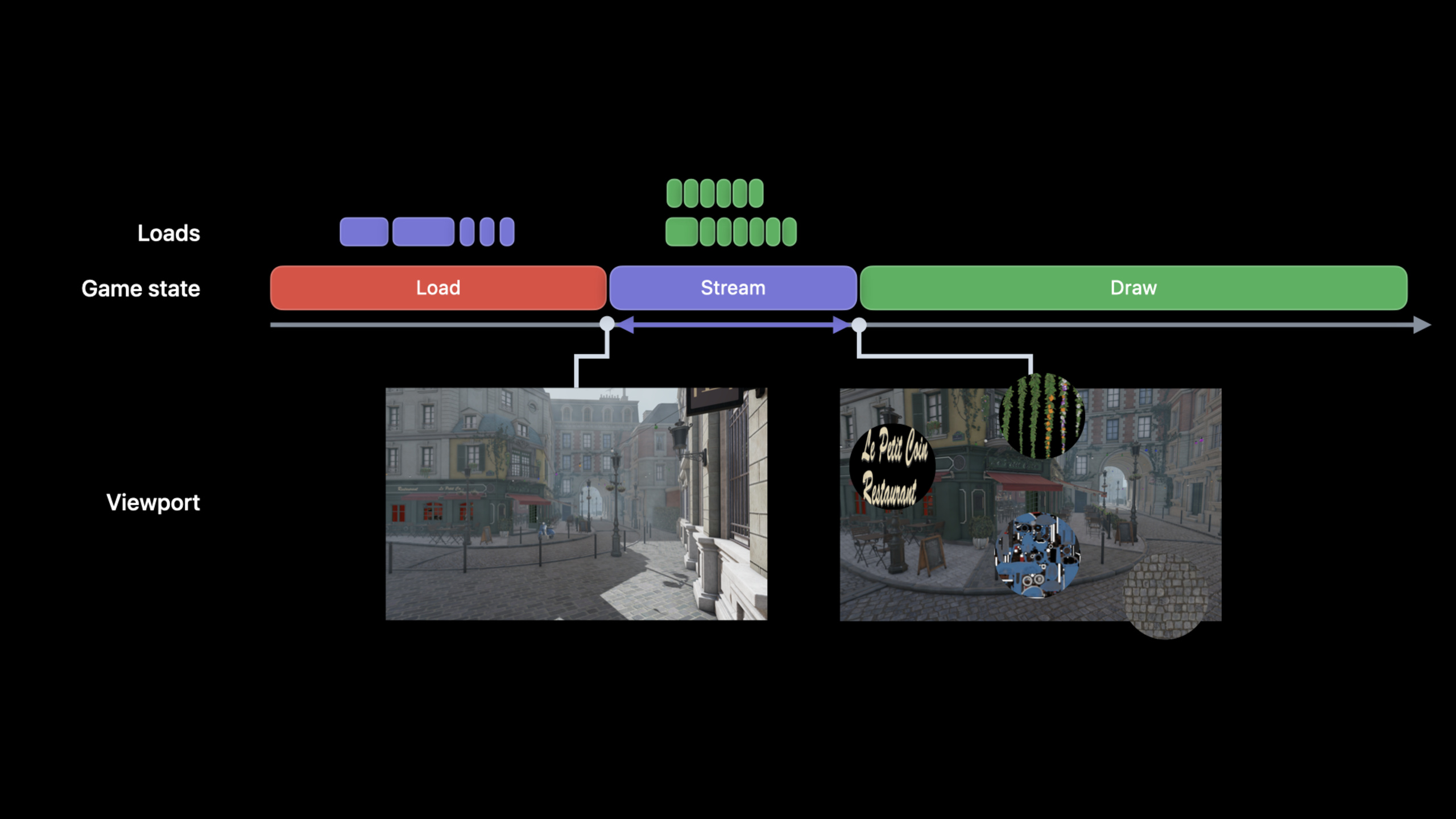
There is a very direct problem with resource loading for large-scale games: the more detailed the resources, the longer players will have to wait. Reading all the texture, audio, and geometry data into memory before starting the level can avoid lags during operation, but it will lengthen the loading screen and take up more memory.
Metal 3’s Fast Resource Loading solves this link. It turns resource loading into an asynchronous IO command. After the App issues a loading request, it does not have to block the current thread and can continue coding, rendering or calculation work. The IO command queue can also execute multiple command buffers concurrently, which is more suitable for high-speed SSD and Apple Silicon’s unified memory architecture.
The core scenario of this session is streaming loading. When the player is close to the blackboard, the game loads higher-resolution textures; the open world map is preloaded by area; when sound effects are more urgent than large textures, audio resources are moved to a higher priority queue. The common goal is to have the game load only the data it currently needs, and try to do so before the player notices.
Another important point is granularity. Apple recommends splitting the load request into smaller pieces, such as using a sparse texture to load the visible area by tile, rather than loading the entire mip level at once. The number of requests will increase, but modern storage hardware can process them concurrently, and Metal 3’s IO queue is designed for this mode.
Detailed Content
Open resource file
(05:19) The first step in Fast Resource Loading is to create a file handle. This handle comes fromMTLDevice, all subsequent load commands read the file content through it.
// Create an Metal File IO Handle

// Create handle to an existing file
var fileIOHandle: MTLIOFileHandle!
do {
    try fileHandle = device.makeIOHandle(url: filePath)
} catch {
    print(error)
}
Key points:
MTLIOFileHandleRepresents a file handle that the Metal IO system can read. -device.makeIOHandle(url:)Open an existing file with Metal device. -catchThe branch processing file failed to open, such as the path is wrong or the resource is inaccessible.- The stated name in the official clip is
fileIOHandle, the assignment is written asfileHandle;Variable names should be kept consistent in actual projects.
Create IO command queue
(06:49) The load command is not submitted directly to the rendering queue, but toMTLIOCommandQueue. The default queue is concurrent, which can also be changed to serial to let the command buffer execute in order.
// Create a Metal IO command queue

let commandQueueDescriptor = MTLIOCommandQueueDescriptor()

commandQueueDescriptor.type = MTLIOCommandQueueType.concurrent // or serial

var ioCommandQueue: MTLIOCommandQueue!
do {
    try ioCommandQueue = device.makeIOCommandQueue(descriptor: commandQueueDescriptor)
} catch {
    print(error)
}
Key points:
MTLIOCommandQueueDescriptorUsed to describe the behavior of IO queues. -type = .concurrentAllow multiple IO command buffers to execute concurrently and complete out of order.- If resources have strict order requirements, serial queues can be used.
-
device.makeIOCommandQueue(descriptor:)Create a Metal IO queue based on the descriptor.
Submit texture and buffer loading
(07:17) After the IO queue is created, the App generates a command buffer from the queue, and then encodes and loads the command into it. Metal 3 supports three types of loading: loading to texture, loading to buffer, and loading to CPU-accessible memory.
// Create Metal IO Command Buffer

let ioCommandBuffer = ioCommandQueue.makeCommandBuffer()

// Encode load commands
// Encode load texture and load buffer commands
ioCommandBuffer.load(texture, slice: 0, level: 0, size: size,
                     sourceBytesPerRow:bytesPerRow, sourceBytesPerImage: bytesPerImage,
                     destinationOrigin: destOrigin,
                     sourceHandle: fileHandle, sourceHandleOffset: 0)
ioCommandBuffer.load(buffer, offset: 0, size: size,
                     sourceHandle: fileHandle, sourceHandleOffset: 0)


// Commit command buffer for execution
ioCommandBuffer.commit()
Key points:
makeCommandBuffer()Create a load batch from the IO queue.- first
loadLoad file data into Metal texture, which can be used for texture streaming loading. -slice、level、destinationOriginSpecifies the area where the texture is written. - the second
loadLoad file data into Metal buffer, which can be used for geometry data or scene data. -sourceHandleOffsetSpecifies the offset in the file from which to start reading. -commit()Submit the loading work, the calling thread does not need to wait for the loading to complete.
Use shared event to synchronize loading and rendering
(08:51) Asynchronous loading brings a new problem: rendering cannot read the resource before it is ready. Metal 3 usesMTLSharedEventEstablish synchronization between the IO command buffer and the graphics command buffer.
var sharedEvent: MTLSharedEvent!
sharedEvent = device.makeSharedEvent()

// Create Metal IO command buffer
let ioCommandBuffer = ioCommandQueue.makeCommandBuffer()

ioCommandBuffer.waitForEvent(sharedEvent, value: waitVal)

// Encode load commands

ioCommandBuffer.signalEvent(sharedEvent, value: signalVal)
ioCommandBuffer.commit()

// Graphics work waits for the IO command buffer to signal
Key points:
device.makeSharedEvent()Create a synchronization object that can be used across queues. -waitForEvent(_:value:)Let the IO command buffer wait for a certain event value before executing it.- The load command is encoded between wait and signal.
-
signalEvent(_:value:)A signal will be emitted after all loading commands in the IO command buffer are completed. - The corresponding graphics command buffer waits for the same event value to avoid reading unloaded resources.
Cancel loads that are no longer needed
(10:29) Open world games often preload areas where the player may travel. Some preloads lose value once the player changes direction. Metal 3 allows attempts to cancel these IO jobs at command buffer granularity.
// Player in the center region
// Encode loads for the North-West region
ioCommandBufferNW.commit()
// Encode loads for the West region
ioCommandBufferW.commit()
// Encode loads for the South-West region
ioCommandBufferSW.commit()

// Player in the western region and heading south
// tryCancel NW command buffer
ioCommandBufferNW.tryCancel()

// ..
// ..
func regionNWCancelled() -> Bool {
    return ioCommandBufferNW.status == MTLIOStatus.cancelled
}
Key points:
- Each region’s preload can be put into a separate IO command buffer.
- When the player is still in the central area, the game submits loading in the northwest, west, and southwest directions at the same time.
- After the player moves south,
tryCancel()Try canceling the loading of the northwest area. -status == .cancelledUsed to determine whether the command buffer is indeed canceled. - The cancellation granularity is command buffer, not a single load command.
Give emergency resources higher priority
(12:28) Both textures and audio can be read through Fast Resource Loading, but their latency requirements are different. When the player teleports to a new scene, a large number of textures can be completed later, and the teleportation sound effects must be played immediately. The solution is to create a high priority IO queue for audio.
// Create a Metal IO command queue

let commandQueueDescriptor = MTLIOCommandQueueDescriptor()
commandQueueDescriptor.type = MTLIOCommandQueueType.concurrent // or serial

// Set Metal IO command queue Priority
commandQueueDescriptor.priority = MTLIOPriority.high // or normal or low

var ioCommandQueue: MTLIOCommandQueue!
do {
    try ioCommandQueue = device.makeIOCommandQueue(descriptor: commandQueueDescriptor)
} catch {
    print(error)
}
Key points:
priorityCan be set to high, normal or low.- High priority queue is suitable for delay-sensitive resources such as audio.
- Texture loading can continue to go through the normal priority queue.
- The priority cannot be modified after the queue is created, so the queue needs to be designed according to resource type in advance.
Offline compressed resource package
(14:04) Fast Resource Loading also supports compressed files. Apple recommends generating the compressed package in the offline stage. During runtime, Metal 3 will find the chunk that needs to be decompressed based on the offset, and load the decompressed data into the resource.
// Create a compressed file

// Create compression context
let chunkSize = 64 * 1024
let compressionMethod = MTLIOCompressionMethod.zlib
let compressionContext = MTLIOCreateCompressionContext(compressedFilePath, compressionMethod, chunkSize)

// Append uncompressed file data to the compression context
// Get uncompressed file data
MTLIOCompressionContextAppendData(compressionContext, filedata.bytes, filedata.length)


// Write the compressed file
MTLIOFlushAndDestroyCompressionContext(compressionContext)
Key points:
chunkSizeDetermine the block size inside the compressed package. The session example uses 64K. -MTLIOCompressionMethod.zlibSelect ZLib compression method. -MTLIOCreateCompressionContextCreate an offline compression context. -MTLIOCompressionContextAppendDataCan be called multiple times to append data from different files to the same compression context. -MTLIOFlushAndDestroyCompressionContextWrite out the compressed file and destroy the context.
Read compressed files
(15:05) When opening a compressed file at runtime, you need to pass the compression method used when creating the compressed package.makeIOHandle. Metal 3 will subsequently perform inline decompression when the load command is executed.
// Create an Metal File IO Handle

// Create handle to a compressed file
var compressedFileIOHandle : MTLIOFileHandle!
do {
    try compressedFileHandle = device.makeIOHandle(url: compressedFilePath, compressionMethod: MTLIOCompressionMethod.zlib)
} catch {
    print(error)
}
Key points:
- Compressed files also pass
MTLIOFileHandleEnter the loading pipeline. -compressionMethodMust match the method used during offline compression. - Metal 3 will convert the file offset into a list of chunks that need to be decompressed.
- The stated name in the official clip is
compressedFileIOHandle, the assignment is written ascompressedFileHandle;Variable names should be kept consistent in actual projects.
Core Takeaways
-
**Make a texture system that loads according to the visual distance. ** Only low-resolution mip is loaded from a distance, and will be used when the player is close.
load(texture:slice:level:size:...)Load higher resolution data. This shortens the initial load time and uses less video memory initially. -
**Do open world area preloading. ** Divide the map into regions, each region corresponds to an IO command buffer. When the player’s movement direction changes, calls are made to areas that are no longer needed.
tryCancel(), leaving storage bandwidth for the new target area. -
**Establish a high-priority IO queue for audio. ** Teleportation, combat prompts, and key UI sound effects are available
loadBytesLoad into the memory allocated by App and putMTLIOPriority.highqueue, reducing the risk of being slowed down by large texture loads. -
**Put resources into Metal IO compressed packages. ** Used during the build phase
MTLIOCreateCompressionContextGenerate a compressed file and use it when runningcompressionMethodofmakeIOHandleOpen. Suitable for game projects with a lot of textures, geometric data and audio. -
**Check if loading is early enough with Metal System Trace. ** The session mentioned that Metal System Trace in Xcode 14 can observe the encoding and execution time of load operations. By aligning the appearance time of the red unloaded tile with the IO queue activity, you can determine whether the load request was sent too late.
Related Sessions
- Discover Metal 3 — Let’s take a look at the Metal 3 overview first to understand the position of Fast Resource Loading among the new capabilities of Metal 3.
- Target and optimize GPU binaries with Metal 3 — Resource loading solves IO waiting, and GPU binary optimization solves shader compilation waiting. Both of them are laggy in first screen and level loading.
- Boost performance with MetalFX Upscaling — Fast Resource Loading is responsible for sending high-quality resources faster, and MetalFX is responsible for outputting high-resolution images with lower rendering costs.
- Maximize your Metal ray tracing performance — Also belongs to the Metal 3 game performance topic, suitable for continuing to study the loading, building and debugging costs of ray tracing scenes.
Comments
GitHub Issues · utterances