
Highlight
MetalFX is an image upscaling and anti-aliasing framework introduced in Metal 3. It offers two modes: Spatial Upscaling and Temporal Anti-Aliasing and Upscaling.
Core Content
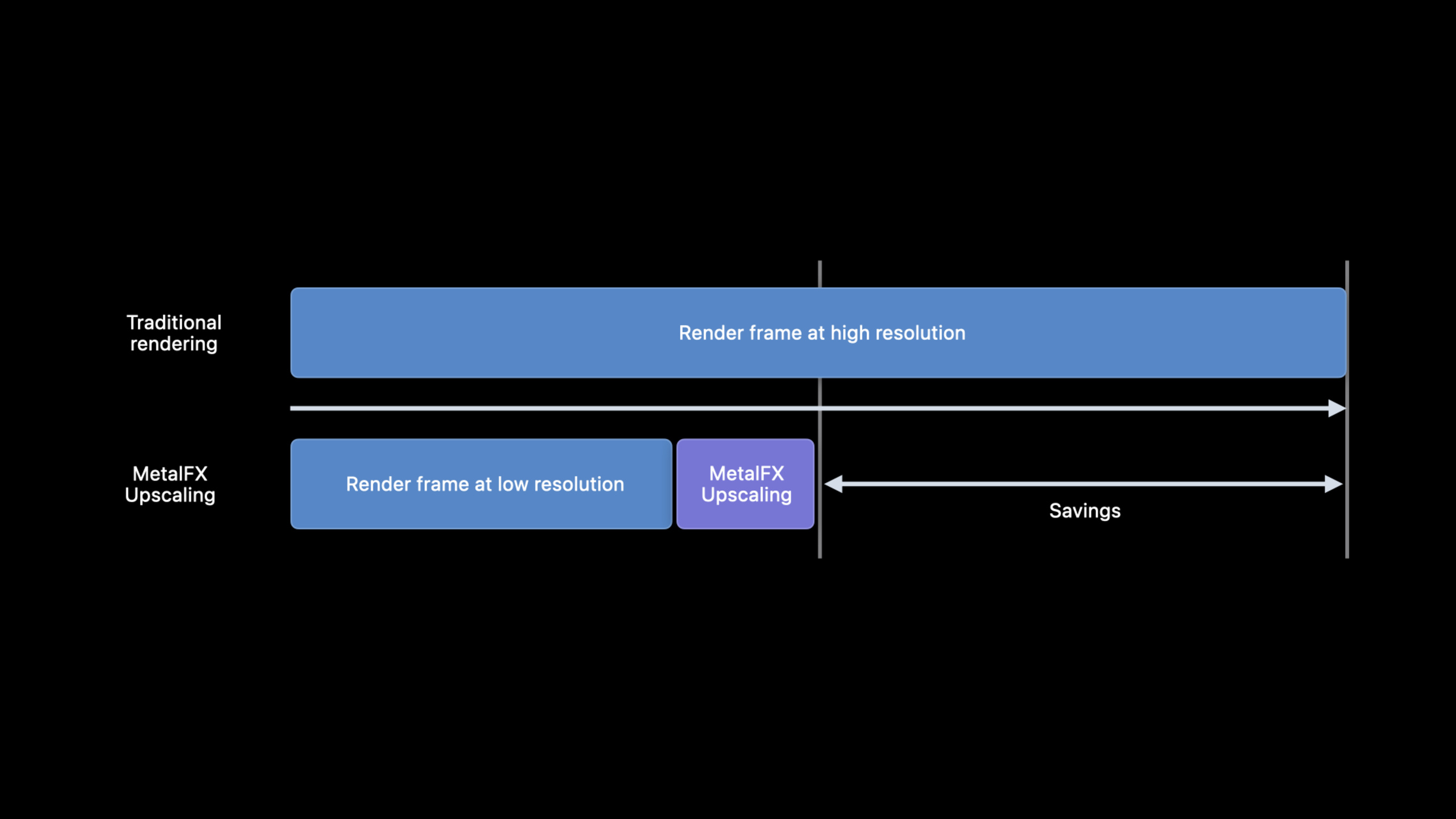
The cost of high-resolution rendering is straightforward: the more pixels, the more GPU time. In order to increase the frame rate in games, a common practice is to reduce the internal rendering resolution and then enlarge the screen to the display resolution. The problem is also straightforward: low resolution will lose details and edges will become blurred. (00:34)
MetalFX Upscaling solves the last step in this pipeline. The app still renders the frame at a lower resolution first, and MetalFX upscales the result to the target resolution. Apple emphasized at the beginning of the session that this API has been platform optimized for Apple devices, with the goal of reducing rendering time while retaining picture quality. (00:45)
It gives two entrances. Spatial Upscaling only requires the anti-aliasing color input of the current frame, is simple to integrate, and is suitable for engines that already have an anti-aliasing solution. Temporal Anti-Aliasing and Upscaling uses multi-frame information, allowing for more input and a higher quality limit. (01:04)
The selection criteria are also practical. If the engine can already output jittered color, motion and depth buffer, the temporal solution will be evaluated first. If these inputs are not available, or mature temporal AA is already available, the spatial solution is easier to integrate into the existing rendering pipeline. (17:55)
Detailed Content
Spatial Upscaling: Amplify the current frame after tone mapping
Spatial Upscaling analyzes the spatial information of the input image and generates an upscaled output. It only requires the anti-aliased color texture. Apple recommends placing it after the game tone mapping is complete, as it works best when the input has already entered perceptual color space. (01:36)
Created first during initializationMTLFXSpatialScalerDescriptor, writes the input and output dimensions, texture format and color processing mode. The scaler object is expensive to create, and Apple recommends that it be created only when the app starts or when the display resolution changes. (03:17)
// Spatial upscaling (initialization)

let desc = MTLFXSpatialScalerDescriptor()
desc.inputWidth = 1280
desc.inputHeight = 720
desc.outputWidth = 2560
desc.outputHeight = 1440
desc.colorTextureFormat = .bgra8Unorm_srgb
desc.outputTextureFormat = .bgra8Unorm_srgb
desc.colorProcessingMode = .perceptual

spatialScaler = desc.makeSpatialScaler(device: mtlDevice)
Key points:
MTLFXSpatialScalerDescriptor()Creates a description object for the spatial amplifier. -inputWidthandinputHeightWrite the dimensions of the low-resolution rendering result. -outputWidthandoutputHeightWrite the final target size. -colorTextureFormatCorresponds to the current frame color texture format passed in later. -outputTextureFormatCorresponds to the amplification result format written by MetalFX. -colorProcessingMode = .perceptualIndicates that the input and output are in the perceptual color space; the session recommends that the spatial scheme use perceptual mode for performance. -makeSpatialScaler(device:)Create reusable scaler objects.
When rendering each frame, first draw the low-resolution picture as usual, then pass the current frame color texture and output texture to the scaler, and finally encode the effect into the same command buffer. (04:08)
// Spatial upscaling (per frame)

// Encode Metal commands to draw game frame here...

// Begin setting per frame properties for effect
spatialScaler.colorTexture = currentFrameColor
spatialScaler.outputTexture = currentFrameUpscaledColor

// Encode scaling effect into command buffer
spatialScaler.encode(commandBuffer: cmdBuffer)

// Encode Metal commands for particle/noise effects and game UI drawing for frame here...
Key points:
- The previous draw pass is responsible for generating low-resolution
currentFrameColor。 colorTexturePointer to MetalFX’s input colormap. -outputTexturePoints to the enlarged target texture. -encode(commandBuffer:)Write MetalFX amplification work to the current command buffer.- Subsequent particle, noise, and UI drawing can continue based on the upscaled results.
spatial schemes are sensitive to input quality. Apple’s recommendations are: input should be anti-aliased and noise free; input in perceptual mode should complete tone mapping, with a value between 0 and 1, and use sRGB color space. (12:25)
Temporal AA and Upscaling: Improve output quality with multi-frame samples
Temporal AA and Upscaling uses data from previous frames to produce higher quality output. Its core idea comes from supersampling: each pixel requires multiple sampling points, which is very expensive to do in a single frame. Spreading the sampling over multiple frames can reduce the cost. (04:39)
Because the screen content will move, the temporal solution requires more input: jittered color, motion, depth, and the output of the previous frame. Motion is used to retrace the corresponding position of the previous frame, and depth is used to determine the foreground, background and newly exposed areas. MetalFX will track the upscaled output of the previous frame, and the App will pass in the color, motion, and depth of the current frame each frame. (05:56)
When initializing the temporal scaler, the description object needs to declare the texture format of color, depth, motion and output. To be set latermotionVectorScale, allowing MetalFX to interpret motion data in the engine into render resolution pixel space. (09:05)
// Temporal antialiasing and upscaling (initialization)

let desc = MTLFXTemporalScalerDescriptor()
desc.inputWidth = 1280
desc.inputHeight = 720
desc.outputWidth = 2560
desc.outputHeight = 1440
desc.colorTextureFormat = .rgba16Float
desc.depthTextureFormat = .depth32Float
desc.motionTextureFormat = .rg16Float
desc.outputTextureFormat = .rgba16Float

temporalScaler = desc.makeTemporalScaler(device: mtlDevice)
temporalScaler.motionVectorScale = CGPoint(x: 1280, y: 720)
Key points:
MTLFXTemporalScalerDescriptor()Create a description object for the temporal scheme. -inputWidthandinputHeightis the internal rendering size. -outputWidthandoutputHeightis the MetalFX output size. -colorTextureFormatCorresponds to jittered color input. -depthTextureFormatCorresponds to the depth input of the current frame. -motionTextureFormatCorresponds to the current frame motion input. -outputTextureFormatCorresponds to upscaled output. -makeTemporalScaler(device:)Create a temporal scaler. -motionVectorScaleUsed to scale the app’s motion data to fit the pixel space expected by MetalFX.
Each frame call has several more states than the spatial solution.resetHistorySet to true on the first frame or scene cut;reversedDepthDeclares whether to use reversed-Z for depth;jitterOffsetPass in the current frame sampling offset. (10:35)
// Temporal antialiasing and upscaling (per frame)

// Encode Metal commands to draw game frame here...

// Setup per frame effect properties
temporalScaler.resetHistory = firstFrameOrSceneCut
temporalScaler.colorTexture = currentFrameColor
temporalScaler.depthTexture = currentFrameDepth
temporalScaler.motionTexture = currentFrameMotion
temporalScaler.outputTexture = currentFrameUpscaledColor
temporalScaler.reversedDepth = reversedDepth
temporalScaler.jitterOffset = currentFrameJitterOffset

// Encode scaling effect into commandBuffer
temporalScaler.encode(commandBuffer: cmdBuffer)

// Encode Metal commands for post processing/game UI drawing for frame here...
Key points:
resetHistoryClear historical frame accumulation, applicable to the first frame and lens switching. -colorTextureis the jittered color input of the current frame. -depthTextureProvides clues for foreground, background and edge judgments. -motionTextureProvides motion information from the current frame position to the previous frame position. -outputTextureReceive high-resolution results written by MetalFX. -reversedDepthTells MetalFX whether to use reversed-Z mapping for depth values. -jitterOffsetPass in the sub-pixel sampling offset of the current frame. -encode(commandBuffer:)Encoding temporal AA and upscaling.
Jitter offset: Static objects cannot drift
The quality of the Temporal solution depends heavily on jitter offset. In the example given by session, a pixel center is located(0.5, 0.5), the actual sampling point is located at(0.625, 0.78), the corresponding jitter offset is(-0.125, -0.28). Apple explicitly states that jitter offset is always-0.5arrive0.5within the range. (11:11)
// Conceptual jitter validation based on the session example.
let pixelCenter = SIMD2<Float>(0.5, 0.5)
let sampleLocation = SIMD2<Float>(0.625, 0.78)
let currentFrameJitterOffset = pixelCenter - sampleLocation

temporalScaler.jitterOffset = CGPoint(
    x: CGFloat(currentFrameJitterOffset.x),
    y: CGFloat(currentFrameJitterOffset.y)
)
Key points:
- This paragraph is a conceptual example used to express the jitter offset calculation relationship in the session.
-
pixelCenterRepresents the pixel center. -sampleLocationIndicates the actual sampling point of the current frame. -pixelCenter - sampleLocationGet the offset passed to MetalFX. -temporalScaler.jitterOffsetMust be consistent with the sampling offset used when rendering the current frame.
The verification method is also very simple: using a set of different jitter offsets to render a static scene without camera and object motion. If the offset is wrong, the static object will shift and the thin lines will be blurred; if the offset is right, the object will stop in place and the thin lines will be gradually resolved. (11:40)
Apple also gives jitter sequence suggestions. For 2x upscaling, it is recommended to use 32 jitters of Halton (2,3) sequence, which is approximately equal to 8 samples per output pixel. (13:36)
Mip bias: trading clarity for stability
Both MetalFX solutions recommend setting a negative mip bias to capture higher-detail textures when rendering at low resolutions. The recommended formula for the spatial scheme islog2(renderResolutionWidth / targetResolutionWidth);When each dimension is enlarged by 2x, the mip bias is-1。(12:53)
// Conceptual mip-bias calculation from the session guidance.
let spatialMipBias = log2(renderResolutionWidth / targetResolutionWidth)
let temporalMipBias = log2(renderResolutionWidth / targetResolutionWidth) - 1
Key points:
- This paragraph is a conceptual example that expresses the calculation rules given by session.
-
spatialMipBiasCorresponds to Spatial Upscaling. -temporalMipBiasCorresponds to Temporal AA and Upscaling. - When each dimension is enlarged by 2x, the spatial result is
-1, the temporal result is-2. - High-frequency textures need to be adjusted one by one. Too low a mip level may cause flickering or moire.
The recommended formula for the Temporal scheme is to subtract 1 from the spatial formula. session shows the board texture:-2Clearest, but flickering and moire will appear on high-frequency fine lines;-1will alleviate these problems;0They can be eliminated. The conclusion is to use the recommended values as a starting point and then adjust according to the texture content. (14:15)
False dependency: Don’t let independent passes be slowed down by resource bindings
MetalFX performance is also affected by false dependencies. An example of session is that shadow pass and post processing pass have no dependencies and can overlap execution across frames; if two passes read and write the same buffer, Metal will prevent parallelism to avoid potential hazards. (16:00)
In a MetalFX scene, this cross-frame false dependency will include the execution time of MetalFX Upscaling into the waiting path. The fix given by Apple is to use separate buffers for post processing and shadow passes, allowing independent passes to resume parallel execution. (17:01)
// Conceptual resource layout for avoiding false dependencies.
let postProcessingBuffer = makePostProcessingBuffer()
let shadowBuffer = makeShadowBuffer()

encodePostProcessingPass(using: postProcessingBuffer)
encodeShadowPass(using: shadowBuffer)
Key points:
- This paragraph is a conceptual example used to express the idea of resource splitting in the session.
-
postProcessingBufferOnly service post processing pass. -shadowBufferOnly shadow pass is served. - Two independent passes no longer read and write the same resource, and the GPU is more likely to overlap execution.
- Checking for false dependencies should be a performance verification step after plugging into MetalFX.
Core Takeaways
-
Make a resolution slider: Let the player switch between the internal rendering resolution and the target resolution. Why it’s worth doing: The basic value of MetalFX is low-resolution rendering plus high-resolution output. How to start: Log in first
MTLFXSpatialScalerDescriptor, enlarge 1280×720 to 2560×1440, and observe the changes in frame time and image quality. -
Add spatial mode to engines that already have temporal AA: Keep the existing AA and put MetalFX Spatial Upscaling after tone mapping. Why it’s worth doing: The spatial solution only requires anti-aliased color input, and the access cost is low. How to start: reuse existing color texture, set
colorProcessingMode = .perceptual, called every framespatialScaler.encode(commandBuffer:)。 -
Make a jitter verification scene: render static thin lines, checkerboards or triangles, and loop through a set of jitter offsets. Why it’s worth doing: Session clearly points out that offset errors will cause static objects to drift and thin lines to become blurry. How to start: Turn off camera and object motion, put
temporalScaler.jitterOffsetRecord to the debug HUD synchronously with the projection matrix jitter. -
Create a mip bias exception table for the material: By default, the negative mip bias is set according to the MetalFX recommended formula, and then the high-frequency texture is called back separately. Why it’s worth doing: Lower mip levels increase detail and can also cause flickering and moire on high-frequency patterns like circuit boards. How to start: Add a mip bias override field to the material, first check the hairline, grid, and cloth textures.
-
Add a cross-frame dependency check pass: record the resource read and write relationships of independent passes in adjacent frames. Why it’s worth doing: false dependency prevents work like shadow, post processing, and MetalFX from overlapping. How to start: Start with the heaviest render/compute pass and find the path that should be independent but share the buffer.
Related Sessions
- Discover Metal 3 — An overview of Metal 3, explaining where MetalFX fits into the new graphics capabilities.
- Target and optimize GPU binaries with Metal 3 — Handle shader compilation and GPU binary to reduce lag when the game is running.
- Load resources faster with Metal 3 — Improve asset streaming loading for large scenes and levels using Fast Resource Loading.
- Maximize your Metal ray tracing performance — Optimizes ray tracing performance for use with MetalFX in high-cost rendering scenarios.
- Go bindless with Metal 3 — Build a more flexible Metal 3 rendering resource binding model.
Comments
GitHub Issues · utterances