
Highlight
Metal 3 allows developers to move GPU binary generation to the project build stage, and provides the optimize for size compilation option to reduce runtime lag, first startup time, new level loading time, shader volume and compilation time.
Core Content
The lag in Metal applications often does not occur in the draw call itself.
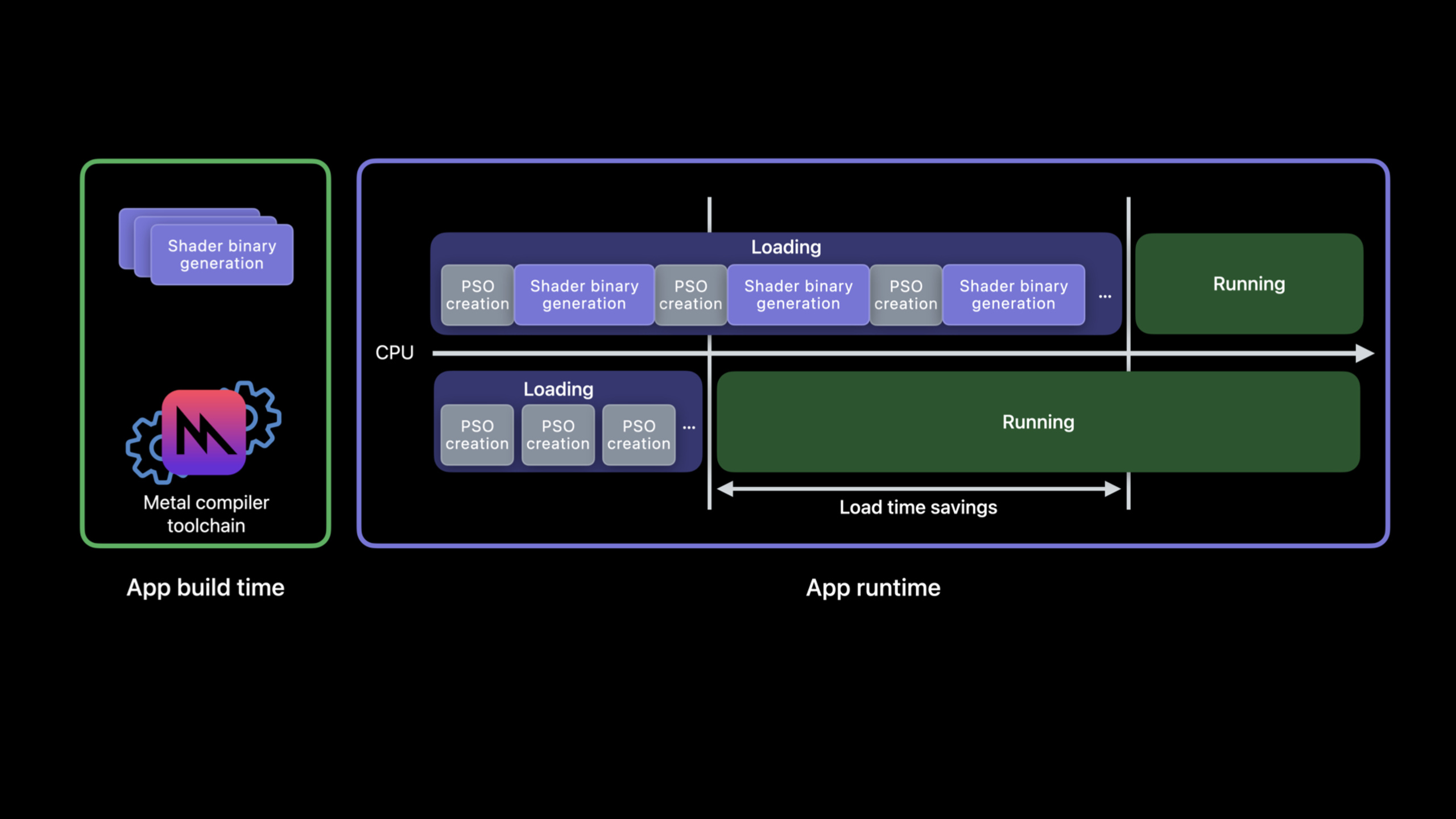
Created by developersMTLRenderPipelineStateMetal may need to generate GPU binary on the fly. This step consumes CPU. If it happens on the startup page, the user will see a longer wait; if it happens in the middle of a frame, command encoding will be interrupted and the screen will drop. (01:11)
In the past, Metal sources could be precompiled into.metallib, you can also let Metal’s file system cache orMTLBinaryArchiveReuse already generated GPU binary. But these archives still need to be generated at runtime. Metal 3 fills the gap: write the pipeline descriptor into a Metal pipelines script in JSON format, and then hand it to the tool chain together with Metal source or Metal library during the project construction phase to directly produce a binary archive. (02:20)
The results are straightforward. When the app starts, only the generated archive is loaded, and PSO creation becomes a lightweight operation; less CPU compilation is required when loading levels; and there is no need to use warm-up frames in exchange for a stable frame rate during the rendering process. (02:48)
The second topic of this session is compile size. The Metal compiler favors runtime performance by default and will do function inlining and loop unrolling. In large shaders, these transformations can bloat the program significantly and take longer to compile. Metal 3 in Xcode 14 adds optimize for size to limit this type of optimization that will expand the size. (09:04)
Detailed Content
Use pipelines script to describe the PSO to be generated offline
(04:47) Offline compilation requires a new input: Metal pipelines script. It is JSON, and the expressed content corresponds to the pipeline descriptor in the API.
Let’s look at the original Objective-C code first. it starts fromdefault.metallibTake the function and spell out a render pipeline descriptor.
// An existing Obj-C render pipeline descriptor
NSError *error = nil;
id<MTLDevice> device = MTLCreateSystemDefaultDevice();

id<MTLLibrary> library = [device newLibraryWithFile:@"default.metallib" error:&error];

MTLRenderPipelineDescriptor *desc = [MTLRenderPipelineDescriptor new];
desc.vertexFunction = [library newFunctionWithName:@"vert_main"];
desc.fragmentFunction = [library newFunctionWithName:@"frag_main"];
desc.rasterSampleCount = 2;
desc.colorAttachments[0].pixelFormat = MTLPixelFormatBGRA8Unorm;
desc.depthAttachmentPixelFormat = MTLPixelFormatDepth32Float;
Key points:
MTLCreateSystemDefaultDevice()Get the current system default Metal device. -newLibraryWithFile:from existing.metallibLoad Metal library. -newFunctionWithName:@"vert_main"Specify vertex function. -newFunctionWithName:@"frag_main"Specify fragment function. -rasterSampleCount = 2Write the number of samples to the pipeline state. -colorAttachments[0].pixelFormatanddepthAttachmentPixelFormatDocument the format of the render target.
The same descriptor can be written as JSON. The build toolchain reads this JSON and knows which function and state combinations to generate GPU binaries for.
{
  "//comment": "Its equivalent new JSON script",
  "libraries": {
    "paths": [
      {
        "path": "default.metallib"
      }
    ]
  },
  "pipelines": {
    "render_pipelines": [
      {
        "vertex_function": "vert_main",
        "fragment_function": "frag_main",
        "raster_sample_count": 2,
        "color_attachments": [
          {
            "pixel_format": "BGRA8Unorm"
          }
        ],
        "depth_attachment_pixel_format": "Depth32Float"
      }
    ]
  }
}
Key points:
libraries.pathsPointer to the Metal library that provides the function. -render_pipelinesIs the list of render pipelines to be generated. -vertex_functionandfragment_functionCorresponds to the function name in the API. -raster_sample_countcorrespondrasterSampleCount。color_attachments[0].pixel_formatCorresponds to the first color attachment format. -depth_attachment_pixel_formatCorresponds to the format of depth attachment.
Unpull JSON from runtime archive
(05:33) If the project already has code to create PSO at runtime, you can first harvest the descriptor during development and testing and serialize the archive to disk.
// Create pipeline descriptor
MTLRenderPipelineDescriptor *pipeline_desc = [MTLRenderPipelineDescriptor new];
pipeline_desc.vertexFunction = [library newFunctionWithName:@"vert_main"];
pipeline_desc.fragmentFunction = [library newFunctionWithName:@"frag_main"];
pipeline_desc.rasterSampleCount = 2;
pipeline_desc.colorAttachments[0].pixelFormat = MTLPixelFormatBGRA8Unorm;
pipeline_desc.depthAttachmentPixelFormat = MTLPixelFormatDepth32Float;

// Add pipeline descriptor to new archive
MTLBinaryArchiveDescriptor* archive_desc = [MTLBinaryArchiveDescriptor new];
id<MTLBinaryArchive> archive = [device newBinaryArchiveWithDescriptor:archive_desc error:&error];
bool success = [archive addRenderPipelineFunctionsWithDescriptor:pipeline_desc error:&error];

// Serialize archive to file system
NSURL *url = [NSURL fileURLWithPath:@"harvested-binaryArchive.metallib"];
success = [archive serializeToURL:url error:&error];
Key points:
- The first half of the creation is the same as the previous section
MTLRenderPipelineDescriptor。 MTLBinaryArchiveDescriptorUsed to create a new binary archive. -newBinaryArchiveWithDescriptor:error:getMTLBinaryArchiveobject. -addRenderPipelineFunctionsWithDescriptor:error:Add descriptor to archive and generate GPU binary. -serializeToURL:error:Write the archive into a file from which the pipelines script can be extracted later.
(06:01) Extraction step usesmetal-source。
metal-source -flatbuffers=json harvested-binaryArchive.metallib -o /tmp/descriptors.mtlp-jsonKey points:
metal-sourceRead content from an existing archive. --flatbuffers=jsonA pipelines script that requires output in JSON format. -harvested-binaryArchive.metallibIt is the archive just serialized. --o /tmp/descriptors.mtlp-jsonSpecify the output file path.
Generate GPU binary during build phase
(06:24) After getting the pipelines script, you can generate the archive directly from the Metal source.
metal shaders.metal -N descriptors.mtlp-json -o archive.metallibKey points:
metalIs a Metal compilation tool. -shaders.metalis the input Metal source. --N descriptors.mtlp-jsonHand the pipelines script over to the toolchain. --o archive.metallibSpecify the output library with GPU binary.
(06:48) If the input is already a Metal library, you can use the Metal translator tool.
metal-tt shaders.metallib descriptors.mtlp-json -o archive.metallibKey points:
metal-ttdeal with existingshaders.metallib。descriptors.mtlp-jsonPipeline descriptor information is still provided. -archive.metallibis the final output deployed to the app bundle.- The session clearly states that the generated Metal library contains the GPU binary and can be deployed to devices supported by the tool chain.
Load the archive generated offline in the App
(07:07) Runtime loading archive is short. Put the file URL into the descriptor and create an archive.
MTLBinaryArchiveDescriptor *desc = [MTLBinaryArchiveDescriptor new];
desc.url = [NSURL fileURLWithPath:@"archive.metallib"];
NSError *error = nil;
id<MTLDevice> device = MTLCreateSystemDefaultDevice();
id<MTLBinaryArchive> binaryArchive = [device newBinaryArchiveWithDescriptor:desc error:&error];
Key points:
MTLBinaryArchiveDescriptorDescribes the archive to load. -desc.urlPoints to the generatedarchive.metallib。NSError *errorReceive errors when creating archive. -MTLCreateSystemDefaultDevice()Get Metal device. -newBinaryArchiveWithDescriptor:error:Create from fileMTLBinaryArchive。
Metal will asynchronously and backgroundly upgrade these offline generated binary archives during system updates or app installations to ensure that they remain compatible with future systems and products. (07:18)
Use optimize for size to control shader volume
(09:04)optimize for sizeIt is suitable to try on large shaders first, especially programs with deep call paths and loops, and the default optimization compilation time is abnormally long. It may reduce runtime performance, so compile time and runtime performance need to be compared. (09:39)
Used in command line-Os。
xcrun metal -Os large_shader.metal

# or

xcrun metal -c -Os large_shader.metal
xcrun metal -c     more_shaders.metal
xcrun metal large_shader.air more_shaders.air
Key points:
- The first command is enabled in a compile-and-link
-Os. - The second set of commands are compiled separately first.
.metalfile, then link.airdocument. --OsIt can only be added to a certain compile command to optimize only part of the shader. - session points out that
-OsDoes not need to be passed to the link command or subsequent commands. - This option can be used together with the GPU binary offline generation introduced earlier.
(12:44) When compiling library from source at runtime, useMTLCompileOptions。
MTLCompileOptions* options = [MTLCompileOptions new];
options.optimizationLevel = MTLLibraryOptimizationLevelSize;

NSString* source = @"...";
NSError* error = nil;
id<MTLLibrary> lib = [device newLibraryWithSource:source
                                          options:options
                                            error:&error];
Key points:
MTLCompileOptionsHosts the Metal source compilation option. -optimizationLevelset toMTLLibraryOptimizationLevelSize, enable size mode. -sourceis a Metal source string provided at runtime. -newLibraryWithSource:options:error:Created with specified optimization levelMTLLibrary。
Core Takeaways
-
Make a shader pre-compiled list: Write the render pipeline descriptor that will be used on the startup page and the first level as pipelines script. Why it’s worth doing: These PSOs are the most likely to impact the first entry experience. How to get started: Start with what you already have
MTLRenderPipelineDescriptorCompare and generate JSON, and thenmetal shaders.metal -N descriptors.mtlp-json -o archive.metallibAdded to the build process. -
Add the archive harvesting switch to the test package: Add the actual pipeline descriptor to the test package
MTLBinaryArchiveand serialized. Why it’s worth doing: Real processes will expose pipelines missed by handwritten lists. How to start: Call next to the path where the PSO was createdaddRenderPipelineFunctionsWithDescriptor:error:, save after testingharvested-binaryArchive.metallib。 -
Make two sets of compilation indicators for large shaders: the same shader uses default optimization and
-OsCompile, record compilation time, binary size and runtime frame time. Why it’s worth doing: Session clearly states that size mode may reduce runtime performance, and the benefits must be judged based on project data. How to start: First select the slowest shader to compile, and usexcrun metal -Osand the default command are run once each. -
Change new level loading to archive loading priority: put the corresponding content into the level resource package
archive.metallib, created first when entering the levelMTLBinaryArchive. Why it’s worth doing: session lists new level load time as a direct benefit of offline compilation. How to start: Maintain its own pipelines script for each level, generate the corresponding archive when building, and use it when runningMTLBinaryArchiveDescriptor.urlload.
Related Sessions
- Discover Metal 3 — An overall understanding of Metal 3’s performance, tool chain, and rendering capability updates, suitable as the entrance to this session.
- Go bindless with Metal 3 — Continuing a deeper dive into the bindless workflow in Metal 3 that impacts large renderer resource organization and CPU/GPU performance.
- Boost performance with MetalFX Upscaling — Focus on another performance path for Metal 3: lower the rendering resolution and use MetalFX to upscale the output.
- Accelerate machine learning with Metal — It belongs to the same Metal topic and introduces the use of Metal and MPS Graph to obtain acceleration in machine learning training scenarios.
Comments
GitHub Issues · utterances