
Highlight
Qiaoyu Deng from Apple’s Cybersecurity team explains the fundamental issues with DNS security and two solutions in iOS 16/macOS Ventura: DNSSEC (DNS Security Extensions) and DDR (DNS Discovery Mechanism).
Core Content
An HTTPS request looks secure.
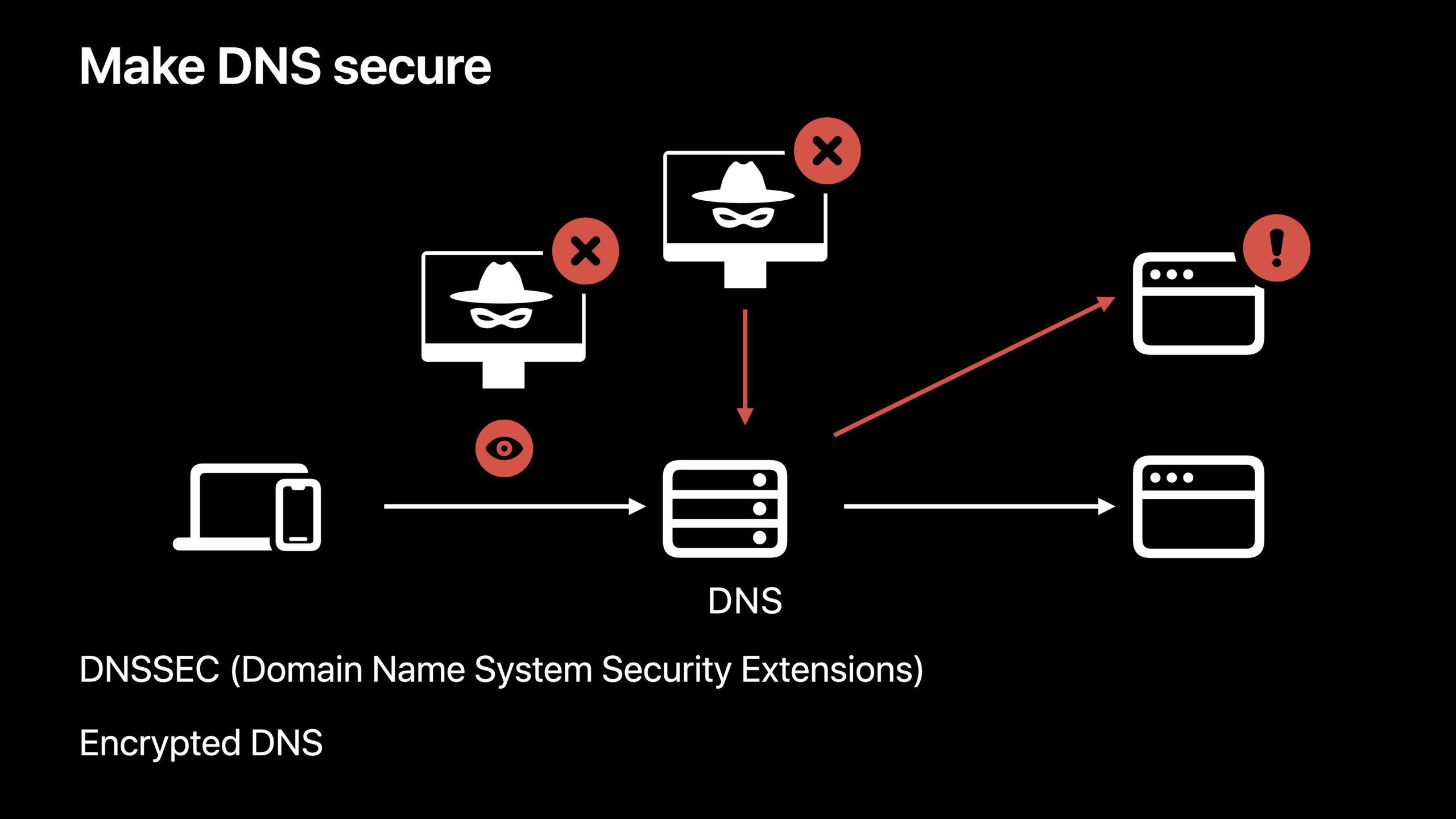
The user enters a domain name, the App establishes a TLS connection, the server certificate passes verification, and all subsequent data is encrypted.The problem lies in an earlier step: before the connection can begin, the system must first use DNS to resolve the domain name into an IP address.
This step has long been lacking two abilities.
First, traditional DNS responses are not authenticated.If an attacker allows the resolver to cache the wrong address, the client may connect to a malicious host.Second, traditional DNS queries are not encrypted.Observers on the network can see which domain names users have queried.
This session gives two paths.DNSSEC authenticates DNS responses with digital signatures, solving the “address authenticity” problem.DDR (Discovery of Designated Resolvers, designated resolver discovery) allows the device to automatically discover encrypted DNS resolvers on the same network, solving the problem of “will the query process be bypassed and observed?”
Detailed Content
DNSSEC resolves certification first
(03:39) iOS 16 and macOS Ventura begin supporting client-side DNSSEC verification.DNSSEC appends a digital signature to DNS responses.If the response is tampered with, the signature cannot match and the client can discard the response.
DNSSEC also certifies “not present”.For example, NSEC record is used in the speech: If there are onlyA.org、C.org、E.org, NSEC record can proveD.orgshould not exist and also proves that the attacker cannot lieA.orgDoesn’t exist.
More complete verification relies on the chain of trust.The client starts from the address, signature and key of the target domain name, and queries the parent zone step by step until it reaches the root.The root trust anchor is pre-installed on the device.As long as the hash of the root key matches the pre-installed anchor, the client can establish trust from the target IP address to the root.
Check the domain name infrastructure before enabling it
(07:45) Apple clearly gives two preconditions.
First, the domain name must support IPv6.In an IPv6-only environment, IPv4-only addresses are translated into synthetic IPv6 addresses.For signed domain names, the synthetic address fails DNSSEC verification.The result is that with DNSSEC turned on, these addresses are unreachable.
Second, the DNS service provider needs to sign the domain name with DNSSEC.If an app requires DNSSEC but the domain name is not signed, the user gets no authentication benefits and only increases DNS traffic and prolongs resolution times.
Therefore, DNSSEC is not suitable to be blindly turned on on the client first.It requires the app, domain name, and DNS service provider to be ready together.
Require DNSSEC at session level in URLSession
(09:01) If a set of requests are all connected to a signed and IPv6-capable domain name that you control, you canURLSessionConfigurationTurn on DNSSEC uniformly.
let configuration = URLSessionConfiguration.default
configuration.requiresDNSSECValidation = true
let session = URLSession(configuration: configuration)
Key points:
- Line 1 creates the default
URLSessionConfiguration。 - Line 2
requiresDNSSECValidationset totrue, requiring requests issued by this session to complete DNSSEC verification. - Line 3 is created with modified configuration
URLSession。
This setting affects all URL requests created from this session.The appropriate API domain for you has already been deployed with DNSSEC and you want the entire set of requests to use certified addresses.
Require DNSSEC on a single URLRequest
(09:38) If only a few requests require stricter DNS authentication, you can put the requirement inURLRequestsuperior.
var request = URLRequest(url: URL(string: "https://www.example.org")!)
request.requiresDNSSECValidation = true
let (data, response) = try await URLSession.shared.data(for: request)
Key points:
- Line 1 creates a pointer to the target domain name
URLRequest。 - Line 2 turns on DNSSEC verification only for this request.
- Line 3 uses
URLSession.shared.data(for:)Make a request.
The speech explained that this session task will only be started after the DNSSEC verification is completed.This granularity is suitable for a few key requests such as login, payment, and device registration, and is also suitable for gradually migrating existing network layers.
Require DNSSEC on Network.framework connections
(10:08) If the App uses Network.framework directly, you canNWParametersTurn on the same requirement.
let parameters = NWParameters.tls
parameters.requiresDNSSECValidation = true
let connection = NWConnection(host: "www.example.org", port: .https, using: parameters)
Key points:
- Line 1 creates the
NWParameters。 - Line 2 requires DNSSEC verification.
- Line 3 creates a link to the target host and HTTPS port with these parameters
NWConnection。
After the connection is initiated, the connection will not enter the ready state until DNSSEC verification is complete and the system has connected to a verified IP address.After DNSSEC is turned on, the system will only use addresses that pass verification to establish connections.
Does not return a dedicated error when DNSSEC fails
(10:46) DNSSEC has a different failure model than HTTPS.HTTPS errors are reported via the API.The system will not return a “DNSSEC validation failed” error when DNSSEC validation fails.
Receiving a response that fails the verification is equivalent to not receiving a response.
If a DNS provider tamperes with the response, the address will not pass the authentication check and will be discarded directly.Resolution is automatically restored after the device joins another network that does not have a tampered response.
The presentation listed several sources of failure: the DNS response was modified; the device was unable to reach the pre-installed trust anchor, so the trust chain could not be established; the network did not support the protocols required for DNSSEC, such as DNS over TCP or the EDNS0 option with the DNSSEC enablement bit; the signed domain name did not support IPv6, causing the synthetic IPv6 address verification to fail.
DDR automatically enables encrypted DNS
(13:09) DNSSEC resolves authentication, but the DNS query itself may still be clear text.iOS 14 and macOS Big Sur already provide encrypted DNS: you can use theNEDNSSettingsManager, or in profileDNSSettings, manually configure system-level encrypted DNS; you can also useNWParametersonPrivacyContextLet the app choose encrypted DNS.
(13:47) New automatic paths are added to iOS 16 and macOS Ventura.If the current network supports DDR, DNS queries automatically use TLS or HTTPS.
When a device joins a new network, it_dns.resolver.arpaInitiate a Service Binding query.A DNS server that supports DDR will return one or more configurations.The device then uses this information to establish an encrypted connection to the designated resolver.
The device also verifies one thing: the unencrypted resolver’s IP address must be included in the designated resolver’s TLS certificate.This confirms that the unencrypted parser and the encrypted parser belong to the same entity.After authentication, the device uses encrypted DNS by default.
DDR only takes effect on the current single network.The device automatically uses encrypted DNS only if the current network supports it.The presentation also pointed out that DDR does not work if the IP address of the DNS server is a private IP address because such addresses cannot be put into a TLS certificate and ownership cannot be verified.
Enterprise encrypted DNS can use client authentication
(16:32) iOS 16 and macOS Ventura also support specifying client authentication in encrypted DNS configuration.The entrance isNEDNSSettingsManagerorDNSSettings profile。
In an enterprise environment, the DNS server may need to verify the client’s identity before allowing access.It is now possible to passNEDNSSettingsofidentityReferenceProperties configure client certificate.The talk likens it to a VPN’s client certificate and explains that it applies to both DNS over TLS and DNS over HTTPS.
Core Takeaways
1. Add DNSSEC switch to key API requests
- What to do: First protect only key requests such as login, payment, and device binding.
- Why it’s worth doing:
URLRequest.requiresDNSSECValidationYou can limit the scope of impact to a single request to avoid changing the entire network layer at once. - How to start: Confirm that the domain name supports IPv6 and has DNSSEC signing completed by the DNS service provider; then in these requests
URLRequestopen onrequiresDNSSECValidation。
2. Do DNSSEC pre-check for your own API domain name
- What to do: Check whether the domain is signed and supports IPv6 before publishing.
- Why it’s worth doing: The speech clearly pointed out that unsigned domain names will bring additional DNS traffic and longer resolution time, and IPv4-only domain names will be unreachable under IPv6-only networks because the synthetic address cannot be verified.
- How to start: Incorporate domain name signing status and IPv6 records into the service online checklist, and then decide whether to enable DNSSEC on the App side.
3. Bind DNSSEC requirements in Network.framework client
- What: Require the use of certified addresses for self-built long connections, real-time communications or custom protocol connections.
- Why it’s worth doing:
NWParameters.requiresDNSSECValidationwill letNWConnectionIt enters the ready state only after the DNSSEC checksum and connection establishment are completed. - How to get started: Create
NWParameters.tls,set uprequiresDNSSECValidation = true, and then use this parameter to createNWConnection。
4. Plan DDR and client certificates for the enterprise network
- What to do: Let the devices in the corporate network automatically switch to encrypted DNS, and let the DNS server verify the client’s identity.
- Why it’s worth it: DDR allows devices to automatically discover DNS over TLS or DNS over HTTPS configurations;
identityReferenceA client certificate can be configured for encrypted DNS. - How to start: Support on network side
_dns.resolver.arpaService Binding query; used on the configuration sideNEDNSSettingsManagerorDNSSettingsprofile provides encrypted DNS and client certificate configuration.
Related Sessions
- Enable encrypted DNS — iOS 14 and macOS Big Sur introduce system-level and app-level entrances for manually configuring encrypted DNS, which is the precursor to this field’s DDR automatic discovery capability.
- Replace CAPTCHAs with Private Access Tokens — It also pays attention to the establishment of trust under privacy protection, and is suitable to be viewed together with DNSSEC’s “authenticate first and then connect” idea.
- Reduce networking delays for a more responsive app — Talking about network connection delays and request response speed can help evaluate the resolution cost brought by DNSSEC.
- Discover Managed Device Attestation — For enterprise device and server trust, complementary to our enterprise encrypted DNS client authentication.
Comments
GitHub Issues · utterances