
Highlight
Apple splits app responsiveness into two factors: round trip duration and number of round trips, and provides implementable latency reduction methods such as HTTP/3, QUIC migration, QUIC datagrams, server buffer tuning and L4S compatibility testing.
Core Content
Many network problems look like insufficient bandwidth.When video conferencing freezes, screen sharing delays, or long rebuffers occur after video jumps, users’ first reaction is often to upgrade their broadband.A counterexample was given at the beginning of Session: when the bandwidth increased from 1Mbps to 2Mbps, the page loading time dropped by nearly 40%; after exceeding 4Mbps, continuing to increase the bandwidth almost no longer improved the page loading time.Conversely, page load times improve linearly for every 20 millisecond drop in latency (03:24).
What really slows down an app is the length of each round trip and how many round trips are required to complete a request.The queue is usually stacked on the slowest link in the network, and new packets must be queued behind old packets.TLS 1.2 over TCP may require 4 round trips to obtain the first response packet; when each round trip is amplified by the queue, the first packet time will become very long (02:16).
The route given by Apple is divided into three layers: reducing the number of round trips on the app side, reducing meaningless queuing on the server side, and testing L4S on the network side.app just useURLSessionand Network.framework, which can automatically use IPv6, TLS 1.3 and HTTP/3 when the server is started; if using QUIC, you can also enable connection migration and datagram flow (04:45).
Servers can also create delays.Session uses the random jump of WWDC video as an example: the server TCP, TLS, and HTTP buffers are configured to 4MB, 256KB, and 4MB respectively. The newly generated data packets are queued behind the old data, resulting in a long black screen after the video jumps.After reducing the HTTP, TLS, and TCP buffers to 256KB, 16KB, and 128KB, playback can be resumed immediately after jumping again (09:36).
Detailed Content
Adopt HTTP/3 and enable connection migration
(06:03) Mobile devices often switch from Wi-Fi to cellular networks.Normal connections need to be re-established and the app will pause briefly.HTTP/3 is based on QUIC and supports connection migration.forURLSession, the opt-in method given by Session is very short:
let configuration = URLSessionConfiguration.default
configuration.multipathServiceType = .handover
Key points:
URLSessionConfiguration.defaultCreate a default session configuration, and subsequent requests can continue to go through the system network stack.multipathServiceType = .handoverAllows connections to migrate when switching networks, with the goal of reducing stalls when switching from Wi-Fi to cellular.- The server needs to support HTTP/3; used on the app side
URLSessionAfterwards, protocol selection is handled by the system when available.
If you use Network.framework directly to create a QUIC connection, the same capability is configured inNWParameterssuperior:
let parameters = NWParameters.quic(alpn: ["myproto"])
parameters.multipathServiceType = .handover
Key points:
NWParameters.quic(alpn:)Create QUIC parameters,alpnUsed to declare the application layer protocol name.multipathServiceType = .handoverTurn on handover mode to keep the connection as continuous as possible when the network changes.- Session is recommended to be verified with your own app after enabling it, because connection migration needs to be tested together with the actual protocol and server deployment.
Use QUIC datagrams instead of using UDP directly
(06:39) iOS 16 and macOS Ventura provide QUIC datagrams if the custom protocol uses UDP directly.They preserve the way datagrams are used, while responding to network congestion, helping to keep round-trip times low and reducing packet loss.
// Only one datagram flow can be created per connection
let options = NWProtocolQUIC.Options()
options.isDatagram = true
options.maxDatagramFrameSize = 65535
Key points:
- Note that only one datagram flow can be created per connection, which affects protocol design.
NWProtocolQUIC.Options()Create QUIC protocol options.options.isDatagram = trueDeclare that this QUIC flow uses datagram mode.options.maxDatagramFrameSize = 65535Set the maximum allowed datagram frame size.- After creating a datagram flow, you can send and receive data like a normal QUIC stream.
Use networkQuality to find out server queues
(07:49) The network quality tool introduced by macOS Monterey can test the service provider network or your own server.The method is to first configure the server as the test destination, and then test Apple’s default server and its own server respectively.If the default server scores well and your own server scores poorly, the problem is likely to be queued on the server side.
networkQuality -s -C https://myserver.example.com/configKey points:
networkQualityIt is a network quality testing tool for macOS.-sLet the tool run in server test mode.-C https://myserver.example.com/configPoint to your test server configuration.- It is recommended to run Session on the default server and your own server once each to compare the responsiveness scores.
Apple also lists three test portals available for external verification:
https://www.waveform.com/tools/bufferbloat
https://github.com/network-quality/goresponsiveness
https://www.speedtest.net/
Key points:
- Waveform provides Bufferbloat test to observe delays caused by queuing.
goresponsivenessIs a Go open source implementation of responsiveness test.- Ookla Speedtest app adds responsiveness measurement and displays round-trip time.
Reduce server buffer size
(09:36) In the case of Session video jump, the server buffer is too large.The new data is blocked by the old data, and the user sees the rebuffer.Apple reduces TCP, TLS, HTTP/2 buffering behavior in Apache Traffic Server:
% cat /opt/ats/etc/trafficserver/records.config

# Set not-sent low-water mark trigger threshold to 128 kilobytes
CONFIG proxy.config.net.sock_notsent_lowat INT 131072

# Set Socket Options flag to the sum of the options we want
# TCP_NODELAY(1) + TCP_FASTOPEN(8) + TCP_NOTSENT_LOWAT(64) = 73
CONFIG proxy.config.net.sock_option_flag_in INT 73

...

# Enable Dynamic TLS record sizes
CONFIG proxy.config.ssl.max_record_size INT -1

...

# Reduce low-water mark and buffer block size for HTTP/2
CONFIG proxy.config.http2.default_buffer_water_mark INT  32768
CONFIG proxy.config.http2.write_buffer_block_size   INT 262144
Key points:
proxy.config.net.sock_notsent_lowatSet the TCP not-sent low-water mark to 128KB.sock_option_flag_inCombination enabledTCP_NODELAY、TCP_FASTOPENandTCP_NOTSENT_LOWAT。proxy.config.ssl.max_record_size INT -1Enable dynamic TLS record sizes.proxy.config.http2.default_buffer_water_markLower the HTTP/2 low-water mark.proxy.config.http2.write_buffer_block_sizeAdjust HTTP/2 write buffer block size.- If you use other web servers, you need to find equivalent configurations instead of copying ATS configuration names.
Test L4S compatibility
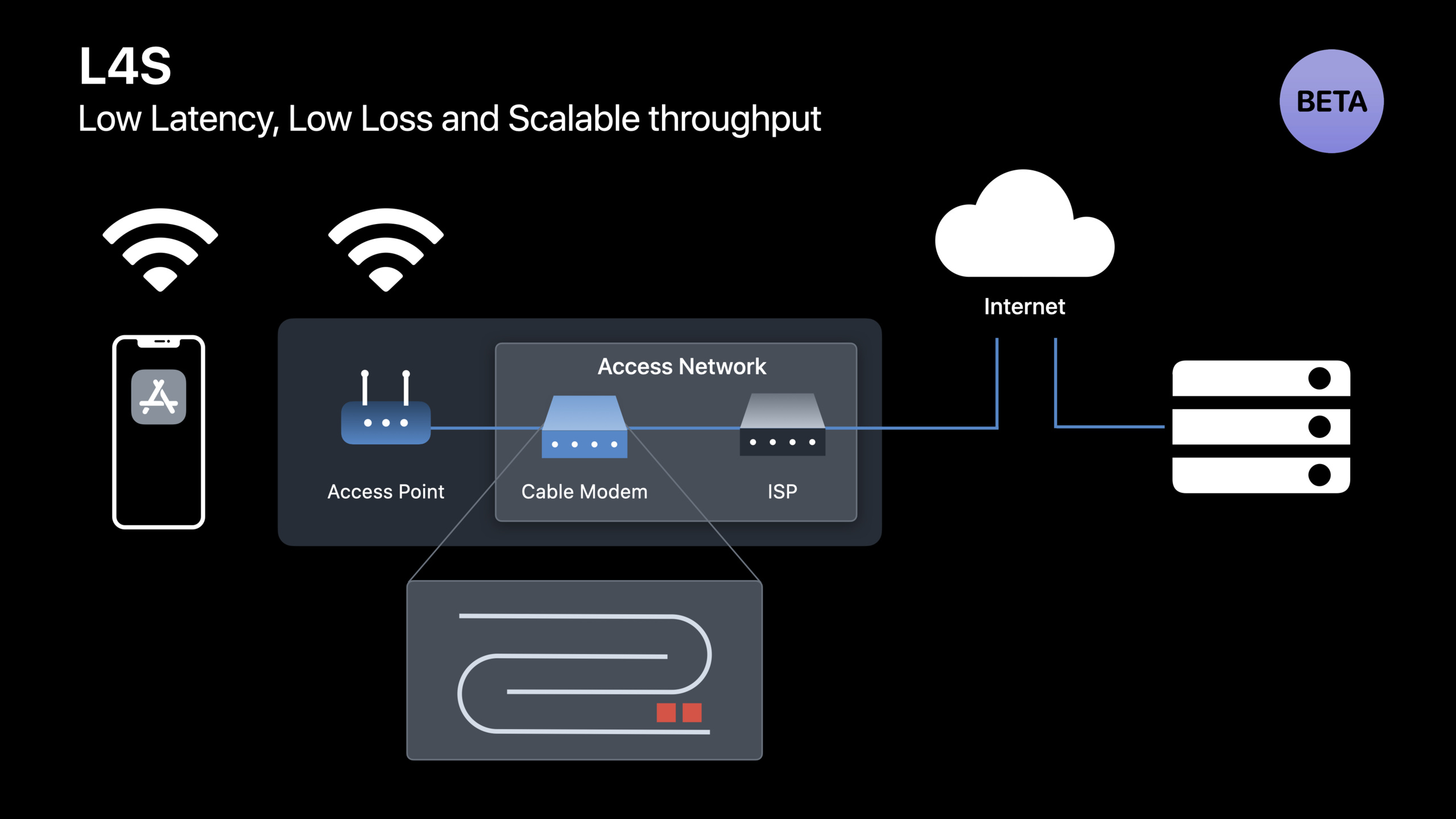
(14:50) L4S is a low-latency technology advanced by Apple in collaboration with the networking community and is available in beta form in iOS 16 and macOS Ventura.It lets the sender adjust the rate through explicit congestion signals, with the goal of keeping queues short and achieving zero congestion loss.
On macOS Ventura, you can use the defaults command given by Session to start testing:
defaults write -g network_enable_l4s -bool trueKey points:
defaults write -gWrite global preferences.network_enable_l4sIs the switch used to enable L4S beta testing in macOS Ventura.-bool trueSet this switch to on.- The corresponding entrance in iOS 16 is in Developer settings.
- If you use a Linux server to test QUIC, the QUIC implementation needs to support accurate ECN and scalable congestion control algorithms.
Core Takeaways
-
Add server responsiveness inspection for video or live broadcast services:
networkQuality -s -CCheck before going online.Test Apple’s default server first, then your own server.When the gap between the two is large, the TCP, TLS, and HTTP buffers are checked first. -
Add network switching test case for real-time collaboration app: switch between Wi-Fi and cellular and observe whether ongoing requests or QUIC connections stall.
URLSessionConfiguration.multipathServiceType = .handoverIt is the smallest entrance. -
Migrate the custom UDP protocol to the QUIC datagrams experimental branch: retain the datagram data model, use
NWProtocolQUIC.OptionsEnable datagram flow, and then verify the round-trip time and packet loss changes in congestion scenarios. -
Establish L4S compatibility test for screen sharing or remote control app: Enable L4S in iOS 16 Developer settings or macOS Ventura defaults, run the real interaction process, and record the menu response, cursor movement and screen update time difference.
-
Treat RPM as a network experience indicator: After Ookla displays round trip time, you can use
60000 / RTT(ms)Get round trips per minute.This metric is more closely aligned with the experience of video conferencing, screen sharing, and search suggestions than download speed alone.
Related Sessions
- Improve DNS security for apps and servers — Both belong to the basic network capabilities, and talk about how DNSSEC and encrypted DNS protect app and server communication portals.
- Deliver reliable streams with HLS Content Steering — For streaming server-side scheduling, it complements the video server responsiveness case of this session.
- Create a more responsive media app — Focus on the responsive experience of media apps and can be used together with network-side latency optimization.
- Meet ScreenCaptureKit — Screen sharing is a typical low-latency scenario in L4S demos, and ScreenCaptureKit is responsible for capture-side performance.
Comments
GitHub Issues · utterances