
Highlight
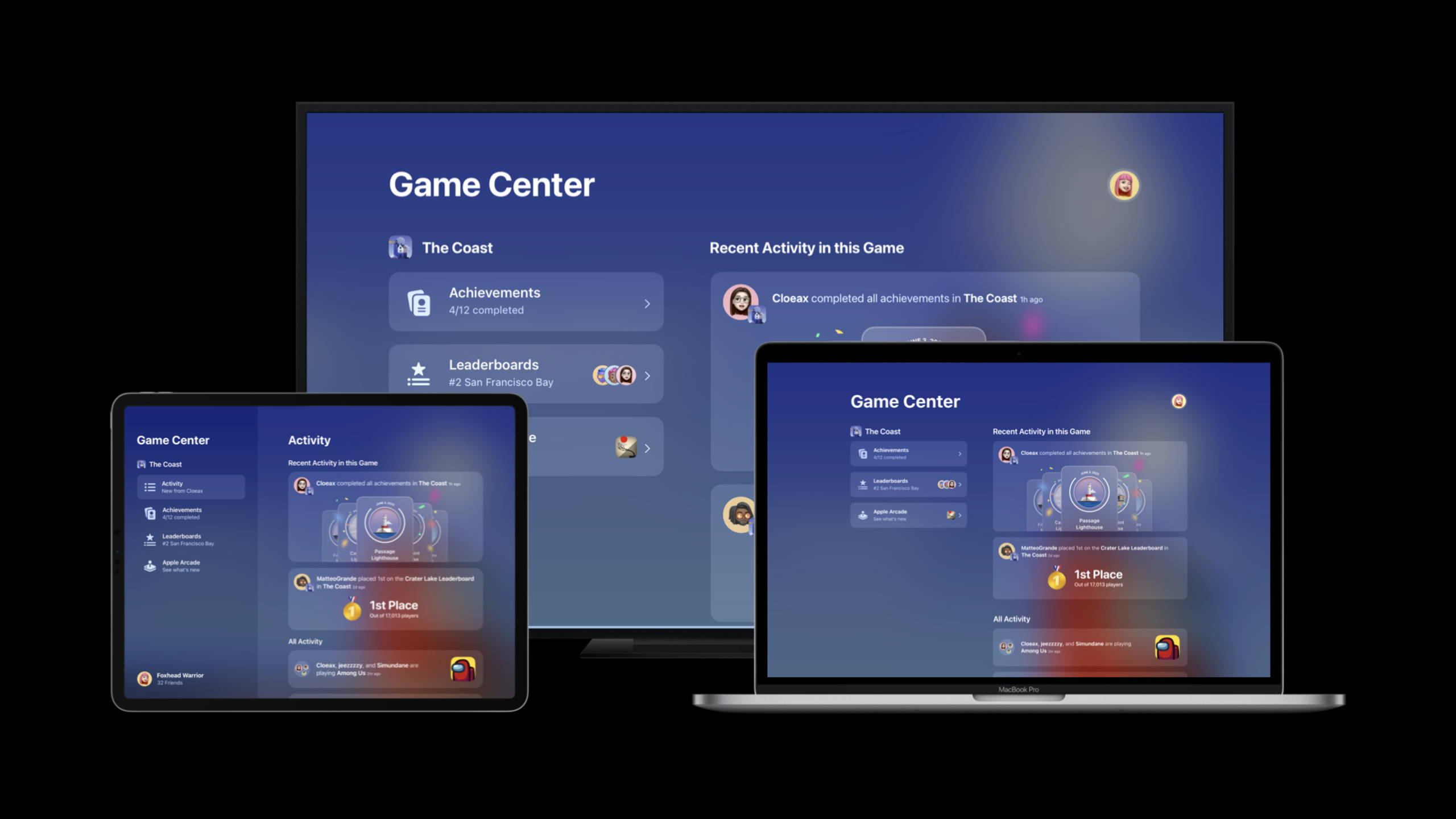
Game Center will integrate friends’ achievements, leaderboard jumps, and score surpasses into the new version of Dashboard Activity in 2022. Games that are already connected to leaderboards and achievements can appear in the information flow of players’ friends without adding new codes.
Core Content
Many games already have leaderboards and achievements. The problem is, these events often stay within the game. When a player gets a new achievement, friends may not know it; when a player reaches the top of the rankings, it is difficult to turn it into a return opportunity.
The changes in Game Center 2022 start from this pain point. The new version of Dashboard adds Activity to put your friends’ events in your game into the same information flow. Events include new achievements, significant increases in rankings, scores between friends being exceeded, etc.
More importantly, games that already use Game Center leaderboards and achievements do not need to write additional code for Activity. The system will automatically display these events on the Dashboard and friend profile pages. Game Center will also send notifications when a friend exceeds the player’s score, and the game itself does not need to request push permission from the user.
This session also filled in the same path for Unity developers. Apple has released a Unity plug-in for GameKit, providing a C# API. Unity projects can authenticate local players, display Access Points, and tap into Game Center’s social distribution capabilities.
Detailed Content
Activity: Put game events into Game Center Dashboard (02:42)
The new Dashboard shows your player friends’ recent activity within and across your games. The events listed in the speech were specific: an achievement was earned, a big jump on the leaderboard, a friend surpassed another player’s high score.
If the game has been configured with leaderboards and achievements, the Activity will appear automatically. The first step that developers need to do is to confirm that Game Center is enabled for the game and complete local player authentication early in the launch process.
// Authenticate the local player
import GameKit

class TitleScreenViewController: UIViewController {

    override func viewDidLoad() {
        super.viewDidLoad()

        // Authenticate the local player
        GKLocalPlayer.local.authenticateHandler = { viewController, error in
            if let viewController = viewController {
                // Present the view controller from Game Center.
                return
            }
        }
    }
}
Key points:
import GameKitIntroduce the GameKit framework required by Game Center. -TitleScreenViewControllerPlacing the certification on the title screen corresponds to the suggestion in the speech to “place it as early as possible, maybe even on the title screen.” -GKLocalPlayer.local.authenticateHandlerRegister the authentication callback and the system will return to the Game Center login interface when needed. -if let viewController = viewControllerDetermine whether the system requires display of the authentication interface. -returnThis should then be rendered by your interface layerviewController, the example comments leave this to the specific game implementation.
Unity: Calling GameKit with C# (04:30)
The Unity project doesn’t need to give up Game Center. The new GameKit Unity plug-in provides a complete C# API. The authentication code in the talk saves the local player object in the game management component.
// Authenticate the local player
using Apple.GameKit;

public class MyGameManager : MonoBehaviour
{
    private GKLocalPlayer _localPlayer;

    private async Task Start()
    {
        try
        {
            _localPlayer = await GKLocalPlayer.Authenticate();
        }
        catch (Exception exception)
        {
            // Handle exception...
        }
    }
}
Key points:
using Apple.GameKit;Use the GameKit namespace exposed by the Unity plug-in. -MyGameManager : MonoBehaviourExplain that this code is placed in the Unity component and driven by the Unity life cycle. -_localPlayerSave the authenticatedGKLocalPlayer, you can continue to use GameKit capabilities later. -Start()marked asasync Task, because the authentication process needs to wait for system results. -await GKLocalPlayer.Authenticate()Call the plug-in’s static authentication method and return the local player object after success. -catch (Exception exception)Leave room for handling authentication failures, such as network errors or player cancellations.
Access Point: Give players an entrance to open the Dashboard (05:25)
After the authentication is completed, players still need a natural entrance to enter the Game Center Dashboard. Apple recommends using Access Point. It is the system entrance in the game. After players click it, the Dashboard will open to view achievements, rankings, and activities.
The speech suggested displaying Access Point on the game menu page. Don’t put it in the real-time play screen where it will interfere with the operation.
// Show the Access Point
import GameKit

class MenuScreenViewController: UIViewController {

    override func viewDidLoad() {
        super.viewDidLoad()

        GKAccessPoint.shared.location = .topLeading
        GKAccessPoint.shared.isActive = true
    }
}
Key points:
MenuScreenViewControllerIndicates that the Access Point is placed on the menu page, not the title authentication page or the in-game interface. -GKAccessPoint.shared.location = .topLeadingSet the entrance display position. -.topLeadingLet the entrance appear in the upper left corner of the interface. The specific location should still be adjusted based on the game UI. -GKAccessPoint.shared.isActive = trueActivate Access Point and the system will display the entrance in the game.
The Unity side code also only needs to set the position and activate it:
// Show the Access Point
GKAccessPoint.Shared.Location =
    GKAcessPoint.GKAccessPointLocation.TopLeading;

GKAccessPoint.Shared.IsActive = true;
Key points:
GKAccessPoint.SharedAccess the shared Access Point instance exposed by the Unity plug-in. -LocationSet the entry location, the same as in the Swift examplelocationcorrespond. -TopLeadingSelect the upper left corner position. -IsActive = trueThe entrance is displayed and the system opens the Dashboard after the player clicks on it.
Leaderboards: Leaderboard events will automatically generate Activity (06:24)
Leaderboards are one of the main sources of Activity. If the player’s friends enter the top 25% of the leaderboard, or if the friend exceeds the player’s score, they will appear in Activity.
Among them, “a friend exceeds your score” will also trigger a Game Center notification. The talk clearly states that this notification is sent by Game Center and the game does not need to deal with whether the user allows the game to push notifications.
This provides a practical direction for ranking list design: don’t just make a permanent list. The recurring rankings will be reset on a weekly or monthly basis, giving players a reason to keep coming back.
App Store Connect
└─ Game Center
   ├─ Leaderboards
   │  ├─ permanent leaderboard
   │  └─ recurring leaderboard
   └─ Achievements
Key points:
App Store ConnectIt is the location to configure the Game Center function. The speech mentioned at 03:56 that Game Center needs to be enabled in the app record. -LeaderboardsUsed to configure the ranking list, the Activity will display dynamics based on friend ranking events. -permanent leaderboardSuitable for recording long-term top scores. -recurring leaderboardCorresponding to the cyclic ranking list mentioned in the speech, time windows are used to create new competitive moments. -AchievementsTogether with the leaderboard, it forms the main event source for the Activity.
Achievements: Achievements will become progress visible to friends (07:42)
Achievements do more than just give players a badge. Game Center Activity will display achievement completion events to friends. When the player completes all achievements in the game, the system will also generate a celebratory Activity.
This places new responsibilities on achievement design. It can record progress and also prompt players to explore hidden content. If the achievement name and description are written clearly, you can turn an achievement into a follow-up clue among friends.
Achievement design
├─ early achievement: teach the first meaningful action
├─ progress achievement: mark a chapter, level, or mode milestone
├─ skill achievement: reward a difficult challenge
└─ completion achievement: recognize finishing every achievement
Key points:
early achievementSuitable for low-threshold events to allow new players to appear in the Activity as early as possible. -progress achievementCorresponding to the player’s game progress, friends can understand where the player has been after seeing it. -skill achievementRewards difficult challenges, suitable for triggering comparisons between friends. -completion achievementCorresponds to the “all accomplished” celebration dynamic in the speech.
Core Takeaways
-
What to do: Add a friend ranking list that resets weekly to the game.
Why it’s worth doing: Activity will show your friends’ performance on the leaderboard, and the looping list can also provide reasons for continued return.
How to get started: Configure recurring leaderboard in the Game Center area of App Store Connect, and then submit scores in the game. -
What to do: Split the novice tutorial into several early achievements.
Why it’s worth doing: Completed achievements will appear in the activities of players and friends, and visible progress will be generated when new players complete the first set of actions.
How to start: Select nodes such as completing a level for the first time, using core skills for the first time, defeating an enemy for the first time, etc., and configure them as Game Center achievements. -
What: Show Game Center Access Point on the menu page.
Why it’s worth it: Players can open the Dashboard from a familiar location and view friends’ updates, achievements, and leaderboards.
How to start: Set on the menu pageGKAccessPoint.shared.location, againGKAccessPoint.shared.isActiveset totrue。 -
What: Adds Game Center login for Unity games.
Why it’s worth doing: GameKit Unity plug-in provides C# API, and Unity projects can also enter the Game Center Activity ecosystem.
How to start: Install the Apple Unity plug-in and call it in the game management componentGKLocalPlayer.Authenticate()。
Related Sessions
- Plug-in and play: Add Apple frameworks to your Unity game projects — Continue learning how to integrate Game Center, Game Controller, Accessibility, Core Haptics, and PHASE Unity plug-ins as a whole.
- Add accessibility to your Unity games — If your game uses Unity, this session shows how to integrate VoiceOver, Switch Control, and Dynamic Type through the Accessibility plug-in.
- Profile and optimize your game’s memory — Focused on runtime tuning for games, explaining how Instruments and Game Memory tools locate memory issues.
- Boost performance with MetalFX Upscaling — Focused on graphics performance, introducing MetalFX Upscaling’s spatial and temporal upsampling paths.
Comments
GitHub Issues · utterances