
Highlight
SwiftUI engineer Julia used a “Directory of Female Computer Scientists” app as an example to introduce the design and use of the Transferable protocol.
Core Content
Julia’s sample app saves profiles of female computer scientists. A profile page contains name, introduction, interesting facts, portrait and video. Users want to do a few mundane things: drag portraits into the app, paste anecdotes from the clipboard, and share profiles on watchOS. (00:38)
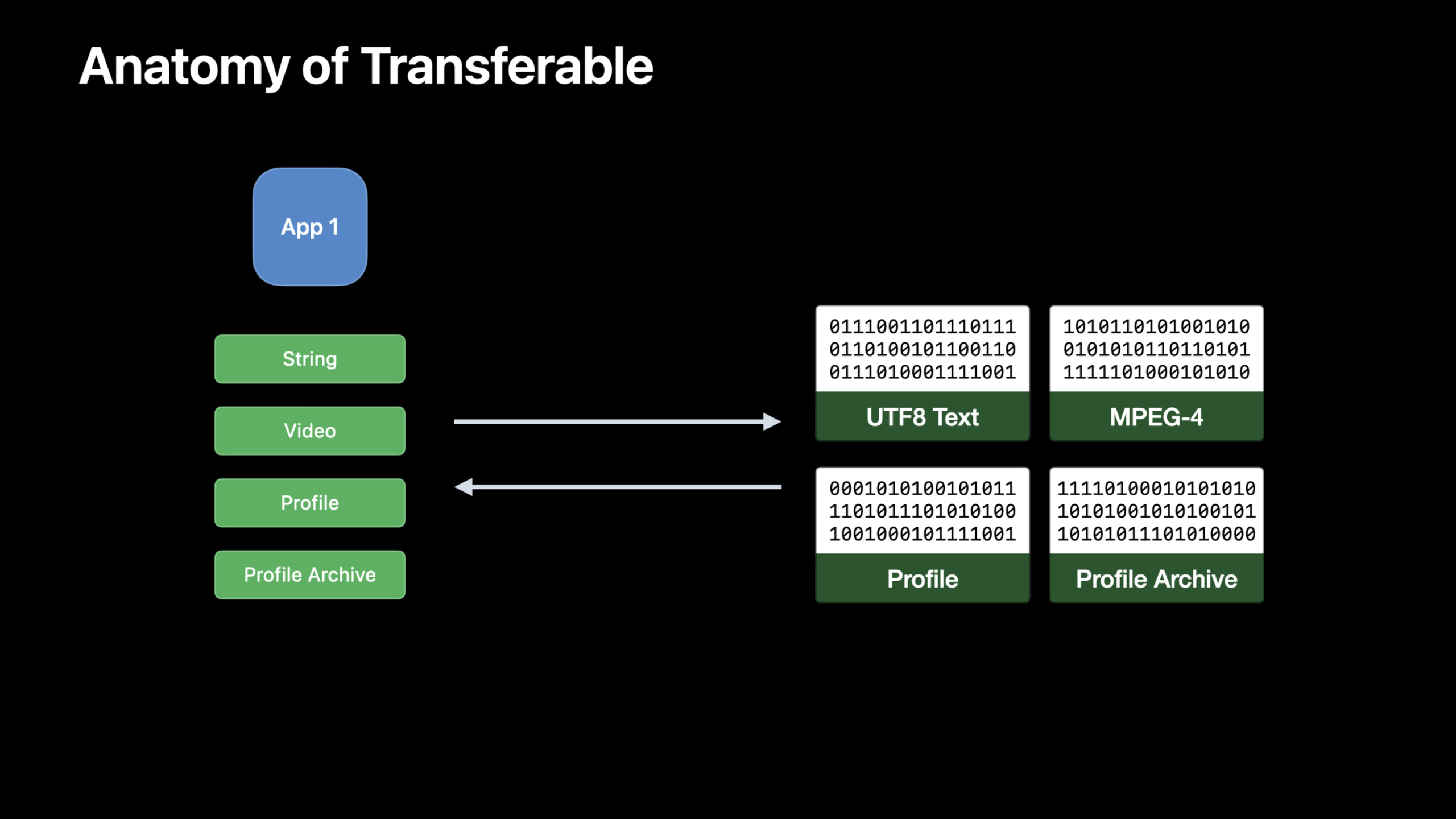
In the past, these entries were often scattered across different APIs. Drag-and-drop, copy-paste, and Share Sheet all turn the model into data that the receiver can understand, and declare what type the data is.TransferablePut this matter back to the model layer: the model itself declares how to export, how to import, and what kind of correspondingUTType。(02:09)
The point of this talk is not to write a share button. The point is to letProfile、ProfilesArchive、VideoThese models declare transfer rules once and are thenPasteButton、.draggable、.dropDestination、ShareLinkWait for the SwiftUI entry to be reused. (05:10)
Detailed Content
Declare the data type first
(04:18) When transferring data across apps, the recipient needs to know what the binary data represents. Apple uses Uniform Type Identifiers (UTType) to describe data structures. If a custom model has its own file format, it needs to declare the custom type first.
import UniformTypeIdentifiers

// also declare the content type in the Info.plist
extension UTType {
    static var profile: UTType = UTType(exportedAs: "com.example.profile")
}
Key Points:
-import UniformTypeIdentifiersintroduceUTType。
extension UTTypeAdd a business semantic name to the system type table. -UTType(exportedAs:)Indicates that this type is defined and exported by the current App.- Note reminders are still there
Info.plistStatement; session recommends adding a file extension at the same time to let the system know that the app can open this kind of file.
Standard types can already be transmitted directly
(05:01)String、Data、URL、AttributedString、ImageAlready followedTransferable. If the functionality only involves these standard types, the SwiftUI entry can be used directly.
import SwiftUI

struct Profile {
    private var funFacts: [String] = []
    mutating func addFunFacts(_ newFunFacts: [String]) {
        funFacts.append(newFunFacts)
    }
}

struct PasteButtonView: View {
    @State var profile = Profile()
    var body: some View {
        PasteButton(payloadType: String.self) { funFacts in
            profile.addFunFacts(funFacts)
        }
    }
}
Key Points:
-funFactsUse a string array to save anecdotes about people.
-addFunFactsReceives a new string and appends it to the model.
-@State var profileLet the view hold a mutable data model.
-PasteButton(payloadType: String.self)Declare to only receive the string content in the clipboard.
- in closure
funFactsThe payload parsed by the system is directly written back to the model.
The same standard types can also be used for drag and drop. The portrait view below putsImageServes as both drag source and drop target.
import SwiftUI

struct PortraitView: View {
    @State var portrait: Image
    var body: some View {
        portrait
            .cornerRadius(8)
            .draggable(portrait)
            .dropDestination(payloadType: Image.self) { (images: [Image], _) in
                if let image = images.first {
                    portrait = image
                    return true
                }
                return false
            }
    }
}
Key Points:
-@State var portraitSave the current avatar picture.
-.draggable(portrait)let currentImageBecome draggable content.
-.dropDestination(payloadType: Image.self)Declare this view to receive image drops.
-images.firstGet the first picture that was dropped.
- Successfully updated
portraitreturn aftertrue, returned when no images are availablefalse。
CodableRepresentation is suitable for ordinary models
(06:34)ProfileIt is the central model of this field. it hasid、name、bio、funFacts、videoandportrait, and have followedCodable。
import Foundation

struct Profile: Codable {
    var id: UUID
    var name: String
    var bio: String
    var funFacts: [String]
    var video: URL?
    var portrait: URL?
}
Key Points:
-CodableLet the model have encoding and decoding capabilities.
-iduseUUIDIdentify individual data.
-funFactsSaves pasteable string data.
-videoandportraitUse optionalURLPoint to external resources.
(07:31) BecauseProfileAlready able to encode and decode, Transferable conformance only needs to be providedtransferRepresentation。CodableRepresentationJSON is used by default, but custom encoder/decoder is also allowed.
import CoreTransferable
import UniformTypeIdentifiers

struct Profile: Codable {
    var id: UUID
    var name: String
    var bio: String
    var funFacts: [String]
    var video: URL?
    var portrait: URL?
}

extension Profile: Codable, Transferable {
    static var transferRepresentation: some TransferRepresentation {
        CodableRepresentation(contentType: .profile)
    }
}

// also declare the content type in the Info.plist
extension UTType {
    static var profile: UTType = UTType(exportedAs: "com.example.profile")
}
Key Points:
-import CoreTransferableintroduceTransferableand representation type.
-extension Profile: Codable, TransferablestatementProfileCan participate in system transmission.
-transferRepresentationis to followTransferableStatic properties to be implemented.
-CodableRepresentation(contentType: .profile)useCodableGenerate binary data and mark content as custom.profiletype.
-UTType.profileandCodableRepresentationThe content type remains consistent.
DataRepresentation suitable for in-memory binary format
(07:49)ProfilesArchiveCSV is already supported. It can be obtained from CSVDataInitialization, you can also export CSVData. This model is suitable forDataRepresentation。
import CoreTransferable
import UniformTypeIdentifiers

struct ProfilesArchive {
    init(csvData: Data) throws { }
    func convertToCSV() throws -> Data { Data() }
}

extension ProfilesArchive: Transferable {
    static var transferRepresentation: some TransferRepresentation {
        DataRepresentation(contentType: .commaSeparatedText) { archive in
            try archive.convertToCSV()
        } importing: { data in
            try ProfilesArchive(csvData: data)
        }
    }
}
Key Points:
-init(csvData:)Describes how to reconstruct an archive from received CSV data.
-convertToCSV()Describes how to export archives as CSV data.
-DataRepresentation(contentType: .commaSeparatedText)Declare the transfer format to be CSV text.
- exporting closures
ProfilesArchiveConvert toData. - The importing closure takes the received
Datatransfer backProfilesArchive。
FileRepresentation is suitable for large files
(08:46) Videos can be large. Julia explicitly says it doesn’t want to load the video into memory.FileRepresentationDisk files are used as transmission carriers, and the receiver uses the file URL to reconstruct the model.
import CoreTransferable

struct Video: Transferable {
    let file: URL
    static var transferRepresentation: some TransferRepresentation {
        FileRepresentation(contentType: .mpeg4Movie) {
            SentTransferredFile($0.file)
        } importing: { received in
            let destination = try Self.copyVideoFile(source: received.file)
            return Self.init(file: destination)
        }
    }

    static func copyVideoFile(source: URL) throws -> URL {
        let moviesDirectory = try FileManager.default.url(
            for: .moviesDirectory, in: .userDomainMask,
            appropriateFor: nil, create: true
        )
        var destination = moviesDirectory.appendingPathComponent(
            source.lastPathComponent, isDirectory: false)
        if FileManager.default.fileExists(atPath: destination.path) {
            let pathExtension = destination.pathExtension
            var fileName = destination.deletingPathExtension().lastPathComponent
            fileName += "_\(UUID().uuidString)"
            destination = destination
                .deletingLastPathComponent()
                .appendingPathComponent(fileName)
                .appendingPathExtension(pathExtension)
        }
        try FileManager.default.copyItem(at: source, to: destination)
        return destination
    }
}
Key Points:
-Videosave a fileURL, do not put the video content into the model attributes.
-FileRepresentation(contentType: .mpeg4Movie)Declare that this is an MPEG-4 movie file.
-SentTransferredFile($0.file)Submit existing files to the system for transfer.
- The importing closure first copies the received file and then creates it using the copied address.
Video。 FileManager.default.url(for:in:appropriateFor:create:)Find the user’s Movies directory.- If the target file name already exists, the code appends
UUIDAvoid covering. -copyItem(at:to:)Complete the file copy and return to the target address managed by the App itself.
ProxyRepresentation provides degraded representation
(10:04) Some receivers do not recognize custom.profileType, but recognize the text.ProxyRepresentationAllows the current model to be represented by another type that is already Transferable. Used herenamerepresentProfile。
import CoreTransferable
import UniformTypeIdentifiers

struct Profile: Codable {
    var id: UUID
    var name: String
    var bio: String
    var funFacts: [String]
    var video: URL?
    var portrait: URL?
}

extension Profile: Transferable {
    static var transferRepresentation: some TransferRepresentation {
        CodableRepresentation(contentType: .profile)
        ProxyRepresentation(exporting: \.name)
    }
}

// also declare the content type in the Info.plist
extension UTType {
    static var profile: UTType = UTType(exportedAs: "com.example.profile")
}
Key Points:
-CodableRepresentation(contentType: .profile)Preserve the most complete custom data format.
-ProxyRepresentation(exporting: \.name)Exports an additional name as a string.
- The order of presentation is important; the receiver will use the first content type it supports.
- Get to know your own app
.profileGet the complete information when you click; the ordinary text box only supports getting the name when texting.
(11:20) Videos can also have both file representation and URL proxies.FileRepresentationGive the recipient the ability to access the contents of the disk file and ensure access rights through a temporary sandbox extension;ProxyRepresentationBundleURLTreated as a normal transportable value.
import CoreTransferable

struct Video: Transferable {
    let file: URL
    static var transferRepresentation: some TransferRepresentation {
        FileRepresentation(contentType: .mpeg4Movie) { SentTransferredFile($0.file) }
           importing: { received in
               let copy = try Self.copyVideoFile(source: received.file)
               return Self.init(file: copy) }
        ProxyRepresentation(exporting: \.file)
  }

    static func copyVideoFile(source: URL) throws -> URL {
        let moviesDirectory = try FileManager.default.url(
            for: .moviesDirectory, in: .userDomainMask,
            appropriateFor: nil, create: true
        )
        var destination = moviesDirectory.appendingPathComponent(
            source.lastPathComponent, isDirectory: false)
        if FileManager.default.fileExists(atPath: destination.path) {
            let pathExtension = destination.pathExtension
            var fileName = destination.deletingPathExtension().lastPathComponent
            fileName += "_\(UUID().uuidString)"
            destination = destination
                .deletingLastPathComponent()
                .appendingPathComponent(fileName)
                .appendingPathExtension(pathExtension)
        }
        try FileManager.default.copyItem(at: source, to: destination)
        return destination
    }
}
Key Points:
- first floor
FileRepresentationTransfer movie files on disk. - importing closures still copy files, avoiding reliance on temporary locations.
-
ProxyRepresentation(exporting: \.file)Provides downgrade output as a URL. - When pasting the video into the text field, the recipient can use the URL; when the recipient needs the file content, use the file representation.
exportingCondition expresses conditional export
(12:35) Some archives do not support exporting to CSV.exportingConditionWrite this business condition to the representation; when the condition is not met, this format will not be exported.
import CoreTransferable
import UniformTypeIdentifiers

struct ProfilesArchive {
    var supportsCSV: Bool { true }
    init(csvData: Data) throws {  }
    func convertToCSV() throws -> Data { Data() }
}

extension ProfilesArchive: Transferable {
    static var transferRepresentation: some TransferRepresentation {
        DataRepresentation(contentType: .commaSeparatedText) { archive in
            try archive.convertToCSV()
        } importing: { data in
            try Self(csvData: data)
        }
        .exportingCondition { $0.supportsCSV }
    }
}
Key Points:
-supportsCSVMake “Can this archive be exported to CSV” a model property.
-DataRepresentationStill describing how to import and export CSV.
-.exportingCondition { $0.supportsCSV }Check the current archive before exporting.
- The condition is
false, the archive will not be provided to the recipient as a CSV.
Core Takeaways
1. Add copy and paste to the data card
- What to do: Make contacts, portfolios, and course cards available
Transferable, output the title or name when copied to the text box. - Why it’s worth doing:
ProxyRepresentation(exporting:)Text degradation can be provided for custom models without requiring all recipients to understand the private format. - How to start: Use first
CodableRepresentation(contentType:)Declare the complete model and appendProxyRepresentation(exporting: \.name)or similar fields.
2. Drag and drop the image editing results
- What: Makes the edited image draggable from the preview area to Finder, Mail, or another window.
- Why it’s worth doing: session shows
ImageAlready followedTransferable,.draggableand.dropDestinationStandard types can be used directly. - How to start: Add to SwiftUI view
.draggable(image);For receiving area.dropDestination(payloadType: Image.self)Update local status.
3. Use CSV as the batch import and export format
- What to do: Add CSV import and export to ledgers, rosters, and inventory tables.
- Why it’s worth doing:
DataRepresentationSuitable for models with existing memory data formats, in the exampleProfilesArchiveIt is a CSV archive. - How to start: Implemented for archive types
init(csvData:)andconvertToCSV(),existDataRepresentation(contentType: .commaSeparatedText)Call these two functions.
4. Big video only transfers files
- What to do: Video editing, sports recording, class recording. When sharing materials with the App, it transfers files instead of the entire memory data.
- Why it’s worth doing: session explicitly states that the video may be large,
FileRepresentationDisk file transfer is suitable to avoid loading into memory at once. - How to start: Model save file
URL,useFileRepresentation(contentType: .mpeg4Movie)returnSentTransferredFile, copied to the App management directory when importing.
5. Control the exportable format according to model status
- What: Expose an export format only if the document has finished rendering, the archive supports CSV, or the user has permission.
- Why it’s worth doing:
exportingCondition”Whether export is allowed” can be bound to the current model instance. - How to start: Add Boolean attributes to the model and append after representation
.exportingCondition { $0.someFlag }。
Related Sessions
- What’s new in SwiftUI — SwiftUI 2022 overview, including ShareLink, PhotosPicker, Transferable, and drag-and-drop portals.
- What’s new in the Photos picker — PhotosPicker uses Transferable to load the selection results, suitable for continuing the image and video selection process.
- Integrate your custom collaboration app with Messages — Shows how collaboration metadata comes into Messages through TransferRepresentation and ShareLink.
- Enhance collaboration experiences with Messages — Explain the collaboration process between Share Sheet and Messages, and supplement the product-level design of sharing experience.
Comments
GitHub Issues · utterances