
Highlight
Cyrus Daboo of Apple’s Device Management team provides a comprehensive look at the expansion of Declarative Device Management in 2022. First introduced at WWDC 21 last year as support for user registrations for iOS only, this year it has been expanded to all MDM registration types, all platforms (iOS, macOS, tvOS), with significant enhancements to the status reporting and predicate system.
Core Content
Mobile device management (MDM) servers used to poll devices.
A classic example is password policy. The server first issues the password policy, then continuously queries the device, waiting for the user to change the password to a compliant state. Only after the next polling confirms compliance, the server dares to issue sensitive configurations such as Wi-Fi or VPN.
Declarative Device Management puts this business logic on the device. The device recalculates activation conditions based on its own status, actively reports changes, and the server becomes a more lightweight reactive system. (00:37)
The updates for WWDC22 focus on three things: expanding platform and registration type coverage, adding status reporting items, and enhancing the predicate system. (03:46)
Detailed Content
Coverage extended to all MDM platforms
(04:02) When declarative device management was first launched at WWDC21, it only supported user registration for iOS. In 2022, it extends to every enrollment type supported by MDM: automatic device enrollment, profile-based enrollment, and profile and account-based user enrollment.
It’s also coming to Shared iPad, macOS Ventura, and tvOS 16. The same set of declarations and status models can be used for iOS, macOS, and tvOS as long as the operating system supports it.
macOS and Shared iPad each have device channel and user channel. To use declarative management on a channel, the server must sendDeclarativeManagementOrder. Status reports are also generated separately by channel, and the server needs to monitor them separately.
macOS / Shared iPad
├─ device channel  -> send DeclarativeManagement -> monitor device status report
└─ user channel    -> send DeclarativeManagement -> monitor user status report
Key points:
device channelManage device-level status. -user channelManage the status of specific users. -DeclarativeManagementTo be enabled individually by channel.- Status reports are also generated separately by channel, and you cannot only monitor one of them.
Password status allows Wi-Fi configuration to be automatically activated
(07:41) This session adds two password-related status items:passcode.is-compliantandpasscode.is-present. They are Boolean values that correspond to the password status that can be obtained in traditional MDM queries.
{
  "management": {
    "client-capabilities": {
      "supported-payloads": {
        "status-items": [
          "passcode.is-compliant",
          "passcode.is-present"
        ]
      }
    }
  }
}
Key points:
management.client-capabilitiesDescribes which declarative capabilities the device supports. -supported-payloads.status-itemsLists the status items that can be subscribed to. -passcode.is-compliantIndicates whether the current password complies with all password policies issued by MDM profiles or configurations. -passcode.is-presentIndicates whether the device already has a password.
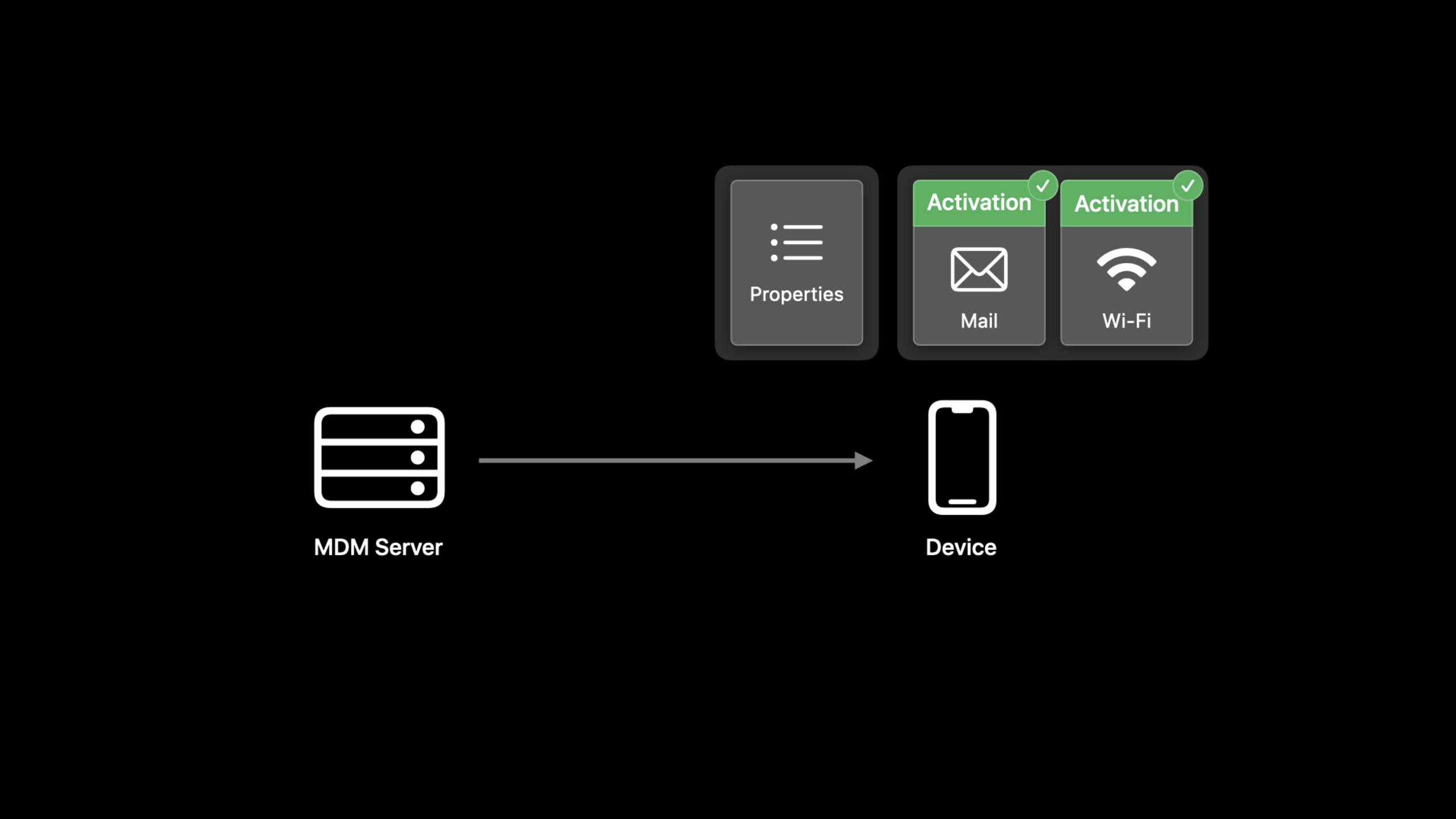
(08:05) The scenario given by Apple is a secure network configuration. The server can send strong password policies and Wi-Fi configuration at the same time, binding the Wi-Fi configuration to a dependencypasscode.is-compliantactivation predicate.
Initially, the password is usually not compliant yet, the predicate is false, and Wi-Fi will not activate. After the user changes the password, the device recalculates activations, the predicate becomes true, and Wi-Fi is automatically activated. This process does not require server-side polling and can even be completed when the device is temporarily offline.
send passcode policy configuration
send Wi-Fi configuration with activation predicate

if passcode.is-compliant == false:
  keep Wi-Fi inactive

when user updates passcode:
  reevaluate activation predicates
  activate Wi-Fi configuration
  send status report to server
Key points:
- This is a conceptual process, and the session does not give the complete Wi-Fi declaration JSON.
- The server delivers the password policy and Wi-Fi configuration at one time.
- The device is responsible for listening for password state changes and recomputing the predicate.
- The server knows when the configuration is activated through status reporting.
Account status is reported incrementally using an array
(10:52) Eight new status items have been added to the account status, covering CalDAV, CardDAV, Exchange, Google, LDAP, incoming mail, outgoing mail and subscribed calendar.
{
  "status-items": [
    "account.list.caldav",
    "account.list.carddav",
    "account.list.exchange",
    "account.list.google",
    "account.list.ldap",
    "account.list.mail.incoming",
    "account.list.mail.outgoing",
    "account.list.subscribed-calendar"
  ]
}
Key points:
account.list.*Only accounts installed by configurations are reported.- Manually created accounts will not appear in these statuses.
- Accounts installed via MDM profiles will also not appear here.
- Incoming mail and outgoing mail are reported separately.
(11:19) Each account status item returns a JSON object corresponding to the account type.identifieris the unique identifier within the array object,declaration-identifierThe configuration identifier corresponding to the installation account.
{
  "identifier": "592D763E-C15B-44F8-A1FC-F88EB1901646",
  "declaration-identifier": "BF8FD199-467B-4BA5-886D-D82B7849E517",
  "hostname": "mail.example.com",
  "port": 443,
  "username": "user01",
  "is-mail-enabled": true,
  "are-notes-enabled": false
}

{
  "identifier": "592D763E-C15B-44F8-A1FC-F88EB1901646",
  "declaration-identifier": "BF8FD199-467B-4BA5-886D-D82B7849E517",
  "calendar-url": "https://holidays.example.com/country/US.ics",
  "username": "user01",
  "is-enabled": true
}
Key points:
identifierUsed to locate objects in the same state array. -declaration-identifierHave the server associate the state object back to the installation account’s configuration. -hostname、port、is-mail-enabled、are-notes-enabledIt is a field in the mail account status. -calendar-url、is-enabledIs a field in the subscribed calendar state.- The server must accept unknown keys that may be added in future system versions.
(12:11) Array values are reported in object increments. When subscribing for the first time, the device sends a complete account list; when adding an account, only new objects are reported; when the account status changes, only changed objects are reported; when an account is removed, the report isremoved: trueobject.
{
  "identifier": "592D763E-C15B-44F8-A1FC-F88EB1901646",
  "removed": true
}
Key points:
identifierMatches existing objects on the server. -removed: trueIndicates that the server should delete the locally saved state of the object.- Incremental reporting reduces the size of the status transmitted between the server and the device.
- The device aggregates state changes over a maximum period of approximately one minute to avoid performance issues.
MDM App status eliminates installation progress polling
(17:13) The MDM server often needs to know whether the App was installed successfully and whether it was removed by the user. It worked in the pastInstalledApplicationListorManagedApplicationListThe command polls the device. Newmdm.appstatus item allows the device to proactively report the status of the App installed by MDM.
{
  "management": {
    "client-capabilities": {
      "supported-payloads": {
        "status-items": [
          "mdm.app"
        ]
      }
    }
  }
}
Key points:
mdm.appIs an array status item.- Each array object represents an App installed by the MDM server.
- Even on supervised devices, it only reports apps installed by MDM.
- The array object is incrementally reported according to the same rules as the previous account status.
(17:35) In the App status report,identifieris the bundle identifier,stateIndicates the current installation stage.
{
  "StatusItems": {
    "mdm": {
      "app": [
        {
          "identifier": "com.apple.Pages",
          "name": "Pages",
          "version": "7358.0.134",
          "short-version": "12.0",
          "external-version-id": "844362702",
          "state": "managed"
        }
      ]
    }
  },
  "Errors": []
}
Key points:
StatusItems.mdm.appIs the MDM App status array. -identifierUse the App’s bundle identifier in this state. -nameis the App name. -version、short-version、external-version-idcorrespondManagedApplicationListVersion information in the response. -stateIndicates the installation phase, such as mentioned in sessionprompting、installing、managed、managed-but-uninstalled。ErrorsAn empty array indicates that the status report has no errors.
(18:18) During the installation process, the user’s registration of the device requires the user’s approval to install the App. Equipment can be reported firstprompting, reported after the user clicks to installinstalling, report after installation is completemanaged. If the user deletes the app manually, the device reportsmanaged-but-uninstalled. The server can then sendRemoveApplicationRemove internally maintained administrative status.
Predicate can query array status items
(20:40) The activation predicate uses an NSPredicate string. The new syntax added in WWDC22 puts the status item name into@status(...), the old syntax continues to be compatible, but has been marked deprecated.
(22:15) When the status item is an array, you can useSUBQUERYFind elements that match the criteria. The following example checks whether the bundle identifier exists on the device ascom.example.appAnd the status ismanagedMDM App.
SUBQUERY(@status(mdm.app),
         $app,
         ($app.@key(identifier) == "com.example.app") AND ($app.@key(state) == "managed")
        ).@count == 1
Key points:
@status(mdm.app)Quotemdm.appStatus array. -$appyesSUBQUERYVariables used when iterating through the array. -$app.@key(identifier)Read from array objectidentifierkey。$app.@key(state)Read from array objectstatekey。.@count == 1Indicates that exactly one object that meets the conditions is found.- Used when accessing keys in array objects
@keyextension term。
Management properties Turn server logic into device properties
(24:10) The server sometimes needs to directly control predicate calculations. For example, schools distribute configurations by teacher role: lower or upper grade Wi-Fi, shared mailboxes for IT administrators, calendars for athletic coaches. Traditional MDM often involves installing or removing profiles one by one after a device is assigned to a teacher.
WWDC22 Newcom.apple.management.propertiesdeclaration. The server can write custom JSON properties to the device and let the activation predicate read these properties.
{
  "management": {
    "client-capabilities": {
      "supported-payloads": {
        "declarations": {
          "management": [
            "com.apple.management.properties"
          ]
        }
      }
    }
  }
}
Key points:
supported-payloads.declarations.managementLists the management declaration types supported by the device. -com.apple.management.propertiesIt is the newly added declaration type for this session.- It lets the server set arbitrary JSON properties that can be read by predicates.
(24:40) management properties declarationPayloadIt is a JSON object defined on the server side. Values can be strings, numbers, arrays, or objects.
{
  "Type": "com.apple.management.properties",
  "Identifier": "AAE09D73-6EF6-4F3B-9E15-11B0F86D5591",
  "ServerToken": "AB4C5B91-3E08-4D4E-A9FF-1E44FE5BFDD4",
  "Payload": {
    "name": "Student One",
    "age": 7,
    "roles": ["grade1", "spanish"]
  }
}
Key points:
TypeSpecify declaration type. -Identifieris the identifier of this declaration. -ServerTokenUsed by the server to identify the version it sends. -Payload.name、Payload.age、Payload.rolesAll are defined by the server.- Multiple management properties declarations can exist at the same time, but the key should remain unique; duplicate keys will cause the predicate value to be unpredictable.
(24:53) activation predicate is used@property(...)Read these properties.
{
  "Type": "com.apple.activation.simple",
  "Identifier": "076F928B-9D8E-4BA2-AD34-5655805C82D7",
  "ServerToken": "4FFA91BF-85AE-4053-B8FE-B1C3E507A9CB",
  "Payload": {
    "StandardConfigurations": [
      "3BBB4407-238A-44B1-ABB1-5E7AB95160E0"
    ]
  },
  "Predicate": "(@property(age) >= 18) AND (\"Grade12\" IN @property(roles))"
}
Key points:
TypeIndicates that this is a simple activation. -Payload.StandardConfigurationsPoints to the configuration to be activated. -PredicateRead management properties. -@property(age) >= 18examineageproperty. -"Grade12" IN @property(roles)examinerolesWhether the specified role is included in the array.
(27:24) The approach in the school scenario is to first preset the complete declarations to the device. On the day the device is assigned to a teacher, the server only sends a management properties declaration containing the teacher role. The device recalculates activations and automatically enables the corresponding Wi-Fi, mailbox, or calendar configuration.
before assignment:
  preload Wi-Fi, mail, calendar declarations
  predicates are false on unassigned devices

on assignment day:
  send one management properties declaration with teacher roles
  reevaluate activations on device
  activate matching configurations

when role changes:
  update one management properties declaration
  reevaluate activations again
Key points:
- This is a summary of the process described by the session, not a new protocol API.
- Preloading declarations reduces the pressure of delivering profiles one by one during peak periods.
- When the role changes, the server only needs to update the attribute declaration.
- Complex server logic is condensed into simple state changes on the device.
Core Takeaways
1. Make a password compliance driven network configuration switch
- What to do: Tie the enterprise Wi-Fi or VPN configuration to a password compliance state.
- Why is it worth doing: session clearly stated
passcode.is-compliantActivation predicate can be triggered to avoid server polling. - How to get started: Subscribe
passcode.is-compliant, put the sensitive network configuration into activation that depends on the status, and observe the status report after the configuration is activated.
2. Make an account installation status panel
- What to do: Display the status of mail, calendar, LDAP, Exchange and other accounts installed by configurations in the MDM console.
- Why it’s worth doing: The account status object has
declaration-identifier, the server can directly associate the status with the delivered configuration. - How to get started: Subscribe
account.list.mail.incoming、account.list.mail.outgoing、account.list.subscribed-calendarWait for status items, pressidentifierConsolidate incremental reports.
3. Make an App installation progress flow
- What to do: Display the App installation process as
prompting、installing、managed、managed-but-uninstalledWait for status changes. - Why it’s worth doing:
mdm.appLet the device proactively report the status of apps installed by MDM to reduceInstalledApplicationListorManagedApplicationListpolling. - How to get started: Enable declarative management and then subscribe
mdm.app, use bundle identifier to merge array objects, and putstateMap to console state.
4. Make a role-driven school equipment allocation process
- What to do: Preload the configuration, and then use the teacher role attributes to activate the corresponding Wi-Fi, mailbox and calendar.
- Why it’s worth doing:
com.apple.management.propertiesThe server role logic can be turned into predicate input on the device, which is suitable for peak scenarios such as the first day of school. - How to start: Design a unique
rolesAttribute key, use@property(roles)Write the activation predicate and only update the management properties declaration when allocating the device.
5. Make a status array incremental synchronizer
- What to do: Implement common array object merging logic for account status and MDM App status.
- Why is it worth doing: session description array value will be reported incrementally by object, new addition, update and deletion all depend on
identifier. - How to start: Start with
identifierBuild index; insert when unknown identifier is received; update when known identifier is received; receiveremoved: trueDelete when.
Related Sessions
- Meet declarative device management — WWDC21 introduces the data model, statements, status and active device management ideas of declarative device management for the first time.
- What’s new in managing Apple devices — WWDC22 device management overview, covering Apple Configurator, identity technology, and MDM protocol updates.
- Explore Apple Business Essentials — Describes device management, support, cloud storage, collections, apps, and settings workflows for small businesses.
Comments
GitHub Issues · utterances