
Highlight
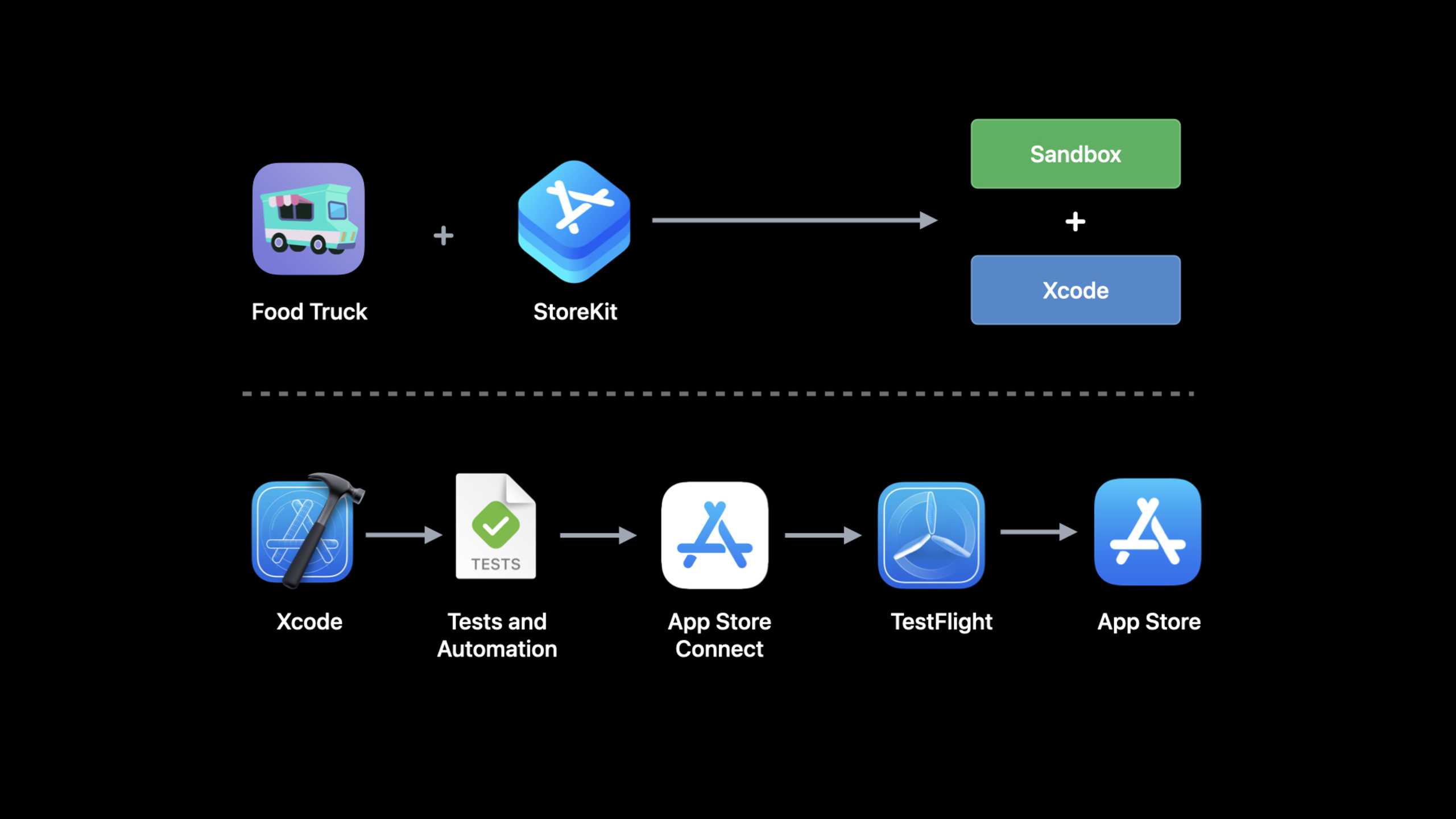
Xcode 14 lets StoreKit tests cover App Store Connect sync configuration, SwiftUI previews, refunds, coupon codes, price increases, billing retries, and Sandbox billing failure simulations.
Core Content
Food Truck is already plugged into StoreKit: annual sales history is a one-time in-app purchase, and Social Feed+ is a subscription. The real trouble for developers isn’t the buy button itself, but the testing lifecycle. Product metadata must be consistent between App Store Connect, Xcode, local unit testing, and Sandbox; subscriptions will also encounter boundary states such as refunds, discount codes, price increases, and billing failures.
Xcode 14 solves configuration issues first. The StoreKit Configuration File synchronizes product and subscription metadata from App Store Connect. The synchronized files are read-only. If you need to modify them, go back to App Store Connect and press the sync button in Xcode. When temporary experiments are needed, the synchronized files can be converted into local editable files, but the conversion is a one-way operation.
Next is the debugging experience. Products in the StoreKit configuration file can directly enter SwiftUI Preview, and the store interface does not need to go to the device to see the real title and description. Transaction Manager adds Transaction Inspector and filtering capabilities. You can view subscription expiration time, subsequent renewals, subscription groups, offers, etc., and you can also narrow the transaction list by product ID or purchase date.
The second half of this session is the subscription boundary state. Refund will makeTransaction.updatesIssue a new transaction with revocation information; the discount code affects both the current transaction and the next renewal; price increases can be made using Transaction Manager orSKTestSessionTrigger; billing retries and grace periods can be simulated in Xcode, unit tests, and Sandbox. The goal is clear: complete the subscription failure path before publishing.
Detailed Content
Sync App Store Connect products and use them in SwiftUI Preview
(01:30) Xcode 14 can synchronize in-app purchase products configured in App Store Connect to the StoreKit Configuration File. This way, the same product and subscription metadata can be used for Xcode local tests, unit tests, sandbox, and final go-live configuration.
(06:58) The synchronized StoreKit configuration will also enter SwiftUI Preview. Session uses the product description of Social Feed+ as an example: modify the title or description in App Store Connect, and after synchronizing to Xcode, the preview interface immediately uses real product data.
VStack(alignment: .leading) {
    Text(subscription.displayName)
        .font(.headline.weight(.semibold))
    Text(subscription.description)
}
Key points:
VStack(alignment: .leading)Display the subscription name and description left-aligned and vertically. -Text(subscription.displayName)Use the localized display name of the StoreKit product, data comes from the configuration file. -.font(.headline.weight(.semibold))Make product names more prominent in the store interface. -Text(subscription.description)Read the localized description of the product. In the demo, this description comes from the StoreKit configuration after synchronization with App Store Connect.
This code is very short and focuses on the data source. After StoreKit is configured to access preview, the layout, copy length and localization effect of the store UI can be directly checked in Canvas.
Test after-sales path with refund request and transaction reversal information
(11:18) Refund entrancerefundRequestSheetHang on a SwiftUI view. When testing the Xcode environment, the refund reasons selected by the user will correspond to the StoreKit API’sRevocationReason. In Xcode or Sandbox, refunds take effect immediately.
struct RefundView: View {
    @State private var selectedTransactionID: UInt64?
    @State private var refundSheetIsPresented = false
    @Environment(\.dismiss) private var dismiss
    var body: some View {
        Button {
            refundSheetIsPresented = true
        } label: {
            Text("Request a refund")
                .bold()
                .padding(.vertical, 5)
                .frame(maxWidth: .infinity)
        }
        .buttonStyle(.borderedProminent)
        .padding([.horizontal, .bottom])
        .disabled(selectedTransactionID == nil)
        .refundRequestSheet(
            for: selectedTransactionID ?? 0,
            isPresented: $refundSheetIsPresented
        ) { result in
            if case .success(.success) = result {
                dismiss()
            }
        }
    }
}
Key points:
selectedTransactionIDSave the ID of the transaction to be refunded; button is not available when no transaction is selected. -refundSheetIsPresentedControls whether the system refund form is displayed. -ButtonAfter being clickedrefundSheetIsPresentedset totrue, triggering the refund form. -.disabled(selectedTransactionID == nil)Prevent incoming invalid transactions. -.refundRequestSheet(for:isPresented:)Pass the transaction ID and impression status to StoreKit.- Match in callback
.success(.success)call afterdismiss(), indicating that the refund request was submitted successfully.
(12:33) After the refund is completed,Transaction.updatesUpdates will be sent out. The app should readrevocationDateandrevocationReason, and then revoke the corresponding rights and interests.
for await update in Transaction.updates {
    let transaction = try update.payloadValue

    if let revocationDate = transaction.revocationDate,
       let revocationReason = transaction.revocationReason {
        print("\(transaction.productID) revoked on \(revocationDate)")

        switch revocationReason {
        case .developerIssue: <#Handle developer issue#>
        case .other: <#Handle other issue#>
        default: <#Handle unknown reason#>
        }

        <#Revoke access to the product#>
    }
    <#...#>
}
Key points:
for await update in Transaction.updatesContinuously monitor transaction updates. -try update.payloadValueGet the verified transaction payload. -revocationDateWhen present, it indicates that the transaction has been revoked. -revocationReasonDifferentiate between developer issues, other causes, and unknown causes.- After handling the reasons, the App should revoke product access rights to avoid refunds and still retain rights and interests.
Test the current status and subsequent renewal status of the discount code
(14:21) To test the discount code, first add the offer code to the local StoreKit configuration file, and then use it in the AppofferCodeRedeemSheetDisplay the redemption form. The Xcode environment will list all offers in the profile, and there is no need to enter the real code generated by App Store Connect.
struct SubscriptionPurchaseView: View {
    @State private var redeemSheetIsPresented = false

    var body: some View {
        Button("Redeem an offer") {
            redeemSheetIsPresented = true
        }
        .buttonStyle(.borderless)
        .frame(maxWidth: .infinity)
        .padding(.vertical)
        .offerCodeRedeemSheet(isPresented: $redeemSheetIsPresented)
    }

}
Key points:
redeemSheetIsPresentedSave the display state of the redemption form. -Button("Redeem an offer")It is the user who actively opens the discount code redemption portal.- After clicking the button, set the binding value to
true。 .offerCodeRedeemSheet(isPresented:)Let StoreKit display the system redemption form.
(16:23) After the discount code redemption is completed,Transaction.updatesandProduct.SubscriptionInfo.Status.updatesNew values will be generated. View current transactionstransaction.offerType, see you next time you renew your subscriptionrenewalInfo.offerTypeandofferID。
for await status in Product.SubscriptionInfo.Status.updates {
    let transaction = try status.transaction.payloadValue
    let renewalInfo = try status.renewalInfo.payloadValue

    if let currentOfferType = transaction.offerType {
        switch currentType {
        case .introductory: <#Handle introductory offer#>
        case .promotional:  <#Handle promotional offer#>
        case .code:         <#Handle offer for codes#>
        default:            <#Handle unknown offer type#>
        }
        self.hasCurrentOffer = true
    }

    if let nextOfferType = renewalInfo.offerType {
        switch currentType {
        case .introductory: <#Handle introductory offer#>
        case .promotional: <#Handle promotional offer#>
        case .code:
            print("Customer has \(renewalInfo.offerID) queued")
            <#Handle offer for codes#>
        default: <#Handle unknown offer type#>
        }
        self.hasQueuedOffer = true
    }
}
Key points:
Product.SubscriptionInfo.Status.updatesUsed to monitor subscription status changes. -status.transaction.payloadValueIndicates the current subscription transaction. -status.renewalInfo.payloadValueIndicates renewal information. -transaction.offerTypeReflects the type of offer used for the current transaction. -renewalInfo.offerTypeReflects the type of offer that will be used for the next renewal. -renewalInfo.offerIDThe configured offer reference name can be obtained in the code type offer. -hasCurrentOfferandhasQueuedOfferRecord the current offer and subsequent offers in the queue separately.
Control price increase prompts and write unit tests
(18:45) The price increase prompt will appear automatically, but the app can control the display timing through the StoreKit Messages API. The Food Truck example will temporarily store the message when the sensitive view appears, and then display it after the user exits the editing process.
private var pendingMessages: [Message] = []

private func updatesLoop() {
    for await message in Message.messages {
      if <#Check if sensitive view is presented#>,
         let display: DisplayMessageAction = <#Get display message action#> {
           try? display(message)
      }
      else {
        pendingMessages.append(message)
      }
    }
}
Key points:
pendingMessagesSave StoreKit messages that are temporarily unsuitable for display. -Message.messagesis the asynchronous message sequence from which price increase alerts will arrive.- Conditional branch is used to check whether the current situation is suitable for popping up system messages.
-
DisplayMessageActionResponsible for actually presenting the message. - When not suitable for display, put
messagePut it in the queue and process it later.
(20:53) After the user agrees or rejects the price increase, the subscription status will passProduct.SubscriptionInfo.Status.updatesrenew. App can watchpriceIncreaseStatusandexpirationReason。
for await status in Product.SubscriptionInfo.Status.updates {
    let renewalInfo = try status.renewalInfo.payloadValue

    if renewalInfo.priceIncreaseStatus == .agreed {
        print("Customer consented to price increase")
        <#Handle consented to price increase#>
    }
    if renewalInfo.expirationReason == .didNotConsentToPriceIncrease {
        print("Customer did not consent to price increase")
        <#Handle expired due to not consenting to price increase#>
    }

    <#...#>

}
Key points:
renewalInfo.priceIncreaseStatus == .agreedIndicates that the user has agreed to the price increase. -renewalInfo.expirationReason == .didNotConsentToPriceIncreaseIndicates that the subscription has expired due to failure to agree to the price increase.- These two judgments cover the key results of the price increase process: continue the subscription or lose the subscription.
(21:19) Unit testing can be usedSKTestSessionDirectly trigger the price increase process and disable system pop-ups.
let session: SKTestSession = try SKTestSession(configurationFileNamed: "<#Configuration name#>")
session.disableDialogs = true

<#Purchase a subscription#>

var transaction: SKTestTransaction! = session.allTransactions().first
session.requestPriceIncreaseConsentForTransaction(identifier: transaction.identifier)

transaction = session.allTransactions().first
XCTAssertTrue(transaction.isPendingPriceIncreaseConsent)

<#Assert app updates for pending price increase#>

session.consentToPriceIncreaseForTransaction(identifier: transaction.identifier)

// OR

session.declinePriceIncreaseForTransaction(identifier: transaction.identifier)
session.expireSubscription(productIdentifier: "<#Product ID#>")

<#Assert app updates for finished price increase#>
Key points:
SKTestSession(configurationFileNamed:)Create a test session with a StoreKit configuration file. -session.disableDialogs = trueKeep tests from being blocked by the system UI. -session.requestPriceIncreaseConsentForTransactionPush the transaction to pending price increase status. -XCTAssertTrue(transaction.isPendingPriceIncreaseConsent)Verification status has entered pending. -consentToPriceIncreaseForTransactionThe simulated user agrees. -declinePriceIncreaseForTransactionaddexpireSubscriptionSubscription expiration after simulated user rejection.
Override billing retries, grace periods, and sandbox billing failures
(24:57) After the subscription renewal fails, the App may first enter the grace period and then enter billing to retry. StoreKit emits updates when the state changes. Food Truck continues to release Social Feed+ during the grace period and guides users to update their payment method when billing is retried.
for await status in Product.SubscriptionInfo.Status.updates {
    let renewalInfo = try status.renewalInfo.payloadValue

    if let gracePeriodExpirationDate = renewalInfo.gracePeriodExpirationDate,
       gracePeriodExpirationDate < .now {
        print("In grace period until \(gracePeriodExpirationDate)")
        <#Allow access to subscription#>
    }
    else if renewalInfo.isInBillingRetry {
        <#Handle billing retry#>
    }

    <#...#>

}
Key points:
renewalInfo.gracePeriodExpirationDateIndicates the grace period end time.- When there is a grace period, the session explicitly requires continued access to the subscription content.
-
renewalInfo.isInBillingRetryUsed to identify the billing retry status. - When billing is retried, the app should prompt the user to fix the payment issue.
(25:27) The interface layer can be viewed directlystatus.state, and open the App Store billing page.
struct SubscriptionStatusView: View {
    let currentSubscription: Product
    let status: Product.SubscriptionInfo.Status
    @Environment(\.openURL) var openURL
    var body: some View {
        Section("Your Subscription") {
            <#...#>
            if status.state == .inBillingRetryPeriod || status.state == .inGracePeriod {
                VStack {
                    Text("""
                    There was a problem renewing your subscription. Open the App Store to
                    update your payment information.
                    """)
                    Button("Open the App Store") {
                        openURL(URL(string: "https://apps.apple.com/account/billing")!)
                    }
                }
            }
        }
    }
}
Key points:
status.stateGeneralize subscription status into enum values that can be used directly in the UI. -.inBillingRetryPeriodand.inGracePeriodAll need to display payment problem prompts. -openURLOpen the App Store billing deep link. -https://apps.apple.com/account/billingIt is the payment information entry in the session example.
(25:50) In the unit test,SKTestSessionYou can enable grace period and billing retry before usingresolveIssueForTransactionSimulate App Store subscription restoration.
let session: SKTestSession = try SKTestSession(configurationFileNamed: "<#Configuration name#>")
session.billingGracePeriodIsEnabled = true
session.shouldEnterBillingRetryOnRenewal = true

<#Purchase a subscription#>

wait(for: [<#XCTExpectation#>], timeout: 60)

let transaction: SKTestTransaction! = session.allTransactions().first
XCTAssertTrue(transaction.hasPurchaseIssue)

<#Assert app still allows access to subscription due to grace period#>

wait(for: [<#XCTExpectation#>], timeout: 60)

<#Assert app detects billing retry and no longer allows access to subscription#>

session.resolveIssueForTransaction(identifier: transaction.identifier)

<#Assert app allows access to subscription#>
Key points:
billingGracePeriodIsEnabledTurn on the grace period in the test session. -shouldEnterBillingRetryOnRenewalLet renewal enter the billing failure path. -transaction.hasPurchaseIssueVerify that the transaction is in purchase issue status.- The first assertion checks that access to the subscription is still allowed within the grace period.
- App recognition billing retry after second assertion check grace period ends.
-
resolveIssueForTransactionSimulated payment issues fixed.
(27:55) Sandbox also adds new billing failure simulation. The Sandbox tester creation form has fewer fields, email addresses support plus signs, and passwords have complexity prompts. Later, the App Store Connect API will support querying Sandbox Apple ID, clearing purchase history, and setting interrupted purchase state. The billing failure simulation in Sandbox Account Settings allows frontend purchases to fail and auto-renewable subscriptions to enter a billing failure state consistent with production. The server can be usedverifyReceipt, App Store Server API, and App Store Server Notifications V2 to verify these statuses.
Core Takeaways
-
Make a set of subscription boundary state test panels: List refunds, discount codes, price increases, billing retries and grace periods as a test list. Why it’s worth doing: These states can be simulated in Xcode or Sandbox, making them suitable for manual acceptance before release. How to start: Use the StoreKit Configuration File to configure the subscription, and verify it item by item with the Inspector and filters of Transaction Manager.
-
Write regression tests for rights revocation after refund: Confirm that the App immediately removes the corresponding function after the refund is successful. Why it’s worth doing: Refunds will come through
Transaction.updatessend out beltrevocationDatetransactions, the code path is clear. How to get started: MonitoringTransaction.updates, after detectingrevocationReasonproduct access rights are revoked. -
Show current offers and queued offers on the store page: Let subscribers know what offers they are currently enjoying and what offers will be applied to the next renewal. Why it’s worth doing: session shows the current transaction and
renewalInfocan be providedofferType. How to get started: SubscribeProduct.SubscriptionInfo.Status.updates, read separatelytransaction.offerType、renewalInfo.offerTypeandrenewalInfo.offerID。 -
Delay display of price increase messages: Temporarily store StoreKit messages in the editor, payment confirmation page, or other sensitive processes. Why it’s worth doing: The price increase prompt may appear multiple times, and Xcode can trigger it repeatedly to verify the timing. How to get started: Monitoring
Message.messages, getDisplayMessageActionThen decide to display or put it in based on the current interface.pendingMessages。 -
Provide repair portal for users who have failed in billing: retain access during the grace period, and prompt users to update payment information when billing is retried. Why it’s worth doing: Clearly stating Grace Period in the session can reduce involuntary churn. How to start: Check
Product.SubscriptionInfo.Status.stateIs it.inGracePeriodor.inBillingRetryPeriod, and useopenURLOpen the App Store billing page.
Related Sessions
- What’s new with in-app purchase — First look at the annual updates of StoreKit 2, App Transaction, Messages API and server API, and then return to this site for test coverage.
- Explore in-app purchase integration and migration — This session introduces the verification status of V2 Notifications and App Store Server API in Sandbox, and the migration details will start from this session.
- Implement proactive in-app purchase restore — After the subscription status test is completed, you can continue to learn how to proactively restore and determine user rights when the app is launched.
- What’s new with SKAdNetwork — This article mentions that StoreKitTest can be used for SKAdNetwork unit testing, which supplements the background of ad attribution testing.
Comments
GitHub Issues · utterances