
Highlight
Vision is Apple’s computer vision framework, providing algorithms for face detection, image classification, contour detection, and more. All algorithms share a unified API pattern—learn one and you know how to use them all.
Core Content
Vision’s value is uniformity. Developers do not need completely different calling patterns for text recognition, barcode detection, face detection, and optical flow. Each capability exposes through a request, runs via a handler, and returns results as observations.
This session updates three existing request types: text recognition, barcode detection, and optical flow. They extend the existing framework with capability upgrades through new revisions. Revisions matter practically: the same request type can gain new languages, new machine learning models, better accuracy, or new output control while keeping the calling model stable.
This session also does two cleanup tasks. First, Vision maps old face detection and face landmarks revision 1 to newer detectors so legacy code keeps working. Second, Xcode Quick Look Preview can overlay VNObservation directly on input images, so you no longer need custom visualization tools while debugging.
Detailed Content
1. Text recognition revision 3: new languages and automatic language detection (01:57)
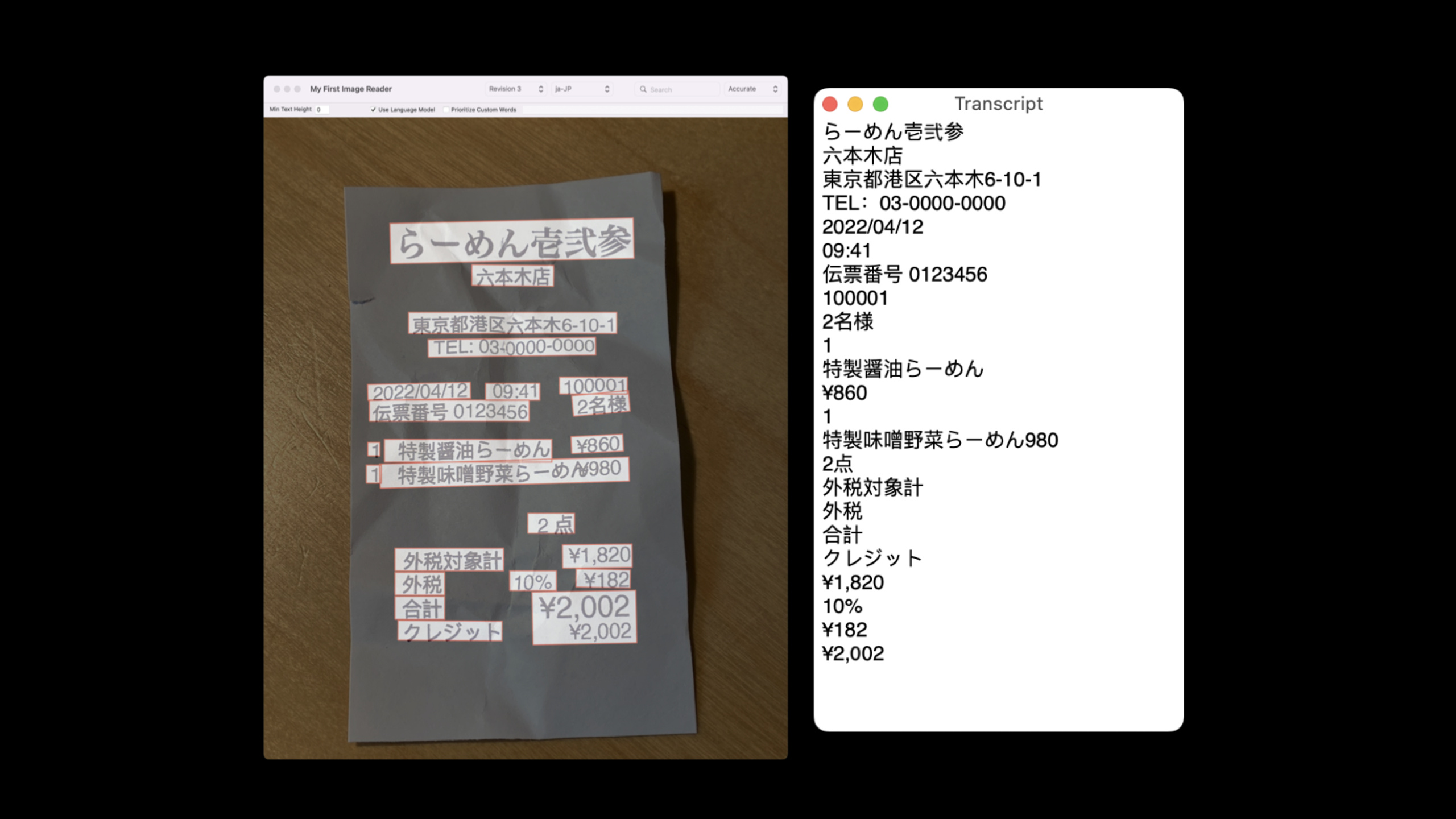
VNRecognizeTextRequestRevision3 is Vision text recognition’s third revision and the text recognizer behind Live Text. The session explicitly notes Korean and Japanese support in this revision. Use supportedRecognitionLanguages to query supported languages.
Another change is automatic language recognition. Previously, apps recognizing text usually needed to know which language users would photograph and set recognitionLanguages accordingly. Now, in accurate recognition mode, set automaticallyDetectsLanguage to true and let Vision detect language automatically.
Conceptual example:
// Conceptual Swift based on the session transcript.
let request = VNRecognizeTextRequest()
request.revision = VNRecognizeTextRequestRevision3
request.recognitionLevel = .accurate
request.automaticallyDetectsLanguage = true
Key points:
VNRecognizeTextRequest()creates a text recognition request.request.revision = VNRecognizeTextRequestRevision3explicitly selects the third recognition model.request.recognitionLevel = .accuratecorresponds to the accurate recognition mode restriction mentioned in the session.request.automaticallyDetectsLanguage = truelets Vision automatically detect text language.
Automatic language detection suits scenarios where you do not know which language users will photograph. The session also notes constraints: language detection can occasionally be wrong. If your app already knows the target language, keep setting recognitionLanguages with automatic detection off.
Conceptual example:
// Conceptual Swift based on the session transcript.
let request = VNRecognizeTextRequest()
request.revision = VNRecognizeTextRequestRevision3
request.recognitionLevel = .accurate
request.recognitionLanguages = ["ja-JP", "ko-KR"]
request.automaticallyDetectsLanguage = false
Key points:
recognitionLanguagesgives Vision explicit language hints."ja-JP"and"ko-KR"correspond to new Japanese and Korean capabilities shown in the session.automaticallyDetectsLanguage = falseavoids extra detection in known-language scenarios.
2. Barcode detection revision 3: detect multiple codes at once (03:34)
VNDetectBarcodesRequestRevision3 moves barcode detection to a modern machine learning model. The session highlights four outcomes: faster detection on multi-code images, recognition of more codes, fewer duplicate detections, and more complete bounding boxes.
This matters for camera scanning apps. Older approaches might process codes one by one in multi-code images or return incomplete linear code bounds. Revision 3 processes multiple codes at once. For linear codes like EAN-13, older results might be a single line; now bounding boxes surround the full visible code.
Conceptual example:
// Conceptual Swift based on the session transcript.
let request = VNDetectBarcodesRequest()
request.revision = VNDetectBarcodesRequestRevision3
let supported = request.supportedSymbologies
Key points:
VNDetectBarcodesRequest()creates a barcode detection request.request.revision = VNDetectBarcodesRequestRevision3uses the third machine learning model.supportedSymbologiesqueries symbologies Vision currently supports.
The session also notes text recognition revision 3 and barcode detection revision 3 underpin the VisionKit Data Scanner API. Data Scanner is a camera scanning UI you can drop into apps, managing the camera stream and returning text and barcode results.
3. Optical flow revision 2: ML-based local motion in video (05:19)
VNGenerateOpticalFlowRequestRevision2 also adopts a modern machine learning model. Optical flow analyzes two chronologically ordered images—usually consecutive video frames. Results describe how content in the first frame must move and by how much to align with the second frame.
Vision returns VNPixelBufferObservation—a motion field over the entire image as a two-channel image: one channel stores X displacement, the other Y displacement. Together they form a 2D motion vector at each pixel.
Conceptual example:
// Conceptual Swift based on the session transcript.
let request = VNGenerateOpticalFlowRequest()
request.revision = VNGenerateOpticalFlowRequestRevision2

// Run the request with two chronological video frames.
// Read the VNPixelBufferObservation result as a two-channel flow image.
Key points:
VNGenerateOpticalFlowRequest()creates an optical flow request.request.revision = VNGenerateOpticalFlowRequestRevision2uses the second ML optical flow model.- Input should be two chronologically ordered frames.
- Output
VNPixelBufferObservationstores X and Y motion components per location.
The session demonstrates differences with a dog running on a beach. Revision 2 more accurately captures water bottle motion and dog tail and ear movement; background noise is lower, closer to the real “static background” case.
Such results suit three scenarios. First, locating motion deviating from background in security video—the session specifically notes optical flow works best with fixed cameras like most security cameras. Second, finding motion regions to track before starting a Vision object tracker. Third, feeding optical flow results into your own video pipeline, such as frame interpolation or motion analysis.
4. Optical flow output resolution: default upsampling or raw network output (09:10)
Revision 1 always returned optical flow at input resolution. Revision 2 defaults to the same behavior, but the underlying ML model’s raw output is lower resolution. For backward compatibility, Vision bilinearly upsamples network output to input image resolution.
This creates a choice. If you already use older optical flow or need full-resolution results, accept default upsampling. If you only need to initialize a tracker or plan your own upsampling, set keepNetworkOutput to use raw model output.
Conceptual example:
// Conceptual Swift based on the session transcript.
let request = VNGenerateOpticalFlowRequest()
request.revision = VNGenerateOpticalFlowRequestRevision2
request.keepNetworkOutput = true
request.computationAccuracy = .medium
Key points:
keepNetworkOutput = trueskips Vision’s default upsampling and returns raw network output.computationAccuracyselects available output resolution.- The session recommends always checking pixel buffer width and height in observations.
- When network output and source image aspect ratios differ, handle resolution and aspect mapping back to the original image.
With default behavior, Vision stretches the low-resolution motion field to input size—easier to integrate with existing code but more memory and latency. Raw network output is lighter but you must handle coordinate mapping yourself.
5. Face detection and face landmarks revision 1 cleanup (11:44)
Vision shipped with face detection and face landmarks from the start. Five years later, Apple has more efficient and accurate revision 2 and revision 3. This release removes underlying revision 1 detectors but continues supporting code that specifies revision 1.
The approach: revision 1 requests are fulfilled by revision 2 detectors while preserving revision 1 external behavior. The session notes two compatibility points: revision 2 detects upside-down faces but does not return them when fulfilling revision 1 requests; revision 2 landmark detector also returns results matching revision 1 landmark constellation.
Conceptual example:
// Conceptual Swift based on the session transcript.
let request = VNDetectFaceLandmarksRequest()
request.revision = VNDetectFaceLandmarksRequestRevision3
Key points:
- Existing revision 1 code continues working; no immediate code change required for this cleanup.
- New code should explicitly specify revision rather than relying on defaults.
- The session recommends revision 3 for these requests for better accuracy and performance.
6. Quick Look Preview: see observation overlays while debugging (14:34)
Vision results are often coordinates, bounding boxes, landmark point sets, and pixel buffers. Console output alone makes it hard to judge whether results land on the right targets. Xcode Quick Look Preview now supports Vision observations. While debugging, hover over a VNObservation, click the preview icon, and see overlays on the input image.
The session demo uses face landmarks. After detecting three faces, Quick Look can show each observation’s face box and landmark constellation separately, letting developers confirm “which face is the first observation.”
Conceptual example:
// Conceptual Swift based on the session transcript.
let request = VNDetectFaceLandmarksRequest()
let handler = makeImageRequestHandler(for: image)
try handler.perform([request])
let results = request.results

// Keep `handler` in scope while inspecting `results` with Quick Look Preview.
Key points:
VNDetectFaceLandmarksRequest()represents the face landmark request in the demo.handler.perform([request])runs the Vision request.request.resultsholds observations viewable in the debugger.- The image request handler must remain in scope for Quick Look to overlay observations on the original input image.
If the image request handler is out of scope, Quick Look can still draw overlays but cannot show the original image—input images live in the handler. Worth documenting in debugging guidelines, especially when quickly trying Vision parameters in Playgrounds.
The session also uses a barcode Playground to compare revision 2 and revision 3. Revision 2 missed one code, duplicated another, and returned a line; revision 3 detected both codes with full bounding boxes. Quick Look’s value is clear: compare model output without writing custom drawing tools.
Core Takeaways
-
What to do: Build multilingual OCR for receipts, menus, or product labels. Why it is worth doing:
VNRecognizeTextRequestRevision3adds Japanese, Korean, and automatic language detection for unpredictable language scenarios. How to start: UsesupportedRecognitionLanguagesto check support; setrecognitionLanguageswhen language is known; enableautomaticallyDetectsLanguagein accurate mode when unknown. -
What to do: Build an inventory tool that scans multiple QR or barcodes at once. Why it is worth doing:
VNDetectBarcodesRequestRevision3detects multiple codes at once with fewer duplicates and more complete linear code bounding boxes. How to start: Pin barcode request revision toVNDetectBarcodesRequestRevision3and usesupportedSymbologiesto limit symbologies your app needs. -
What to do: Add motion region hints to fixed-camera video. Why it is worth doing:
VNGenerateOpticalFlowRequestRevision2better separates local motion from static background; the session explicitly cites security cameras as a primary use case. How to start: Take two chronological video frames, run optical flow, read X/Y motion fromVNPixelBufferObservation, map motion intensity to a heat map. -
What to do: Automatically choose tracker initial position before video object tracking. Why it is worth doing: The session notes optical flow can help decide where an object tracker should start. How to start: Use optical flow to find the most motion-prominent region across consecutive frames, then use that region as tracker initialization candidate.
-
What to do: Build a Vision debugging Playground. Why it is worth doing: Quick Look Preview shows observations on input images directly without custom drawing per request type. How to start: Keep the image request handler in scope, run text, barcode, face, or landmark requests, then preview observations one by one in Xcode or Playground.
Related Sessions
- Detect people, faces, and poses using Vision — Recommended prerequisite covering Vision human, face, and pose detection.
- Capture machine-readable codes and text with VisionKit — Covers Data Scanner API, directly using text recognition and barcode detection foundations from this session.
- Add Live Text interaction to your app — Covers bringing Live Text image and paused-video interaction into apps.
- Explore the machine learning development experience — Supplements the full flow of model conversion, performance evaluation, and on-device execution on Apple platforms.
Comments
GitHub Issues · utterances