
Highlight
This is the advanced Create ML Components session. Basics (Transformer and Estimator concepts) are covered in “Get to know Create ML Components.” This session focuses on two advanced topics: temporal data processing and incremental training.
Core Content
For action classification, a model tells you someone is doing jumping jacks in a video clip. A real fitness app also needs another answer: how many times. One jumping jack spans consecutive frames; a single frame cannot provide the full answer.
Create ML Components introduces temporal transformers here. They take an AsyncSequence and output a new AsyncSequence. Video frames, camera frames, and audio buffers can flow over time, then be windowed, downsampled, or fed into models.
The session’s first example is an action repetition counter. The pipeline starts from video or camera frames, extracts human body pose, selects one person, windows poses, then accumulates action counts. The count is a floating-point number because the model includes partially completed repetitions.
The second example is sound classifier training. Traditional retraining re-extracts all audio features each time. Create ML Components lets you split feature extractor and classifier, cache preprocessed features, process only new data when it arrives, and reuse old features when tuning classifier parameters.
Detailed Content
Express video and audio with AsyncSequence
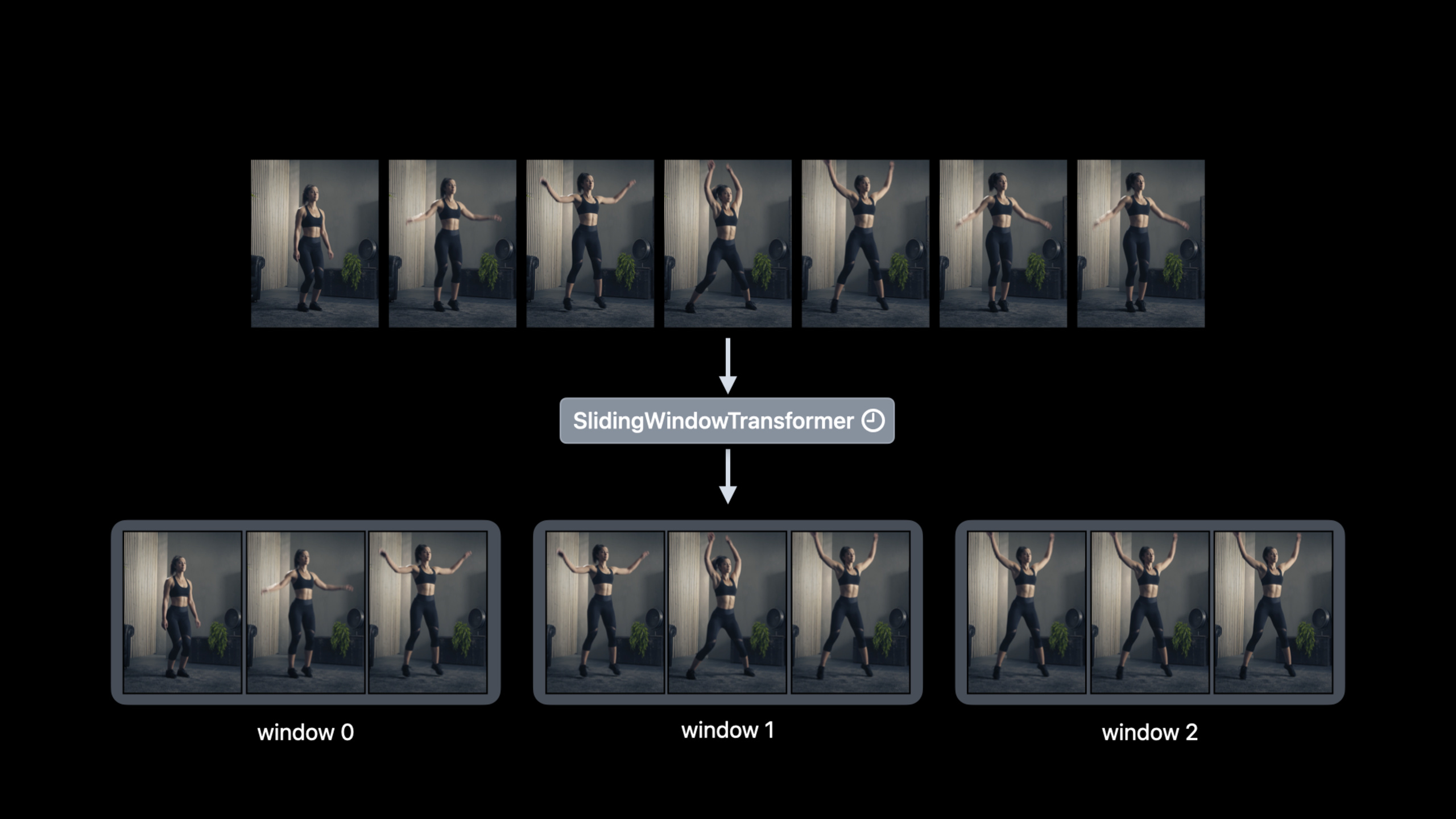
(01:55) The presenter first breaks down the problem: video is a sequence of frames arriving over time, and Swift’s AsyncSequence fits this input. Use map for per-frame processing. When multiple frames must be handled at once, use a temporal transformer.
Conceptual code (organized from component names in the transcript; real initialization parameters omitted):
let frames = videoReader.read(videoURL)

let transformedFrames = frames.map { frame in
    preprocess(frame)
}

let windows = SlidingWindowTransformer(
    length: 90,
    stride: 90
).applied(to: transformedFrames)
Key points:
videoReader.read(videoURL)reads video as a time-ordered frame sequence; the transcript states the video reader returns an async sequence of frames.maptransforms frames asynchronously, suitable when processing one frame at a time.SlidingWindowTransformeris a temporal component: async sequence in, windowed async sequence out.length: 90means each window contains 90 frames or 90 poses.stride: 90means non-overlapping windows; the later live camera example reduces stride.
Compose an action repetition counter
(03:42) The action counting pipeline has four stages: HumanBodyPoseExtractor, PoseSelector, SlidingWindowTransformer, HumanBodyActionCounter.
Conceptual code (component names from transcript; call form shows composition order):
let poseExtractor = HumanBodyPoseExtractor()
let poseSelector = PoseSelector(strategy: .rightMostJointLocation)
let slidingWindow = SlidingWindowTransformer(length: 90, stride: 90)
let actionCounter = HumanBodyActionCounter()

let repetitionCounter = poseExtractor
    .appending(poseSelector)
    .appending(slidingWindow)
    .appending(actionCounter)
Key points:
HumanBodyPoseExtractortakes image input and outputs an array of body poses; the transcript notes it uses the Vision framework.- Output is an array because multiple people may appear in one image, common in group training scenarios.
PoseSelector(strategy: .rightMostJointLocation)picks one pose from the array; the presenter uses the right-most joint location strategy.SlidingWindowTransformer(length: 90, stride: 90)groups consecutive poses into windows of 90.HumanBodyActionCounterconsumes windowed pose sequences and outputs cumulative repetition count so far.
Switch offline video to live camera
(05:38) Offline video can update the count every 90 frames. A live fitness app cannot wait that long. The session’s change is small: switch input to readCamera and reduce stride from 90 to 15.
Conceptual code (from transcript readCamera and stride parameters):
let cameraFrames = readCamera(configuration)

let liveWindow = SlidingWindowTransformer(
    length: 90,
    stride: 15
)

let liveCounter = poseExtractor
    .appending(poseSelector)
    .appending(liveWindow)
    .appending(actionCounter)
Key points:
readCamera(configuration)reads camera frames; the transcript says it takes camera configuration and returns an async sequence of camera frames.length: 90keeps a 90-frame window so the counter sees complete action segments.stride: 15slides the window every 15 frames.- At 30fps, 15 frames is half a second, so the count updates every half second.
- Stride too large slows feedback; smaller stride increases compute frequency—trade off for your app goals.
Split sound classifier feature extraction and training
(06:30) Create ML’s MLSoundClassifier remains the simplest entry for sound classifier training. For more control, split it into underlying components: AudioFeaturePrint feature extractor and a classifier.
(08:04) The key step is calling preprocess first—run input through transformers up to the estimator, then train on preprocessed features.
Conceptual code (showing AudioFeaturePrint, logistic regression classifier, and preprocess from transcript):
let featureExtractor = AudioFeaturePrint()
let classifier = LogisticRegressionClassifier()

let soundClassifier = featureExtractor.appending(classifier)

let features = try await soundClassifier.preprocess(trainingData)
let model = try await soundClassifier.fitted(to: features)
Key points:
AudioFeaturePrintis a temporal transformer that extracts audio features from an async sequence of audio buffers.LogisticRegressionClassifieris the classifier chosen in the example.featureExtractor.appending(classifier)combines feature extraction and classifier into a sound classification task.preprocess(trainingData)processes training data into features for reuse.fitted(to: features)trains on already-extracted features, avoiding re-extraction on every retrain.
Reuse old features for new data and hyperparameter tuning
(08:38) When new training data arrives, extract features only for the new data and append supplemental features to old features. When tuning classifier parameters, continue reusing old features.
Conceptual code (emphasizes data flow, not complete API):
let originalFeatures = try await soundClassifier.preprocess(originalData)
let supplementalFeatures = try await soundClassifier.preprocess(newData)

let allFeatures = originalFeatures + supplementalFeatures

let tunedClassifier = LogisticRegressionClassifier(l2Penalty: newPenalty)
let tunedSoundClassifier = featureExtractor.appending(tunedClassifier)
let tunedModel = try await tunedSoundClassifier.fitted(to: allFeatures)
Key points:
originalFeaturesis cached preprocessing from old data.supplementalFeaturescomes only from new data, saving repeated feature extraction on old data.allFeaturesmerges old and new features for training.l2Penaltyis a classifier parameter mentioned in the transcript.- Do not change the feature extractor when tuning parameters; the presenter warns that changing it invalidates old features.
Batch incremental training, early stopping, and checkpoints
(09:43) Large datasets may not fit in memory. The session swaps the logistic regression classifier for an updatable classifier such as a fully connected neural network classifier, then updates the model in batches.
(10:53) The presenter also uses the Swift Algorithms package to batch features with chunks.
Conceptual code (showing default model, chunks, update, mapFeatures, checkpoint from transcript):
var model = classifier.defaultModel()
let features = try await soundClassifier.preprocess(trainingData)

for iteration in 0..<maxIterations {
    for batch in features.chunks(ofCount: batchSize) {
        model = try await classifier.update(model, with: batch)
    }

    let validationPredictions = try await model.mapFeatures(validationFeatures)
    let accuracy = Metrics.classificationAccuracy(
        validationPredictions,
        validationAnnotations
    )

    if accuracy >= 0.95 {
        break
    }

    if iteration.isMultiple(of: checkpointInterval) {
        try model.write(to: checkpointURL)
    }
}

try model.write(to: finalModelURL)
Key points:
defaultModel()corresponds to the default initialized model in the transcript—a training starting point not yet useful for prediction.preprocess(trainingData)runs before the training loop to avoid re-extracting features each iteration.features.chunks(ofCount: batchSize)from Swift Algorithms controls how much training data loads into memory at once.classifier.update(model, with: batch)is the core of incremental training; each batch updates the model once.mapFeatures(validationFeatures)generates validation predictions paired with annotations for evaluation.accuracy >= 0.95is the early-stopping example: stop when accuracy reaches 95%.model.write(to: checkpointURL)inside the loop saves training progress; long training can resume from checkpoints.
Core Takeaways
1. Fitness action counter
- What to do: Use the camera to count jumping jacks, squats, or lunges.
- Why it is worth doing: The session already provides pose extraction, pose selection, sliding window, and action counting components for real-time feedback.
- How to start: Get frame sequences with
readCamera, set stride around 15, and verify count latency and accuracy in a single-person view first.
2. Training video replay analysis tool
- What to do: Import a training video, automatically count actions per window, and mark time ranges where actions change.
- Why it is worth doing: Offline video can use 90-frame, stride-90 non-overlapping windows with lower compute pressure than live scenarios.
- How to start: Read frames with a video reader, then chain
HumanBodyPoseExtractor,PoseSelector,SlidingWindowTransformer, andHumanBodyActionCounter.
3. Continuously updatable sound classifier
- What to do: Train a classifier for ambient sounds, device sounds, or alert tones and keep adding new recordings.
- Why it is worth doing:
preprocesslets old audio features be reused; new data only adds supplemental features. - How to start: Extract features with
AudioFeaturePrint, cache results, train the classifier; when new data arrives, run feature extraction only on new samples.
4. Low-memory training for large datasets
- What to do: Train sound classification models on memory-constrained Macs or CI machines.
- Why it is worth doing: Updatable classifiers support batch model updates without loading all training data at once.
- How to start: Switch to a fully connected neural network classifier, batch with Swift Algorithms
chunks, and callupdatein a loop.
5. Resumable long-running training jobs
- What to do: Add early stopping and checkpoints to the training flow to reduce wasted training time.
- Why it is worth doing: The presenter’s curve reaches 95% after about 10 iterations and plateaus; continuing training yields little benefit.
- How to start: Compute accuracy on the validation set each round and
breakat the target threshold; write the model to disk every few rounds.
Related Sessions
- Get to know Create ML Components — Understand Transformer, Estimator, and
appendingbefore this session’s temporal components and incremental training. - Explore the machine learning development experience — From model selection, conversion, and evaluation to performance tuning—complete on-device ML deployment flow.
- Optimize your Core ML usage — Focus on post-deployment device performance, connecting with this session’s training flow.
- Meet AsyncSequence — Temporal transformer inputs and outputs center on AsyncSequence; understanding it speeds up reading the data flow.
Comments
GitHub Issues · utterances